May 1st: A Network of MSP430s
So getting my little network was not as easy as I had hoped. Sure it is simple enough but I kept running into problems or just making very silly mistakes.
In my last blog post I showed you a picture of how I would lay out my network, with the CC3000/FRAM at the centre I2Cing to all it's children. I ran into my first problem when I realised that the I2C/SPI module was already being used on the board by the CC3000.
To fix this I decided I would use the serial UART interface and use a launchpad as a brother to the CC3000/FRAM board.
Brotherly Love
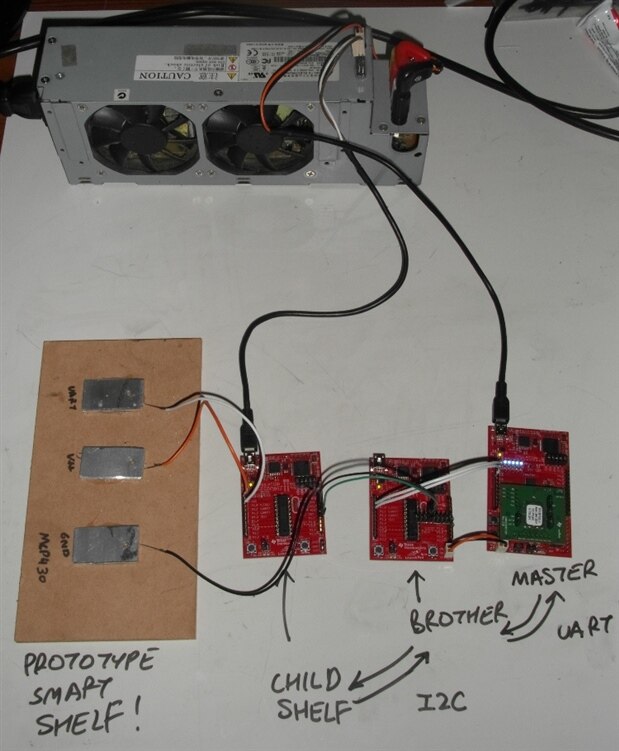
You can see in the picture below the master FRAM board connected to the brother launchpad and my re-purposed ATX desk power supply with a chopped up usb cable to power the whole lot.
One convenient off shoot to this setup is that I can let the brother do all of the work looking after all of the sensors so that the master can do more important things like talk to the computer (overlord?)...

Serial UART
Setting up the serial UART between the master an brother was easy enough, for the master I just used some of the dispatcher code that came with the CC3000 demo code. To program the brother I used what I think is the best tool I have ever used for programming embedded devices... Grace...
Grace is TIs graphical programming environment for a whole bunch of their devices, it is essentially an interactive datasheet where you can just click on the peripherals you want to use and set them up as you would like. Not only that it generates perfectly commented C code so you can see how it can all be done without Grace.
I will make a bit of a video tutorial of Grace soon, but at the moment I am a little short of time. So once you have set up the various clocks and uart specific instructions you just have to add some code (which grace helps you with) to use your new serial interface. You can see my send and receive functions below, the receive is handled in an interrupt so no polling is required.
unsigned char uart_rx_buffer[8];
int uart_rx_byte_pointer = 0;
char instruction_received = 0;


void UartSend(unsigned char *data, int length){
          while(length>0){
                    while (!(IFG2 & UCA0TXIFG));
                    UCA0TXBUF = *data++;
                    length--;
          }
}


void UartReceive_ISR(void){
          uart_rx_buffer[uart_rx_byte_pointer] = UCA0RXBUF;


          if(uart_rx_buffer[uart_rx_byte_pointer] == '!'){
                    uart_rx_byte_pointer = 0;
                    instruction_received = 1;
          }else{
                    uart_rx_byte_pointer++;
          }
}
Looking after the children
So the brother can now chat away with the master, so now I needed a way for the brother to keep tabs on all of the children. Although at the moment I only plan to have four condiments being measured I am making sure everything is as flexible as possible for upgrades in the future.
To store all relevant food data I have set up an array of structures which my lanuchpad brother can use to store the levels of all the child containers it can find.
The code below handles all of this (except for the I2C bits which I will talk about later). When the PC sends a request for food levels, the CC3000/FRAM master relays this command to the launchpad brother over the uart. The brother then updates the content of all the locations using the I2C interface. If for some reason the I2C request fails the returned data is set to XX to let the PC know that the particular foodstuff could not be found (i.e probably an error). If the particular foodstuff was there last time but, but not currently there (i.e. someone is using it) then the old data is returned but a '0' is appended to the data to let the PC know that the data is not up to date.
The way I have set this up it will not matter if you pick up one of the clever containers and place it back on a different location on the smart shelf.
typedef struct{
          unsigned char i2c_address;          //Address directly related to location list number
          unsigned char content;                    //current content at this location
          unsigned char level;                    //the level of the content
          unsigned char current;                    //1 is this data is current, 0 is the last update failed
}locations;

int NUM_OF_LOCATIONS = 2;

locations location_list[8];

void brotherUpdate(void){
          int i;
          for(i = 0; i < NUM_OF_LOCATIONS; i++){
                    if(I2cReceiveFrom(i+2, 2)){
                              location_list[i].i2c_address = i+2;
                              location_list[i].content = getI2cByte(0);
                              location_list[i].level = getI2cByte(1);
                              location_list[i].current= 1;
                    }else{
                              location_list[i].current = 0;
                    }
          }
}

unsigned char findAddress(unsigned char this_content){
          int i = 0;
          for(i = 0; i < NUM_OF_LOCATIONS; i++){
                    if(location_list[i].content == this_content){
                              return location_list[i].i2c_address;
                    }
          }
          return 0;
}

void returnLevel(unsigned char this_content){
          unsigned char location_address;
          unsigned char return_string[4];

          brotherUpdate();

          location_address = findAddress(this_content);

          if(location_address > 0){
                    return_string[0] = location_list[location_address - 2].content;
                    return_string[1] = location_list[location_address - 2].level;
                    return_string[2] = location_list[location_address - 2].current + '0';
          }else{
                    return_string[0] = this_content;
                    return_string[1] = 'X';
                    return_string[2] = 'X';
          }

          return_string[3] = '!';

          UartSend(return_string, 4);
}
So the test setup looks something like this.. The mdf with the three aluminium tabs on it is my prototype smart shelf, I have moved away from IR communication for something better (but that is talk for next time).
Next time I will show you some of my I2C code and also describe my new idea for communicating between the smart shelf and the clever containers.