


Hi Everyone!
So the Ultimate Road Test has begun, and this means several things, some interesting projects using TIs products and a serious of unrelated comments about whatever is happening (Currently Moonraker (1979), how cool are lasers and space stations?!). This will partly explain the choice of project name, "Nice Asgard" .
The Starting Point
The starting point for this whole adventure is the SimpleLink Wi-Fi CC3000, specifically the MSP430 FRAM Evaluation Kit version which combines the FRAM version of the MSP430 Launchpad with the CC3000 Wireless Solution. This package contains everything you need to get your embedded device online via WiFi. This is done through the built in IP stack, WiFi driver, and security support. This is not forgetting the simple intergration with other processors without needing huge amounts of power or special features on the processor. Over all, pretty fancy. Can't wait to get started with it.
The Method
Start with the most important. Like anyone, I tend to have grand ideas for projects (Sadly a robot to serve drinks would take a little too much time to get right. Sigh.), I don't let this put me off however. Let them flow, why stifle creativity? The trick to dealing with this has been to categorise everything into Essentials, the things a system must have, Extras, things that can be done later when the essentials are working, and Toys, the things that you can mess around with when all the work is done, a bit like a reward system. Do all your chores and you get to build that robot. (Confession: This time is also replaced with Eat Cake Time, for obvious reasons).
The Plan
Many people enjoy a good film, be it at the cinema or in the comfort of their own home. We all have our habits when it comes to watching films through our Home Cinema System (Be it big TV and surround sound or just a laptop), for some it is to turn the lights off, close the blinds (Or whatever you have), get yourself a drink and enjoy the film. What about reading a book? Turn the lights up, maybe open the blinds?
Whatever we do around the home, we have preferences for how things should be when we do them, so why not make it easier? So you are sitting on the train home, your station is coming up and you have decided to watch a film when you get in. Simple, press a button on your phone and your home starts getting ready. All you have to do is turn on the TV and put your film on. Perhaps you are reading your addicted to your new book and have lost track of time? Suddenly it has got dark! Time to close those blinds and turn the lights on from the comfort of your own seat/bed/floor/hammock(Anyone reading this from a hammock please raise your hand).
With all of this in mind, the plan is to make managing the environment easier for those who love their media. Should the time be available, make it possible to for the system to take over some of the button pushing. Take your keys off the hook and your lights are turned off, blinds closed, however you set it to handle the event.
Still a bit of a sketchy idea, but a nice starting point! Time to get to designing.
April 1st
After some initial issues (Also known as being ill, fighting with a network and finding I didn't have a Eur/UK adapter for the kits router), the devices are up and running. In usual April Fools fashion, something has gone wrong however. I'm assuming a firewall is ignoring the rules. Going to take a while to work that one out. Meanwhile however the design stage can go on. The basic idea is going to be the wifi enabled device acts as a base station and takes all the user input. Based on the given instructions, decisions are made which mode is to be enabled and this is sent to the relevant device through a zigbee network, or possibly wired if more appropriate. From there the settings for the relevant mode are taken and applied through a motor controller for the blinds and a LED driver for the lighting.
For this first iteration all the modes and remote devices will be hardcoded. A simple struct will store the settings for each mode
struct setting{
    int blindPos;
    int lightLev;

};


struct setting settingsMAX;
struct setting settingsMIN;
Instances for max and min settings are included to allow some rough calibration of the system. For example if there is a point where you don't want the blinds to go above, you can define that in the code. This value is currently a bit arbitary, and may well just be the equivilent of a run time value for the motors. Depending on progress this may change to be a representation of distance or the value from a rotary encoder. The light level at present will be read from a LDR. This value may well be repurposed to act as a minimum light level before the mode is changed during normal operation, much like a street light. When the values drops too low, a light will be turned on at a low level and gradually brightened.
With this in mind, a communications protocol is needed for the zigbee/wired network
April 4th
For the first iteration I've decided to go with 5 states for the system. These cover the most common situations, give or take some alterations.
The settings assume that the higher the number, the higher the blind, so 1024 would be completely open. As previously stated, this value is liable to change to represent something more...real.
| State | Settings |
|---|---|
| dayNorm | blindPos = 1024, lightLev = 0 |
| nightNorm | blindPos = 0, lightLev = 1024 |
| film | blindPos = 0, lightLev = 0 / lightLev = 250 |
| open | blindPos = 1024, lightLev = 0 |
| closed | blindPos = 0, lightLev = 0 |
You'll notice two unsual states, open and closed, these are designed to be fixed values. The aim is that when the room is in dayNorm, nightNorm or film, the values can be altered by small amounts. Imagine you are watching a film, but its slightly too dark to read the DVD box to find out that actors name, the flexibility in the film state will let you turn the lights up just enough to let you see it. The fixed states won't allow this however, they are intended for when you are not at home. Going to bed for the evening? Put it into closed, your blinds close and your lights go out. These fixed states can also be considered as broadcast states rather than room specific.
April 8th
To save some time, the communications code from the Home Automation example is being used. Although the GUI provided by this mean nothing when it comes to this project, the code for generating packets can be used as a starting point. Rather than sending specific values for each state, the application will accept a range and make a decision based on that. Its a complicated method, perhaps way more complicated than it needs to be, but it should work. If not I guess I'll have to revent to my usual plan B and delete everything and start from scratch (An option I hate doing, but when the hacks get to such a level you don't have much choice!)
I stand corrected, found a previous note on my makeshift dry wipe board about the packets. With the format of the system, each state can be reduced to sending a byte (With bytes/ints for headers and footers). This should drastically cut down on the data being sent and might help cut down on power consumption.
The plan for this coming week is to do a quick catch up on Processing. While this won't be the main GUI for the system, it will be useful for testing the main components until the other interface is in place and working. Aside from the GUI, the outputs need to be sorted, at least for the base station device. Get the drivers working here and the other devices should be rather quick to do (Minus the inevitable hiccups)
April 15th
With code on its way, currently minus drivers for the motor/light controllers, it is time to make sure nothing gets lost. The solution? Git. This version control system integrates quite nicely with CCS in the Team function on a project. The only downside to controlling the repo through CCS, is the lack of clear error messages Eclipse provides. If you are familiar with git and making it work you should have no problems, however if you are not it will take a bit longer.
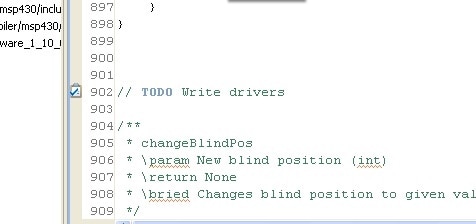
One feature I love in CCS is the highlighting of tasks. Starting comments with certain phrases such as TODO makes the program highlight the section, a life saver when you need to mark something for later. You can also define your own which can be useful (Preferences, C/C++, Task Tags).
Depending on the project, you may also be working to some coding standards. Thankfully, CCS supports these to some extent, in particular MISRA-C 2004. While these are not particularly necessary for a project such as this one, I am using a few of the conditions. Specifically these are 14.1 (No unreachable code), 14.4 (No goto statement used), 15.5 (No continue statement used), 19.3 (Include directive rules). With any luck, when the project is built with these no errors will be produced (As it happens, when I built with these options something else broke and refused to compile. The good news is none of the produced errors relate to MISRA-C)
Bit curious what sort of lights are being used by people at the minute, and how when it comes to watching gilm/TV at home. Put up a quick survey to try and find out.
April 22nd
While the results of the survey come in (Tell your friends please!), its time to work on the user interface. Unfortunately this means working from a text editor for a short while. It seems the mystery compilation issue from the last post was the result of a bug in CCS (Pro tip, make sure you're software is up to date and don't always believe the updater). So while the up to date version downloads I'll just have to make do.
The work this week is focussing on the user interface. While having an interface on your computer, tablet or whatever (Currently a hit and miss solution using a hacked up Processing app) is nice, it is not always suitable. Imagine for a second that you have forgotten to charge your device, or your computer has broke, what then? You have just lost your interface to your home automation system. Those lights you turned on? They aren't going off too easily. Or you've just got up in the middle of the night to take care of something or someone, are you really going to turn on your computer just to turn a light on? The solution is to include an interface on the device itself. There are several options here, a load of buttons, a touch screen or a touch interface and seperate screen. While buttons are a nice solution for any interface due to cost, adaptability (Who doesn't want to build an interface out of those giant emergency stop buttons instead of the small PCB mounted ones?), they don't have that...modern look. Take mobile phones for example, compared to 5 years ago, there has been a shift towards touch over buttons. Touch interfaces do however have their draw backs, a big one being cost, especially for touch screen of any great size. Simple touch interfaces are coming down in price though. TI have a good range of touch controllers that you could use in your project. To get going, you can use something such as the MSP430 Capacitive Touch Booster Pack. To keep the cost down, and to reduce complexity, the booster pack is the best option for this project. This just raises the question of communication however. With the RF expansions on the FRAM board taken by the WiFi module, and the UART taken by the USB interface (Not required, but highly useful for debugging during development and in an end product situation), a different solution is needed. This means SPI, I2C or some careful abuse of GPIO to get the data across.
At this stage of the project, cap touch interfaces fall into the category of Extras, things that would be nice but only need to be done once the main components are working properly. For this reason, switches will be used. They provide a quick solution to add in an interface but without the complication of dealing with communication with an added MSP430 that would be required by the Booster pack option. To keep the system adaptable however, as an end product, the option will be available to pick between the two. Cue everyone's favourite, preprocessing.
The plan currently is to handle the menu using as few buttons as possible. Given that all the settings are currently hardcoded* and we are only selecting a mode, we only need three buttons (A mobile device style lock switch would be good, but is optional and doesn't require any IO).
| Function | Pin |
|---|---|
| Up | P1.0 |
| Down | P1.1 |
| Select | P1.2 |
Regardless of the inputs, an output is still needed. I've always been a little curious about this, when shopping for that DIY project (The ones without clear specifications), how do you choose a LCD to use? DO you go by cost and make do? Pick whatever is available at your store of choice? Always go for graphic even when you don't really need it? Work out how much you actually want to show, add some and go from there? Share your thoughts on how to about about it.


