


So it is time to wrap up the project ahead of the deadline. This week will be a mixture of finishing off board layouts, summaries, and anything else that comes up. Sure to be interesting while I'm on holiday! (Just a little short notice, was only booked yesterday)
In the meantime, here is a demo video. Or would be anyway. Thanks to the previously blogged about tool chain issues (I've had great luck, only broke 3 of them  ), there isn't much of a demo. Wouldn't want to disappoint however so to keep you entertained is a short presentation on the work done. This includes a very short introduction to the components and a walk through of the code. Please, ask questions should you have them. All the software parts (code and schematics) are available in the repos. If anyone wants to try to get it working, fix it, improve it, make it into a paper plane (Please keep it green. Save the paper for your next project proposal or similar!), please do. Fork away and let us know how you get on. A text based summary will come during the week.
Don't forget, ask questions, take note of the Llamas advice and have fun!
Design Summary
This system is designed to make watching your favourite film, TV or game easier by reducing the number of things you have to do to get the environment just right. For many, the habit is to turn off the lights, close the blinds and watch the film in the dark. Lets face it, if you are going to put on a film you are looking to be lazy, so why not automate what you can?
The challenge is to do this using the Texas Instruments CC3000 WiFi evaluation kit. This project makes a few assumptions, if you are the kind of person to have a home automation system, you most likely have a smart phone, a tablet, a laptop or other wireless device (If anyone has data on how this applies to those using home automation due to a health issue, please share!) This makes the design a little easier, use the wireless device as the remote control. Something of a Bring Your Own Device approach to the problem. Why create a whole new device when you can use standard hardware and simply drop in an app? The use of WiFi (Implemented as a client rather than an access point), would also allow the user to control the system from outside the network through the internet. Stuck late at work or in traffic? Close the blinds and turn on the lights on the go through mobile internet. With this design, the system is broken down into a device per room with one base station acting as a controller. The diagram below shows how it is configured.
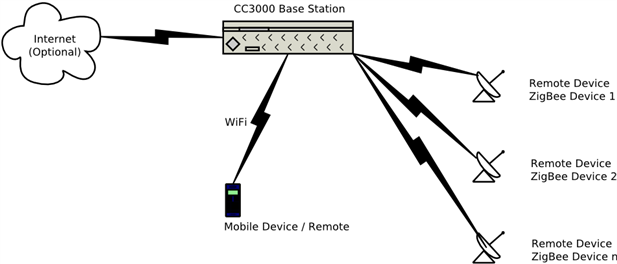
This system is made up of several main components, the WiFi network, the ZigBee network and the drivers. The Wifi portion connects the main user interface to the system. This means any Wireless enabled computer is able to send the relevant instructions to the system to say what mode the relevant room needs to be in. Once these instructions are with the base station, one of two things can happen. The first is that the instructions are followed. This is because the base device controls a room just like any of the end devices. If the instruction is not for the base station it is forwarded onto the right end device using the second main component, the ZigBee network.
The ZigBee protocol was chosen for a few reasons, one being previous experience with XBee modules, second being the availability of processors which natively support the protocol and lastly, the protocol is designed for this. ZigBee has several published profiles for applications and several draft profiles. Out of these profiles, there are two which fit this use, the published Home Automation profile and the draft Building Automation profile. When you look into the specifications for these, the Home Automation profile covers exactly what is being done here as it provides lighting and closure controls (Window coverings, shades etc). Couldn’t get more suitable if you tried! To make it even better, the available software stacks for TI ZigBee products are compliant, as tested by a ZigBee Alliance test house. Z-Stack samples also support the Home Automation profile. It is like a match made in heaven!
With the instruction at the right end device, you need to have an output, to do this we need two components, a lighting driver and a motion controller. With the move towards green technology, there are very few options for lights, the biggest one being LEDs. As it happens, TI provide some lovely LED drivers, including one controllable by a PWM signal. The result is a dimmable light that can be controlled by a tiny processor. Sticking with the PWM theme, this kind of signal can also be used to drive the motor of choice. With the available range of motor drivers, there are multiple options for motors, be it a DC motor, a stepper motor or a servo. For this system, a stepper motor was chosen, allowing suitable levels of precision and the use of a step counter rather than a timer. With this in mind, the solutions chosen were the DRV8805 for the motion control and the TPS61042 for lighting control.
The user interface is not just limited to the computer application however. The base station, and eventually each end device, is designed to accommodate a control panel. This means a LCD to display a menu and buttons to switch through the menu. Other options for the interface included using a capacitive touch sensor in place of buttons, much like the iPod and many touch screen devices.

