


Hello World,
I have built a 5x5x5 LED Cube From scratch and I wanted to show you how amazing a LED cube looks when powered from wireless power! It looks the same as plugged into the wall. Now, some people might think this is boring but I and millions of others think this is a breakthrough, that we can power millions of devices wirelessly! I wanted to build this to get away from the testing of the Wireless Power Eval kit and show off what it was meant to do! The Eval Kit likes to Power Everything at 5V and under 1 Amp! It sometimes even likes to power things a little over a amp!
A Functional Description:
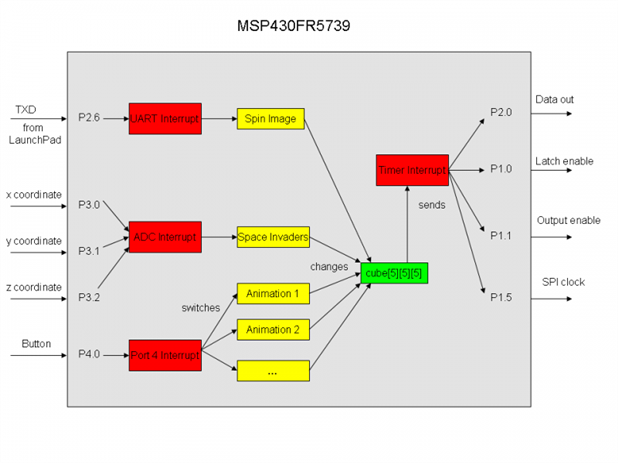
The MSP430FR5739 Experimenters Board http://www.ti.com/tool/msp-exp430fr5739 is used to control an 5x5x5 LED cube. The LED cube is made up from 125 LEDs arranged into 5 layers of 25 LEDs each. All LED anodes of a layer are connected and all cathodes of a row are connected. This allows multiplxing with LED drive IC's, so instead of requiring 125 connections it requires one to each ot he five layers and 25 to each LED in a layer making a total of 30.
The cathodes of the LEDs are connected to TI TLC5916IPWTLC5916IPW 8-bit constant-current LED sink drivers. The LED current is set by a single resistor connected to the R-EXT input of the IC. The 1.8k resistor sets the LED current to ~10mA; this resistor can be altered to vary the current supplied to the LEDs. The advantage of using a constant current sink driver IC is that almost any LED can be used and the supply current remains constant regarless of the LED forward voltage. If the output current does need to be altered, it only requires the current setting resistor to be changed.
Each of the LED layers is arranged in a 5x5 matrix and controlled by a PNP transistor connected to the LED anodes. The remaining free pins of the forth LED driver are used to switch the PNP transistors ON and OFF, so that when the respective layer control output from the LED driver goes low, the transistor connects VDD = 5V to the anodes of the LED layer.
When a layer is connected to VDD and the output of the LED driver goes low it connects the cathode of the respective LED to GND, lighting it up! Thus, if you wire the LEDs incorrectly, 5V goes to the cathodes of the LED layer and will not turn on the LEDs. Make sure you solder the LED's correctly!
The outputs of the current sink drivers are controlled by the MSP430FR5739. Each driver IC contains an 8-bit shift register and an output latch. Via SPI the desired state of the outputs is clocked into the latches. The drivers are cascaded; a full cycle to refresh the whole cube needs to send 30 bits (5 bits for the layer selection and 25 for the LEDs in the selected layer). After all bits are sent the data is latched to the outputs and the outputs are enabled. By using SPI and the LED drivers, only 4 I/O pins are needed to control the whole cube!
The layers are turned on one after another. When doing this very quickly the eye can't see the switching anymore, giving us a static image. The refreshing is done by a timer interrupt every 2.5ms. With this rate you won't be able to see any flickering. (Just like the light bulb flicker at 50/60Hz).

Here is the process of building a LED CUBE!
Step 1:
Poke 25 holes in a cardboard box, order a pizza and use it for a led cube builder!
Then stick in 25 leds for a 5x5x5 Led Cube! You want the longer lead all facing the same way! This longer lead is the Anode! The shorter lead is the Cathode!

Get the schematic here: http://processors.wiki.ti.com/images/2/20/Schematics.pdf There is a minor error in the schematic, All LE lines should be connected together, instead of being connected to the SDI/SDO lines.

Step 2:
Bend all of the longer leads (Anode) to touch another Anode lead. They should all be touching! There will be some open spots but we will use wire to connect those spots later.
*********DOUBLE CHECK AND MAKE SURE IT IS THE ANODE YOU ARE BENDING....IF YOU USE THE CATHODE...YOU WILL HAVE TO START ALL OVER AGAIN OR DO A LOT OF 0 AND 1 SWITCHING IN THE PROGRAMMING******

Step 3:
Solder all Anodes together! And you will end up with something like this. This is your first layer! Only 4 More exactly like this to go!

Step 4:
After creating all 5 layers of 5x5 Leds, then it is time to start soldering the layers together. Bend just the tips of the cathode in towards the led layer on top. This makes it a lot easier to solder the led cathode leads to each other.
Here is three layers soldered together.

Step 5:
Keep Soldering! Four layers Done!

Step 6:
All done with all 5 layers...Flip over and get ready to install into a board!
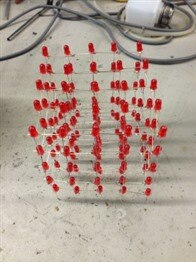
Step 7:
Build a board with enough room to hold the led cube, Custom Board and the MSP430FR5739 kit. I created a board with a grid so I knew where to drill the holes for the cathodes of the LEDs. I then sanded the board and painted it black.

Step 8:
Build PCB and solder components to it.


Solder wires to Custom Board and MSP430FR5739.
Program MSP430FR5739 using TI's MSP430 with your choice of Development tools. I used TI's Code Composer Studio. http://www.ti.com/tool/ccstudio
Powered On and checking all leds to make sure they all are working!
Grab the Source Code Here:http://processors.wiki.ti.com/images/5/57/Source_Code.zip
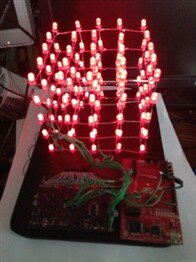
Hard to see in the dark but I just plugged a micro USB into the MSP430FR board from the Wireless Power Evaluation Kit. I will upload a picture of this later.
Here is the video of some sample patterns I used to test the Wireless Power Eval kit, MSP430FR5739 FRAM, my custom built board and the LED Cube!
I will include the Eagle Schematic and Board Files later today!
Special Thanks to Mario Pillar, so I didn't have to reinvent the wheel with the LED Cube!
http://processors.wiki.ti.com/index.php/Magical_LED_cube
| Schematics.pdf | |

-

lfa555
-
Cancel
-
Vote Up
0
Vote Down
-
-
Sign in to reply
-
More
-
Cancel
Comment-

lfa555
-
Cancel
-
Vote Up
0
Vote Down
-
-
Sign in to reply
-
More
-
Cancel
Children