element14 Community
element14 Community
    Register Log In
  • Site
  • Search
  • Log In Register
  • Community Hub
    Community Hub
    • What's New on element14
    • Feedback and Support
    • Benefits of Membership
    • Personal Blogs
    • Members Area
    • Achievement Levels
  • Learn
    Learn
    • Ask an Expert
    • eBooks
    • element14 presents
    • Learning Center
    • Tech Spotlight
    • STEM Academy
    • Webinars, Training and Events
    • Learning Groups
  • Technologies
    Technologies
    • 3D Printing
    • FPGA
    • Industrial Automation
    • Internet of Things
    • Power & Energy
    • Sensors
    • Technology Groups
  • Challenges & Projects
    Challenges & Projects
    • Design Challenges
    • element14 presents Projects
    • Project14
    • Arduino Projects
    • Raspberry Pi Projects
    • Project Groups
  • Products
    Products
    • Arduino
    • Avnet & Tria Boards Community
    • Dev Tools
    • Manufacturers
    • Multicomp Pro
    • Product Groups
    • Raspberry Pi
    • RoadTests & Reviews
  • About Us
  • Store
    Store
    • Visit Your Store
    • Choose another store...
      • Europe
      •  Austria (German)
      •  Belgium (Dutch, French)
      •  Bulgaria (Bulgarian)
      •  Czech Republic (Czech)
      •  Denmark (Danish)
      •  Estonia (Estonian)
      •  Finland (Finnish)
      •  France (French)
      •  Germany (German)
      •  Hungary (Hungarian)
      •  Ireland
      •  Israel
      •  Italy (Italian)
      •  Latvia (Latvian)
      •  
      •  Lithuania (Lithuanian)
      •  Netherlands (Dutch)
      •  Norway (Norwegian)
      •  Poland (Polish)
      •  Portugal (Portuguese)
      •  Romania (Romanian)
      •  Russia (Russian)
      •  Slovakia (Slovak)
      •  Slovenia (Slovenian)
      •  Spain (Spanish)
      •  Sweden (Swedish)
      •  Switzerland(German, French)
      •  Turkey (Turkish)
      •  United Kingdom
      • Asia Pacific
      •  Australia
      •  China
      •  Hong Kong
      •  India
      • Japan
      •  Korea (Korean)
      •  Malaysia
      •  New Zealand
      •  Philippines
      •  Singapore
      •  Taiwan
      •  Thailand (Thai)
      • Vietnam
      • Americas
      •  Brazil (Portuguese)
      •  Canada
      •  Mexico (Spanish)
      •  United States
      Can't find the country/region you're looking for? Visit our export site or find a local distributor.
  • Translate
  • Profile
  • Settings
element14's The Ben Heck Show
  • Challenges & Projects
  • element14 presents
  • element14's The Ben Heck Show
  • More
  • Cancel
element14's The Ben Heck Show
Forum How to create CNC plans on Illustrator?
  • Blog
  • Forum
  • Documents
  • Polls
  • Files
  • Members
  • Mentions
  • Sub-Groups
  • Tags
  • More
  • Cancel
  • New
Join element14's The Ben Heck Show to participate - click to join for free!
Actions
  • Share
  • More
  • Cancel
Forum Thread Details
  • Replies 9 replies
  • Subscribers 34 subscribers
  • Views 3282 views
  • Users 0 members are here
Related

How to create CNC plans on Illustrator?

Former Member
Former Member over 14 years ago

In one of the last episodes we got a glimpse of Ben creating plans in Illustrator.  I'm building a custom pinball cabinet and would like to have parts cut via a CNC machine.  I have no experience in creating my plans digitally, only hand drawn.  I've been searching for tutorials on creating plans in Illustrator, but Ihave not come across anything. 


Would anyone here happen to have a tutorial or anything on creating technical & precise plans in Illustrator?


Perhaps, in one episode we could get a more detailed look on how ben actually creates his CNC plans.


Thanks!


Dazz

  • Sign in to reply
  • Cancel

Top Replies

  • diegomonzon
    diegomonzon over 7 years ago +1
    I published this you will probably find this tool useful. https://diegomonzon.com/illustrator-to-gcode/
  • Former Member
    Former Member over 14 years ago

    I second this

    • Cancel
    • Vote Up 0 Vote Down
    • Sign in to reply
    • Cancel
  • Former Member
    Former Member over 14 years ago

    you could also use google sketchup or go into more advanced programs like autocad, inventor, or my personal favorite solidowrks, those can work in conjunction with mastercam to generate gcode, i think the reason why ben uses illustrator is because it creates a vector image that a gcode sender his using can read, i personally find it a lot easier to use one of the 3 i listed above since they give you a 3d representation and you can use tools liek collision detection to see if your design will actually work and they have huge liblaries of ready made parts that you can easily insert into assemblies such as nuts bolts bearing and frame members, i also like their other analitical tools that can check if your design is strong enough and suggest where to add or subtract material, this goes for autcad inventor and solidworks since i dont think google sketch up can do such advanced things, im not sure if this is avaliable to everyone but as a student i can got a free version of inventor and revit that you download, i went through a link we got from school but i think you might be able to find it on their website as well.

    • Cancel
    • Vote Up 0 Vote Down
    • Sign in to reply
    • Cancel
  • Keitarusm
    Keitarusm over 13 years ago

    Anyone ever get any info on using illustrator for this? I'm very interested to know.

    • Cancel
    • Vote Up 0 Vote Down
    • Sign in to reply
    • Cancel
  • colecago
    colecago over 13 years ago

    Do you have your own CNC machine?  Or are you looking on how to make plans for someone else to CNC it?  If the second, it depends on the company for what format they want, many shops want drawing files from a real cad program, others, like Ponoko will take vector images from Adobe Illustrator, look at this for an example of how to create AI files for Ponoko to use

    http://www.ponoko.com/starter-kits/adobe-illustrator


    I'm not an expert on how Ben converts his 2D vector images into GCode for his own machine, he would have to comment on that.  I will say though, a lot of times when doing simple 3D things (like an arcade cabinet) its easier and quicker to draw up the 2D pieces showing all the views than it is to create the 3D part, which would then have to be converted to 2D views anyways for anyone to machine it.


    When I get things custom machined, I typically use Draftsight which is like a free version of Autocad 2D by the solid works company.  It works pretty well, doesn't annoy you with ads, and is free.  Pretty awesome.

    • Cancel
    • Vote Up 0 Vote Down
    • Sign in to reply
    • Cancel
  • Keitarusm
    Keitarusm over 13 years ago in reply to colecago

    Hey colecago, I don't have my own CNC. I was planning on using ponoko.com. I have seen their starter kits, which have great advice on format and things like line color and thickness and overlaps and things of that nature. I'm looking for some advice on how to actually create a deisgn with proper dimensions.


    Everything I've found still treats your design as artwork, meaning that they just show you like a bird that was drawn or something, where you wouldn't necissarily care about exact dimensions, other than total height and width, and the fact that it looks pretty. I need to figure out how to say, create a trapezoid. I have the dimensions on paper, I culd easily create this in a program like say sketch up, where there are clear cut tools for designing with dimensions, but it doesn't seem so easy in illustrator.


    Obviouly I'm lacking some basic skills with illustrator, I was just hoping someone had found maybe a 'maker's guide' to illustrator somewhere.

    • Cancel
    • Vote Up 0 Vote Down
    • Sign in to reply
    • Cancel
  • benheck
    benheck over 13 years ago

    I use Illustrator because 1) I am used to it from my background in graphic arts 2) 90% of what I CNC/laser is 2D pieces so it's fine for that.


    For 3D printed objects try Autodesk's 123D. It's as easy to use as Sketchup but is parametric and can export STL for printing.

    • Cancel
    • Vote Up 0 Vote Down
    • Sign in to reply
    • Cancel
  • Keitarusm
    Keitarusm over 13 years ago in reply to benheck

    Thanks so much!

    • Cancel
    • Vote Up 0 Vote Down
    • Sign in to reply
    • Cancel
  • diegomonzon
    diegomonzon over 7 years ago

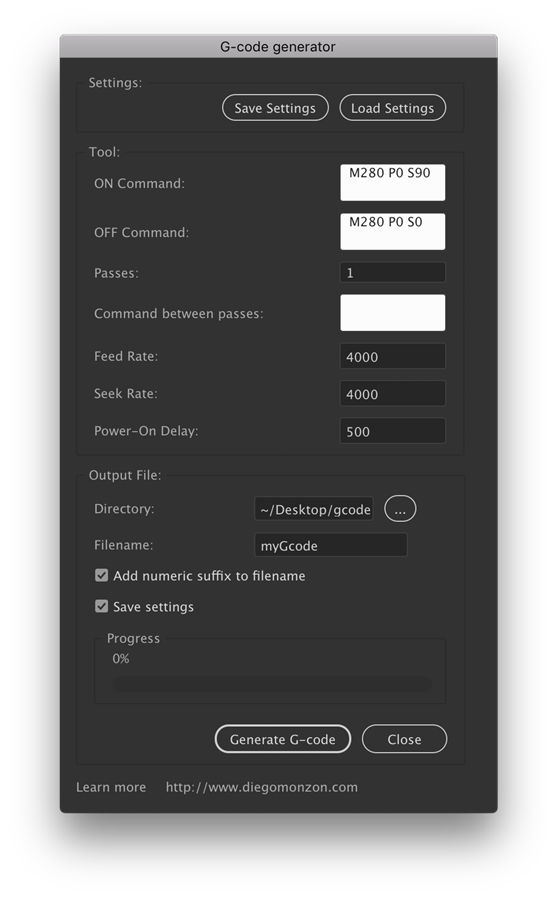
    I published this you will probably find this tool useful. https://diegomonzon.com/illustrator-to-gcode/

    image

    • Cancel
    • Vote Up +1 Vote Down
    • Sign in to reply
    • Cancel
  • gnatman
    gnatman over 7 years ago in reply to diegomonzon

    I cam across this thread trying to use your script/ plugin thing for making my laser engraving/burnings. I'm really familiar with illustrator but not making my own scripts. I'm curious what it would take to request an option where the gcode can change intensity. I'm looking to use your code to make gradients and what not.  I was trying to use one on inkscape but I can't get it to work properly. I'm not sure whats going on with it exactly but the image I convert using the inkscape code is ghosting.


    I hope to hear from you on this.

    Thanks

    • Cancel
    • Vote Up 0 Vote Down
    • Sign in to reply
    • Cancel
element14 Community

element14 is the first online community specifically for engineers. Connect with your peers and get expert answers to your questions.

  • Members
  • Learn
  • Technologies
  • Challenges & Projects
  • Products
  • Store
  • About Us
  • Feedback & Support
  • FAQs
  • Terms of Use
  • Privacy Policy
  • Legal and Copyright Notices
  • Sitemap
  • Cookies

An Avnet Company © 2025 Premier Farnell Limited. All Rights Reserved.

Premier Farnell Ltd, registered in England and Wales (no 00876412), registered office: Farnell House, Forge Lane, Leeds LS12 2NE.

ICP 备案号 10220084.

Follow element14

  • X
  • Facebook
  • linkedin
  • YouTube