

Table of contents

Abstract
A robot arm that detects kids and throws candy at them.
Project
Introduction

(gif make take a second to load)
For anyone wanting to follow along, here are the parts needed:
Hardware components
-
Raspberry Pi 3 Model B
-
Logitech HD Pro webcam
-
HC-SR04 ultrasonic sensor
-
USB speaker
-
Seeed Studio SO-ARM100 robot arm
Prepping the Robot Arm

For the robot arm, I'm using a SO-ARM100. Turns out, they have 2 arms in the package. It's a "follower" and "leader" arm, where you are intended to move the leader and the follower copies its movements. As many others I'm sure will, I saw this as an opportunity to have 2 robot arms that can each move autonomously, as opposed to using a leader-arm. The parts are open source and can just be 3d printed, and the follower and leader are the same until the part that acts as a hand. That means that at some point I'll have to fix my 3d printer (again) but for now, one arm is plenty.
For the most part assembly was super easy. They have it setup where you need to program each servo 1-6, and what I did (and recommend) was just put a piece of tape on each and label them to ensure nothing wonky happens later. By far the biggest issue I had was from the 2 times I did something slightly wrong. Removing a screw once it's in is not easy, so ensuring there's no need to do that in the first place, the assembly is easy.
There were 2 other main learnings I had for the setup that were worth noting. There is a minimum and maximum threshold that the robot is limited within. If you exceed these values, the behavior gets really weird. However, the other learning, is that this most likely only happens if something messes up the calibration in the first place. My logic was that it's capable of moving to the values I'm physically moving it to and it can handle that with the servos, but re-calibrating resolved a lot of headaches. So, if there are weird behaviors for you, give that a check.
Doing the Candy Throwing Thing
Now for the part that makes the project interesting. The goal was to throw candy, so my thinking was that I'd record all the movements as I walked the robot through the process. Then, I'd play them all back and we'd be all set. As hinted at, I had a couple points of confusion between the calibration and the threshold and tried quite a few iterations before simplifying things.

I made it such that I recorded a few key points instead, where it'd raise up, move over to the candy, grab it, lean back, and throw it. At first, it was either ridiculously fast or just doing seemingly random nonsense. Through that time, I tried a lot of various ideas. Trying to just slow it down, trying to interpolate the positions except for the fast part where it throws it, etc. There were quite a lot of iterations to make this work smoothly but since the journey is only interesting when it's interesting, the point is we got there and the code that worked is shared at the end.
There are 3 scripts included. The sequence recorder does as described and allows you to move the robot to each position you want it to hit, but also lets you say how much time to get to each position. When you want it to go as fast as possible, put a 0. For my successful sequence, I had the throwing part broken into 2 segments, both set at a 0 for how long I want it to take. At the top of the throw, the hand is still closed, and then at the end the hand is fully open. This ensured that the candy was held long enough to actually successfully get a good throw.
The simple sequence playback one does as described and runs the sequence nicely. This was handy for testing and getting everything working as intended.
Once those aspects worked, I moved it over to a Raspberry pi. I had started on one, but iterating on a Pi is a bit painful, so I moved to a desktop till everything cooperated. You can just copy-paste your working project onto the raspberry pi and everything works how it's been working, so this was an excellent time saver. But, I wanted to add some extra elements from there.
The 3rd included script is what runs our full, fun candy robot process. As for what that entails...
Making it Interesting
At Halloween, Trick or Treating is specifically for kids. Parents get shafted, and I fully intended to keep tradition alive in this regard. The robot arm would only throw candy at kids!
Even without these specifics, the plan was to add a webcam and leverage computer vision to comment about what we see in addition to giving or denying candy. This is actually something that is built into the code of the Lerobot robotic arm we're working with here, but since I also want commentary I used the openai api. I have it not process a frame from our webcam, but give or deny candy based on whether it sees a kid, and comment according to some basic rules. Since we have a specific response set we require, we can process this and run our robot arm process we trained previously whenever we do give candy.
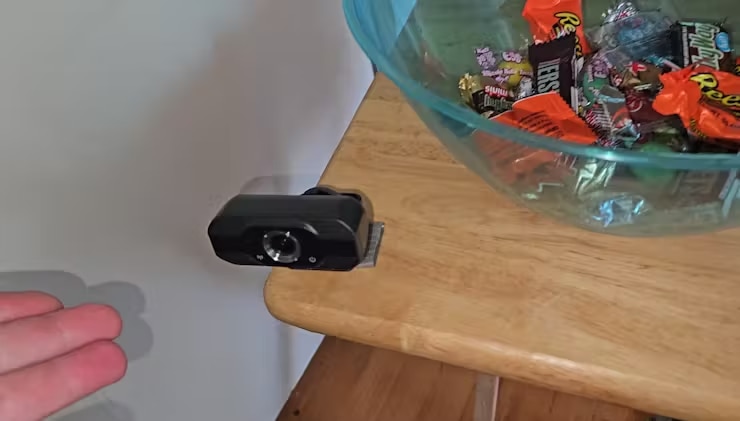
Now that we have a paid api involved, it made sense to keep it cheap by adding an ultrasonic sensor. This kept it such that it would only start the process of sending a frame from our webcam to a vision api if someone had walked in proximity to begin with. I also limited the loop to a short-ish timeframe wherein it could be triggered, and found everything to be working well. So, it was time to throw candy at some kids. Conveniently, 2 live at my house, so it was time to give them a sugar rush.
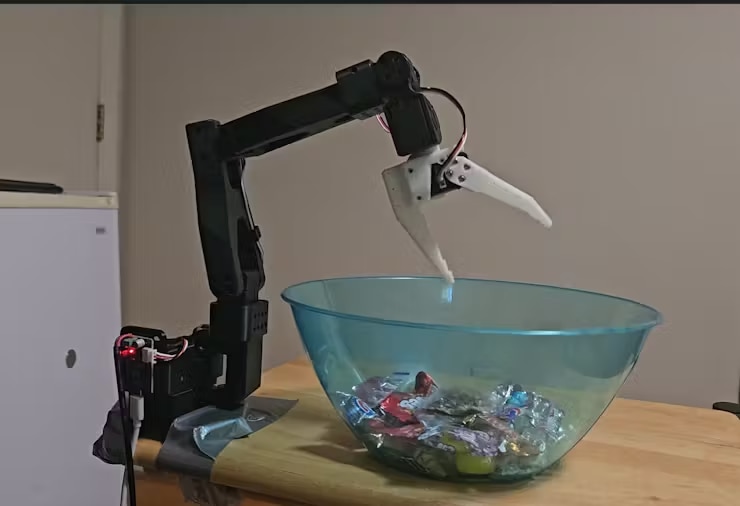
A Robot Threw Candy at My Kids (in a good way)
I took this outside, in a non-bar-fighty-way. I setup a bowl of candy and plugged in the candy robot. Now that I'd positioned it well and slowed it down just enough to stay interesting but not be a safety hazard, it was time to let my kids face the judgment of AI-Vision (spoilers, they're kids so they got candy). They were thrilled. The robot worked very consistently and would reach in, grab something, and hurl candy at the happy kiddos.
Of course, now that I'd added the kid-specific aspects, I had to test the adult part. I had brought my son up to test the setup to ensure it'd throw candy at kids (he was rewarded for his efforts, of course), but I hadn't tested against adults. It was time for the moment of truth. My wife and I were both denied candy, though she was complimented and I was just denied - fair enough honestly.
Now I had a fully functioning robot that would identify kids and throw candy at them. Needless to say, this will be quite handy when trick or treaters come around on actual Halloween. Hopefully you enjoyed the journey and have a good one.