element14 Community
element14 Community
    Register Log In
  • Site
  • Search
  • Log In Register
  • Community Hub
    Community Hub
    • What's New on element14
    • Feedback and Support
    • Benefits of Membership
    • Personal Blogs
    • Members Area
    • Achievement Levels
  • Learn
    Learn
    • Ask an Expert
    • eBooks
    • element14 presents
    • Learning Center
    • Tech Spotlight
    • STEM Academy
    • Webinars, Training and Events
    • Learning Groups
  • Technologies
    Technologies
    • 3D Printing
    • FPGA
    • Industrial Automation
    • Internet of Things
    • Power & Energy
    • Sensors
    • Technology Groups
  • Challenges & Projects
    Challenges & Projects
    • Design Challenges
    • element14 presents Projects
    • Project14
    • Arduino Projects
    • Raspberry Pi Projects
    • Project Groups
  • Products
    Products
    • Arduino
    • Avnet & Tria Boards Community
    • Dev Tools
    • Manufacturers
    • Multicomp Pro
    • Product Groups
    • Raspberry Pi
    • RoadTests & Reviews
  • About Us
  • Store
    Store
    • Visit Your Store
    • Choose another store...
      • Europe
      •  Austria (German)
      •  Belgium (Dutch, French)
      •  Bulgaria (Bulgarian)
      •  Czech Republic (Czech)
      •  Denmark (Danish)
      •  Estonia (Estonian)
      •  Finland (Finnish)
      •  France (French)
      •  Germany (German)
      •  Hungary (Hungarian)
      •  Ireland
      •  Israel
      •  Italy (Italian)
      •  Latvia (Latvian)
      •  
      •  Lithuania (Lithuanian)
      •  Netherlands (Dutch)
      •  Norway (Norwegian)
      •  Poland (Polish)
      •  Portugal (Portuguese)
      •  Romania (Romanian)
      •  Russia (Russian)
      •  Slovakia (Slovak)
      •  Slovenia (Slovenian)
      •  Spain (Spanish)
      •  Sweden (Swedish)
      •  Switzerland(German, French)
      •  Turkey (Turkish)
      •  United Kingdom
      • Asia Pacific
      •  Australia
      •  China
      •  Hong Kong
      •  India
      •  Korea (Korean)
      •  Malaysia
      •  New Zealand
      •  Philippines
      •  Singapore
      •  Taiwan
      •  Thailand (Thai)
      • Americas
      •  Brazil (Portuguese)
      •  Canada
      •  Mexico (Spanish)
      •  United States
      Can't find the country/region you're looking for? Visit our export site or find a local distributor.
  • Translate
  • Profile
  • Settings
Project14
  • Challenges & Projects
  • More
Project14
Blog Cooling FAN Controller Using an LM35 (No MCU)
  • Blog
  • Forum
  • Documents
  • Theme Suggestions
  • Polls
  • Members
  • More
  • Cancel
  • New
Join Project14 to participate - click to join for free!
  • Share
  • More
  • Cancel
Group Actions
  • Group RSS
  • More
  • Cancel
Engagement
  • Author Author: Hesam.M
  • Date Created: 29 Dec 2021 9:28 PM Date Created
  • Views 3544 views
  • Likes 5 likes
  • Comments 2 comments
  • lm35
  • heatsink
  • dc fan contreol
  • fan
  • temperature
  • temperature sensor
  • lm358
Related
Recommended

Cooling FAN Controller Using an LM35 (No MCU)

Hesam.M
Hesam.M
29 Dec 2021

The high temperature of the power components is a known phenomenon in electronics. To overcome this challenge, the designers mount heatsinks on the components to dissipate the heat, however, in many commercial and home appliance devices, the embedded heatsink is not adequate and the air must be circulated faster to reduce the heatsink and component temperature, otherwise, the lifetime of the component is reduced significantly.

The proposed automatic FAN controller board is simple, compact, and can be embedded inside commercial devices. The LM35 temperature sensor could be fixed on the heatsink using some silicon glue. 

The user can easily set the temperature threshold using a potentiometer. The board can be supplied using a 5V or a 12V supply, therefore a variety of 5V, 12V, miniature, and PC FANs can be used.

I used Altium Designer 21 and SamacSys component libraries (SamacSys Altium plugin) to draw the schematic and PCB. Except for the connectors, all components are SMD and easy to solder.

You don't have permission to edit metadata of this video.
Edit media
x
image
Upload Preview
image

Circuit Analysis

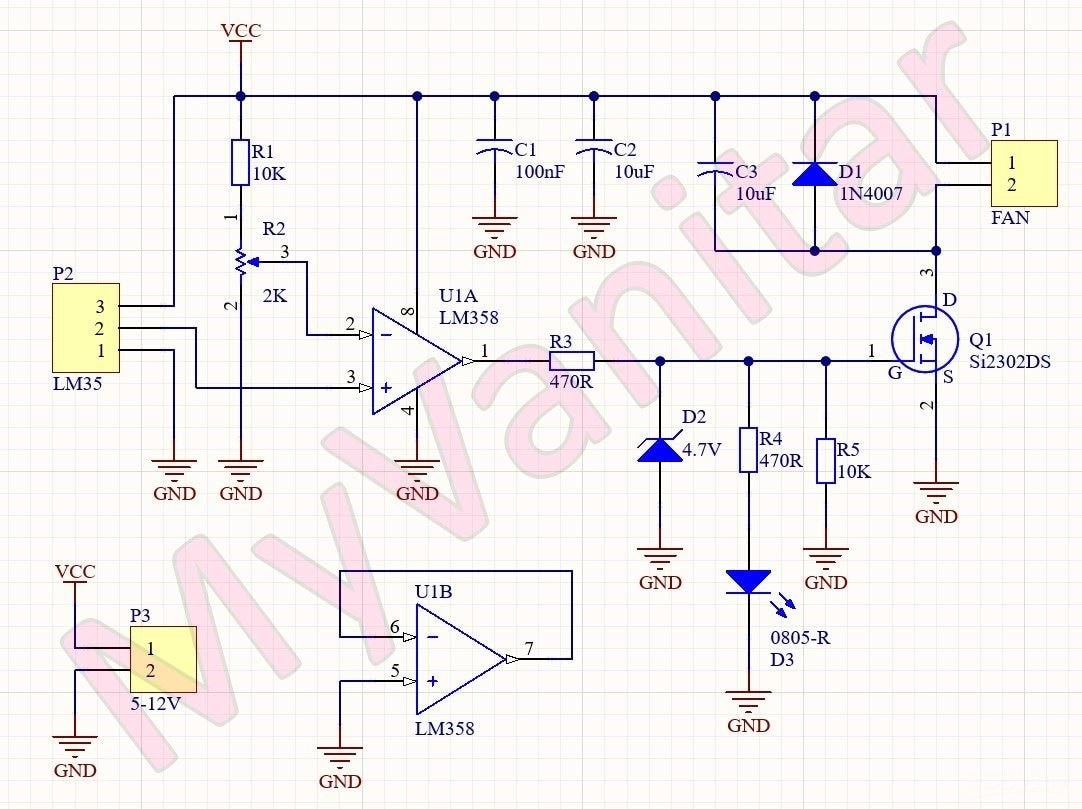
Figure 1 shows the schematic diagram of the device. The two major components are a temperature sensor and an OPAMP.
image

Figure 1

The schematic diagram of the cooling Fan controller (Altium Designer)

U1 is the LM358 opamp [1] that is configured as a comparator. If the voltage of the positive input is higher/lower than the negative input, then the output would be close to the VCC/GND. When the temperature of the environment (the voltage on the positive pin) is higher than the pre-set temperature (the voltage on the negative pin), then the output will be activated and vice versa. The LM358 has two opamps. The second opamp is not used and configured as a voltage follower. R2 is a multiturn potentiometer to easily adjust the temperature threshold.

R3 and D2 are used to limit the output voltage of the U1 because the maximum tolerable voltage of the gate pin of Q1 is 8V [2], moreover, they help to maintain the voltage of the D3 LED at around 4.7V, so the value of the R4 is fixed to 470R for any supply voltage. R5 is used to prevent the unwanted triggering of the Q1 gate.

Q1 is the SI2302 N-Channel SMD Mosfet [2] that can switch up to 2.2A continuously, so I decided to use this MOSFET, instead of using a mechanical relay. D1 protects the Q1 against reverse inductive currents and C3 is used to reduce the switching noises. C1 and C2 are bypass capacitors and are used to reduce noises.

PCB Layout

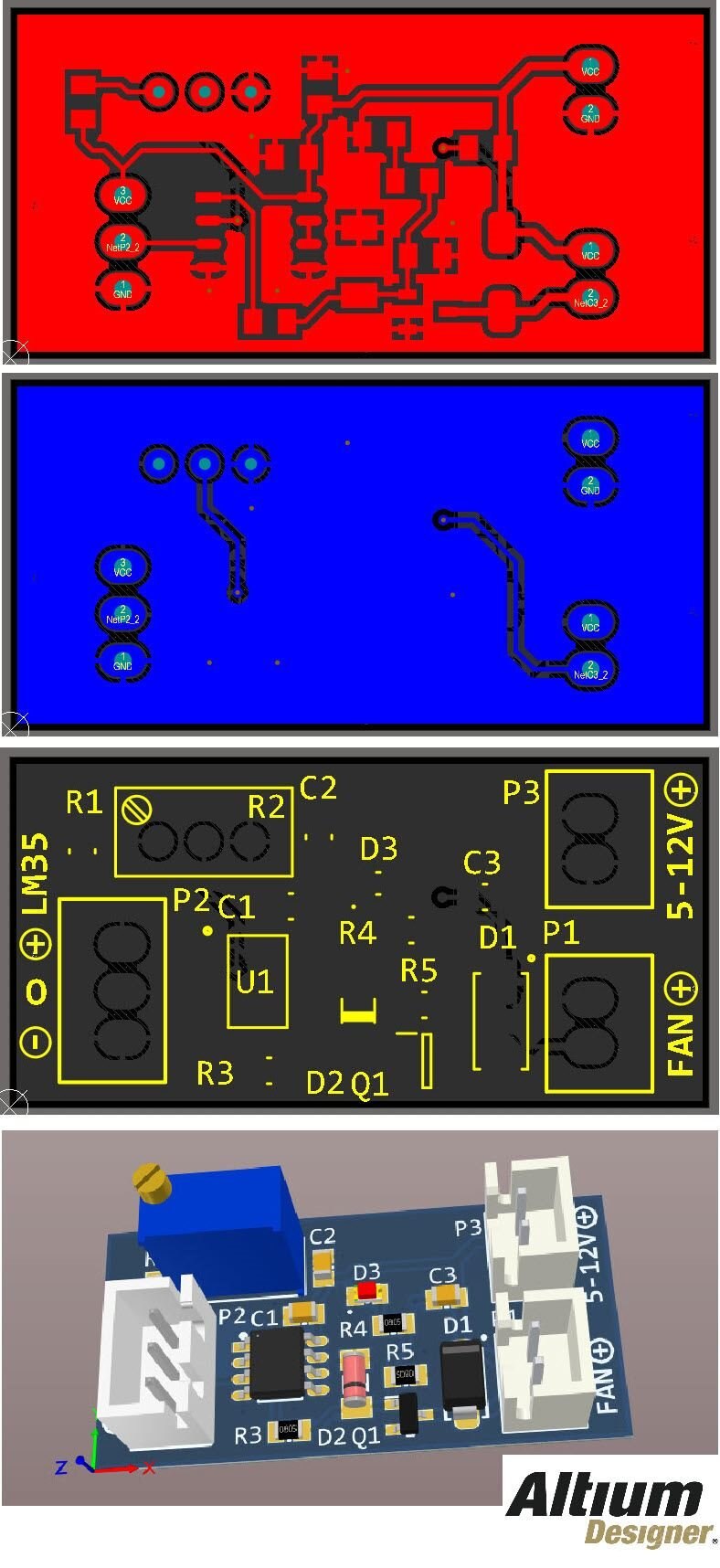
Figure 2 shows the PCB layout of the design. It is a two layers PCB board and except for the connectors, all components are SMD. The board size is 3.8cm*1.9cm.
image

Figure 2

The PCB layout of the cooling fan controller (Altium Designer)

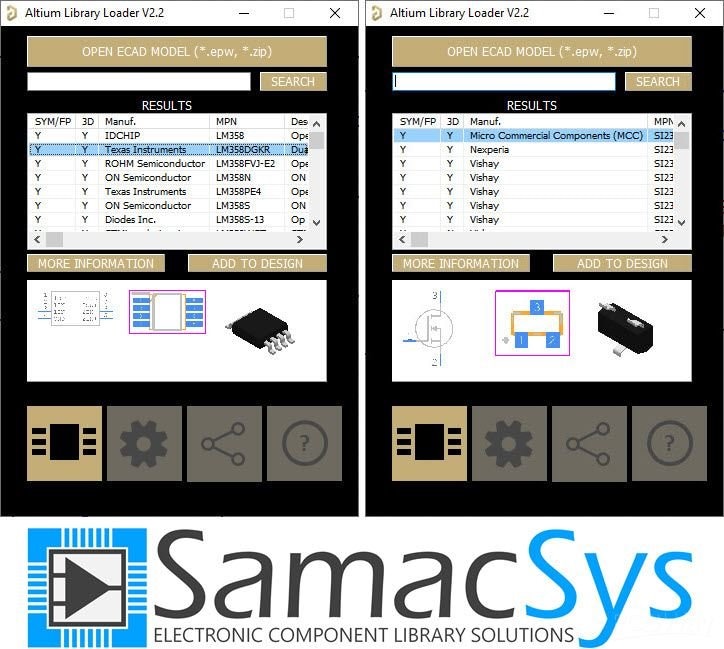
When I decided to design the schematic and PCB for this project, I realized that I don’t have the component libraries of U1[3] and Q1[4] in my component libraries storage. So as usual, I selected IPC-rated SamacSys component libraries and install the missing libraries (schematic symbol, PCB footprint, 3D model) using the free SamacSys tools and services. There are two methods to import the libraries into the electronic designing CAD software: you can visit the componentsearchengine.com and download and import the libraries, or you can use the SamacSys CAD plugins and directly import the component models into the design environment. Figure 3 shows all supported electronic designing CAD software [5]. As it is clear, all known CAD Software is supported. I use Altium Designer, so I installed the missing libraries using the SamacSys Altium plugin (Figure 6) [6].

image

Figure 3

All supported electronic designing CAD software by the SamacSys plugins
image

Figure 4

Selected component libraries in the SamacSys Altium plugin

Bill of Materials

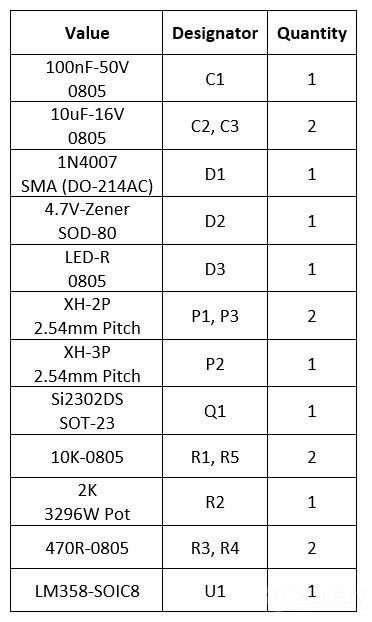
Figure 5 shows the bill of materials for the project.
image

Figure 5, Bill of materials

References

Source: https://bit.ly/3eyyp5F
[1]: LM358 datasheet: https://www.st.com/resource/en/datasheet/lm358.pdf
[2]: SI2302 datasheet: https://www.vishay.com/docs/63653/si2302dds.pdf
[3]: LM358 schematic symbol, PCB footprint, 3D model: https://componentsearchengine.com/part-view/LM358D/STMicroelectronics
[4]: Si2302 schematic symbol, PCB footprint, 3D model: https://componentsearchengine.com/part-view/SI2302DDS-T1-GE3/Vishay
[5]: Electronic designing CAD software plugins: https://www.samacsys.com/library-loader-help
[6]: Altium Designer plugin: https://www.samacsys.com/altium-designer-library-instructions

  • https://www.altium.com/yt/myvanitar
  • View
  • Hide
  • Sign in to reply

Top Comments

  • rsjawale24
    rsjawale24 over 3 years ago +1
    Great project! I had done a similar mini-project during my undergrad days using a single LM35 with multiple opamp comparator, I was able to control devices as the temperature deviated from the set-points…
  • rsjawale24
    rsjawale24 over 3 years ago

    Great project!
    I had done a similar mini-project during my undergrad days using a single LM35 with multiple opamp comparator, I was able to control devices as the temperature deviated from the set-points.

    • Cancel
    • Vote Up +1 Vote Down
    • Sign in to reply
    • More
    • Cancel
  • shabaz
    shabaz over 3 years ago

    Hi, 

    This reads like marketing for Altium and Samac, but nevertheless, this sounds odd, how come Altium Designer didn't have LM358 and Si2303 within its libraries by default? Both are common components (the MOSFET has the same symbol and footprint as a hundred other SOT-23 MOSFETs..). If you really wanted to demonstrate the value, you should have chosen very unusual parts that cannot possibly be expected to be within Altium Designer's libraries.

    • Cancel
    • Vote Up 0 Vote Down
    • Sign in to reply
    • More
    • Cancel
element14 Community

element14 is the first online community specifically for engineers. Connect with your peers and get expert answers to your questions.

  • Members
  • Learn
  • Technologies
  • Challenges & Projects
  • Products
  • Store
  • About Us
  • Feedback & Support
  • FAQs
  • Terms of Use
  • Privacy Policy
  • Legal and Copyright Notices
  • Sitemap
  • Cookies

An Avnet Company © 2025 Premier Farnell Limited. All Rights Reserved.

Premier Farnell Ltd, registered in England and Wales (no 00876412), registered office: Farnell House, Forge Lane, Leeds LS12 2NE.

ICP 备案号 10220084.

Follow element14

  • X
  • Facebook
  • linkedin
  • YouTube