element14 Community
element14 Community
    Register Log In
  • Site
  • Search
  • Log In Register
  • Community Hub
    Community Hub
    • What's New on element14
    • Feedback and Support
    • Benefits of Membership
    • Personal Blogs
    • Members Area
    • Achievement Levels
  • Learn
    Learn
    • Ask an Expert
    • eBooks
    • element14 presents
    • Learning Center
    • Tech Spotlight
    • STEM Academy
    • Webinars, Training and Events
    • Learning Groups
  • Technologies
    Technologies
    • 3D Printing
    • FPGA
    • Industrial Automation
    • Internet of Things
    • Power & Energy
    • Sensors
    • Technology Groups
  • Challenges & Projects
    Challenges & Projects
    • Design Challenges
    • element14 presents Projects
    • Project14
    • Arduino Projects
    • Raspberry Pi Projects
    • Project Groups
  • Products
    Products
    • Arduino
    • Avnet & Tria Boards Community
    • Dev Tools
    • Manufacturers
    • Multicomp Pro
    • Product Groups
    • Raspberry Pi
    • RoadTests & Reviews
  • About Us
  • Store
    Store
    • Visit Your Store
    • Choose another store...
      • Europe
      •  Austria (German)
      •  Belgium (Dutch, French)
      •  Bulgaria (Bulgarian)
      •  Czech Republic (Czech)
      •  Denmark (Danish)
      •  Estonia (Estonian)
      •  Finland (Finnish)
      •  France (French)
      •  Germany (German)
      •  Hungary (Hungarian)
      •  Ireland
      •  Israel
      •  Italy (Italian)
      •  Latvia (Latvian)
      •  
      •  Lithuania (Lithuanian)
      •  Netherlands (Dutch)
      •  Norway (Norwegian)
      •  Poland (Polish)
      •  Portugal (Portuguese)
      •  Romania (Romanian)
      •  Russia (Russian)
      •  Slovakia (Slovak)
      •  Slovenia (Slovenian)
      •  Spain (Spanish)
      •  Sweden (Swedish)
      •  Switzerland(German, French)
      •  Turkey (Turkish)
      •  United Kingdom
      • Asia Pacific
      •  Australia
      •  China
      •  Hong Kong
      •  India
      •  Korea (Korean)
      •  Malaysia
      •  New Zealand
      •  Philippines
      •  Singapore
      •  Taiwan
      •  Thailand (Thai)
      • Americas
      •  Brazil (Portuguese)
      •  Canada
      •  Mexico (Spanish)
      •  United States
      Can't find the country/region you're looking for? Visit our export site or find a local distributor.
  • Translate
  • Profile
  • Settings
Project14
  • Challenges & Projects
  • More
Project14
Blog First steps with STMicroelectronics Nucleo-64 + Nucleo-IKS01A3 boards
  • Blog
  • Forum
  • Documents
  • Theme Suggestions
  • Polls
  • Members
  • More
  • Cancel
  • New
Join Project14 to participate - click to join for free!
  • Share
  • More
  • Cancel
Group Actions
  • Group RSS
  • More
  • Cancel
Engagement
  • Author Author: Marco.Queroz
  • Date Created: 3 Jun 2022 3:23 PM Date Created
  • Views 1492 views
  • Likes 2 likes
  • Comments 3 comments
  • nucleo64
  • stm32
  • AvnetdoBrasil
  • nucleoIKS01A3
  • project14
Related
Recommended

First steps with STMicroelectronics Nucleo-64 + Nucleo-IKS01A3 boards

Marco.Queroz
Marco.Queroz
3 Jun 2022

Nucleo-64 + Nucleo-IKS01A3

Hello!!

Let's configure your ST Nucleo-64 board together!

1. Download the software

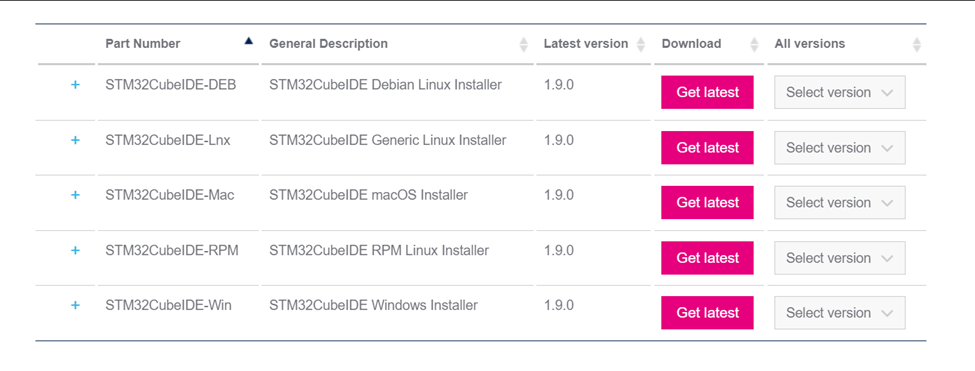
The first software is:

  • STM32CubeIDE-Win - https://www.st.com/en/development-tools/stm32cubeide.html

- Going down the page you will find some options and you can choose the version compatible with your device.

image

After installing it will download an enZip folder, click to extract it and save it to a location. After extracting, run and install the program. After installing the program, install the following software:

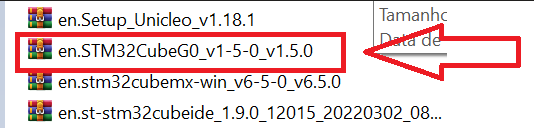
  • STM32CubeG0 - https://www.st.com/en/embedded-software/stm32cubeg0.html#get-software 

- Extract the folder in the same location as the previous item.  
image

Right after we install this other software, you need to download the next files:

  • X-CUBE-AZRTOS-G0 - https://www.st.com/content/st_com/en/products/embedded-software/mcu-mpu-embedded-software/stm32-embedded-software/stm32cube-expansion-packages/x-cube-azrtos-g0.html  

image

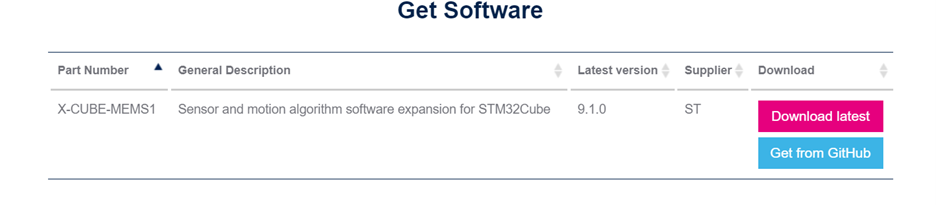
  • X-CUBE-MEMS1 - https://www.st.com/en/embedded-software/x-cube-mems1.html#overview 

image

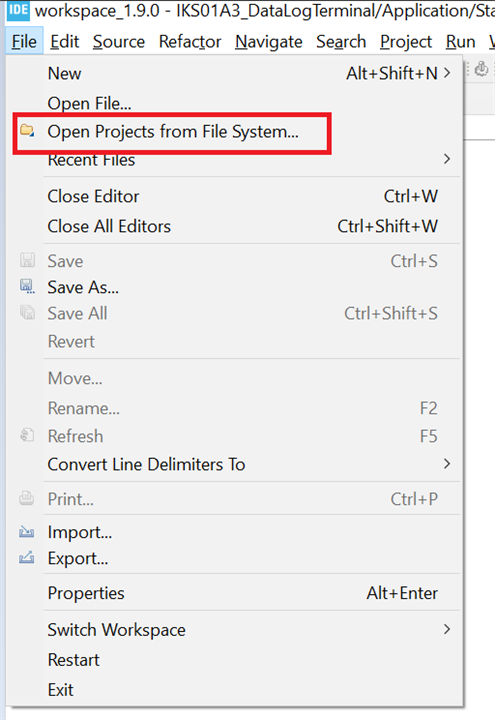
  • After installation, open the IDE and click "File", "Open File System Projects..." as shown in the image below.
image

  • A window will open and you must click on "Archive..." there you select
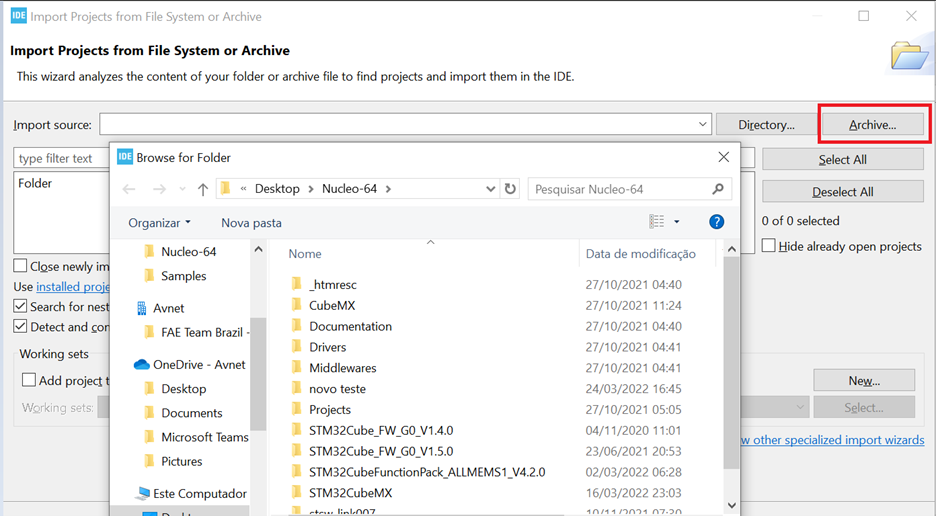
image

  • Then look for the STM32CubeG0

image

After loading the folder load the project. To test go to "projects", "Nucle-G071RB", "examples", "GPIO". Now your LED will be blinking!!

And now let's configure and run our board with Nucleo-IKS01A3

Core-IKS01A3

For those who prefer something visual, follow the steps in this tutorial: Getting Started with X-CUBE-MEMS1

image

Let's install the MX program ( https://www.st.com/en/development-tools/stm32cubemx.html ) after installing it go to install/remove
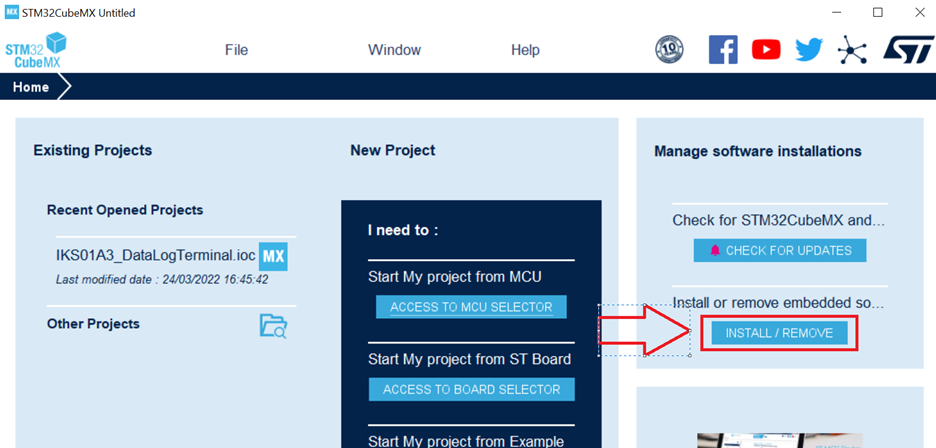
image

We click on STMicroelectronics and look for the X-Cube-MEMS1 application and click on "Update", after loading select the square indicated in the figure below and click install

image

After installation click close and type "access to board selector"

image

Let's look for our board to configure it

image

configuring the board

Then go to "Software Packages" --> "Select Components" We look for X-Cube-MEMS1 and dec until we find "MEMS1 device applications", install and enable "IKS01A3 DataLogTerminal". Go to the "I" at the top of the table to open the port configuration pdf.
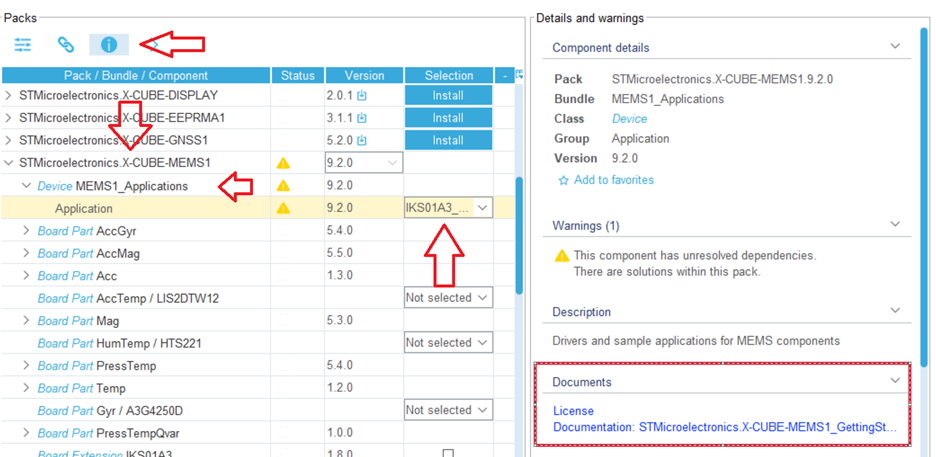
image

In the pdf we will go to page 41 and start configuring our ports! Be careful to check if it is the configuration of your card, in our case we use the IKS01A3

 imageimage

To configure the ports go to "connectivity", "I2C1" and enable "I2C" change the "I2C speed mode" to "fast mode" then just click on the port we want to change and make the modification

image

After changing the ports, we minimize the "connectivity" and open the "Software Packs" and enable the options and configure as follows:

image

After the settings go to "System View", "INVIC" and enable the following options
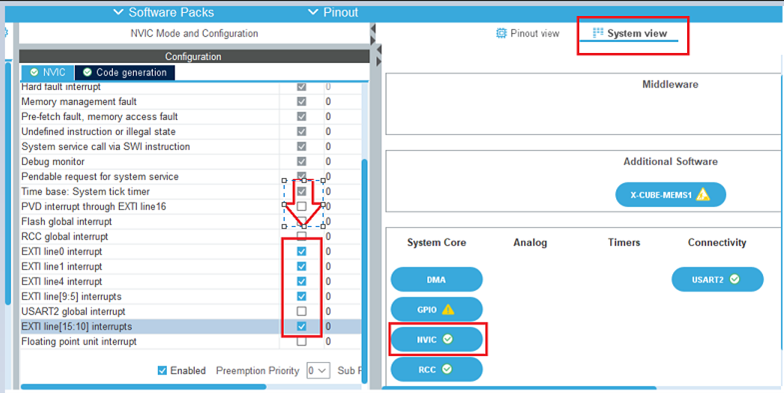
image

Then go to "Project Manager" and create a project. Fill in the data, change the "Application Structure" to "Basic", the "Toolchain/IDE" to "STM32CubeIDE" and disable the "Generate Under Root" option. Once that's done, just click on "Generate Code", "Open Project" which will open your IDE with your project, so just put it to run!

Thanks

I would like to thank all my team for the support and help they gave me during the project, the answers to the doubts, the tips on how to improve and the indications for my project to get better and better.

  • Sign in to reply
  • michaelkellett
    michaelkellett over 3 years ago in reply to Marco.Queroz

    I think it would be a very good idea if Avnet or E14 employees or representatives were to clearly state their connections and objectives in posts.

    A great many of the blogs on E14 are generated in the community with no direct commercial connection, it is very important to readers of blogs that they can tell the provenance of what they are reading.

    Your own blog here would be much improved by an introductory paragraph explaining what the board is, why anyone might wish to choose it and the objectives of the new material you are presenting. A little bit about yourself, in the blog or in your profile would be good.

    MK

    • Cancel
    • Vote Up 0 Vote Down
    • Sign in to reply
    • More
    • Cancel
  • Marco.Queroz
    Marco.Queroz over 3 years ago
    Good afternoon @michaelkellett
    This is a project using STMicroeletronics boards
    Core-64 and attaching the X-Nucleo-IKS01A3 board to it.
    
    The "team" is the team in which I find myself in the company Avnet do Brasil.
    
    And this project shows, step by step, how to run the board projects! This X-Nucleo-IKS01A3 has several sensors that identify the ambient temperature, atmospheric pressure, humidity, among other sensors.
    
    I hope I have clarified your doubts and if you have any more doubts you can ask, I'm here to explain and help in any way I can!
    • Cancel
    • Vote Up 0 Vote Down
    • Sign in to reply
    • More
    • Cancel
  • michaelkellett
    michaelkellett over 3 years ago

    I don't understand this post at all.

    What is your project, who are your "team".

    What is this project supposed to do ?

    MK

    • Cancel
    • Vote Up 0 Vote Down
    • Sign in to reply
    • More
    • Cancel
element14 Community

element14 is the first online community specifically for engineers. Connect with your peers and get expert answers to your questions.

  • Members
  • Learn
  • Technologies
  • Challenges & Projects
  • Products
  • Store
  • About Us
  • Feedback & Support
  • FAQs
  • Terms of Use
  • Privacy Policy
  • Legal and Copyright Notices
  • Sitemap
  • Cookies

An Avnet Company © 2025 Premier Farnell Limited. All Rights Reserved.

Premier Farnell Ltd, registered in England and Wales (no 00876412), registered office: Farnell House, Forge Lane, Leeds LS12 2NE.

ICP 备案号 10220084.

Follow element14

  • X
  • Facebook
  • linkedin
  • YouTube