


Introduction and Project Concept
Modern agriculture and smart horticulture face constant challenges: optimizing resource utilization, maintaining precise environmental parameters, and minimizing human intervention in repetitive tasks. Greenhouses require strict monitoring of temperature, relative humidity, light intensity, and atmospheric pressure to ensure optimal crop yield and health.
In this comprehensive project, we design, build, and deploy a distributed Greenhouse Monitoring and Controlling System utilizing NXP's robust wireless hardware ecosystem. By combining the FRDM-KW24D development board for local sensor nodes and the NXP Rapid IoT Prototyping Kit (featuring the KW41Z wireless MCU) as a hybrid Bluetooth Low Energy / Thread router, this system achieves reliable, low-power mesh connectivity across an entire greenhouse environment.
Relay modules and actuators are used to automatically control electrical loads: irrigation pumps, heaters, grow lamps, and automated ventilation windows. Full automation of climate processes allows greenhouse owners to focus entirely on crop management and plant care rather than manual device control.
The system allows continuous control over key parameters that affect proper plant growth, such as:
-
Temperature
-
Relative humidity
-
Atmospheric pressure
-
Illumination level (sunlight)
System management and telemetry data visualization are provided via a mobile device (e.g., a smartphone) connected to the Mesh network through a hybrid router.
Architecture and Network Topology
A key element of the project is the use of the Thread wireless mesh network (based on the IEEE 802.15.4 standard), which ensures secure, low-power, and self-healing communication between all nodes distributed throughout the greenhouse.
The system architecture can be divided into two main layers:
-
Thread Network Clients: Responsible for collecting data from sensors and executing local control of physical devices.
-
Hybrid Router: Receives data from the entire sensor network and makes it available to the end-user via a Bluetooth Low Energy (BLE) interface.
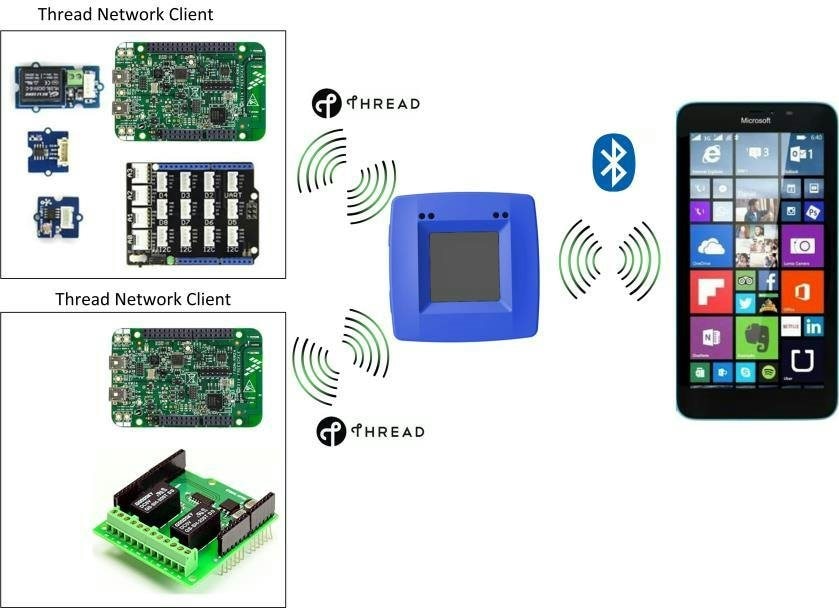
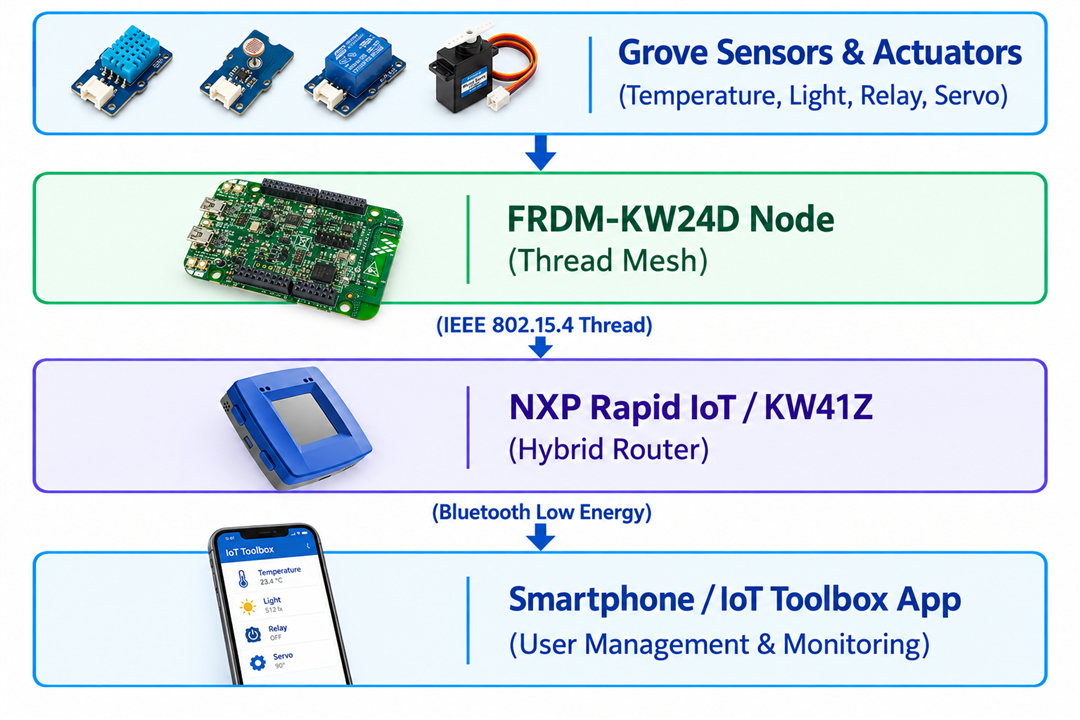
The concept is illustrated in the diagram above. The system's components communicate with each other using the Thread wireless networking protocol.
Hardware Components
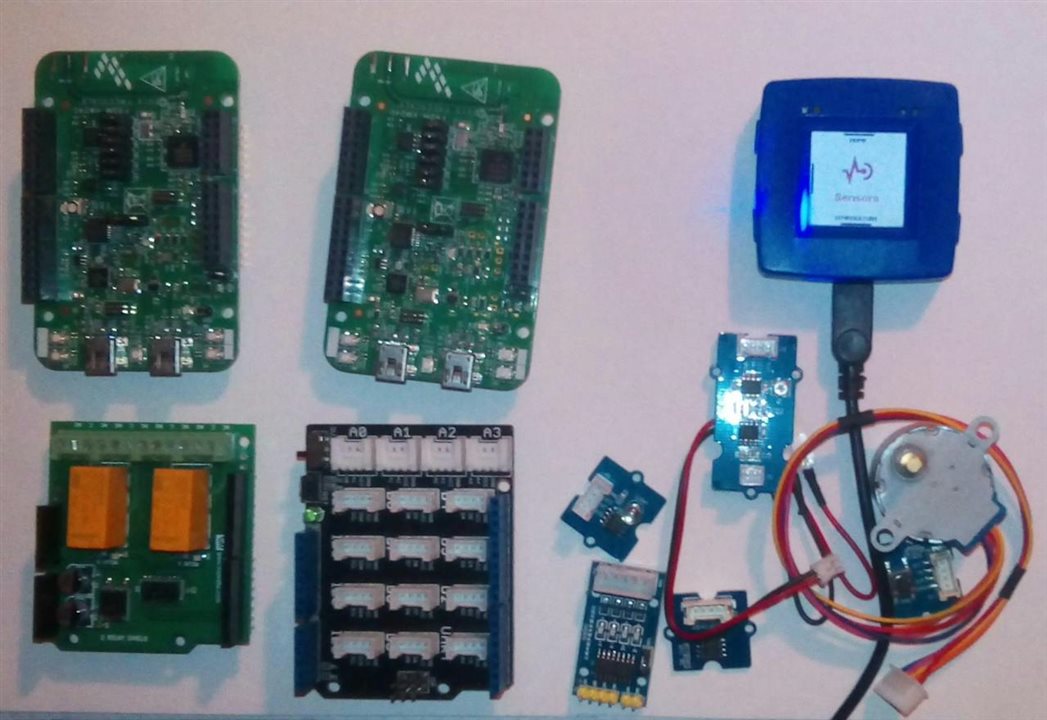
The prototype was built using dedicated NXP microcontrollers, evaluation boards, and universal expansion modules:
-
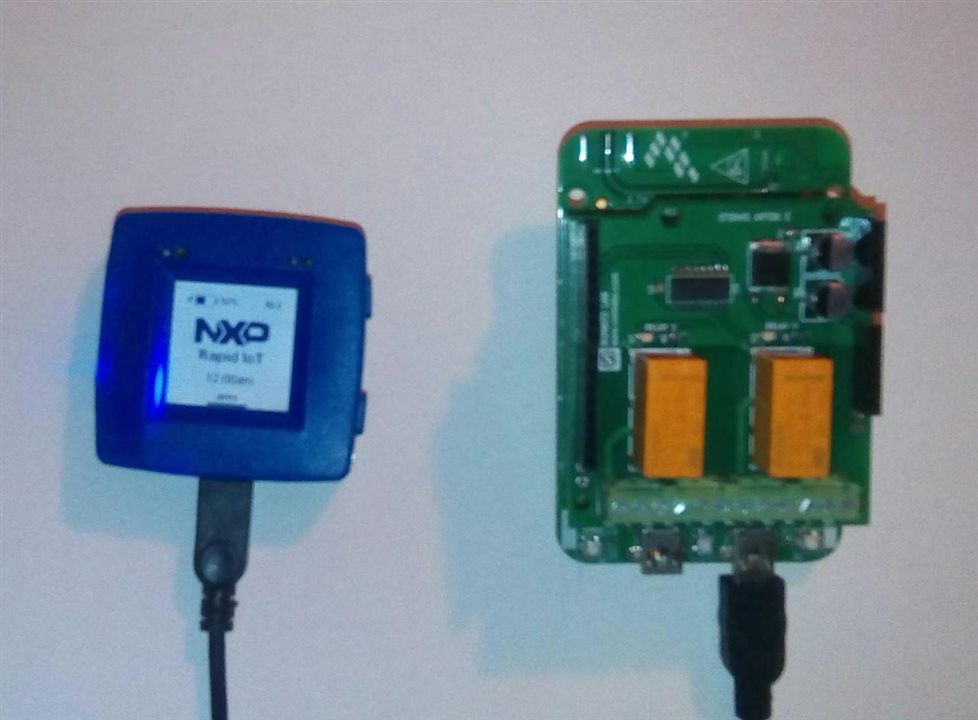
NXP Rapid IoT Prototyping Kit – acts as a hybrid border router and central control point.
-
FRDM-KW24D – ARM Freedom Development Board for Kinetis KW24D MCU – basic client nodes for the Thread network.
-
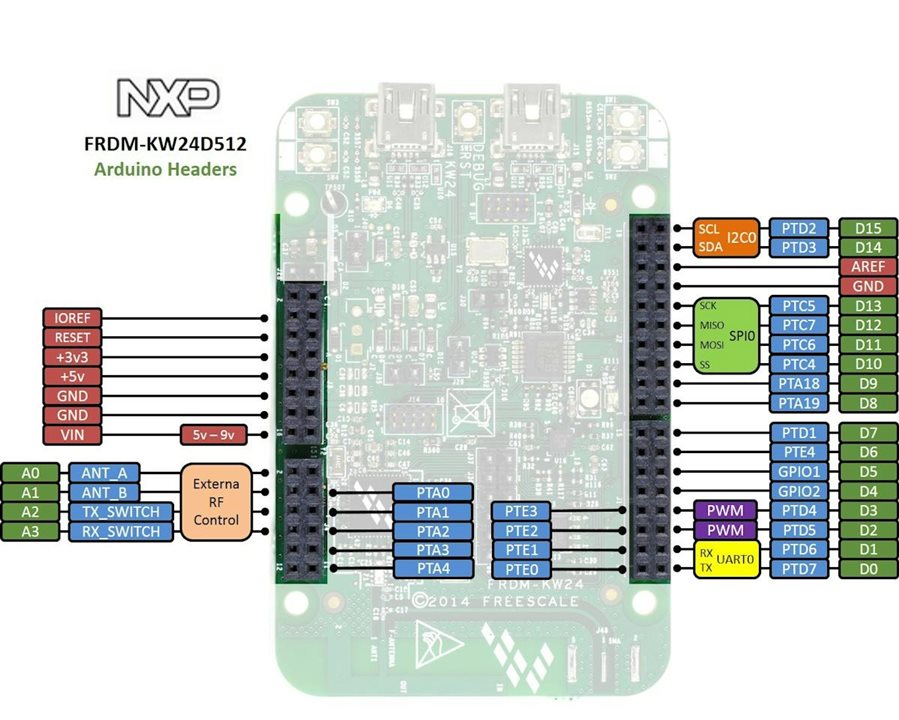
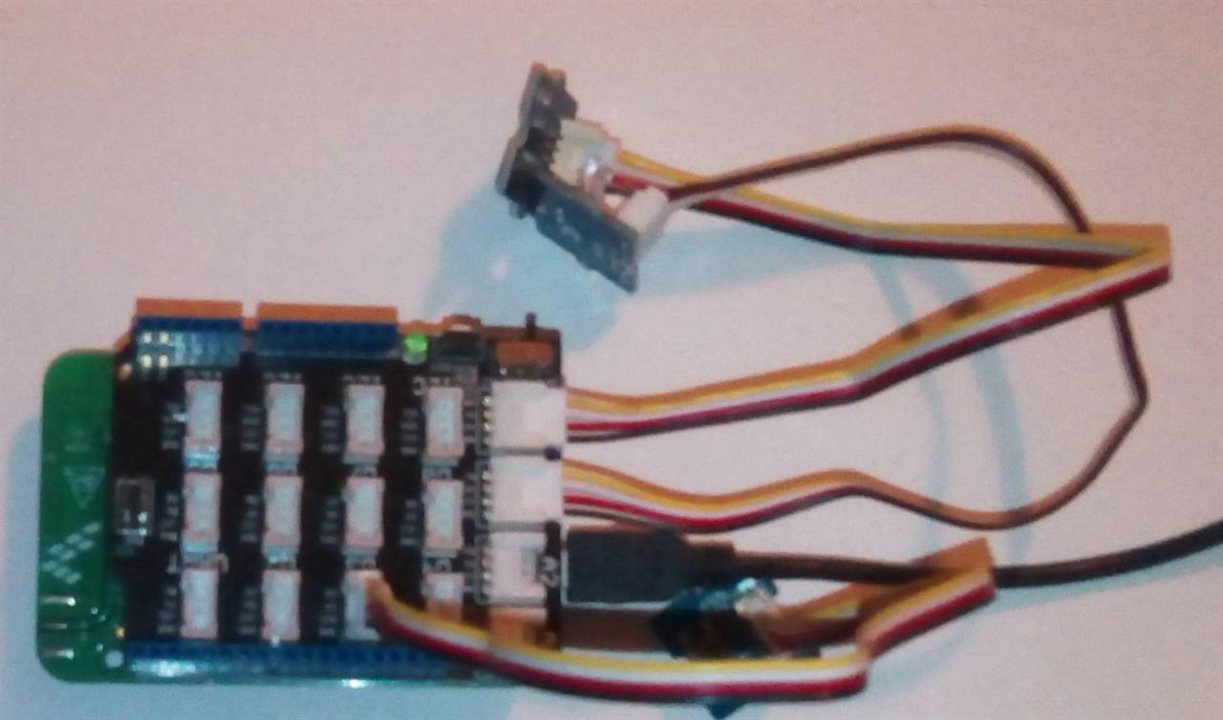
Seeed Studio Grove Starter Kit – a kit containing a light sensor, temperature sensor, mini servo, and a smart relay module. The pin connectors of the FRDM-KW24D boards are fully compatible with Arduino Headers, facilitating shield and sensor mounting.
-
Numato Relay Shield – 2 Channel – an additional two-channel relay module to handle higher electrical loads (such as heaters and pumps).
Software and Development Tools
The project was implemented using professional embedded software tools for NXP microcontrollers:
-
MCUXpresso IDE (version 10.3.1) and newer software development environments.
-
SDK for KW41Z (SDK_2.2.0_FRDM-KW41Z).
-
NXP Kinetis Design Studio and the Kinetis MKW2xD and MCR20A Connectivity Software (1.0.2) package used for programming previous iterations of the FRDM-KW24D nodes.
Detailed Description of System Elements
1. Thread Network Client
Each monitoring node in the mesh network is based on the NXP MKW24D512 Kinetis Wireless MCU.
-
The NXP FRDM-KW24D evaluation boards were used to test firmware and radio communication stability.
-
A wide range of compatible sensors (temperature, light) and actuators (relays, servos) were attached to the boards using universal Arduino Headers and the Grove system.
-
The program, written using Kinetis MKW2xD and MCR20A Connectivity Software and compiled in Kinetis Design Studio IDE, handles cyclical environmental data reading and native control of relay outputs based on predefined threshold logic (Edge Computing).
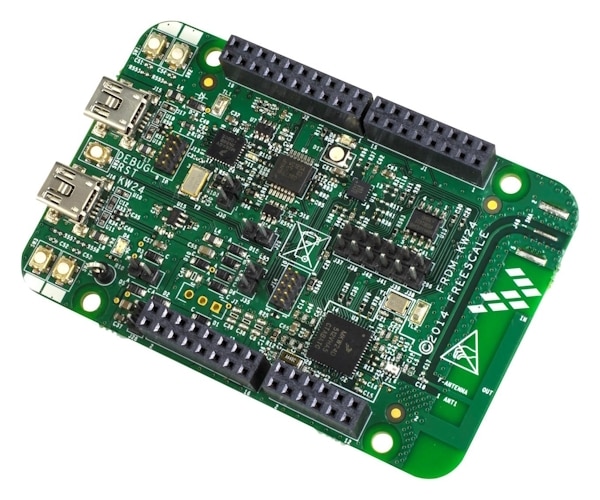
The FRDM-KW24D board connectors are compatible with Arduino Headers.
2. Hybrid Router
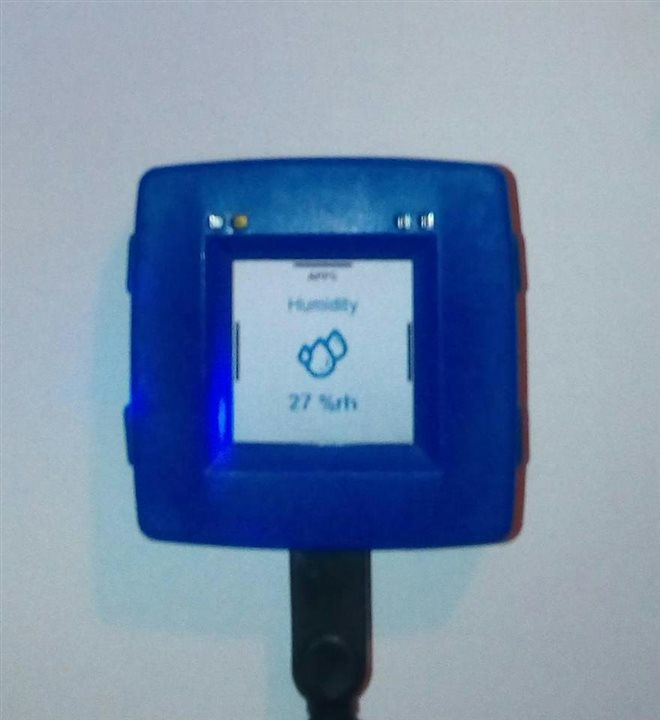
Data collected by the sensor nodes is transmitted wirelessly using the Thread protocol to the NXP Rapid IoT Prototyping Kit.
-
This module is based on the KW41Z wireless MCU, featuring an integrated modem that simultaneously supports Bluetooth Low Energy (BLE 4.2), Generic FSK, and 802.15.4 protocols.
-
The KW41Z functions as a hybrid BLE–Thread wireless router, bridging two distinct wireless technologies.
-
This microcontroller not only collects telemetry data from the greenhouse mesh network but can also directly control environmental parameters using connected actuators.
-
Firmware for the KW41Z MCU was written in C using the official SDK for KW41Z package and compiled in the MCUXpresso IDE.
3. User Interface and Management
-
The user has full visibility of the greenhouse status and the ability to manage the system directly from a mobile device (e.g., a smartphone).
-
Communication with the user is handled via the BLE Terminal feature within the dedicated IoT Toolbox mobile application provided by NXP.
Software Applications & Development Environment
Developing and flashing firmware across different NXP wireless architectures requires specific toolchains and software development kits (SDKs):
-
MCUXpresso IDE (v10.3.1+): The primary integrated development environment for building and debugging firmware on modern NXP Kinetis and LPC microcontrollers.
-
SDK for KW41Z (
SDK_2.2.0_FRDM-KW41Z): Comprehensive software package containing peripheral drivers, FreeRTOS ports, and the BLE/Thread protocol stacks for the Rapid IoT kit. -
Kinetis Design Studio & Connectivity Software (v1.0.2): Legacy development setup used to compile and flash the IEEE 802.15.4 and Thread stack software onto the FRDM-KW24D nodes.
-
NXP IoT Toolbox App: A mobile utility application available for Android and iOS that provides a built-in BLE Terminal interface to interact directly with the hybrid router.
System Architecture & Topology
The system is structured into a three-tier architecture designed for scalability, low power consumption, and local autonomy:
1. Sensor & Actuator Layer (Edge Nodes)
Each greenhouse zone features an FRDM-KW24D board connected to Grove sensors. The board samples physical quantities periodically. Crucially, it runs local automation rules (Edge Computing): if the temperature exceeds a predefined safety threshold, the MCU activates the relay or servo instantly, bypassing network latency or dependency on the cloud.
2. Mesh Network Layer (Thread Protocol)
Nodes communicate using the Thread network protocol, an IPv6-based, low-power mesh networking standard built on IEEE 802.15.4. Thread provides self-healing properties—if one node loses power or signal, surrounding nodes automatically reroute data packets to maintain continuous connectivity across the greenhouse structure.
3. Gateway & Mobile Management Layer
The NXP Rapid IoT Prototyping Kit acts as a hybrid router. It maintains a foot in both worlds: participating in the Thread mesh network to receive sensor telemetry, and broadcasting a Bluetooth Low Energy (BLE) GATT profile. Greenhouse owners can walk into the facility with a smartphone, open the NXP IoT Toolbox, and read real-time parameters or override automation settings manually.
Step-by-Step Implementation Guide
Step 1: Hardware Assembly & Pin Mapping
-
Connect the Seeed Studio Grove Shield directly onto the Arduino-compatible headers of the FRDM-KW24D board.
-
Plug the Grove Light Sensor into an analog input port (e.g., ADC0).
-
Plug the Grove Temperature Sensor into an alternate analog or digital interface.
-
Connect the Grove Smart Relay or Numato 2-Channel Relay Shield to designated digital output GPIO pins (e.g., GPIOD, Pin 1) to control external 12V/230V devices like irrigation valves or heating coils.
Step 2: Flashing the Sensor Node Firmware (FRDM-KW24D)
The firmware initializes the microcontroller clocks, configures GPIOs, reads environmental data, performs local evaluations, and prepares the data packet for Thread transmission.
#include "fsl_device_registers.h"
#include "board.h"
#include "fsl_debug_console.h"
#include "fsl_gpio.h"

#define RELAY_PIN_GPIO      GPIOD
#define RELAY_PIN_MASK      (1U << 1U)

typedef struct {
    float temperature;
    uint16_t lightLevel;
    uint8_t relayStatus;
} GreenhouseSensorData_t;

void BOARD_InitPeripherals(void) {
    gpio_pin_config_t relay_config = {kGPIO_DigitalOutput, 0};
    GPIO_PinInit(RELAY_PIN_GPIO, 1U, &relay_config);
}

void ReadSensors(GreenhouseSensorData_t *data) {
    // Simulated sensor acquisition (replace with actual ADC/I2C reads)
    data->temperature = 24.5f;
    data->lightLevel = 750;    // Lux units
}

void ProcessActuators(GreenhouseSensorData_t *data) {
    // Local Edge Computing logic: Trigger ventilation if temp exceeds 28°C
    if (data->temperature > 28.0f) {
        GPIO_PortSet(RELAY_PIN_GPIO, RELAY_PIN_MASK);
        data->relayStatus = 1;
    } else {
        GPIO_PortClear(RELAY_PIN_GPIO, RELAY_PIN_MASK);
        data->relayStatus = 0;
    }
}

int main(void) {
    BOARD_InitPins();
    BOARD_BootClockRUN();
    BOARD_InitDebugConsole();
    BOARD_InitPeripherals();

    GreenhouseSensorData_t sensorData;
    PRINTF("FRDM-KW24D Greenhouse Sensor Node Initialized Successfully.\r\n");

    while (1) {
        ReadSensors(&sensorData);
        ProcessActuators(&sensorData);

        // Transmit telemetry payload via Thread stack protocol
        // Thread_SendDatagram((uint8_t*)&sensorData, sizeof(sensorData));

        PRINTF("Telemetry -> Temp: %.1f °C | Light: %d lx | Relay State: %d\r\n",
               sensorData.temperature, sensorData.lightLevel, sensorData.relayStatus);

        // Delay loop or RTOS task sleep before next poll cycle
    }
}
Step 3: Flashing the Hybrid Router Firmware (NXP Rapid IoT / KW41Z)
The hybrid router listens for incoming Thread packets from the sensor nodes and immediately mirrors that data over Bluetooth Low Energy to any nearby smartphone running the IoT Toolbox application.
#include "fsl_device_registers.h"
#include "board.h"
#include "fsl_debug_console.h"
#include "ble_interface.h"
#include "thread_interface.h"

static uint8_t greenhouseBuffer[64];
static uint16_t dataLength = 0;

void Thread_ReceiveCallback(uint8_t *payload, uint16_t length) {
    if (length <= sizeof(greenhouseBuffer)) {
        for(uint16_t i = 0; i < length; i++) {
            greenhouseBuffer[i] = payload[i];
        }
        dataLength = length;
        PRINTF("Received Thread mesh packet, size: %d bytes\r\n", length);

        // Bridge data over BLE GATT notification to smartphone app
        BLE_SendNotificationToClient(greenhouseBuffer, dataLength);
    }
}

void BLE_CommandReceiveCallback(uint8_t *command, uint16_t length) {
    PRINTF("Command received from mobile app via BLE override.\r\n");
    // Forward command down into the Thread mesh network
    Thread_SendMeshCommand(command, length);
}

int main(void) {
    BOARD_InitPins();
    BOARD_BootClockRUN();
    BOARD_InitDebugConsole();

    // Initialize wireless protocol stacks
    BLE_InitStack();
    Thread_InitStack();

    PRINTF("KW41Z Hybrid Router (Thread / BLE Gateway) Online.\r\n");

    while (1) {
        // Background stack event processing loops
        BLE_Process();
        Thread_Process();
    }
}
Testing and Calibration
-
Bench Testing: Power the FRDM-KW24D board via USB and verify serial output through a terminal emulator (such as PuTTY or TeraTerm at 115200 baud). Confirm that sensor simulation values update correctly.
-
Mesh Pairing: Power up the NXP Rapid IoT kit and ensure it successfully establishes a Thread commissioning session with the KW24D nodes.
-
Mobile Verification: Launch the NXP IoT Toolbox application on your smartphone, connect to the Rapid IoT device via BLE, and verify that incoming environmental telemetry appears in the BLE Terminal screen.
Conclusion & Future Roadmap
The developed greenhouse monitoring and control system proves that combining low-power NXP microcontrollers with the modern Thread mesh protocol and BLE connectivity creates a stable and scalable platform for Smart Agriculture solutions. The implemented architecture allows for easy expansion with additional sensor nodes without compromising signal range or data transmission stability.
Planned future enhancements include:
-
Migrating all legacy Kinetis toolchains completely to modern MCUXpresso SDK with Thread 1.3 support.
-
Integrating capacitive soil moisture sensors and CO2 gas detectors for advanced greenhouse management.
-
Adding an MQTT cloud bridge to forward telemetry to local dashboards like Home Assistant or Grafana.
Bill of Materials (Hardware Components)
To successfully replicate or scale this project, gather the following hardware components:
-
NXP Rapid IoT Prototyping Kit
-
Role: Acts as the central hybrid router, bridging the IEEE 802.15.4 Thread mesh network with Bluetooth Low Energy (BLE) for mobile connectivity.
-
-
FRDM-KW24D - ARM Freedom Development Board for Kinetis KW24D MCU
-
Role: Functions as the Thread mesh network client / sensor node. Powered by the Kinetis MKW24D512 wireless microcontroller with integrated 2.4 GHz transceiver.
-
-
Seeed Studio Grove Starter Kit
-
Role: Provides modular plug-and-play sensors and actuators, including:
-
Grove Light Sensor (for solar radiation tracking)
-
Grove Temperature Sensor (thermistor-based climate monitoring)
-
Mini Servo (for micro-actuation, such as adjusting small vent flaps)
-
Grove Smart Relay (for switching low-power auxiliary loads)
-
-
-
Numato Relay Shield - 2 Channel
-
Role: Handles heavier electrical loads like irrigation water pumps, heating elements, and greenhouse exhaust fans.
-