


Project Overview
MorseMatrix is a standalone, real-time hardware Morse code decoder built on an Arduino Uno Q Single Board Computer with a built-in LED matrix. It turns the morse code entered through physical button presses into readable text by measuring press durations that is dash or dot, driving synchronized audio-visual feedback, and displaying decoded ASCII characters on the 8X13 LED Matrix—removing the need for a connected computer or serial monitor.
Project Inspiration and Concept
When thinking about a project for this challenge, nothing immediately jumped out at me until I started thinking about fundamental hardware communication. To me, sending raw signals or messages instantly brings up the iconic image of Morse code telegraph machines—complete with the classic trope of calling in emergency reinforcements!
As a hardware enthusiast and a heavy gamer who grew up playing games like Ghost Recon and Dynasty Warriors, the idea of having a physical Morse decoder to mimic calling in tactical support/calling for reinforcements sounded incredibly fun. I decided it was finally time to build my own DIY Morse code signaling device.
Hardware Requirements
-
Arduino Uno Q
-
Input: 1x Tactile Push Button
-
Audio Output: 1x Passive or Active Piezo Buzzer
-
Visual Output: Built-in 8X13 LED Matrix & Onboard
LED_BUILTIN -
Jumper wires, Breadboard
Design
I initially started with a minimal setup on the Arduino UNO Q: a tactile push-button input paired with a simple piezo buzzer(active) and an external LED for immediate audio-visual feedback. Once I confirmed that the basic input timing logic worked reliably, I wanted to take the project a step further.
| {gallery} |
|---|
|
|
|
|
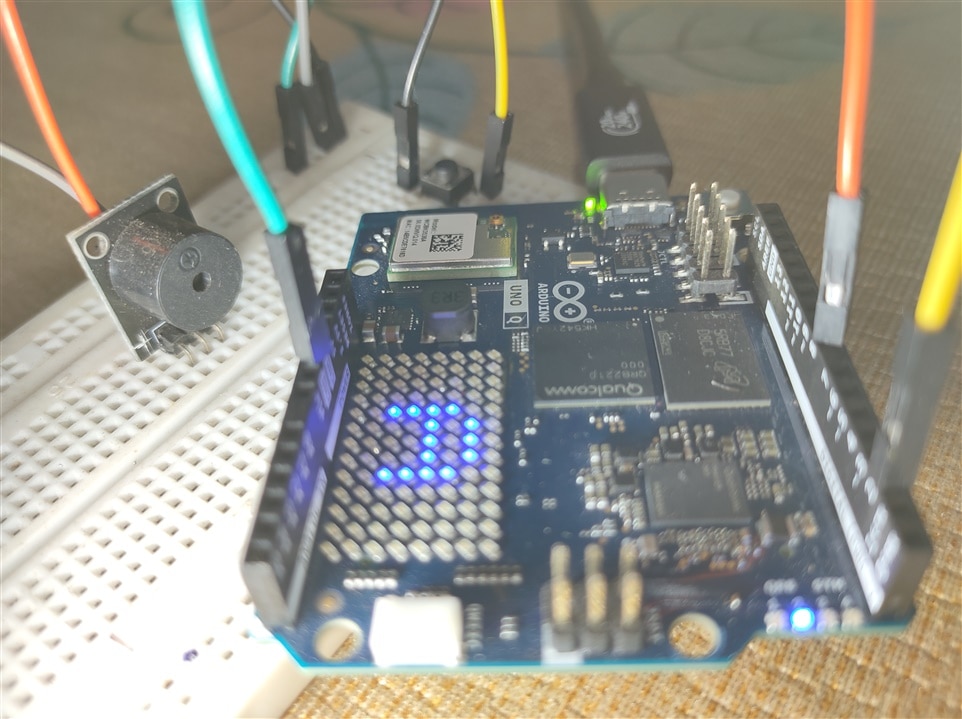
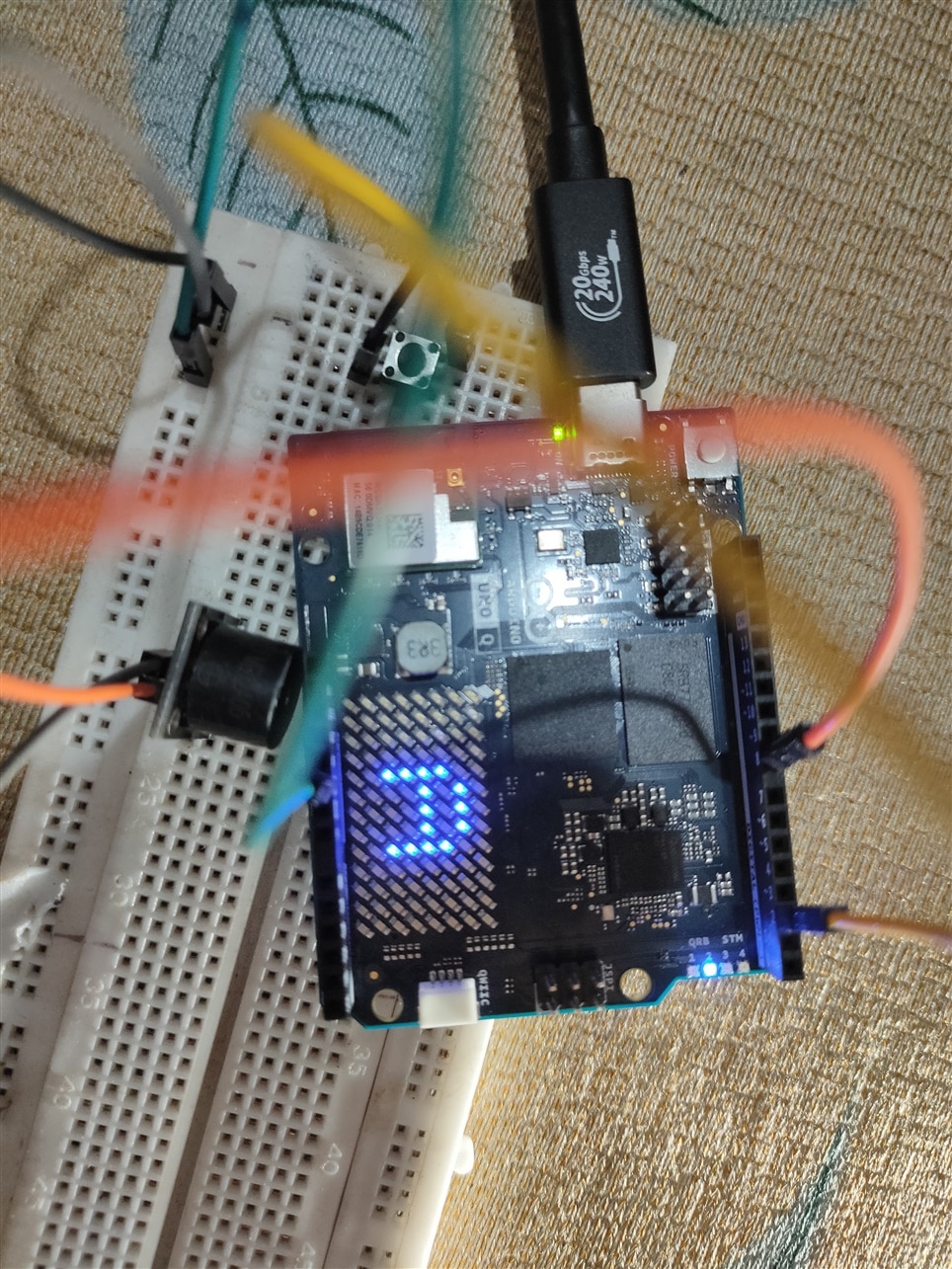
Relying on a connected computer screen and a Serial Monitor to view decoded characters felt incomplete for a standalone hardware device. To make it truly standalone, I decided to render the decoded ASCII characters directly onto the board's 8X13 LED Matrix.
How It Works
#include "Arduino_LED_Matrix.h"

ArduinoLEDMatrix matrix;

#define BUTTON_PIN 2
#define BUZZER_PIN 8
#define LED_PIN    LED_BUILTIN // Onboard LED

const unsigned long DOT_MAX_TIME = 250;     // Dot (.)
const unsigned long LETTER_GAP  = 700;     //  decode
const unsigned long WORD_GAP    = 2000;    //  space

unsigned long pressStartTime = 0;
unsigned long releaseTime    = 0;
bool isPressed = false;
String currentMorse = "";

// UNO Q matrix is 8 rows x 13 columns
uint8_t frame[8][13];

struct MorseMap { char letter; const char* code; };
MorseMap morseTable[] = {
  {'A', ".-"},   {'B', "-..."}, {'C', "-.-."}, {'D', "-.."},  {'E', "."},
  {'F', "..-."}, {'G', "--."},  {'H', "...."}, {'I', ".."},   {'J', ".---"},
  {'K', "-.-"},  {'L', ".-.."}, {'M', "--"},   {'N', "-."},   {'O', "---"},
  {'P', ".--."}, {'Q', "--.-"}, {'R', ".-."},  {'S', "..."},  {'T', "-"},
  {'U', "..-"},  {'V', "...-"}, {'W', ".--"},  {'X', "-..-"}, {'Y', "-.--"},
  {'Z', "--.."}, {'1', ".----"},{'2', "..---"},{'3', "...--"},{'4', "....-"},
  {'5', "....."},{'6', "-...."},{'7', "--..."},{'8', "---.."},{'9', "----."},
  {'0', "-----"}
};

// Clean 5x5 upright font definitions for A-Z
const uint8_t font5x5[][5] = {
  {0b01110, 0b10001, 0b11111, 0b10001, 0b10001}, // A
  {0b11110, 0b10001, 0b11110, 0b10001, 0b11110}, // B
  {0b01111, 0b10000, 0b10000, 0b10000, 0b01111}, // C
  {0b11110, 0b10001, 0b10001, 0b10001, 0b11110}, // D
  {0b11111, 0b10000, 0b11110, 0b10000, 0b11111}, // E
  {0b11111, 0b10000, 0b11110, 0b10000, 0b10000}, // F
  {0b01111, 0b10000, 0b10011, 0b10001, 0b01110}, // G
  {0b10001, 0b10001, 0b11111, 0b10001, 0b10001}, // H
  {0b01110, 0b00100, 0b00100, 0b00100, 0b01110}, // I
  {0b00001, 0b00001, 0b00001, 0b10001, 0b01110}, // J
  {0b10001, 0b10010, 0b11100, 0b10010, 0b10001}, // K
  {0b10000, 0b10000, 0b10000, 0b10000, 0b11111}, // L
  {0b10001, 0b11011, 0b10101, 0b10001, 0b10001}, // M
  {0b10001, 0b11001, 0b10101, 0b10011, 0b10001}, // N
  {0b01110, 0b10001, 0b10001, 0b10001, 0b01110}, // O
  {0b11110, 0b10001, 0b11110, 0b10000, 0b10000}, // P
  {0b01110, 0b10001, 0b10101, 0b10010, 0b01101}, // Q
  {0b11110, 0b10001, 0b11110, 0b10010, 0b10001}, // R
  {0b01111, 0b10000, 0b01110, 0b00001, 0b11110}, // S
  {0b11111, 0b00100, 0b00100, 0b00100, 0b00100}, // T
  {0b10001, 0b10001, 0b10001, 0b10001, 0b01110}, // U
  {0b10001, 0b10001, 0b10001, 0b01010, 0b00100}, // V
  {0b10001, 0b10001, 0b10101, 0b11011, 0b10001}, // W
  {0b10001, 0b01010, 0b00100, 0b01010, 0b10001}, // X
  {0b10001, 0b01010, 0b00100, 0b00100, 0b00100}, // Y
  {0b11111, 0b00010, 0b00100, 0b01000, 0b11111}  // Z
};

char decodeMorse(String morse) {
  for (auto &item : morseTable) {
    if (morse == item.code) return item.letter;
  }
  return '?';
}

void clearMatrix() {
  memset(frame, 0, sizeof(frame));
  matrix.renderBitmap(frame, 8, 13);
}

void displayCharOnMatrix(char c) {
  // Clear buffer completely (erases stray rightmost pixels)
  memset(frame, 0, sizeof(frame));

  if (c >= 'A' && c <= 'Z') {
    int index = c - 'A';

    // Perfectly centers a 5x5 character inside an 8x13 grid:
    // Vertical Start: Row 1 (leaves 1 empty row top, 2 empty rows bottom)
    // Horizontal Start: Col 4 (leaves 4 empty cols left, 4 empty cols right)
    for (int r = 0; r < 5; r++) {
      uint8_t rowPattern = font5x5[index][r];
      for (int c_idx = 0; c_idx < 5; c_idx++) {
        if (rowPattern & (1 << (4 - c_idx))) {
          frame[r + 1][c_idx + 4] = 1; // Direct exact pixel mapping
        }
      }
    }
  }

  matrix.renderBitmap(frame, 8, 13);
}

void setup() {
  pinMode(BUTTON_PIN, INPUT_PULLUP);
  pinMode(BUZZER_PIN, OUTPUT);
  pinMode(LED_PIN, OUTPUT);

  // Explicitly initialize LED to OFF (this board's built-in LED is active-LOW)
  digitalWrite(LED_PIN, HIGH);

  Serial.begin(115200);
  matrix.begin();

  clearMatrix();
}

void loop() {
  int buttonState = digitalRead(BUTTON_PIN);
  unsigned long now = millis();

  // Button Pressed (LOW) -> Turn ON Buzzer and Built-in LED
  if (buttonState == LOW && !isPressed) {
    isPressed = true;
    pressStartTime = now;

    tone(BUZZER_PIN, 800);
    digitalWrite(LED_PIN, LOW); // Active-LOW: LOW = ON
  }

  // Button Released (HIGH) -> Turn OFF Buzzer and Built-in LED
  else if (buttonState == HIGH && isPressed) {
    isPressed = false;

    noTone(BUZZER_PIN);
    digitalWrite(LED_PIN, HIGH); // Active-LOW: HIGH = OFF

    unsigned long pressDuration = now - pressStartTime;
    if (pressDuration > 30) {
      if (pressDuration <= DOT_MAX_TIME) {
        currentMorse += ".";
        Serial.print(".");
      } else {
        currentMorse += "-";
        Serial.print("-");
      }
    }
    releaseTime = now;
  }

  // Letter Gap Timeout -> Render decoded letter upright & centered
  if (!isPressed && currentMorse.length() > 0 && (now - releaseTime) > LETTER_GAP) {
    char decodedChar = decodeMorse(currentMorse);
    Serial.println();
    Serial.print("Decoded: ");
    Serial.println(decodedChar);

    displayCharOnMatrix(decodedChar);

    currentMorse = "";
  }

  // Word Gap Timeout -> Print space on terminal
  if (!isPressed && (now - releaseTime) > WORD_GAP && currentMorse.length() == 0) {
    Serial.print(" ");
    releaseTime = now;
  }
}
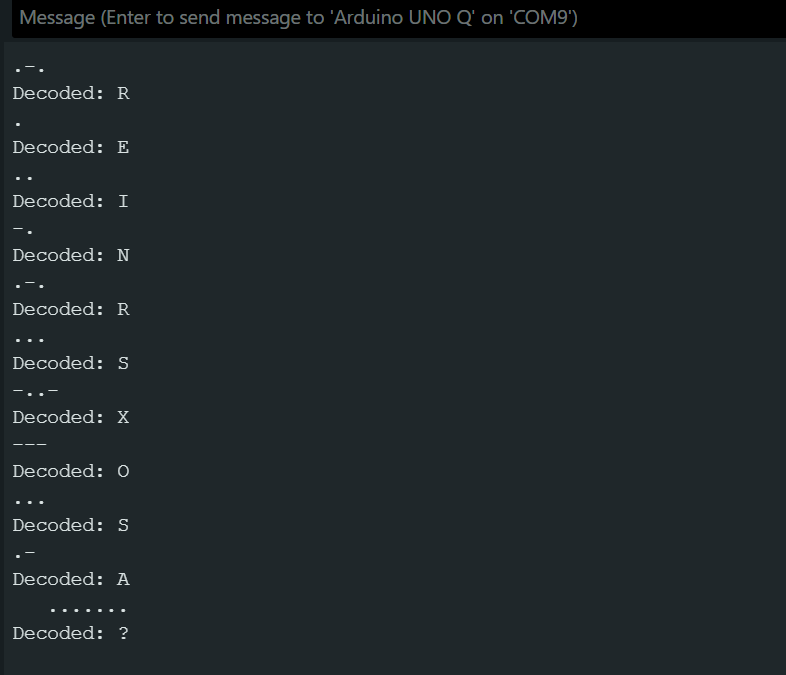
Signal Input & Timing Thresholds
-
Active-LOW Button Sensing: The button uses the internal
INPUT_PULLUPresistor. When pressed, the pin readsLOW. -
Tone & LED Synchronization: While pressed, the buzzer beeps and the onboard LED illuminates.
-
Duration Classification:
Press Duration <= 250 ms => Dot (.)
Press Duration > 250 ms => Dash (-)
Technical Challenges & Corrections
Matrix Skewing & Stray Pixels
Bringing the display to life presented a few interesting hardware and software challenges:
- Matrix Skew Alignment: My initial character renderings were visibly skewed like a parallelogram, accompanied by a stray pixel in the corner. I diagnosed this as a buffer stride issue—my code was sizing the frame buffer for 12 columns instead of the driver's required 13 columns (8X13), causing an accumulator bit shift across rows. Sizing the array to
uint8_t frame[8][13]instantly straightened the 5x5 font and centered it cleanly. - Streamlining Components (Active-LOW LED): To keep the hardware footprint clean, I eliminated the external LED and repurposed the board's built-in
LED_BUILTIN. Because this board wires the onboard LED using active-LOW logic, I updated the control logic so thatLOWilluminates the LED during button presses andHIGHturns it off when idle.
Addressing the Mechanical Debouncing Problem
While testing the physical telegraph key interface, I ran into a classic electronics hurdle: mechanical switch contact bounce.
When holding down the tactile button to input a long signal ("dash"), the internal metal contacts physically vibrate against each other for 5 to 20 ms. This rapid fluctuation tricks the microcontroller into interpreting a single continuous press as multiple unwanted short "dots."
To address this issue, I evaluated two solutions:
-
Software Debouncing (Current Implementation): The sketch uses a 30 ms threshold check (
if (pressDuration > 30)) to ignore micro-spikes generated during contact transitions before registering a valid press. -
Hardware RC Low-Pass Filter (Planned Upgrade): To completely eliminate bounce at the hardware level, a 10K Ohm pull-up resistor, a 1K Ohm series resistor, and a 100 nF ceramic capacitor can be wired in parallel with the tactile switch. The capacitor acts as a voltage reservoir, smoothing out transient voltage spikes before they reach Pin 2.
Future Enhancements
While the current version serves as a functional single-character Morse decoder, I have several exciting features planned for future updates:
- Word Buffer Memory: Expanding the decoding logic beyond single characters so it can store multi-character sequences, assemble full words, and auto-scroll long messages across the LED matrix. The present code does not properly decode words. Works only for single character.
- Interactive Morse Trainer Mode: An interactive learning game mode that displays a random target letter on the matrix, prompts the user to enter the matching Morse code, and provides visual and auditory feedback for correct or incorrect attempts.
- Dynamic Audio Pitch Mapping: Utilizing a passive piezo buzzer to synthesize distinct audio frequencies (pitch scales) for different character groups or signaling speeds.
Conclusion
This challenge was a fantastic hands-on experience that allowed me to complete and share another project I had been meaning to build for a long time, and provided the exact push I needed to stop procrastinating and bring it to life.
A huge thank you to the amazing Element14 team and community for organizing these wonderful events and challenges—they continuously inspire us to build, experiment, and share!
Curious to read the comments !!