


Since the time I learnt that the next project14 theme was going to be "Make a Connection" - Build a project that sends a message or Signal, I have been racking my mind for something unique. I blasted through the usual suspects, nearly finalized on a tap based system to send message. Partly Inspired by the Movie Escape plan and an idea to make a SOS system for people trapped under building rubble.
But for some reason I couldn't finalize it. But then, Idea strikes you when you least expect it. Me and my friend was on a work trip together when out of hunger we entered a themed restaurant. It was quite large with lots of table nd very enjoyable with the view but the waiters did take time to notice that we needed their assistance.


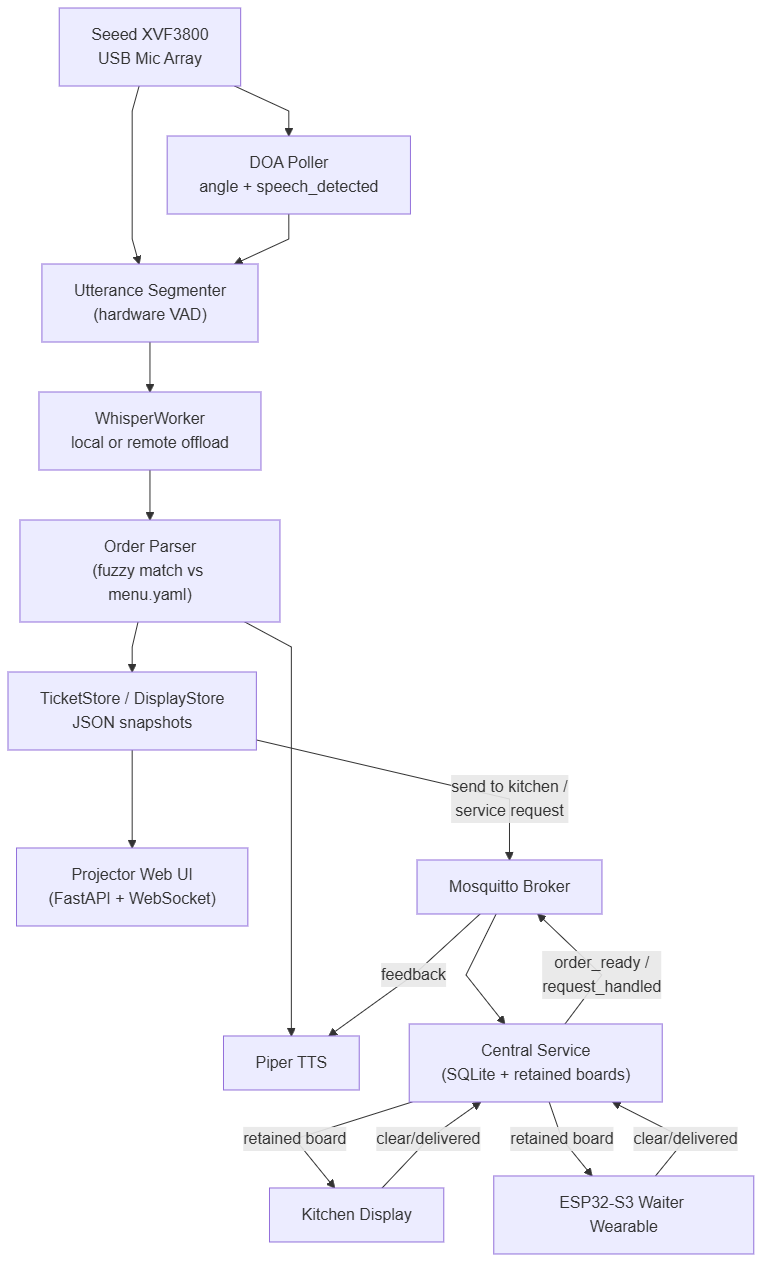
And so the idea was finalized. It was to build a system that can take up my order via voice and send it to the kitchen,. Also alert the waiter that I need assistance with water or condiments etc. There are already QR based systems that does this work, but I really disapprove of it because, after making the order via phone, people switch to doom scrolling. I like restaurants that let you just talk. Not a QR code menu, not a tablet propped against the ketchup bottle — just say what you want and have it show up. That's the whole idea of Order Up: a voice-ordering assistant that sits at a table, listens to whomsoever speaking, figures out which seat they're in from the direction their voice came from, turns what they said into a structured order, and pushes it to the kitchen — all running locally, no cloud, no LLM API calls.
The Concept
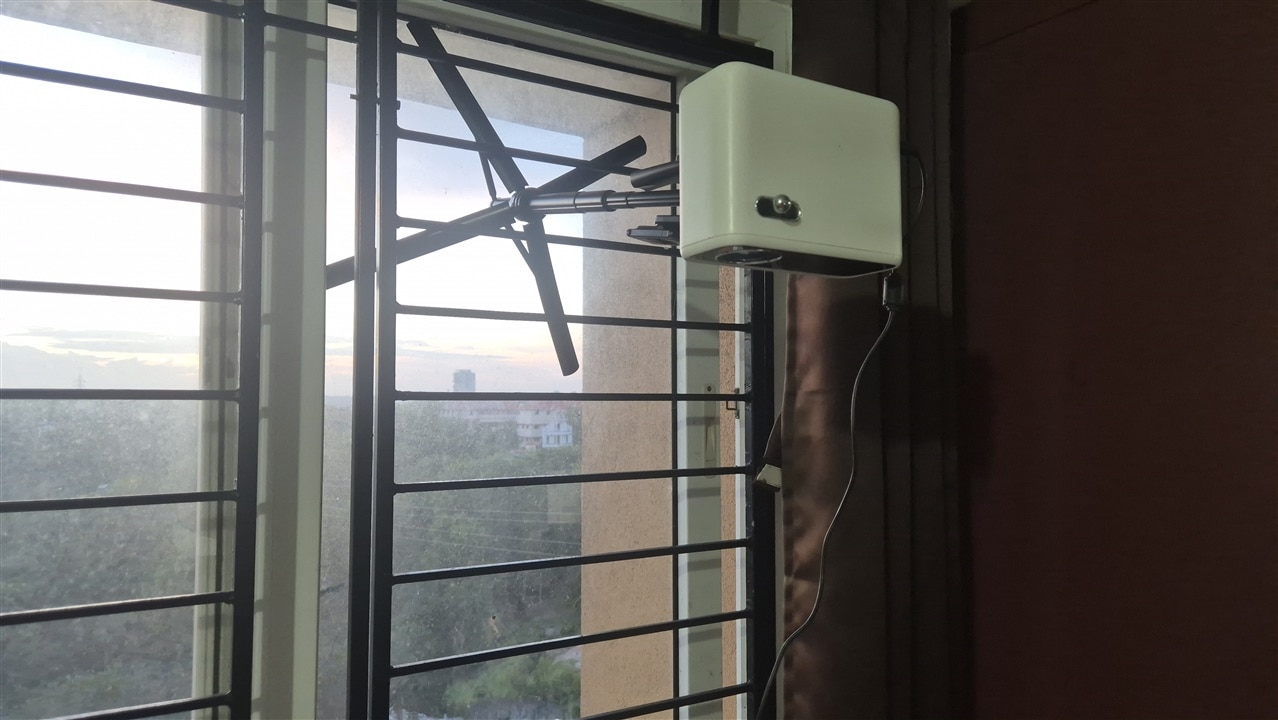
I had purchased a Seeed Respeaker XVF3800 from embeddedguy nearly half an year ago, I was slowly experimenting it and this idea fitted it brilliantly. So the concept became One board per table. The ReSpeaker mic array captures audio and also reports direction-of-arrival (DOA), which way the sound came from. so I can map "angle" to "seat". Speech gets transcribed locally on a Radxa Q6A with whisper.cpp, the transcript gets fuzzy-matched against a real menu and the result becomes a kitchen order. As I started playing with the Radxa and Respeaker in parallel with another project (Dockbot), I came across Seeed Studio's Interactive Signage for Restaurant Competition. I thought why not kill two birds with one stone, But their requirement was slightly different the keyword being "Signage". and so i decided to add in a projector which projects each seat's menu/order state on to the dining table table. All requests gets published over MQTT to a central service that fans out to a kitchen display for making the order. For the waiter to help out with requests, and ESP32-S3 wearable will be made.
This entire project took me around three months, I had to reach out to couple of my friends to help me with many issues. But in the end, It was complete. This is gonna be a code heavy projects, so do apologize for it but trust me, the final project is AWESOME
Code Organization
To Follow the code along, Let me explain to you how the code is organized. IT is slightly chaotic.
-
orderup/— the per-table pipeline (one process per board, one board per table), plus the one part of this tree that isn't per-table:audio/— captures mic frames, shells out toarecord(https://linux.die.net/man/1/arecord)doa/— polls the XVF3800 for angle + speech-detected over USBasr/— wraps whisper.cpp (local or remote offload)nlp/— fuzzy order-parsing and voice-command recognition (after the whisper Speech to text)ticket/— the seat's current order/display state, as JSONtts/— speaks replies through Piperweb/— serves the projector UIseat_map.py— top-level module, turns a DOA angle into a seat labelintegrations/— where a table's pipeline talks outward:kitchen_sink.pyto the central service over MQTT,order_sink.pyto an optional external Django backend over HTTP (disabled by default)main.py— wires all of the above together; the file most of this post's snippets come fromkitchen/— not per-table. This is the central service (server.py, classCentralService) — its own always-on process, not scoped to any one table — plusweb_server.py, the FastAPI process that bridges that service's MQTT board topics to the browser-based kitchen display over a websocket
-
firmware/waiter_wearable/— a separate PlatformIO codebase for the ESP32-S3 wearable staff carry; it only talks to the rest of the system over MQTT, the same broker the central service uses.
The Flowchart
Introduction to Respeaker
The ReSpeaker XVF3800 USB 4-Mic Array is a circular four-microphone system based on the XMOS XVF3800 chip. It can detect the Direction of Arrival (DoA) of sound, reduce background noise, remove echoes, automatically adjust microphone gain, detect speech, and capture voices from all directions up to 5 meters away.

It supports two operating modes: USB mode for plug-and-play connection to a computer, and I2S mode for connecting to embedded systems such as the XIAO ESP32S3. When combined with the XIAO ESP32S3, it becomes a powerful platform for building advanced voice and audio applications. Seeed Studio has many similar boards on their Respeaker Line up but at the time of writing this XVF3800 is the best one. I will be using this in USB Mode and use python to interface it. Their Wiki has really good documentation here: https://wiki.seeedstudio.com/respeaker_xvf3800_python_sdk/
The Official Documentation said that the default firmware was the USB one, but It never got detected as one and I was afraid it had a problem but after flashing the right firmware, it got detected as a USB microphone.
Talking to the chip itself is just a thin wrapper class, XVF3800 (orderup/doa/xvf3800.py), around its USB vendor-command interface — find() grabs the device by VID/PID, and get_doa()/get_version() read named parameters off it:
from orderup.doa.xvf3800 import XVF3800

xvf = XVF3800.find()  # VID 0x2886, PID 0x001A by default
print(xvf.get_version())        # e.g. (2, 0, 10)

reading = xvf.get_doa()
print(reading.angle_deg, reading.speech_detected)  # e.g. 137.0 True

xvf.close()
read()/write() underneath work off a small PARAMETERS table (resid, cmdid, count, access, type) ported from Seeed's own reference implementation, so adding a new readable/writable parameter is just adding a row there rather than hand-rolling another ctrl_transfer call. If a prior process gets killed mid-transfer and leaves the device wedged (Errno 5 Input/Output Error on every subsequent call), xvf.reset() issues a USB port reset to recover it without a physical unplug.
The XVF3800 does its own onboard voice processing and reports DOA over a USB vendor-command interface in parallel with the audio data. Before writing a line of the actual pipeline, I spent time just confirming the device behaved the way its datasheet claimed: card 0 "Array" showed up for both capture and playback, and scripts/test_doa.py pulled a real firmware version ((2, 0, 10)) and varying angle readings as I physically moved around it.
The "map angle to seat" idea from the pitch above turned out to be genuinely this simple once the angle reading was trustworthy — a table of angle ranges from config/seats.yaml, checked in order (orderup/seat_map.py):
class SeatMap:
    def label_for_angle(self, angle_deg: float | None) -> str:
        if angle_deg is None:
            return self.unmapped_label
        angle = angle_deg % 360
        for seat in self.seats:
            if seat.angle_min <= angle < seat.angle_max:
                return seat.label
        return self.unmapped_label
Whichever direction the loudest voice came from at the moment the utterance ended, It is assumed the sound came from corresponding seat. Note the important keyword, "The moment the utterance ended", It is important because, the XVF3800 sometimes starts with wrong calculation of the DOA but corrects itself soon. If you look at the videos below you'll see the LED moving to correct the DOA.
Getting the Mic to Actually Listen and Filter Out non-Voice
The first real wall I hit was voice activity detection — figuring out when someone is actually talking versus when they're not, so I know when to cut an utterance and hand it to whisper. This was easier to implement than a streaming system.
My first pass was the obvious one: measure audio energy (RMS), and if it's above a threshold, that's speech (orderup/audio/vad_segmenter.py):
class EnergyVadBackend(VadBackend):
    def __init__(self, threshold: int = 500) -> None:
        self.threshold = threshold

    def is_speech(self, frame: np.ndarray, sample_rate: int) -> bool:
        rms = float(np.sqrt(np.mean(frame.astype(np.float64) ** 2)))
        return rms >= self.threshold
It was completely unusable. I measured 4 seconds of silence against 4 seconds of real speech and got statistically indistinguishable RMS . No threshold value could separate those two numbers. It turned out that the XVF3800's onboard AGC (automatic gain control) normalizes loudness on its processed audio output. By the time the samples reach frame above, the chip has already flattened out the exact signal characteristic is_speech was trying to detect.
The fix was to stop trying to infer speech from the audio at all, and instead read the chip's own speech_detected flag — computed internally by the XMOS chip before AGC is applied, and delivered alongside every DOA reading:
class DoaVadBackend(VadBackend):
    """Uses the XVF3800's own speech_detected flag instead of computing
    anything from the audio frame itself."""

    def __init__(self, doa_poller) -> None:
        self._doa_poller = doa_poller

    def is_speech(self, frame: np.ndarray, sample_rate: int) -> bool:
        return self._doa_poller.latest_speech_detected()
Teaching It to Hear: Whisper
Whisper is OpenAI's speech-to-text model, and whisper.cpp is a C/C++ port of it by Georgi Gerganov that runs the same models without needing Python or a GPU — which is exactly what made it usable on the Radxa Q6A's ARM cores. It ships a range of model sizes (tiny, base, small, medium, large, each with an .en English-only variant), so you can trade accuracy for speed depending on the hardware.
To install it on Debian:
sudo apt update
sudo apt install -y build-essential cmake git

git clone https://github.com/ggerganov/whisper.cpp.git
cd whisper.cpp

# Download a model, e.g. base.en
sh ./models/download-ggml-model.sh base.en

# Build (CMake is the current build path; add -DGGML_CUDA=1 etc. for GPU backends)
cmake -B build
cmake --build build --config Release

# Test it
./build/bin/whisper-cli -m models/ggml-base.en.bin -f samples/jfk.wav
The resulting whisper-cli binary at build/bin/whisper-cli is exactly what orderup/asr/whisper_worker.py shells out to, model path and all.
Model Tradeoff
Transcription is done by local whisper.cpp, shelled out as a subprocess rather than a Python binding — that gets the upstream ARM NEON optimizations for free and process-isolates a crash from the rest of the app. I based my work from https://turingpi.com/whisper-cpp-piper-tts-arm64-turing-pi-rk3588/ I started with tiny.en for speed, then ran a head-to-head against base.en on three real recordings. Identical transcripts on two of them. On the third, tiny.en misheard "cheeseburger" as "is burger" — base.en got it right. That's a real order-accuracy bug, the latency cost: 1.7s → 3.9s per utterance. I decided that wrong order will be more frustrating to the user than a slower but correct order recognition. Switching whisper.cpp's default 5-beam search to greedy decoding (-bs 1 -bo 1) plus using all 8 cores clawed back about 25% of that.
The actual subprocess call is nothing fancier than this (orderup/asr/whisper_worker.py):
def _transcribe_local(self, wav_path: Path) -> str:
    cmd = [
        str(self._binary),
        "-m", str(self._model),
        "-f", str(wav_path),
        "-l", self._language,
        *self._extra_args,
    ]
    result = subprocess.run(cmd, capture_output=True, text=True, timeout=30)
    if result.returncode != 0:
        print(f"[whisper] failed: {result.stderr.strip()}")
        return ""
    return result.stdout.strip()
extra_args is where the greedy-decoding flags live, kept in config rather than hardcoded so I could A/B them without touching code (config/app.yaml):
# -nt: no timestamps. -bs 1 -bo 1: greedy decoding instead of the default
# 5-beam search -- measured ~25% faster on this board with no accuracy
# loss on short order-length utterances. -t 8: use all cores (default 4).
extra_args: ["-nt", "-bs", "1", "-bo", "1", "-t", "8"]
Deciding to Move Whisper Off the Radxa
Even with greedy decoding and all 8 cores, base.en on the Q6A's ARM Cortex-A55 cores sat at 3.3–3.9 seconds per utterance which is noticeably slower than a real conversation's back-and-forth. My main Desktop would be running the main kitchen server and it is an i7, maybe I can use it?, so I put it to the test.
scripts/live_stt_bench.py reuses the real pipeline's own audio capture and hardware-VAD segmenter, and for every utterance that comes off the mic, fires local whisper-cli and a POST to a small benchmark server on the desktop (scripts/bench_stt_server.py) concurrently, then prints both results side by side the moment they're both back:
# On the desktop first:
python3 scripts/bench_stt_server.py

# Then on the Q6A, talking into the mic as normal:
python3 scripts/live_stt_bench.py --remote http://192.168.29.206:8765
Each row it prints breaks the remote time into compute versus network, and flags whether the two transcripts actually agree, so a "faster" remote result can't quietly hide a wrong transcript:
  #  dur_s  local_s  remote_compute_s  remote_rt_s  network_s  match
  1   1.80     3.41               0.58         0.63       0.05    yes
  2   2.10     3.87               0.61         0.66       0.05    yes
Across 25 real utterances captured this way, the remote machine matched the local transcript exactly every single time, at ~0.6s of compute plus ~0.05s of network overhead - roughly 5-6x faster than the local range it was replacing and Thankfully there is no difference in the transcription. A flaky offload machine degrades voice ordering to "a bit slower," never breaks it. That fallback logic mattered more to get right than the offload path itself; a remote dependency that can silently take down the whole pipeline is worse than not having the optimization at all.
The fallback lives in one place, and it's structured so a remote failure just falls through to the same local path that was always there (orderup/asr/whisper_worker.py):
def transcribe(self, audio: np.ndarray) -> str:
    with tempfile.TemporaryDirectory() as tmpdir:
        wav_path = Path(tmpdir) / "utterance.wav"
        _write_wav(wav_path, audio, self._sample_rate)
        if self._remote_url is not None:
            text = self._transcribe_remote(wav_path)
            if text is not None:
                return text
            print("[whisper] remote transcription failed, falling back to local")
        return self._transcribe_local(wav_path)

def _transcribe_remote(self, wav_path: Path) -> str | None:
    try:
        resp = requests.post(
            self._remote_url,
            data=wav_path.read_bytes(),
            timeout=self._remote_timeout_s,
        )
        resp.raise_for_status()
        payload = resp.json()
    except (requests.RequestException, ValueError) as exc:
        print(f"[whisper] remote request error: {exc}")
        return None
    if "error" in payload:
        print(f"[whisper] remote whisper-cli failed: {payload['error']}")
        return None
    return payload["text"].strip()
Understanding What It Heard: the Order Parser
No LLM here — deterministic fuzzy-matching (rapidfuzz) against the configured menu. That was a deliberate choice: predictable, debuggable, fully offline, and honestly fast enough that adding a network round-trip for parsing would only add latency for no accuracy benefit (the parsing step already costs close to nothing locally — the real bottleneck was always transcription).
RapidFuzz is a fast C++-backed string-matching library — a drop-in-ish, much faster replacement for the older fuzzywuzzy. At its simplest it scores how similar two strings are, 0–100:
from rapidfuzz import fuzz

fuzz.ratio("cheeseburger", "cheese burger")   # ~96.0 -- near-identical
fuzz.ratio("cheeseburger", "is burger")       # ~57.1 -- a whisper mishearing, still recoverable
fuzz.ratio is a plain Levenshtein-style similarity over the two full strings — no substring games. That "no substring games" property is exactly why it was the right tool here and fuzz.partial_ratio/fuzz.WRatio weren't: this project needs whole-phrase matching that isn't fooled by one shared word inside a much longer sentence (see _best_window_ratio below).
Installing it is a single pip command, no compiled dependencies to fetch separately:
pip install rapidfuzz
Two bugs here taught me more than the rest of the parser combined:
Fuzzy matching modifiers was actively dangerous
fuzz.partial_ratio` matched "no onions" against "...with SOME onions" — the exact opposite meaning, but sharing the word "onions." It also matched "extra cheese" against "cheeseburger" on shared letters alone. For item names, fuzzy matching helps catch ASR mishearings. For modifiers — short, semantically loaded phrases where getting it wrong silently corrupts an order — I switched to exact whole-word matching only. Precision over recall, deliberately.
Item names still get the fuzzy fallback (orderup/nlp/order_parser.py); modifiers don't:
def _find_modifiers(clause: str, alias_pairs: list[tuple[str, object]]) -> list[str]:
    """Exact whole-word/phrase alias matches only -- no fuzzy fallback.

    Modifiers are short, semantically loaded phrases where fuzzy substring
    scoring is actively dangerous: fuzz.partial_ratio previously matched
    "no onions" against "...with SOME onions" (opposite meaning, but they
    share the word "onions") and matched "add cheese" against
    "cheeseburger" (shared letters, unrelated meaning). Unlike item names
    (which benefit from a fuzzy fallback for ASR mishears), a wrongly
    attached modifier silently corrupts an order, so precision is
    prioritized over recall here.
    """
    found: list[str] = []
    seen: set[str] = set()
    for alias, mod in alias_pairs:
        if mod.id in seen:
            continue
        if re.search(rf"\b{re.escape(alias)}\b", clause):
            found.append(mod.id)
            seen.add(mod.id)
    return found
re.search(rf"\b{re.escape(alias)}\b", clause) is the whole trick: a plain word-boundary regex match, either hits or it doesn't, no similarity score to accidentally clear a threshold on a false positive.
Quantity words after filler phrases got dropped.
"Three sodas and one salad" correctly parsed quantity 3. But "I would like to have three sodas and one salad" — same order, just with the filler words real people actually say — silently defaulted to quantity 1, because the quantity extractor only checked the clause's first word. Fixed by scanning the whole clause instead of assuming quantity words show up at the front:
def _extract_quantity(clause: str, menu: Menu) -> tuple[int, str]:
    """Returns (quantity, clause with the first quantity word/digit removed).

    Scans the whole clause, not just the leading word: natural speech puts
    filler words before the quantity ("I would like to have three sodas"),
    so a leading-word-only check misses it and silently defaults to 1.
    """
    words = clause.split()
    for i, word in enumerate(words):
        if word.isdigit():
            return int(word), " ".join(words[:i] + words[i + 1:])
        if word in menu.quantity_words:
            return menu.quantity_words[word], " ".join(words[:i] + words[i + 1:])
    return 1, clause
_transcribe_remote returns None — never raises — on every failure mode: a network error, a bad response body, or the remote server's own whisper-cli call failing. transcribe treats None as "try local" and nothing else; there's no separate error path for "the offload machine is unreachable" versus "the offload machine's whisper-cli crashed" versus "the network hiccuped." They all degrade the same way.
Talking Back using Piper
Piper is a fast, fully local neural TTS engine from the Rhasspy project, built for exactly this kind of on-device use — it ships as a single prebuilt binary (an aarch64 release included, which is what made it a fit for the Q6A) plus small ONNX voice models, so there's no separate Python TTS stack to install and no network round-trip to speak a reply.
Installing it is just grabbing the release archive and a voice model:
# aarch64 example -- swap for the amd64 asset if running on x86
wget https://github.com/rhasspy/piper/releases/latest/download/piper_arm64.tar.gz
tar -xzf piper_arm64.tar.gz
cd piper

# grab a voice, e.g. a US English medium-quality one
wget https://huggingface.co/rhasspy/piper-voices/resolve/main/en/en_US/lessac/medium/en_US-lessac-medium.onnx
wget https://huggingface.co/rhasspy/piper-voices/resolve/main/en/en_US/lessac/medium/en_US-lessac-medium.onnx.json
Using it standalone from the command line is just piping text in and getting a WAV out:
echo "Order confirmed for seat one" | ./piper \
    --model en_US-lessac-medium.onnx \
    --output_file reply.wav

aplay reply.wav
That's the exact shape orderup/tts/piper_tts.py's PiperTts class wraps as a subprocess — synthesize() shells out to piper the same way, and speak() chains that straight into aplay for playback:
class PiperTts:
    def synthesize(self, text: str, out_path: Path) -> None:
        cmd = [str(self._binary), "--model", str(self._voice), "--output_file", str(out_path)]
        subprocess.run(cmd, input=text, capture_output=True, text=True, env=self._env, timeout=30)

    def speak(self, text: str) -> None:
        with tempfile.TemporaryDirectory() as tmpdir:
            wav_path = Path(tmpdir) / "reply.wav"
            self.synthesize(text, wav_path)
            self._play(wav_path)
Beyond One Table: MQTT and Retained Messages
"Send to kitchen" and service requests don't hit an HTTP endpoint — they publish to an MQTT broker (Mosquitto), and one central service (not scoped to any single table) subscribes, persists to SQLite for crash-safety, and republishes two rolling "board" snapshots: one for the kitchen display, one for waiter wearables. MQTT fit this better than HTTP for the same reason it fits most IoT fan-out: many small, independent publishers and subscribers (every table's board, the central service, the kitchen display, every wearable) that don't need to know about each other's IP addresses or be online at the same moment — they only need to agree on a broker and a topic name.
Standing Up the Broker
The broker itself runs as one Mosquitto container, not a bare-metal install — one docker compose up on whatever machine is going to be "the network's central point" (in this deployment, the same box running the central service) is the entire setup (docker/mosquitto/docker-compose.yml):
services:
  mosquitto:
    image: eclipse-mosquitto:2
    container_name: orderup-mosquitto
    restart: unless-stopped
    ports:
      - "1883:1883"
    volumes:
      - ./mosquitto.conf:/mosquitto/config/mosquitto.conf:ro
      - mosquitto-data:/mosquitto/data
      - mosquitto-log:/mosquitto/log

volumes:
  mosquitto-data:
  mosquitto-log:
cd docker/mosquitto
docker compose up -d
restart: unless-stopped means it survives a host reboot without anyone remembering to start it by hand — important for something every table's pipeline depends on to send an order at all. The mounted mosquitto.conf is deliberately minimal, because this only ever runs on a closed restaurant LAN, never internet-facing:
# Matches config/app.yaml's mqtt: block (broker_port: 1883) and the
# Phase 0 plan in docs/mqtt-architecture-plan.md: closed restaurant LAN,
# no internet-facing exposure, so anonymous access is fine.
listener 1883 0.0.0.0
allow_anonymous true

persistence true
persistence_location /mosquitto/data/

log_dest stdout
allow_anonymous true and no TLS listener are choices that only make sense because this box never leaves the restaurant's own LAN — the moment this needed to be reachable from outside that network, both of those would need to change.
Pointing Every Board at It
Every process that needs the broker — each table's pipeline, the central service, the kitchen display's web bridge — reads the same three settings out of its own config/app.yaml:
mqtt:
  # Broker every table, the central service (orderup/kitchen/server.py),
  # the KDS, and waiter wearables all connect to -- see
  # docs/mqtt_topics.md. Always on -- unlike backend.* below, this has no
  # real external dependency to gate behind a flag.
  broker_host: 192.168.29.206
  broker_port: 1883
  table_id: table1
broker_host/broker_port point at the container above; table_id is the one setting that differs per board — it's what namespaces every MQTT topic a table publishes to (orderup/table1/order_sent, orderup/table2/order_sent, …), so two tables' pipelines never collide on the same topic even though they're all talking to one shared broker.
Sending an Order
The trigger is a voice command, recognized before the order parser ever runs (so "send my order to the kitchen" — which contains the substring "my order" — can't get misread as "show my order"), and the handler is a straight line from ticket to broker (orderup/main.py, inside the transcript consumer):
if is_send_to_kitchen(text):
    lines = ticket_store.pop_all(seat_label)
    if lines:
        kitchen_sink.send_order(seat_label, lines)
ticket_store.pop_all empties that seat's pending order and hands back the lines; kitchen_sink.send_order (orderup/integrations/kitchen_sink.py, running inside the same per-table process) is what actually does the MQTT publish:
def send_order(self, seat_label: str, lines: list[TicketLine]) -> bool:
    payload = {
        "table_id": self._table_id,
        "seat_label": seat_label,
        "timestamp": time.time(),
        "items": [
            {"item_id": l.item_id, "name": l.name, "quantity": l.quantity, "modifiers": l.modifiers}
            for l in lines
        ],
    }
    return self._publish(f"orderup/{self._table_id}/order_sent", payload)
self._table_id comes from that table's own config/app.yaml (mqtt.table_id, e.g. "table1") — each board's process is configured with its own identity, so the topic name itself namespaces the order by table. The central service — CentralService in orderup/kitchen/server.py, a separate always-on process not tied to any one table — is subscribed on the other end and is what actually calls _publish_board, shown above.
Two different things consume that retained board on the way out, and they don't do it the same way: the ESP32-S3 wearable runs a plain MQTT client directly (PubSubClient, in firmware/waiter_wearable/src/main.cpp) and subscribes to orderup/board/waiter itself — no intermediary. Its incoming-message handler deserializes the retained JSON and hands the items array straight to the screen-drawing routine:
void onMqttMessage(char *topic, byte *payload, unsigned int length) {
  JsonDocument doc;  // ArduinoJson v7: auto-sized, no manual capacity math
  DeserializationError err = deserializeJson(doc, payload, length);
  if (err) {
    Serial.printf("[waiter] bad board payload: %s\n", err.c_str());
    return;
  }
  renderBoard(doc["items"].as<JsonArray>());
}
renderBoard walks that array (newest-first, since the central service publishes oldest-first) and draws each item's table/seat/request text plus a touch-sized "DONE" button — the same button FT3168.getTouch() reads back from, closing that loop. A browser can't hold a raw MQTT connection the same way, so the kitchen display goes through orderup/kitchen/web_server.py instead: a small FastAPI process that subscribes to orderup/board/kds on the Python/MQTT side and re-broadcasts every update to connected browsers over a plain websocket — the same static-file-plus-websocket pattern the projector UI (orderup/web/server.py) already used, just fed by MQTT instead of a JSON file on disk.
Retained Messages
The interesting design decision here wasn't the transport, it was solving "how does a freshly-connected subscriber get current state" without building a separate query API. MQTT's retained messages answer that for free — publish the board snapshot with retain=True, and any client that connects after the fact (a rebooted wearable, a freshly opened kitchen display) gets the latest snapshot immediately, no polling, no REST endpoint to maintain in parallel with the pub/sub path.
The freshly-connected-subscriber problem is solved by one keyword argument (orderup/kitchen/server.py):
def _publish_board(self, board: str, items: list[dict]) -> None:
    self._client.publish(f"orderup/board/{board}", json.dumps({"items": items}), qos=1, retain=True)
retain=True is the one doing that work; qos=1 is a separate, unrelated MQTT setting — "deliver at least once," with the broker re-sending until it gets an acknowledgment, instead of the fire-and-forget default (qos=0). It's there because a dropped board update is a KDS silently missing a new order, not just a stale-but-eventually-correct display.
versus the one-off notifications the same service sends (self._client.publish(f"orderup/{table_id}/{kind}", ..., qos=1), no retain) — an order_ready ping shouldn't replay to a table that reconnects an hour later, so that one deliberately omits the flag _publish_board always sets.
Projecting the Menu: the Table-Top Display
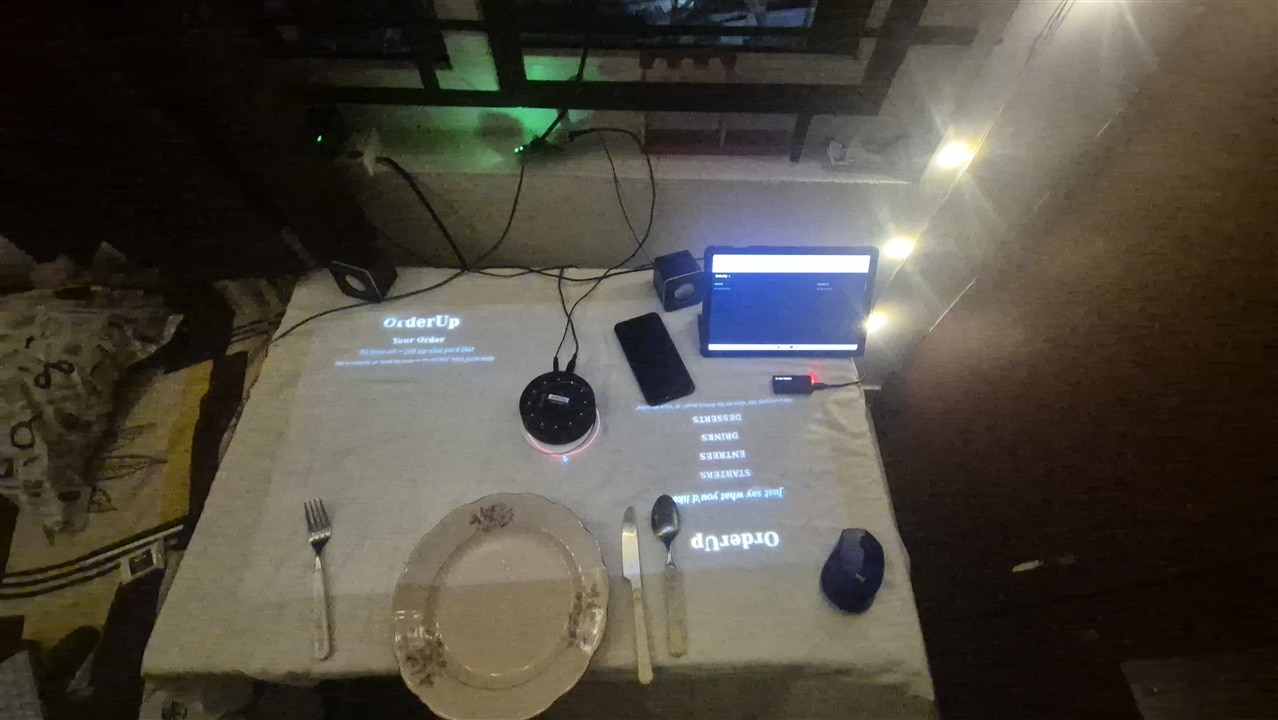
This is the piece that came out of the Interactive Signage angle mentioned back in "The Concept" — a small FastAPI process (orderup/web/server.py) that a projector points straight down at the table, showing each seat its own menu/order state.
How It's Built
The web UI is deliberately a pure read-only viewer — it never writes pipeline state, only reads the same files the voice pipeline already produces:
def _load_state_paths() -> tuple[Path, Path]:
    app_cfg = yaml.safe_load(APP_CONFIG_PATH.read_text())
    paths = app_cfg["paths"]
    return Path(paths["ticket_state_file"]), Path(paths["display_state_file"])
ticket_state.json (written by orderup/ticket/ticket_store.py) is each seat's current order lines; display_state.json (written by orderup/ticket/display_store.py) is each seat's current view — which category it's showing, or order, or a transient confirmed/ready notice, or off for "focus on eating" mode. Two endpoints hand those over as JSON — /api/menu (menu + seat layout, from config/menu.yaml and config/web_layout.yaml) and /api/ticket (the live combined state) — and a websocket, /ws/ticket, pushes a fresh snapshot to the browser whenever either file's mtime changes:
@app.websocket("/ws/ticket")
async def ws_ticket(websocket: WebSocket) -> None:
    await websocket.accept()
    last_mtimes: tuple[float | None, float | None] = (None, None)
    try:
        while True:
            mtimes = _mtimes()
            if mtimes != last_mtimes:
                last_mtimes = mtimes
                await websocket.send_json(read_combined_state())
            await asyncio.sleep(0.4)
    except WebSocketDisconnect:
        pass
Polling the mtimes every 0.4s instead of a filesystem watcher is a deliberately small trade — the pipeline already writes those files as plain JSON on every state change, so a watcher would save a bit of CPU for a UI where 0.4s of extra latency on a menu update is imperceptible.
On the browser side, app.js renders two independent halves of the screen — config/web_layout.yaml maps left_seat/right_seat to seat labels from config/seats.yaml, and the right half is rotated 180° in CSS so it reads upright to whoever's sitting across the table. Each half is driven purely by that seat's current view string from display_state.json — welcome, a menu category, order, confirmed, ready, or off:
function renderView(side, view, categories, ticket) {
  ...
  if (view === "order") {
    renderOrderView(container, ticket);
  } else if (view === "confirmed") {
    renderNotice(container, "Sent to Kitchen!");
  } else if (view === "ready") {
    renderNotice(container, "Order Ready!");
  } else if (view === "off") {
    renderOff(container);
  } else if (isCategory) {
    renderCategory(container, categories, view);
  } else {
    renderWelcome(container);
  }
}
There's deliberately no combined "show everything" view — a seat is always showing exactly one thing at a time, driven entirely by what that seat last said ("show me the dessert menu", "show my order", "turn off the menu"), which is what makes it feel like the table is responding to you rather than just displaying a static menu.
Running It
orderup/web/server.py is its own process, separate from the voice pipeline, and the two talk to each other only through those two JSON files on disk — either can restart without taking the other down. Standalone, it's just:
python -m orderup.web.server
which serves on :8080. In the actual table deployment it's launched alongside the voice pipeline and then handed straight to a kiosk browser pointed at itself, all in one script (scripts/run_table.sh):
"$VENV_PYTHON" -u -m orderup.main > >(tee "$LOG_DIR/pipeline.log") 2>&1 &
PIPELINE_PID=$!

"$VENV_PYTHON" -u -m orderup.web.server >"$LOG_DIR/projector.log" 2>&1 &
PROJECTOR_PID=$!

# ...wait for :8080 to come up, then...

DISPLAY="${DISPLAY:-:0.0}" firefox-esr --kiosk --private-window "$PROJECTOR_URL"
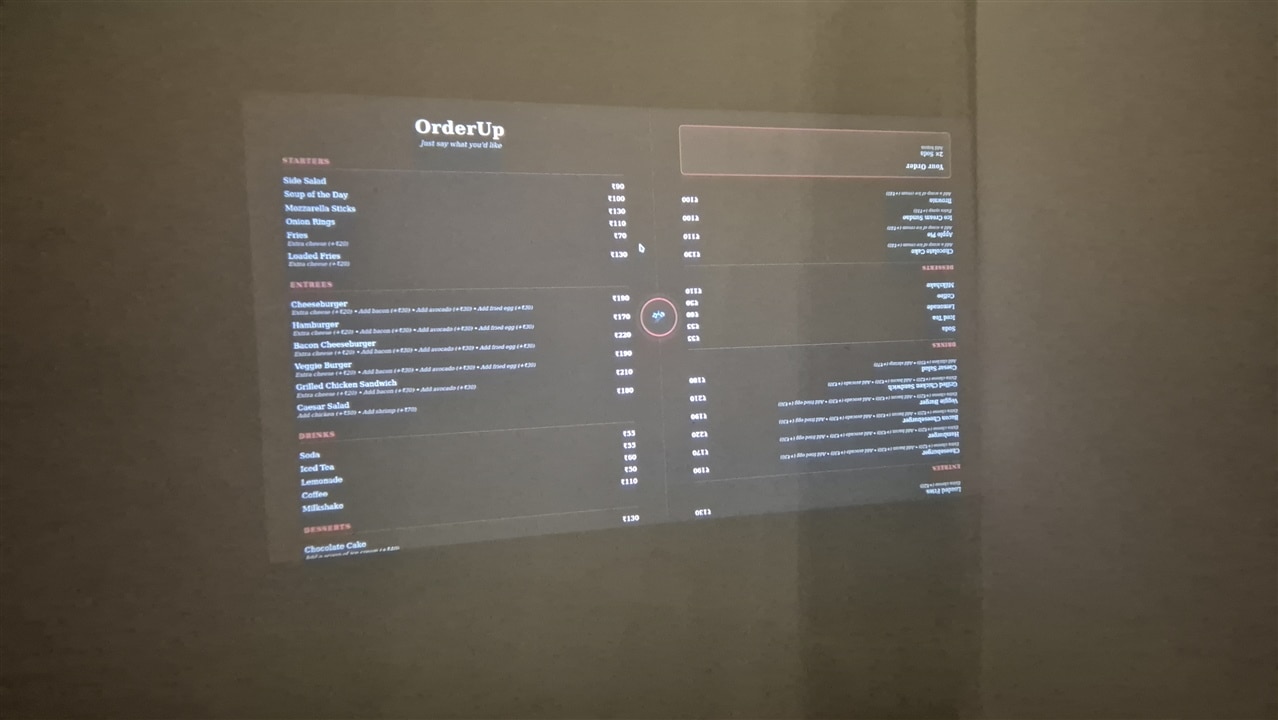
--private-window on the kiosk browser is there for a specific reason: this display should always show whatever's currently deployed, never a stale cached bundle left over from before the last git pull (I was working between my main desktop and Radxa) a persistent browser profile's disk cache can otherwise keep serving old JS/CSS indefinitely, since the static files aren't sent with cache-busting headers. A fresh private window every launch sidesteps that entirely instead of having to get cache headers right.
The Waiter Wearable: the ESP32-S3 Device and Its Firmware
The Device
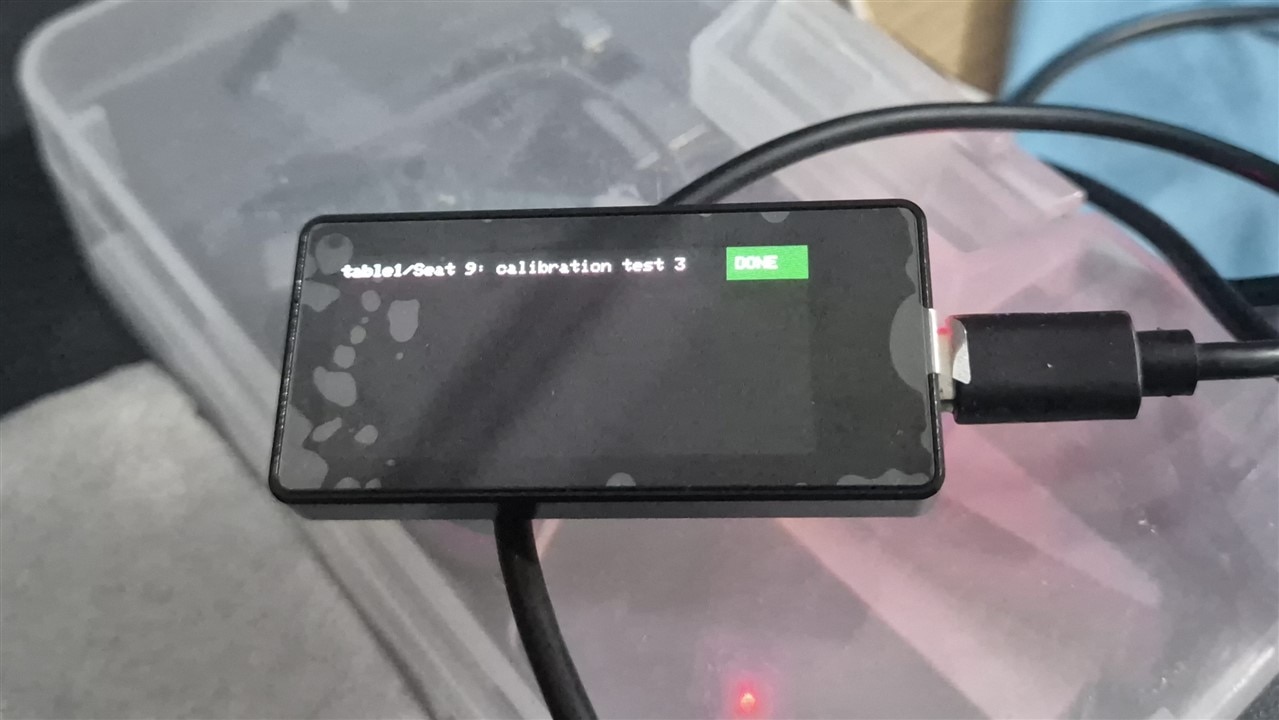
The wearable staff carry is a Waveshare ESP32-S3-AMOLED-1.91: an ESP32-S3R8 (8MB octal PSRAM, 16MB flash) with a 1.91", 536×240 AMOLED panel (an RM67162 driven over QSPI), a capacitive touch layer (FT3168, over I2C), a QMI8658 IMU, and a JST battery header — small enough to actually wear, with just enough screen to show a handful of live requests. It's USB-powered in this deployment (no sleep/battery management wired up), and there's no buzzer or haptic on the board, so alerts here are screen-only.

Firmware Setup
The firmware is a plain PlatformIO project (firmware/waiter_wearable/), Arduino framework. There's no stock PlatformIO board definition for this exact Waveshare board, so platformio.ini starts from the generic esp32-s3-devkitc-1 definition and overrides memory settings for the octal-PSRAM/16MB-flash variant:
[env:esp32-s3-waveshare-amoled-1_91]
platform = espressif32
board = esp32-s3-devkitc-1
framework = arduino
board_build.arduino.memory_type = qio_opi
board_upload.flash_size = 16MB
board_build.partitions = default_16MB.csv

build_flags =
    -DARDUINO_USB_MODE=1
    -DARDUINO_USB_CDC_ON_BOOT=1

lib_deps =
    moononournation/GFX Library for Arduino @ 1.4.9
    knolleary/PubSubClient @ ^2.8
    bblanchon/ArduinoJson @ ^7.1.0
Those two build_flags matter more than they look: esp32-s3-devkitc-1's default USB config assumes USB-OTG wiring for Serial, but this board only exposes the native USB-Serial/JTAG peripheral — without them, boot ROM text still shows up over USB (it goes through the JTAG-serial console independent of Arduino's Serial object), but every Serial.print/printf call in the actual firmware is silently dropped. The GFX library is also pinned to exactly 1.4.9, not ^1.4.9 — 1.5+ needs a header from a newer arduino-esp32 core than the pinned espressif32 platform ships, and fails to compile here.
include/board_pins.h maps the QSPI display bus, the shared I2C bus, and the touch controller's reset/interrupt lines — pulled from Waveshare's own demo repo for this board.
Before a first build, copy include/secrets.h.example to include/secrets.h and fill in the WiFi SSID/password and the MQTT broker's LAN IP. Then it's the usual PlatformIO loop:
pio run                      # build
pio run -t upload            # flash over USB-C
pio device monitor           # serial log (115200 baud)
# or all at once:
pio run -t upload -t monitor
What the Firmware Actually Does
src/main.cpp is a single-file Arduino sketch: setup() brings up the display (Arduino_RM67162 over Arduino_ESP32QSPI), probes the touch controller once, then connects WiFi and MQTT; loop() just keeps both connections alive and polls for a touch. The interesting logic sits in three places:
- Rendering the board.
renderBoard()draws up to three requests at once — sized to be legible from across a room — walking the retained JSON backwards so the newest request shows first, and remembering which item id is on each row so a tap can be mapped straight back to it:void onMqttMessage(char *topic, byte *payload, unsigned int length) { JsonDocument doc; // ArduinoJson v7: auto-sized, no manual capacity math DeserializationError err = deserializeJson(doc, payload, length); if (err) { Serial.printf("[waiter] bad board payload: %s\n", err.c_str()); return; } renderBoard(doc["items"].as<JsonArray>()); } - Trusting the touch controller. A failed I2C read can look exactly like a real tap —
Wire'srequestFrom()can report success even when the FT3168 never actually ACKs, which produced garbage coordinates that happened to land on the "done" button and auto-cleared a real request seconds after it arrived.probeTouch()reads a real status register once at boot, and every bit of touch handling is gated on that probe having actually succeeded:bool probeTouch() { Wire.beginTransmission(I2C_ADDR_FT3168); Wire.write((uint8_t)0x02); bool wrote = Wire.endTransmission(false) == 0; bool read = Wire.requestFrom(I2C_ADDR_FT3168, (size_t)1) > 0 && Wire.available() > 0; return wrote && read; } - Turning a tap into a clear.
handleTouch()remaps the FT3168's native-portrait raw coordinates into the display's rotated landscape space, checks whether the tap lands in a row's "DONE" button, and if so publishesorderup/board/clearwith that row's item id — the central service is what actually removes it and republishes the board, closing the loop back to this same screen.
Verifying the wearable doesn't require the whole voice pipeline running — publishing a fake retained board straight to the broker is enough to check the device end to end:
mosquitto_pub -h <radxa-ip> -t orderup/board/waiter -r -m \
  '{"items": [{"table_id": "table1", "seat_label": "Seat 1", "request": "water", "timestamp": 0}]}'
Closing the Loop
Two gaps stood out once the core pipeline was solid.
One-way kitchen communication. The clear/delivered mechanism already existed on the staff side — a "Delivered" button on the kitchen display, tap-to-clear on the wearable — but nothing told the table when that happened. I closed that: when staff clear an item, the central service looks up which table and seat it originally came from and publishes a notification back to it. The table's pipeline picks that up and speaks a confirmation — "Order ready for Seat 1!" — and briefly flashes a checkmark on the projector before reverting to whatever that seat was actually showing before (not hardcoded back to a default screen, which turned out to matter for the next feature).
The lookup that makes that possible is nothing more than finding the item in the in-memory recent-orders list before removing it — every board item already carries the table_id/seat_label it was created with, since that's what kitchen_sink.send_order put in the payload back at the table (orderup/kitchen/server.py, method handle_clear, trimmed below to the kds branch — the waiter branch is the identical lookup/removal pair against self._recent_requests instead):
def handle_clear(self, board: str, item_id: int) -> None:
    """A board UI (browser or wearable) marked an item delivered/done.

    Looks up the item's original table_id/seat_label *before* removing
    it from the in-memory list, so the clear can be echoed back to the
    table it came from -- closing the loop this project's known gaps
    used to call out.
    """
    if board == "kds":
        item = next((i for i in self._recent_orders if i.get("id") == item_id), None)

    if board == "kds":
        self._recent_orders = [i for i in self._recent_orders if i.get("id") != item_id]
        self._publish_board("kds", self._recent_orders)
        if item is not None:
            self._publish_feedback("order_ready", item)
No separate "which table does this belong to" lookup table exists anywhere — the item dict is the record of where it came from, carried along unchanged from the moment kitchen_sink.send_order first published it. _publish_feedback (further down) is what actually sends order_ready back out to orderup/{table_id}/order_ready, where kitchen_sink.py's own MQTT subscription on the table side picks it up.
One small helper carries that "revert to whatever it was before, not a hardcoded default" rule everywhere a transient screen gets shown (orderup/main.py):
def _schedule_revert(display_store: DisplayStore, seat_label: str, target_view: str, delay_s: float) -> None:
    """Reverts a transient screen (e.g. "confirmed"/"ready") back to
    whatever view the seat was actually on before it -- not hardcoded to
    "welcome" -- so a seat that had the menu hidden (view "off", the
    "focus on eating" command) doesn't get the menu silently turned back
    on by an unrelated kitchen/order-ready event."""
    timer = threading.Timer(delay_s, display_store.set_category, args=(seat_label, target_view))
    timer.daemon = True  # must not block process exit if still pending at shutdown
    timer.start()
It's called from three places in main.py — the kitchen-sent confirmation, the "new order lines just got added" order view, and this one, the order-ready feedback — and all three follow the identical pattern: read display_store.get_category(seat_label) before overwriting it, so there's always a real "before" to schedule the revert back to:
if kind == "order_ready":
    reply_text = f"Order ready for {seat_label}!"
    previous_view = display_store.get_category(seat_label) or "welcome"
    display_store.set_category(seat_label, "ready")
    _schedule_revert(display_store, seat_label, previous_view, KITCHEN_CONFIRMATION_DISPLAY_S)
A "focus on eating" mode. Two new voice commands — "turn off the menu" and "turn on the menu" — let a table hide the projector display once they've ordered, so it's not just glowing at them through dinner. The subtler part was: while the menu is off, an unrecognized utterance is now silently ignored instead of triggering the usual spoken "I didn't understand." A table having a normal conversation shouldn't get scolded by the mic every time it picks up a stray sentence. A genuine order still gets a normal spoken confirmation even in that mode — the suppression only applies to the failure case:
if not new_lines and (not speak_no_match_reply or display_store.get_category(seat_label) == "off"):
    # No order matched. Either the menu's hidden ("focus on
    # eating" mode -- stray unrecognized speech there is almost
    # certainly table conversation, not a command) or
    # nlp.speak_no_match_reply is off entirely (default -- most
    # no-match utterances are ordinary table talk or whisper
    # mis-transcribing background noise, not a failed order
    # attempt). A genuine order match (below) always still gets
    # its normal spoken confirmation either way.
    reason = "menu hidden, no match" if display_store.get_category(seat_label) == "off" else "no match"
    print(f"[{seat_tag}] ({latency_str}) heard: {text!r} -> ignored ({reason})")
    continue
Those two features fed back into each other in a way I didn't expect going in: implementing "revert to previous view" for the order-ready notification also fixed a latent bug in the existing kitchen-confirmation flow, which had always hardcoded reverting to the welcome screen — silently undoing a table's "menu off" choice the moment they sent an order. Building the second feature exposed a real bug in the first one.
The Final Demo
Set on edge of my room. Since I was unable to get a "date" to sit on the other side of the table who would fit in the tiny crack, i simulated my date with a Voice recording on a mobile phone.
The Bloopers - I am Bugman


