


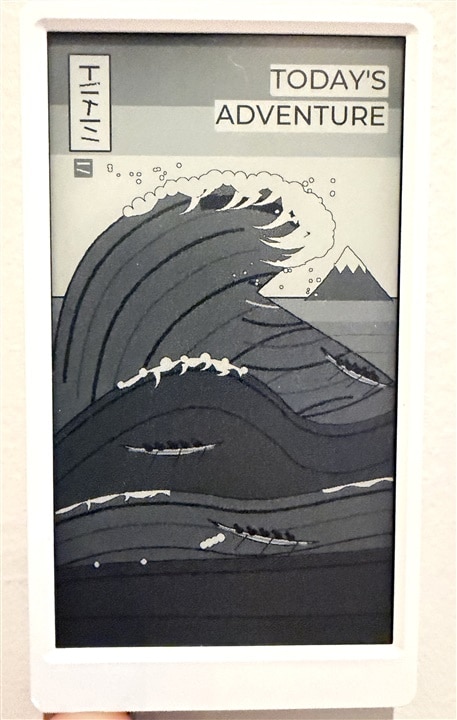
I developed Today's Adventure to maximize the simple but elegant nature of e-ink displays. It turns weather, time and seasonal context into a plan for the day. What started as a need for accurate local weather evolved into a system that helps you make the most of any given day's weather.
How I Built It
Step 1 — Choose the hardware
I used an M5Stack M5Paper v1.1, which combines an ESP32, Wi-Fi, an e-ink display, an RTC and battery circuitry. The display runs in portrait orientation at 540 × 960 pixels.
A USB data cable connects the board to the development computer for initial installation and diagnostics. This version retrieves weather online, so it needs no external weather sensors or additional circuit wiring.
Step 2 — Put it where it is useful
I attached the M5Paper directly to my fridge using its built-in magnet. No additional mount was needed.
The location shaped the project. I wanted something I could glance at during the day, and removing it frequently to charge would be inconvenient. Power management then became a major part of the design.
Step 3 — Prepare the software
I used UIFlow2 firmware for the M5Paper, installed through M5Burner. The repository records testing with UIFlow2 v2.4.9.
To prepare the project on a computer:
git clone https://github.com/Matthewjg95/todays-adventure.git
cd todays-adventure
python -m pip install -r requirements-dev.txt
python -m pip install pyserial
python -m unittest discover tests -v
python main.py --demo
```
The demo produces an ASCII layout using synthetic weather. It helps exercise the
software before uploading, but is not a substitute for checking the actual panel.
Step 4 — Configure the location and connection
I configured latitude, longitude, time zone and hemisphere in config.py. Wi-Fi credentials live in wifi_secrets.py, copied from the supplied example and excluded from Git.
Local destinations and calendar events are defined in adventures.py and events.py. The current catalog is based around Syracuse; someone adapting the project for another area should update those files as well as the coordinates.
Step 5 — Turn weather information into messages
The weather service retrieves Open-Meteo data and combines it with time, daylight and seasonal information.
Separate rules select the headline, a short sentence about the day, a local destination and activity suggestions. The rules account for context, avoid repeated ideas and suppress outdoor suggestions in severe conditions.
Message selection runs locally. It does not require a cloud text-generation request.
Step 6 — Design and test the screen
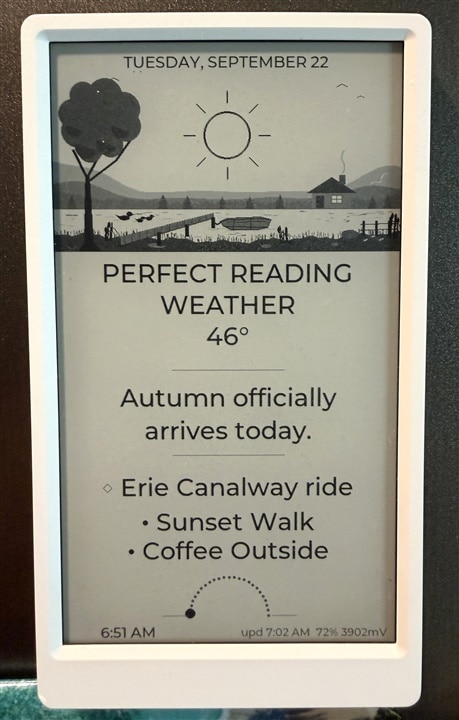
I arranged the grayscale illustration, date, headline, temperature, message, suggestions and sun or moon information into one full display frame.
Testing the physical device revealed a spacing problem between the local destination and the first suggestion. I adjusted the layout and checked the result on the board. This was a useful reminder that a desktop preview cannot fully reproduce the panel’s fonts and rendering.
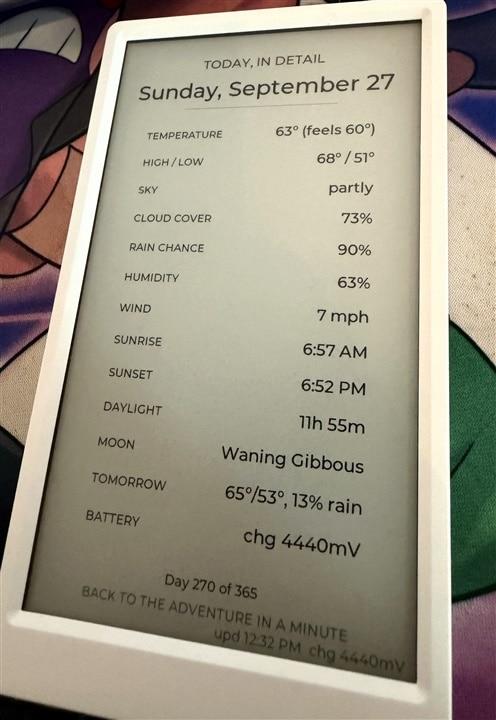
The side button also opens a detail card with weather, forecast, daylight and moon information.
Step 7 — Install and verify the application
Using the repository’s tools/m5link.py uploader, I created the scene directories and transferred the runtime modules, Wi-Fi credentials, boot file and artwork to the board.
The Complete Build Guide includes the directory-creation commands and full upload list. After uploading, start the application with:
-python tools/m5link.py reset
The device can subsequently download updates from GitHub. Changed files are checked against their SHA-256 hashes before installation.
For the current release, I verified the installed version and all 26 payload hashes on the board. The desktop suite passed 69 tests, and I confirmed the full-battery wave screen on the physical display.
Making A Connection With Today!
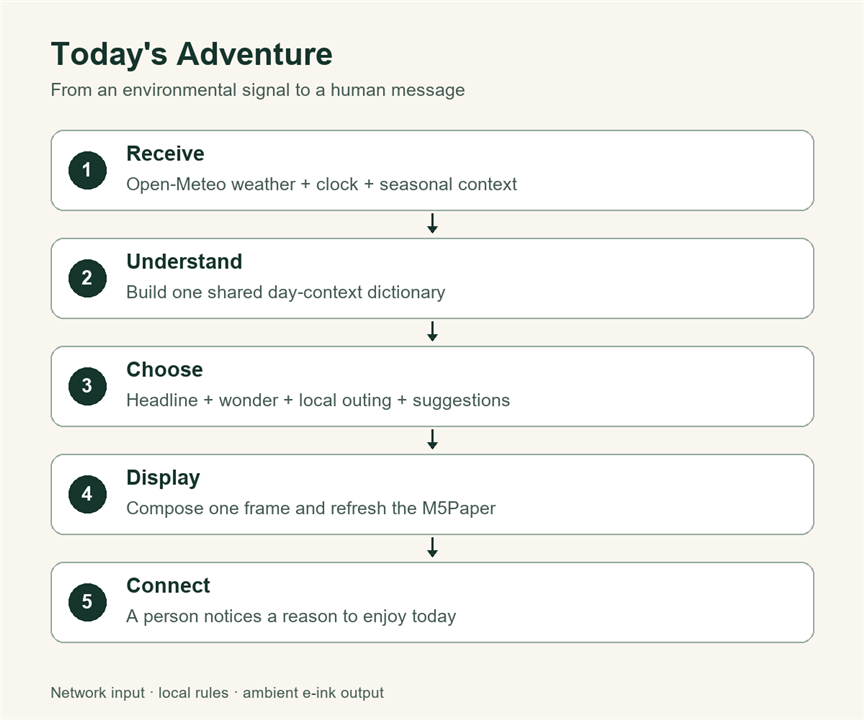
Today’s Adventure receives environmental information over Wi-Fi and turns it into a visible message:
Weather data + time → local rules → e-ink message → person
Temperature, rain and daylight become an invitation such as “Open the windows today,” a local outing or an evening suggestion. Mounted on the fridge, the display communicates that message during every moment in the day.
That interpretation is the project’s connection to the theme: the electronics receive information, give it context and communicate something a person can act on.
What makes it different
The original contribution is the combination of contextual messages, local suggestions, illustrated presentation and operation designed around a fridge-mounted device.
The hardware is an off-the-shelf development board. My work brings its capabilities together into an application that answers a practical question: what could I do with today?
Several technical decisions support the experience:
- Context-aware selection: Weather, daylight, time and season influence the messages and suggestions.
- Limited wake periods: Fridge mode schedules five daytime updates and two nighttime updates. An explicit plugged-in mode supports more frequent updates.
- Persistent scheduling records: The device records attempted update slots to avoid repeating the same work after a reset.
- Diagnostics and updates: Wake logs, watchdog information and hash-verified OTA downloads make faults and releases easier to investigate.
At a reported 100% battery, the display shows the wave artwork like shown at the beginning of this post. Below full charge, the next render returns to the adventure screen.
Notes for reproducing the build
The validated configuration uses Fahrenheit and miles per hour. The weather API explicitly requests those units; changing the configuration flag alone is not a complete unit conversion.
OTA follows this repository’s master branch and can replace config.py. For a personalized installation, fork the repository, point the updater to your fork and maintain its manifest.
Source and Credits
https://github.com/Matthewjg95/todays-adventure
The project uses M5Stack hardware and UIFlow firmware, with weather data supplied by Open-Meteo. AI tools assisted with code development and illustration work. The demonstration photographs show the physical device; their presentation edits are limited to conventional cropping, lighting adjustments and a labeled straightened detail crop.