


Edited to get the videos and pictures to actually upload
I made this prototype for an Open University Interaction Design course using a Circuit Playground Bluefruit, an all-in-one micro-controller development board, with a built-in ring of neopixels. It was my first foray into working with micro-controllers and neopixels, so although it's not very electronics-y I thought I would share, especially with where I got stuck and could use some advice!
The project was inspired by Heat Network Heating, which is a communual form of heating for a building or disctrict and particularly common in social housing. The heat network my building is on on actually gets the heat from the local harbour, which is pretty cool. However because of the communal nature it means that residents don't get a choice of heating supplier, the multiple sub-contractors managing it and the technologies in their home, and are often quite confused how it works. Alongside my own experiences, I spoke with people in my building and also looking at research from Citizens Advice Bureau and the Social Market Foundation, around consumer issues with heat network heating, which included issues with the controls and topping up and barriers around age, disability, digital inclusion and poverty, and the need for regulations being introduced.
The focus of my module was users and interaction, rather than technology, electronics and coding, but textbook we used 'Interaction Design: Beyond Human-Computer Interaction' by Yvonne Rogers, Helen Sharp, and Jennifer Preece featured some electronics and maker projects, including the Lilypad Arduino kit that inspired me to try this! It was a bit of a learning curve.
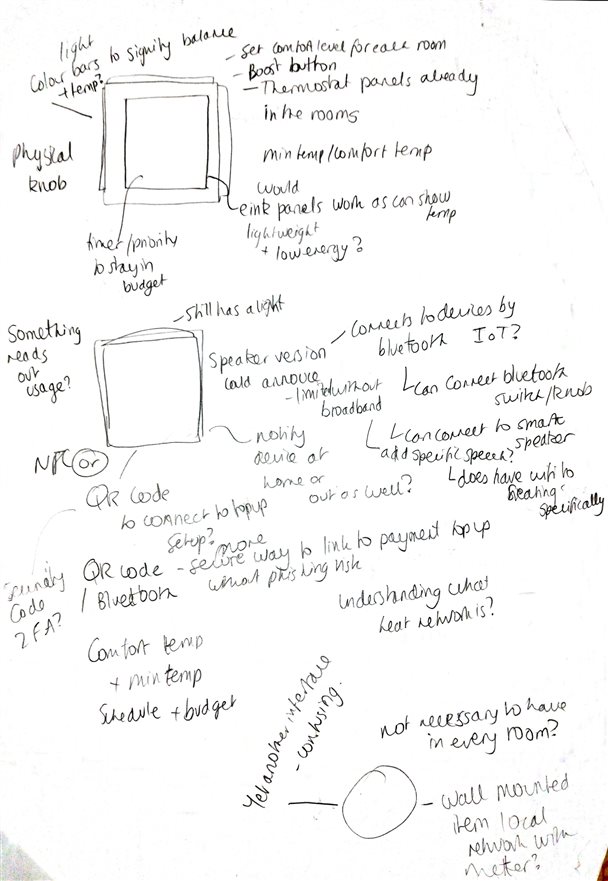
Looking at the users needs and barriers around thermostats being complicated and confusing I decided I wanted to make something that would reassure the user and help them understand what was happening with their heating and reduce stress, Making use of ambient lighting seemed to be a good way to achieve this. Initially I found a bluetooth controlled lighting strips, but it wasn't customisable enough to test and then I found NeoPixel strips and microcontrollers and I got a bit confused. When I saw the Circuit playground Bluefruit and saw that it uses Python I felt more confident I could make some with actual lights. There was a TFT screen with attachments ready to screw on as well, which meant I could even have a small screen in my prototype, which I hadn't considered would be possible when I started.
It was really fun, I plugged in the Circuit Playground for the first time and the LEDs light up and animate all the colours of the rainbow. First I connected it to the Bluefruit Playground app, this is very limited, but was useful to see some of the different things the LED's could do and start to design how I wanted my lights.
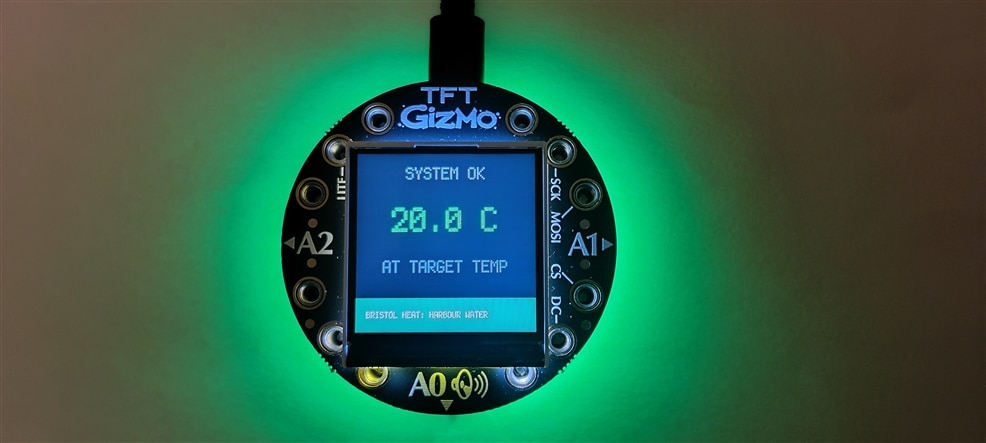


Then I followed the instructions to set it up to run CircuitPython, using an IDE called MU. A big challenge was working out what libraries I needed. The LED.animation library was great, most of the LED effects I wanted to set up I just needed to call a function from the library and adjust colours and timings and there were a couple that I made more manually. I experience migraines so one of the first things I worked out was how to reduce the brightness of the LEDs cp.pixels.brightness = 0.2 worked well for me. Another important thing I learned as a beginner was to use monotropic, which has to be set at the beginning, so that stopping the NeoPixels to animate them doesn't pause everything running.
My orginal plan was to use pictures for the screen designs and load them on, but I didn't account for the limited storage on the Circuit Playground Bluefruit, so I to make the screens in code. I used Google Gemini to help me make template to match my screen layouts and then was able to call the templates as a function with the content. This was actually so cool to use and prototype with, because I can so quickly adjust and change content or have different versions, so I think I will use this approach for other things too.
One issue I found really irritating and haven't managed to resolve is the capacitive touch buttons on the front beside the screen are not very consistent or easy to use and I spent quite a lot of time trying to work out how make and add some form of buttons to the front to fit the form factor, but I got confused and overwhelmed with deadlines looming. Would love any suggestions of how I can learn more about how to do this as it's pretty important!
Because the purpose of this prototype was to test the concept of the ambient LEDs with users, it was never intended to fully function. That said I would really like to explore making different light 'modes' and adding sound for accessibility. Having seen projects where people have made their own functioning thermostats, I would love to make a different prototype, ideally together with other local residents, focusing more on real data and interactivity within a home. This would allow us to test the impact, suitability and propose a more user and community-centred approach to heating controls. I have also been really inspired by the possibilities for NeoPixels for creative art projects and installations - it doesn't seem too intimidating anymore!
As a designer I would really recommend to other designers to have a play and try making things, because it opens up a world of creative possibilities you may not have considered.


