The inspiration
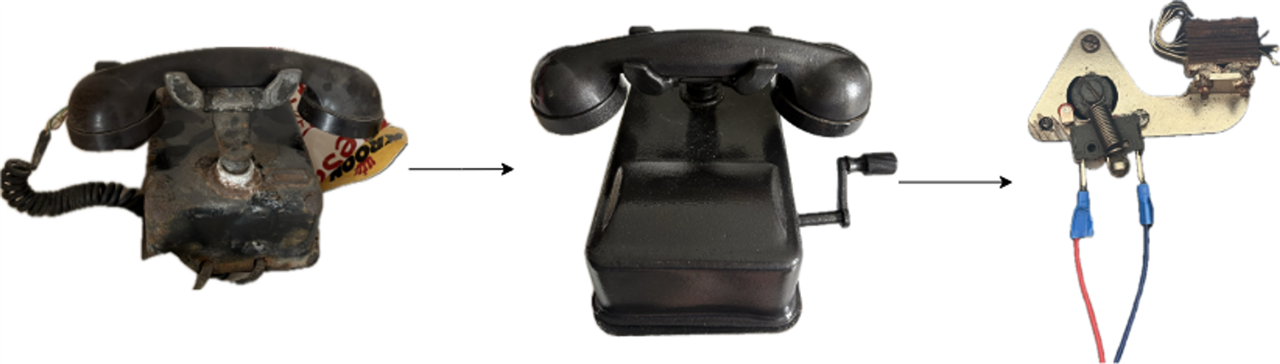
Let's be honest, our grandparents hate smartphones. They find it hard to navigate through menus, forget where the emergency button is, and often want nothing to do with modern technology. On top of that, the world is full of electronic waste. That's where the idea came from: why not kill two birds with one stone? My bachelor's thesis professor gave me this telephone to restore; although its exact model remains unconfirmed despite historical research, engraved codes on the components indicate it was standardized by the Reichspost (RP), possibly pointing to a Siemens & Halske Ortsbatterie desk phone from 1933 that used a local battery system and a side-mounted magneto crank instead of a rotary dial. I took an old telephone from the World War II era and gave it a second chance. The main idea was to build an emergency device where seniors or vulnerable people don't have to learn anything new, they use the exact classic gesture they grew up with: picking up the receiver from the hook. This project started as my bachelor's thesis.
How it works
On the outside, the classic look was preserved, but on the inside, some microcontrollers were inserted to implement an emergency logic. There's no need to touch screens or search for contacts. When someone has an emergency, they have two super simple options: either pick up the receiver (detected instantly by a microswitch hidden in the hook mechanism) or just say "Help" (voice command).
What happens next?
The second the alarm is triggered, the LilyGO T-Call (ESP32 + SIM800L) board springs into action:
-
It talks to nearby cell towers to grab its coordinates via the GSM network.
-
It automatically sends a message on Telegram with a direct Google Maps link so the family knows exactly where the person is.
-
It places a direct emergency phone call straight through the SIM card.

Step-by-Step implementation guide
Step 1 - hardware assembly & retrofitting: cleaning and restoring the vintage telephone chassis, painting it with a rugged hammer-tone finish, and adapting a custom microswitch onto the receiver's hook mechanism to capture physical lifting.
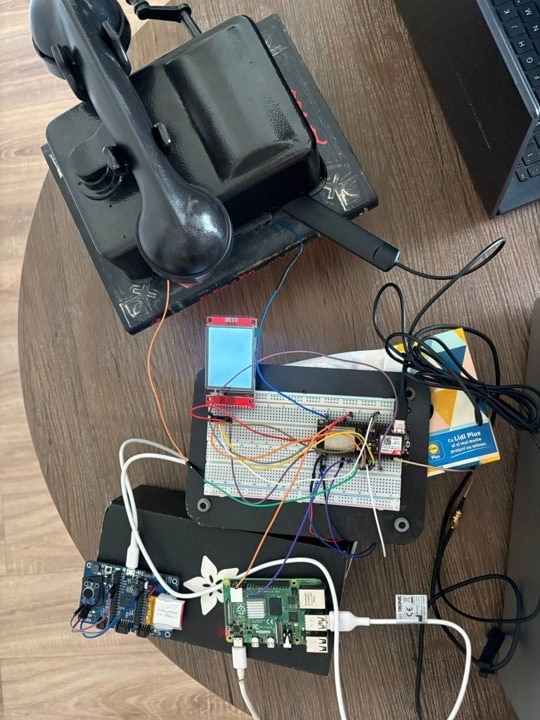
Step 2 - The processing & communication core & audio/visual feedback: inside the shell, I mounted the LilyGO T-Call board (which packs an ESP32-WROVER-B and a SIM800L module together), a 2-inch TFT ST7789 display, a voice-command subsystem (powered by a Raspberry Pi 4 and an Adafruit PyBadge), an external antenna, and a Li-Po battery. To keep track of what's happening, the display was used to indicate all the states the board goes through, from initialization and operator detection to network searching and placing the call. Additionally, to give the user instant audio feedback, I added an active buzzer. It chirps during critical moments (like confirming that an emergency alarm has been triggered) and, even better, it mimics a traditional dial/ring tone while the emergency call is active so the user knows the call is going through.
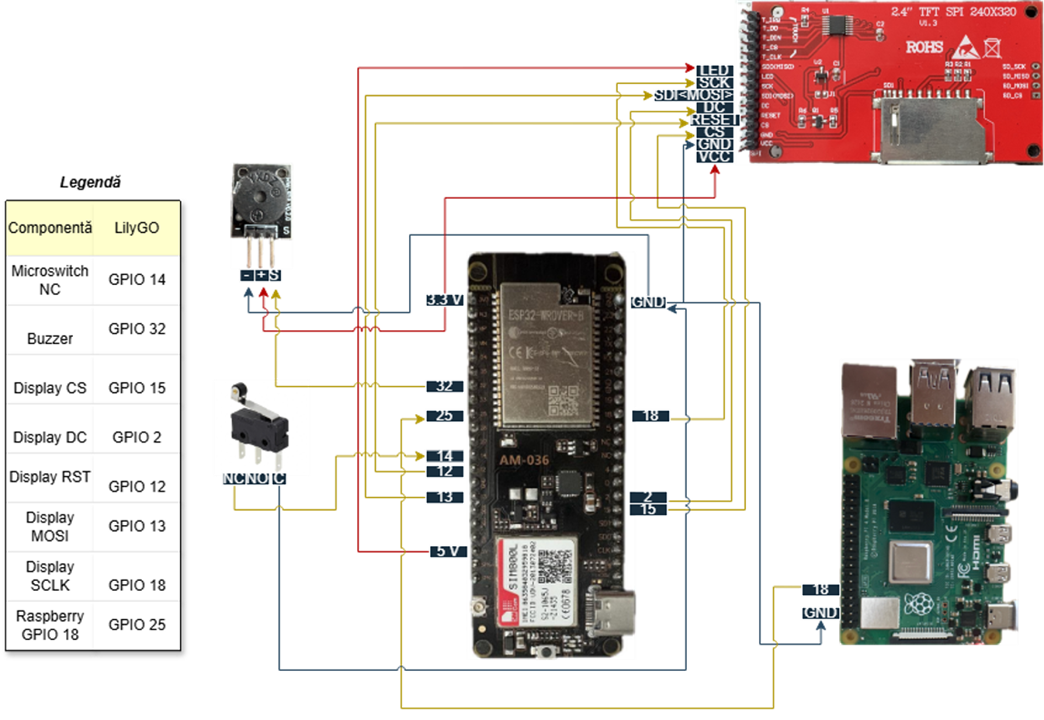
Step 3 - firmware & cellular positioning: writing the Arduino-based firmware using a finite-state machine logic to query tower parameters sequentially (AT+CCED, AT+CENG, AT+CREG=2) for cellular triangulation.
Step 4 - cloud & Telegram integration: executing HTTPS POST requests to the Google Geolocation API and utilizing the Telegram Bot API to dispatch formatted Markdown emergency messages.

What the Telegram message contains:
- Source field: the structure of this message stays identical whether triggered by voice or the hook-switch, only the source field changes.
- Timestamp & Location: shows the exact date, time, and coordinates with estimated precision.
- Google Maps Link: a valid, clickable link opening the exact pin on Google Maps.
- GSM Tower Data: MCC & MNC: identifies the country (Romania - 226) and operator (Vodafone - 01), LAC defines the zone group of cell towers, while Cell ID is the unique identifier of the specific tower antenna used for connection, and the signal who shows the network signal strength at activation.
Step 5 - Voice command subsystem: training a custom voice-recognition model to detect the trigger word "Help", allowing the system to initiate an emergency alert hands-free alongside the physical hookswitch. The voice module was developed by another colleague. In collaboration, I developed a way to integrate it inside my project.
Interesting Challenges and Workarounds
Challenge 1 (AT command incompatibility): the primary command initially planned for data extraction (AT+CCED) was not supported by the SIM800L firmware version.
- Workaround: developed a cascading fallback algorithm that automatically switches to AT+CENG and AT+CREG=2 to reliably extract network parameters under any condition.
Challenge 2 (rural geolocation accuracy): testing in rural areas revealed long distances between cell towers, resulting in coverage radio over 6 km and position errors around 1 km.
- Workaround: thoroughly documented this physical limitation of Cell-ID technology and proposed upgrading to a native GPS module (like the LilyGO T-SIM7000G) for future iterations.
Challenge 3 (voice recognition reliability): voice triggers proved inconsistent in noisy real-world environments.
- Workaround: by testing different thresholds for the voice recognition method, a 70% accuracy has been achieved, taking into account that only an analog microphone could be installed on the Adafruit microcontroller; a better microphone would achieve better results.
Current project status & remaining challenges
What is working right now: the hardware restoration of the vintage telephone housing is complete, the mechanical hook switch and audio feedback (buzzer) are fully functional, and the core emergency loop, fetching cellular data and dispatching a Telegram alert with a Google Maps link, works reliably in covered areas.
Remaining challenges & the next-gen dissertation plan: right now, the project is a solid prototype, but the journey doesn't stop here. For my dissertation project, I am currently working on scaling and expanding this architecture to make it truly smart and medical-grade. The remaining challenges and upcoming upgrades include:
- mmWave Radar Integration: hiding a millimeter-wave (FMCW) radar sensor inside the vintage casing to provide non-contact, automated fall detection and continuous health monitoring for seniors.
- TinyML Audio Analysis: implementing an on-device Machine Learning model running directly on the ESP32 using TinyML to classify distress sounds (like cries for help or breaking noises) acoustically.
- Hyper-Local Geolocation: tackling the rural positioning error (~1000m) by fusing raw GSM cell-tower data with nearby Wi-Fi network scanning through the Google Geolocation API, aiming to bring accuracy down under 150 meters.
If you have any other ideas for future improvements, feel free to share them! Thank you for taking the time to read about my project, and if you want to find out more or discuss it further, feel free to drop me a message anytime!