element14 Community
element14 Community
    Register Log In
  • Site
  • Search
  • Log In Register
  • Community Hub
    Community Hub
    • What's New on element14
    • Feedback and Support
    • Benefits of Membership
    • Personal Blogs
    • Members Area
    • Achievement Levels
  • Learn
    Learn
    • Ask an Expert
    • eBooks
    • element14 presents
    • Learning Center
    • Tech Spotlight
    • STEM Academy
    • Webinars, Training and Events
    • Learning Groups
  • Technologies
    Technologies
    • 3D Printing
    • FPGA
    • Industrial Automation
    • Internet of Things
    • Power & Energy
    • Sensors
    • Technology Groups
  • Challenges & Projects
    Challenges & Projects
    • Design Challenges
    • element14 presents Projects
    • Project14
    • Arduino Projects
    • Raspberry Pi Projects
    • Project Groups
  • Products
    Products
    • Arduino
    • Avnet & Tria Boards Community
    • Dev Tools
    • Manufacturers
    • Multicomp Pro
    • Product Groups
    • Raspberry Pi
    • RoadTests & Reviews
  • About Us
    About the element14 Community
  • Store
    Store
    • Visit Your Store
    • Choose another store...
      • Europe
      •  Austria (German)
      •  Belgium (Dutch, French)
      •  Bulgaria (Bulgarian)
      •  Czech Republic (Czech)
      •  Denmark (Danish)
      •  Estonia (Estonian)
      •  Finland (Finnish)
      •  France (French)
      •  Germany (German)
      •  Hungary (Hungarian)
      •  Ireland
      •  Israel
      •  Italy (Italian)
      •  Latvia (Latvian)
      •  
      •  Lithuania (Lithuanian)
      •  Netherlands (Dutch)
      •  Norway (Norwegian)
      •  Poland (Polish)
      •  Portugal (Portuguese)
      •  Romania (Romanian)
      •  Russia (Russian)
      •  Slovakia (Slovak)
      •  Slovenia (Slovenian)
      •  Spain (Spanish)
      •  Sweden (Swedish)
      •  Switzerland(German, French)
      •  Turkey (Turkish)
      •  United Kingdom
      • Asia Pacific
      •  Australia
      •  China
      •  Hong Kong
      •  India
      •  Japan
      •  Korea (Korean)
      •  Malaysia
      •  New Zealand
      •  Philippines
      •  Singapore
      •  Taiwan
      •  Thailand (Thai)
      •  Vietnam
      • Americas
      •  Brazil (Portuguese)
      •  Canada
      •  Mexico (Spanish)
      •  United States
      Can't find the country/region you're looking for? Visit our export site or find a local distributor.
  • Translate
  • Profile
  • Settings
Project14
  • Challenges & Projects
  • More
Project14
Show and Tell! Journey of an Autonomous hunter robot and a Stygian Witch Eye
  • News
  • Member Updates
  • Competitions
  • Forum
  • Documents
  • Theme Suggestions
  • Polls
  • Members
  • More
  • Cancel
  • New
Join Project14 to participate - click to join for free!
  • Share
  • More
  • Cancel
Group Actions
  • Group RSS
  • More
  • Cancel
Engagement
  • Author Author: robogary
  • Date Created: 8 Aug 2026 2:11 AM Date Created
  • Views 190 views
  • Likes 5 likes
  • Comments 6 comments
  • arduino
  • Show and Tell
Related
Recommended

Journey of an Autonomous hunter robot and a Stygian Witch Eye

robogary
robogary
8 Aug 2026

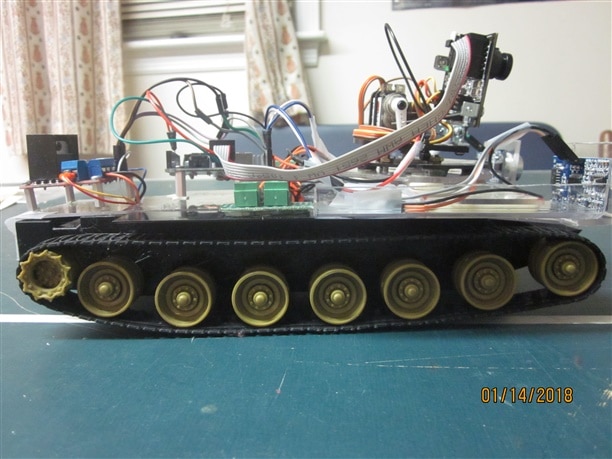
For interesting STEM demonstrations at schools, I had built a small hobby robot called the Orange Giraffe Hunter.

Its job was to look around , lock in, and chase down a plastic Orange Giraffe    

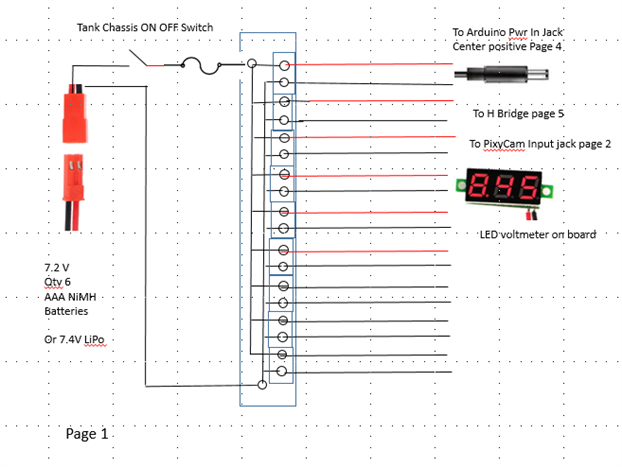
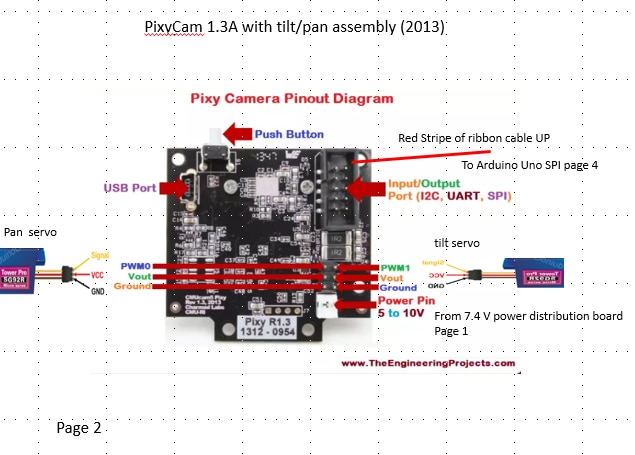
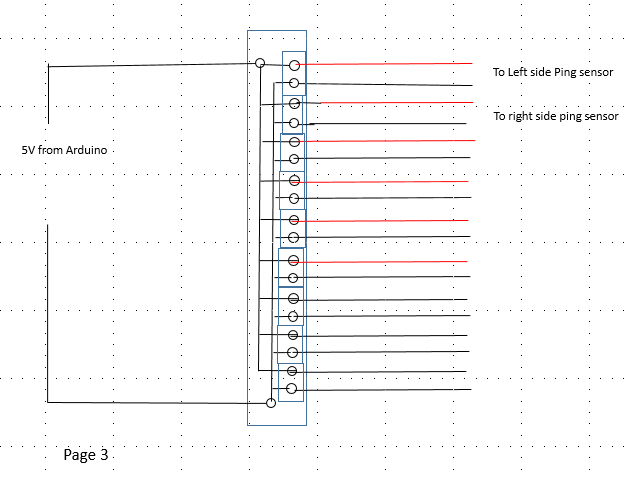
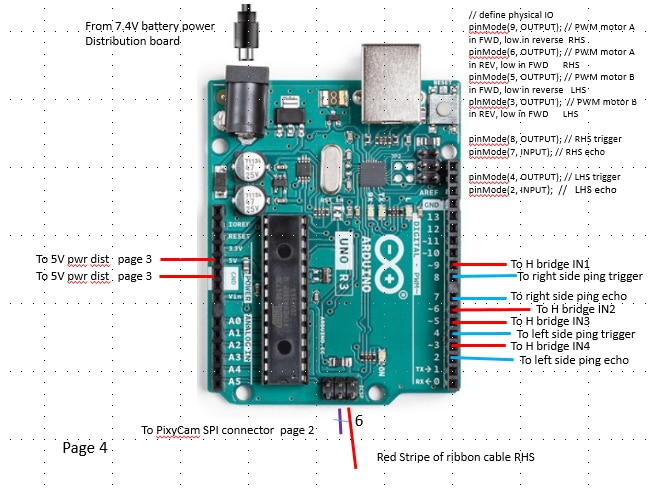
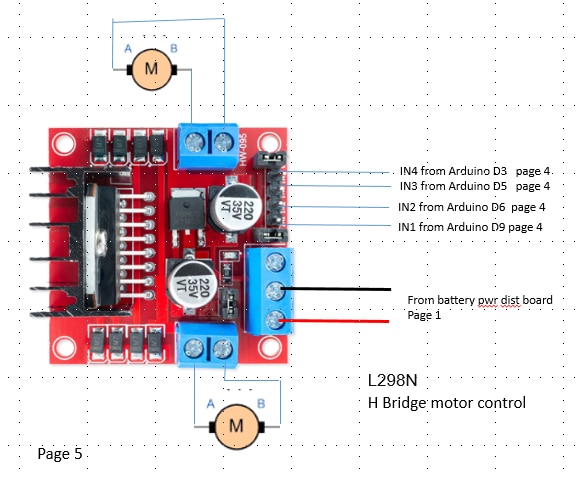
The prototype build used an Arduino Uno, H bridge ,ping sensors, and a PixyCam object detection system on a hobby tank chassis.  

https://www.youtube.com/watch?v=LphKr1IjpIM&t=2s
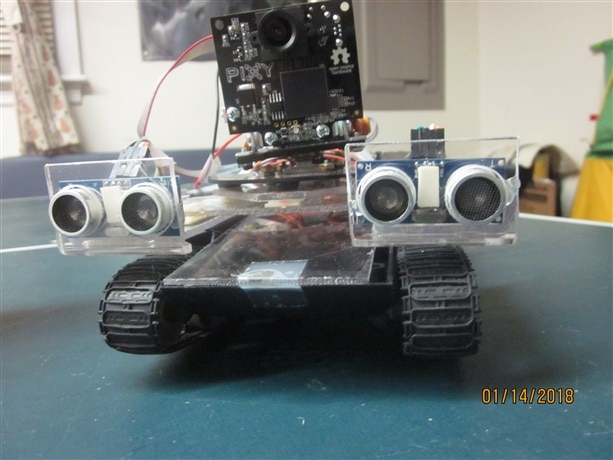
image image

image     image

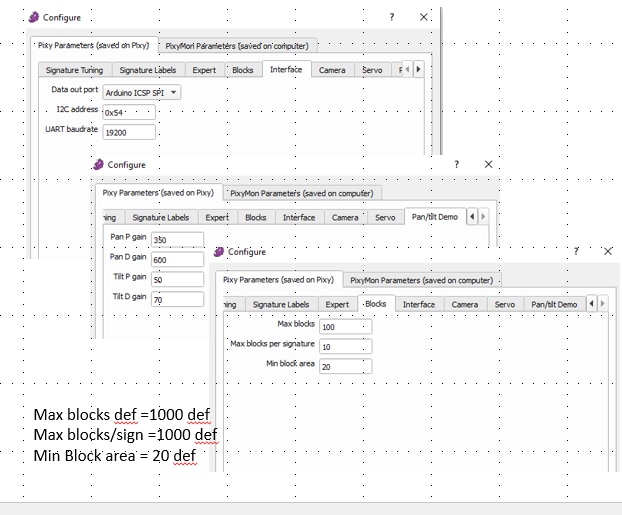
image  image

image  image

Operation : couple things: this robot is supposed to find a specific object , whose size and color is constant and supposedly unique.

The tilt and pan servos are 180 degrees servos. The camera pan cant point backwards, and the tilt itself cant go past 90 degrees. 

The code first checks for a specific target (color and mimimum pixel size)..... The "hunt" sequence.

If the object is "seen", it is tested to be left of the center field of view, or the right side for steering, i.e. speed reference to the left and right side motors. The object's pixel size identifies how close the object is. If the object is small pixelwise, the steering correction is also small. The code trims the speed reference to keep the object centered in the field of view.

The robot continues on target until the ping sensors stop it a few inches away.

if no object was detected, the tilt and pan servos go to fixed predefined angles with respect to the tanks "straight ahead" to find the object. The Pixy would take a snapshot, if no object detected, would sequence to the next tilt and pan angle reference. 

If an object was detected, the tank treads would pivot to that pan heading, and restart the detection sequence. 

If the "hunt" sequence doesnt find the object, the tank pivots 90 degrees clockwise, and restarts a "hunt" sequence. 

In later code versions, the camera tilt servo is omitted because the field of view is pretty wide. 

The PixyCam "snapshot" was unreliable. Timers were provided after a servo move before taking a snapshot, and some time allowed for the SPI to update the detection (in spite of the spec ), but still there were misses. The later code versions took 5 snapshots after each servo move before declaring "object found" . It only took 1 positive out of the 5 to declare "found" . I lacked the tools to see pixycam data frame by frame and check spi timing.

Id hoped to make the "hunt" sequence fast and smooth, but it was a bit clunky with the timers and multiple redundant camera shots. 

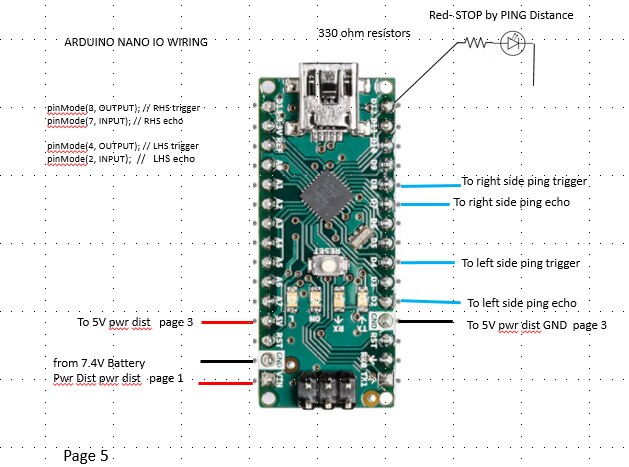
The last hardware update moved the ping sensors to a separate Arduino Nano. That change seemed to help PixyCam reliability, possibly the ping code interfering with spi communications. I'm not 100% sure, because it was then that I fried the PixyCam by plugging it in the spi backwards. 

The PixyCam detection itself was highly dependant on ambient light intensity and hue. The color detection was fairly broad , if tuned too tight, the object wouldn't been seen in a room with different lamps. If a person entered the room with a shirt colored like the target, the "hunter" would chase that larger object. 

The Arduino Uno control software had semi-annual upgrades to significantly improve the collision avoidance using ping sensors and object searching strategy.  

------ several years of code progression -------  

An attempt was made to upgrade to the Arduino Rev 4 , but the software SPI driver for the PIXYCAM 1 was not compatible. 

The target object was reprogrammed via the PixyCam PixyMon tool to chase down a yellow rubber duck. 

The performance  PixyCam uses blob detection to locate an object and tell the arduino its position in the field of view. There are lots 

of misidentifications, detection reliability is highly dependent on the ambient light hue and intensity.

The "blob" size has to be big to avoid finding other smaller like color objects. It cant tell a yellow duck from a banana.    

While making code and improvements and external diagnostic LEDs, I decided to change from Arduino Uno to  Qty 2 Arduino Nanos. 
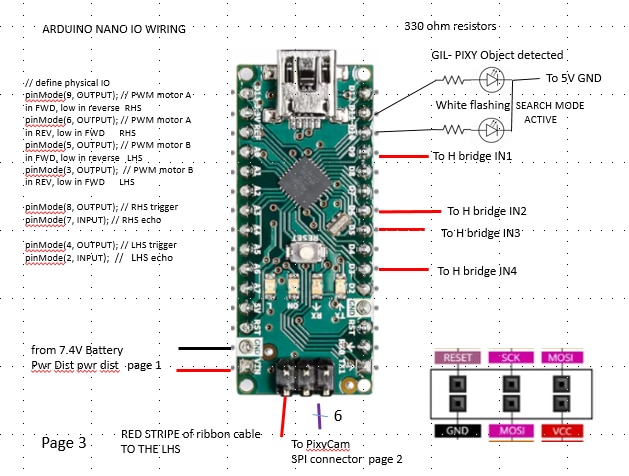
image image

Opps, the SPI wiring on Nano is different than the Uno - The PixyCam let out some bad smoke. Oh well farewell  to my Pixy friend  

The Autonomous hunter robot is now off line.  

https://www.youtube.com/watch?v=iIGEVzC9s5w

** Since the project original inception, technology and performance expectations have changed alot. ** 

My STEM fans expect reliable object detection from the hunter robots.

Heck Ring Cameras do it. Tolls booths read license plates and bill the vehicle owner. Traffic Cams issue speeding ticket fines.

Sure , object detection is everywhere.  

In the movie "Clash of the Titans", 3 blind Stygian Witchs share a magical orb that gives them sight, one "eye" for all, when held to their forehead. Sinbad takes their eye to get them to help him. 

image

Likewise, the Autonomous Hunter Robot  has no sight , so it is on the shelf awaiting a new eye from its creator.   

Could an Arduino Q  be in its future to help bring its object detection back to life and restore its sight ? 

  • Sign in to reply
  • DAB
    DAB 13 days ago

    Interesting project.

    • Cancel
    • Vote Up 0 Vote Down
    • Sign in to reply
    • More
    • Cancel
  • beacon_dave
    beacon_dave 13 days ago in reply to robogary

    Perhaps could turn this into a feature. A remote control that allows you to change the target colour if an appropriate target enters the room. Get yourself some 'follow me' shoes.

    • Cancel
    • Vote Up 0 Vote Down
    • Sign in to reply
    • More
    • Cancel
  • robogary
    robogary 14 days ago in reply to beacon_dave

    One time the robot was chasing an orange giraffe, then started after a girl in red tennis shoes. It later went after a guy in a Spiderman costume. It was funny 

    • Cancel
    • Vote Up 0 Vote Down
    • Sign in to reply
    • More
    • Cancel
  • beacon_dave
    beacon_dave 14 days ago

    "...It cant tell a yellow duck from a banana..."

    It could be an interesting experience if you turn up wearing banana boots...  Slight smile

    • Cancel
    • Vote Up 0 Vote Down
    • Sign in to reply
    • More
    • Cancel
  • robogary
    robogary 14 days ago in reply to beacon_dave

    Great question! You're pretty close. 

    A couple things: this robot is supposed to find a specific object , whose size and color is constant and supposedly unique.

    The tilt and pan servos are 180 degrees servos. The camera pan cant point backwards, and the tilt itself cant go past 90 degrees. 

    The code first checks for a specific target (color and mimimum pixel size)..... The "hunt" sequence.

    If the object is "seen", it is tested to be left of the center field of view, or the right side for steering, i.e. speed reference to the left and right side motors. The object's pixel size identifies how close the object is. If the object is small pixelwise, the steering correction is also small. The code trims the speed reference to keep the object centered in the field of view.

    The robot continues on target until the ping sensors stop it a few inches away.

    if no object was detected,  the tilt and pan servos go to fixed predefined angles with respect to the tanks "straight ahead" to find the object.  The Pixy would take a snapshot, if no object detected, would sequence to the next tilt and pan angle reference. 

    If an object was detected, the tank treads would pivot to that pan heading, and restart the detection sequence. 

    If the "hunt" sequence doesnt find the object, the tank pivots 90 degrees clockwise, and restarts a "hunt" sequence. 

    In later code versions, the camera tilt servo is omitted because the field of view is pretty wide. 

    The PixyCam "snapshot" was unreliable. Timers were provided after a servo move before taking a snapshot, and some time allowed for the SPI to update the detection (in spite of the spec ), but still there were misses. The later code versions took 5 snapshots after each servo move before declaring "object found" . It only took 1 positive out of the 5 to declare "found" . I lacked the tools to see pixycam data frame by frame and check spi timing.

    Id hoped to make the "hunt" sequence fast and smooth, but it was a bit clunky with the timers and multiple redundant camera shots. 

    The last hardware update moved the ping sensors to a separate Arduino Nano. That change seemed to help PixyCam reliability, possibly the ping code interfering with spi communications. I'm not 100% sure, because it was then that I fried the PixyCam by plugging it in the spi backwards. 

    The PixyCam detection itself was highly dependant on ambient light intensity and hue. The color detection was fairly broad , if tuned too tight, the object wouldn't been seen in a room with different lamps. If a person entered the room with a shirt colored like the target, the "hunter" would chase that larger object. 

    • Cancel
    • Vote Up 0 Vote Down
    • Sign in to reply
    • More
    • Cancel
>
element14 Community

element14 is the first online community specifically for engineers. Connect with your peers and get expert answers to your questions.

  • Members
  • Learn
  • Technologies
  • Challenges & Projects
  • Products
  • Store
  • About Us
  • Feedback & Support
  • FAQs
  • Terms of Use
  • Privacy Policy
  • Legal and Copyright Notices
  • Sitemap
  • Cookies

An Avnet Company © 2026 Premier Farnell Limited. All Rights Reserved.

Premier Farnell Ltd, registered in England and Wales (no 00876412), registered office: Farnell House, Forge Lane, Leeds LS12 2NE.

Follow element14

  • X
  • Facebook
  • linkedin
  • YouTube