element14 Community
element14 Community
    Register Log In
  • Site
  • Search
  • Log In Register
  • Community Hub
    Community Hub
    • What's New on element14
    • Feedback and Support
    • Benefits of Membership
    • Personal Blogs
    • Members Area
    • Achievement Levels
  • Learn
    Learn
    • Ask an Expert
    • eBooks
    • element14 presents
    • Learning Center
    • Tech Spotlight
    • STEM Academy
    • Webinars, Training and Events
    • Learning Groups
  • Technologies
    Technologies
    • 3D Printing
    • FPGA
    • Industrial Automation
    • Internet of Things
    • Power & Energy
    • Sensors
    • Technology Groups
  • Challenges & Projects
    Challenges & Projects
    • Design Challenges
    • element14 presents Projects
    • Project14
    • Arduino Projects
    • Raspberry Pi Projects
    • Project Groups
  • Products
    Products
    • Arduino
    • Avnet & Tria Boards Community
    • Dev Tools
    • Manufacturers
    • Multicomp Pro
    • Product Groups
    • Raspberry Pi
    • RoadTests & Reviews
  • About Us
    About the element14 Community
  • Store
    Store
    • Visit Your Store
    • Choose another store...
      • Europe
      •  Austria (German)
      •  Belgium (Dutch, French)
      •  Bulgaria (Bulgarian)
      •  Czech Republic (Czech)
      •  Denmark (Danish)
      •  Estonia (Estonian)
      •  Finland (Finnish)
      •  France (French)
      •  Germany (German)
      •  Hungary (Hungarian)
      •  Ireland
      •  Israel
      •  Italy (Italian)
      •  Latvia (Latvian)
      •  
      •  Lithuania (Lithuanian)
      •  Netherlands (Dutch)
      •  Norway (Norwegian)
      •  Poland (Polish)
      •  Portugal (Portuguese)
      •  Romania (Romanian)
      •  Russia (Russian)
      •  Slovakia (Slovak)
      •  Slovenia (Slovenian)
      •  Spain (Spanish)
      •  Sweden (Swedish)
      •  Switzerland(German, French)
      •  Turkey (Turkish)
      •  United Kingdom
      • Asia Pacific
      •  Australia
      •  China
      •  Hong Kong
      •  India
      •  Japan
      •  Korea (Korean)
      •  Malaysia
      •  New Zealand
      •  Philippines
      •  Singapore
      •  Taiwan
      •  Thailand (Thai)
      •  Vietnam
      • Americas
      •  Brazil (Portuguese)
      •  Canada
      •  Mexico (Spanish)
      •  United States
      Can't find the country/region you're looking for? Visit our export site or find a local distributor.
  • Translate
  • Profile
  • Settings
Mixing Electronics & Water
  • Challenges & Projects
  • Project14
  • Mixing Electronics & Water
  • More
  • Cancel
Mixing Electronics & Water
Blog (Semi)Automated Plant Irrigation System
  • Blog
  • Forum
  • Documents
  • Events
  • Polls
  • Files
  • Members
  • Mentions
  • Sub-Groups
  • Tags
  • More
  • Cancel
  • New
Join Mixing Electronics & Water to participate - click to join for free!
  • Share
  • More
  • Cancel
Group Actions
  • Group RSS
  • More
  • Cancel
Engagement
  • Author Author: urkraft
  • Date Created: 1 Feb 2018 9:50 PM Date Created
  • Views 8785 views
  • Likes 17 likes
  • Comments 81 comments
  • ardintermediate
  • arduino_projects
  • conservation_projects
  • mixewaterch
  • openarduinoch
Related
Recommended

(Semi)Automated Plant Irrigation System

urkraft
urkraft
1 Feb 2018

Semi-automated Plant Irrigation System

Summary

This is an automated system for watering my olive tree.


The main components are:

  • A soil moisture sensor
  • A 10 gallon bucket of water with a water level sensor
  • An Adafruit Feather HUZZAH ESP8266 microcontroller (hereafter referred to as “feather”)
  • A peristaltic water pump


The two sensors are connected to inputs of the feather, and the water pump is controlled by an output signal from the feather. There are two built in LED’s on the feather:

  • Red: used to indicate that the soil is dry enough to warrant watering
  • Blue: Used to indicate that the bucket is empty (requires a refill of water)


There are three criteria which all have to be met in order to turn on the pump (and water the plant):

  1. There must be water in the bucket
  2. The lack of moisture in the soil must be greater than a specified threshold value
  3. A specified minimum amount of time must have elapsed since the pump was last turned off while watering.


Any one of the following criteria will cause the pump to be turned off:

  • No water left in the bucket
  • The moisture level of the soil is higher than a specified threshold value (this criteria also triggers starting of the timer which keeps track of the amount of time that has elapsed since the pump was turned off).


Basically, the feather just goes in a loop checking the criteria above and taking the necessary action. Each loop iteration takes approximately 20-30 seconds to complete.


A feature that I would also like to implement is to have the system send me a message whenever it detects that the water bucket is empty (and possibly send a new reminder each day for a week before giving up). Unfortunately I have not found any official libraries with SMTP capabilities that I can use to accomplish this, so I do not know when or if I will be able to accomplish this goal.


I have tested the system quite a bit while implementing it (during the last 2 days) and feel confident that I have found and fixed all of the problems I have encountered along the way, but experience has taught me that the test of time is a very important test – and that test has only just begun.


Parts used

  • 1 Adafruit Feather HUZZAH ESP8266 (https://learn.adafruit.com/adafruit-feather-huzzah-esp8266/overview)
  • 1 5v 2.1A DC power supply w/micro usb contact (for the HUZZAH)
  • 1 12v 1A DC power supply (https://www.kjell.com/no/produkter/elektro-og-verktoy/stromforsyning/stromforsyning/ac-dc/fast-utgangsspenning/ac-dc-stromadapter-12-v-(dc)-12-w-p44382)
  • 1 power jack for the 12v power supply
  • 1 soil moisture sensor (https://www.kjell.com/no/produkter/elektro-og-verktoy/arduino/moduler/luxorparts-jordfuktmaler-p87941)
  • 1 water level switch NC (https://www.kjell.com/no/produkter/elektro-og-verktoy/elektronikk/electromechanics/strombrytere/nivabrytere/nivastrombryter-nc-p36037)
  • 1 22k ohm 1/8w resistor
  • 2 10k 1/8w resistor
  • 1 33 ohm 1/4w resistor
  • 2 1N4001 diodes
  • 1 Peristaltic Pump (https://www.kjell.com/no/produkter/elektro-og-verktoy/elektronikk/electromechanics/motorer/luxorparts-vaeskepumpe-peristaltisk-p90782)
  • 1 VR05R241A single pole DIL relay (https://www.kjell.com/no/produkter/elektro-og-verktoy/elektronikk/electromechanics/releer/1-polet-dil-rele-5-v-dc-0-5-a-30-v-p36110)
  • 1 Breadboard
  • Assorted jumper wires


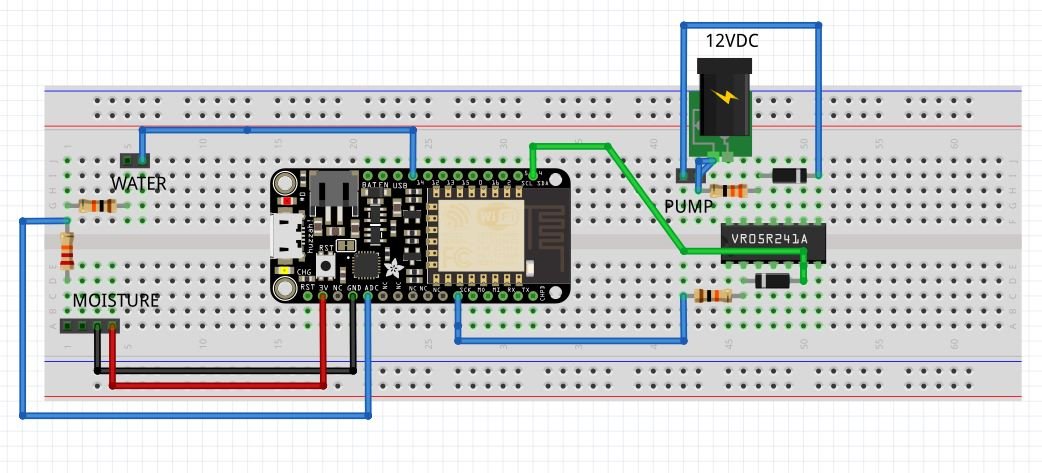
Schematic Drawing

image

Breadboard

image

Code

#include 

//==========
// CONSTANTS
//==========

// wifi
const char* MY_SSID     = "";
const char* PASSWORD = "";

// I/O
const int LED = 0;  // (Output) indicates pump status (pump ON => LOW signal => lit)
const int PUMP = 4; // (Output) turns water pump on (set LOW) and off (set HIGH)
const int WATER_EMPTY_LED = 2;  // (Output) indicates water reservoir status 
                                // (empty => LOW signal => lit)
const int WATER_LEVEL = 14;  // (Input) to detect water in reservoir (water => HIGH)

// A0 : ADC (Analog Input) used to read soil humidity: high value => dry, low value => wet 
// Max value is approx. 825 - bone dry
// Min value is approx. 470 - drowning in water
const int PUMP_ON_THRESHOLD = 700;  // ADC input value >= this value => Turn on water pump
const int PUMP_OFF_THRESHOLD = 650; // ADC input value <= this value => Turn off water pump
                                    // (and do not turn on again for at least a day)
const long MINIMUM_TIME = 1000 * 60 * 60 * 24; // minimum time between watering (1 day)

//==========
// VARIABLES
//==========

// timing
unsigned long previousMillis = 0;
unsigned long currentMillis = 0;

// soil moisture reading
int moisture = 800; // previous 
int tmpMoisture = 0;  //  new (temporary)

//======
// SETUP
//======

void setup() {
  // initialize Serial
  Serial.begin(115200);
  delay(100);

  Serial.println();
  Serial.println();
  Serial.print("Connecting to ");
  Serial.println(MY_SSID);

  // initialize info
  WiFi.begin(MY_SSID, PASSWORD);
  WiFi.config(IPAddress(192, 168, 33, 95), IPAddress(192, 168, 33, 1), IPAddress(192, 168, 33, 1));
  
  while (WiFi.status() != WL_CONNECTED) {
    delay(500);
    Serial.print(".");
  }

  Serial.println("");
  Serial.println("WiFi connected");  
  Serial.println("IP address: ");
  Serial.println(WiFi.localIP());

  Serial.println();
  Serial.println();

  Serial.println("Soil moisture sensor");

  // initialize IO
  pinMode(WATER_LEVEL, INPUT);
  pinMode(PUMP, OUTPUT);
  digitalWrite(PUMP, HIGH);
  pinMode(LED, OUTPUT);
  digitalWrite(LED, HIGH);
  pinMode(WATER_EMPTY_LED, OUTPUT);
  digitalWrite(WATER_EMPTY_LED, HIGH);
  delay(2000); // give soil moisture sensor a chance to stabilize
}

void loop() {
  
  // check water reservoir
  while (digitalRead(WATER_LEVEL) == LOW) {  // water reservoir is empty 
    digitalWrite(WATER_EMPTY_LED, LOW);  // turn on the WATER_EMPTY_LED
    digitalWrite(PUMP, HIGH);  // make sure the water pump is turned off
    Serial.println("No water in reservoir => fill it up!");
    soil_moisture(false); // get soil moisture reading and update the soil moisture indicator LED
    // future code to send message at appropriate intervals goes here ...
    delay(10000); // allow moisture sensor to stabilize before next reading
  }
  digitalWrite(WATER_EMPTY_LED, HIGH); // The reservoir has water => turn off the WATER_EMPTY_LED
  soil_moisture(true);  // get the soil moisture reading and do appropriate actions
  delay(10000); // make sure that the moisture sensor gets time to stabilize before next reading
}


void soil_moisture(bool waterAvailable) {
  tmpMoisture = analogRead(A0); // take a soil moisture reading
  if (tmpMoisture != moisture) {  
    // only do the following if the moisture level has changed
    moisture = tmpMoisture;
    // print the moisture data to the serial interface ...
    Serial.print("moisture = ");
    Serial.println(moisture);
    if (moisture >= PUMP_ON_THRESHOLD) { // soil is dry enough for watering ...
      digitalWrite(LED, LOW); // turn on the indicator LED ...
      Serial.print("Dry threshold reached - ");
      if (waterAvailable) { // water is in the reservoir => OK to continue ...
        Serial.print("and water is available - ");
        currentMillis = millis();
        if ((previousMillis == 0) or (currentMillis - previousMillis >= MINIMUM_TIME)) {
          // the appropriate amount of time has transpired since the last watering => OK to water
          digitalWrite(PUMP, LOW);  // turn on pump
          Serial.println("water the plant!");
        } else {
          // not enough time has transpired since last watering => need to wait before watering
          Serial.println("but wait a bit longer.");
        }
      } else {
        // water reservoir is empty ...
        Serial.println("but the water reservoir is empty - fill it up!");
      }
    } else if (moisture <= PUMP_OFF_THRESHOLD) {
        // soil is moist enough ...
        digitalWrite(LED, HIGH);  // turn off the indicator LED
        digitalWrite(PUMP, HIGH); // make sure the water pump is off
        // update previousMillis. Want to wait at least MINIMUM_TIME before next watering
        previousMillis = millis();
        Serial.println("The soil moisture level is high - turning off the water pump.");
    } else {
      // moisture level between thresholds - no action necessary
      Serial.println("The soil moisture level is adequate - no action is being taken.");
    }
  }
}


You don't have permission to edit metadata of this video.
Edit media
x
image
Upload Preview
image

  • Sign in to reply

Top Comments

  • urkraft
    urkraft over 8 years ago +7
    Status update: Here is a picture of the latest breadboard configuration (although i would be amazed if it would be helpful to anyone as it looks like a rats nest). It is now connected to all the sensors…
  • ntewinkel
    ntewinkel over 8 years ago in reply to urkraft +5
    Thanks Raymond! Hey I just found a case - it fits inside a TicTac container! -Nico
  • ntewinkel
    ntewinkel over 7 years ago in reply to urkraft +5
    What if you replaced the corroded prongs with copper (or copper plated) nails ($5 for a bag here at Home Depot)? Or you could probably use a few cutoff bits of copper house wiring (likely free even at…
Parents
  • urkraft
    urkraft over 8 years ago

    Status update:

    I have finally gotten my ESP-01 to connect to an access point (AP) - even one that is hidden! There were a LOT of things that need to be learned and corrected along the way for me, and i will try to document as much as i can here.


    It appears that uploading sketches to the device you loose the ability to communicate with it with AT commands. The first thing it appears that should be done with these devices is to make a connection to an AP and possibly update the firmware. I do not understand how this works, but i have read many places indications that this could be an issue.


    Now for the things that i believe that i understand to some degree:


    Here is what i would call a generic diagram for an ESP-01 flashing circuit:

    image

    Notes about the flashing circuit:

    • It is VERY important to use a 3.3V power supply capable of supplying enough current. I do not know how much current is recommended, but i have read a number of places that neither the 3.3V output from an Arduino nor the 3.3V output from the MB102 breadboard power supply module are reliable for this purpose - so be warned! (I used a lab bench power supply capable of delivering 3A - overkill, i am sure, but there were so many problems to be overcome that i wanted to be 100% sure that this was not the source of my problems).
    • I have also observed that a number of people have reported having problems using 10k resistors where indicated in the diagram. Their problems appeared to be resolved by using 3.3k resistors instead. (I did not have 3.3k resistors, so i used the 3.9k resistors that were available to me.)
    • I did not use capacitors C1 and C2.
    • The USB to TTL converter in the diagram is assumed to be using 3.3V levels on the ESP-01 side. I used an Arduino USB 2 Serial which uses 5V levels with a 3.3V to 5V bi-directonal level shifter circuit as my USB to TTL Converter.
    • I used the Arduino IDE to upload sketches
    • To upload sketches successfully i had to press and hold the Reset switch, then press and hold the Flash switch, then release the Reset switch, but keep holding the Flash switch depressed until the sketch was done uploading. If problems occurred it was usually sufficient to turn off power to the ESP-01, disconnect the USB cable from the pc, close the Arduino IDE (and Serial window), and reconnect and restart the IDE.
    • Here is a picture of the Arduino settings that i found to work for me:

    image

              NOTE:

    1. My ESP-01 has 1MB (black pcb, blue pcb usually => 512KB)
    2. Crystal Frequency choice WILL affect which "baud" setting you will have to use in order to be able to read output to Serial - and will probably prevent the unit from finding and connecting to access points!!!!


    • If you use an Arduino Uno you will have to connect the Rx from the ESP-01 to the Rx of the UNO (and Tx to Tx as well).


    And here is the code i uploaded to the ESP-01 to test everything:


    #include 
    
    
    const char* MY_SSID = "*********"; // use your SSID here
    const char* PASSWORD = "**********"; // use your password here
    
    
    IPAddress staticIP(192, 168, 1, 32); // static ip address for the ESP-01
    IPAddress gateway(192, 168, 1, 1);
    IPAddress subnet(255, 255, 255, 0);
    
    
    const String HOST = "192.168.1.30"; // static ip address of my raspi server
    const int HTTP_PORT = 80;
    const String URL = "/fillReservoir.php"; // my script to send email informing reservoir empty
    
    
    const int RESERVOIR = 0; // use GP0 as input to signal ESP-01 reservoir empty 
    const int BLUE_LED = 2; // use the blue LED on the ESP-01 to signal status
    
    
    int reservoirLevel; // LOW input will signal that the reservoir is empty
    int ledStatus = HIGH; // to turn LED off
    
    
    void setup() {  
      Serial.begin(115200);  
      Serial.println();
      delay(100);  
    
    
      pinMode(BLUE_LED, OUTPUT);
      digitalWrite(BLUE_LED, ledStatus);
      
      WiFi.mode(WIFI_STA);
      bool wifiIsConnected = false;
      wifiConnect();
      for (int i = 3; i > 0; i--) { // make 3 attempts to connect to the AP
        if (wifiIsConnected = wifiConnect()) {
          break;
        }
      }
      if (!wifiIsConnected) {
        digitalWrite(BLUE_LED, LOW);
        delay(10000);
        exit(1);
      }
      
      delay(100);  
      sendMessage(); // just to test that the reservoir empty messaging is working
      delay(500);  
      pinMode(RESERVOIR, INPUT);
      delay(100);
    }  
      
    void loop() {
      if (LOW == (reservoirLevel = digitalRead(RESERVOIR))) {
        sendMessage();
        delay(1000UL * 60UL * 24UL); // wait a day before testing reservoir status again
      }
      delay(5000);
    }
    
    
    void sendMessage() {
      WiFiClient client;  
        
      if (!client.connect(HOST, HTTP_PORT)) {  
        //Serial.println("connection failed");  
        return;  
      }  
        
      client.print(String("GET ") + URL + " HTTP/1.1\r\n" +  
                   "Host: " + HOST + "\r\n" +   
                   "Connection: close\r\n\r\n");  
      delay(500);  
    }
    
    
    bool wifiConnect() {
      bool wifiConnected = false;
    
    
      WiFi.begin(MY_SSID, PASSWORD);
      WiFi.config(staticIP, gateway, subnet);
      for (int i = 40; i > 0 ; i--) { // wait for 20 seconds to be connected, blinking every second
        Serial.print("Connection status: ");
        Serial.println(WiFi.status());
        if (wifiConnected = (WiFi.status() == 3)) {  //WL_CONNECTED)) {
          wifiConnected = true;
          break;
        }
        delay(500);
        if (ledStatus == HIGH) {
          ledStatus = LOW;
        } else {
          ledStatus = HIGH; 
        }
        digitalWrite(BLUE_LED, ledStatus);
      }
      ledStatus = HIGH;
      digitalWrite(BLUE_LED, ledStatus);
      WiFi.printDiag(Serial);
      return wifiConnected;
    }


    Serial output:


    image

    E-mail received:


    image


    And this is how the breadboard looks:


    image


    -raymond

    • Cancel
    • Vote Up +3 Vote Down
    • Sign in to reply
    • More
    • Cancel
  • ntewinkel
    ntewinkel over 8 years ago in reply to urkraft

    >I have finally gotten my ESP-01 to connect to an access point


    Hooray! Congrats! Excellent news image


    My flashing circuit is pretty much the same as yours, except I left GPIO2 disconnected and I don't have reset hooked up (I need to hook that up... major pain the way it is!).

    I have a 3.3v USB-Serial adapter so I just use the power supply from it as VCC. Seems to work well.


    >I did not use the capacitors in the circuit above (my circuit was equivalent to shorting out them).


    I think those are supposed to make it more stable, but I left them out too. Seems to be fine without it. Did you mean you left those disconnected rather than shorted? (otherwise gnd-vcc would not be happy-making)


    Cheers,

    -Nico

    • Cancel
    • Vote Up +2 Vote Down
    • Sign in to reply
    • More
    • Cancel
  • urkraft
    urkraft over 8 years ago in reply to ntewinkel

    You are absolutely right regarding the capacitors Nico, i left them out. I am so tired now that i am not thinking properly. It is past midnight now in Eiksmarka and i have not been sleeping much lately. I will correct that right now.


    -raymond

    • Cancel
    • Vote Up +1 Vote Down
    • Sign in to reply
    • More
    • Cancel
  • ntewinkel
    ntewinkel over 8 years ago in reply to urkraft

    Yes sleep is good!


    Norway! Very cool, I hear great things about Norway all the time image

    • Cancel
    • Vote Up 0 Vote Down
    • Sign in to reply
    • More
    • Cancel
Comment
  • ntewinkel
    ntewinkel over 8 years ago in reply to urkraft

    Yes sleep is good!


    Norway! Very cool, I hear great things about Norway all the time image

    • Cancel
    • Vote Up 0 Vote Down
    • Sign in to reply
    • More
    • Cancel
Children
No Data
element14 Community

element14 is the first online community specifically for engineers. Connect with your peers and get expert answers to your questions.

  • Members
  • Learn
  • Technologies
  • Challenges & Projects
  • Products
  • Store
  • About Us
  • Feedback & Support
  • FAQs
  • Terms of Use
  • Privacy Policy
  • Legal and Copyright Notices
  • Sitemap
  • Cookies

An Avnet Company © 2026 Premier Farnell Limited. All Rights Reserved.

Premier Farnell Ltd, registered in England and Wales (no 00876412), registered office: Farnell House, Forge Lane, Leeds LS12 2NE.

ICP 备案号 10220084.

Follow element14

  • X
  • Facebook
  • linkedin
  • YouTube