


Introduction:
Search-and-rescue operations are among the most difficult yet important applications of robotics engineering. In disasters like building collapses, industrial accidents, nuclear incidents, and so on, the ability to quickly find survivors, assess dangerous environments, and deliver needed supplies without putting people in danger is paramount. Tele-operated ground robots meet this need directly, letting operators navigate dangerous, GPS-denied areas with little situational awareness and under a lot of time pressure. These challenges are reflected in the mission scenario underpinning this project. Alex, the tele-operated rescue robot developed, is designed to navigate its environment under remote control via a dual-operator architecture, locating items via floor-mounted colour markers, retrieving them using a robotic arm, and delivering them to another location. A 360° LIDAR sensor provides continuous spatial awareness to support real-time operator decision-making and post-mission mapping. Robots like the iRobot PackBot and Quince have been deployed in active conflict zones and nuclear disaster sites, respectively, performing precisely this kind of remote sensing, manipulation, and environmental mapping under conditions hostile to human entry. Alex is designed and evaluated against the same functional requirements that define these platforms.
System Architecture:
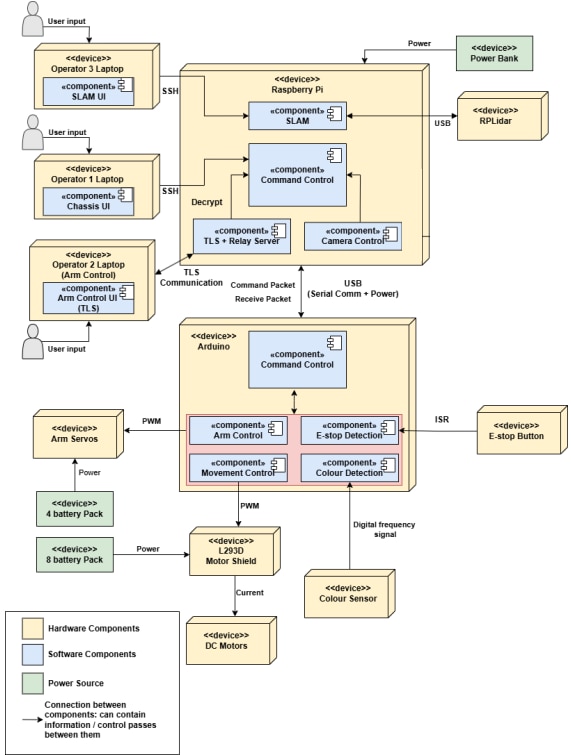
Alex involves 11 devices, namely the Arduino Mega, Raspberry Pi, DC Motors, Colour Sensor, Motor Shield, Arm Servos, E-stop Button, LiDAR and three laptops for the teleoperator. Figure below shows the system architecture of our Alex robot, which shows all components of Alex and its connections.
Hardware Design:

Firmware Design:
High-Level Algorithm:
- Hardware Configuration: Timers and pins setup so that the Arduino can properly control the robot
- Initialisation: Synchronise hardware and establish safety protocols.
- Receive User Command: Listen for operator input using USART.
- Carry Out Command: Process input, check if e-stop is active (if it is, the packet will be disregarded), transmit data packets, and execute hardware movement.
- Loop: Repeat steps 2 and 3 until objective is met

Further Breakdown
-
Hardware Configuration
- Communications (USART): Configured to a 9600 baud rate to ensure stable, lowerror serial communication with the Raspberry Pi.
- Safety (E-Stop): The designated E-Stop pin is configured to trigger a hardware interrupt on any logical change.
- The Interrupt Service Routine (ISR) implements software debouncing to prevent multiple triggers from a single press.
- The logic evaluates both the system state and the physical button state:
- if the E-stop is disabled and the button is depressed, it halts the system
- if enabled and released, it resumes operation.
- Colour Sensor (TCS3200): The output frequency is scaled to 20% to keep the signal within the Nyquist-equivalent sampling limits of the microcontroller.
- External Interrupt 1 (INT1) is initialised to increment a variable on every logical change. Over a 100ms window, this yields discrete frequency values for the red, green, and blue color channels.
- Robotic Arm (Servos): The servo pins are initialised as outputs, and Timer 5 is configured for Output Compare Match.
- Instead of relying on four separate timers, the Timer 5 ISR is programmed as a sequential state machine to "daisy-chain" control pulses.
- The ISR toggles the respective PORTK pins and dynamically recalculates the next interrupt interval to deliver precise pulse widths. A final idle phase is calculated to maintain a stable 20ms refresh frame.
- Locomotion (Motors): The L293D motor driver shield is configured utilising the standard AFMotor library.
2. Initialisation
- Interrupt Activation: Global interrupts are initialized via the sei() command. Individual hardware components are subsequently activated by configuring their respective control registers. Specifically, the EIMSK register is modified to enable both the INT0 (E-Stop) and INT1 (Colour Sensor) external interrupts, while the TIMSK5 register is updated to activate the Timer 5 servo interrupts. Crucially, the hardware-level configuration of INT0 guarantees that the E-Stop mechanism will instantly preempt the main program loop under any condition.
- Default Hardware States: The servos are initialized to safe, pre-calculated base angles to prevent erratic, unpredictable movements upon startup. The default motor speed is set to a duty cycle of 78.4% via the AFMotor library.
- Sensor Start, GUI Update and Handshake will be discussed under Software Design.
3. Receive User Command
To prevent unpredictable hardware behavior, the firmware uses a strict, structured communication protocol to ensure data integrity between the Raspberry Pi and the Arduino.
- Packet Polling: The Arduino continuously polls the UART receive buffer, ignoring all incoming bytes until it detects the specific two-byte magic header (0xDE, 0xAD).
- Payload Retrieval: Upon verifying the magic bytes, the Arduino reads the subsequent 101 bytes (comprising a 100-byte payload and a 1-byte checksum).
- Data Verification: The Arduino computes a local checksum by performing a bitwise XOR across all payload bytes. If this computed value differs from the received checksum byte, the system assumes bit-corruption occurred during transmission and discards the entire packet.
- Carry Out Command
The complete command processing workflow on the Raspberry Pi is detailed in Section 6.
- Loop
Repeat steps 3 to 4 until the objective is met.
Software Design
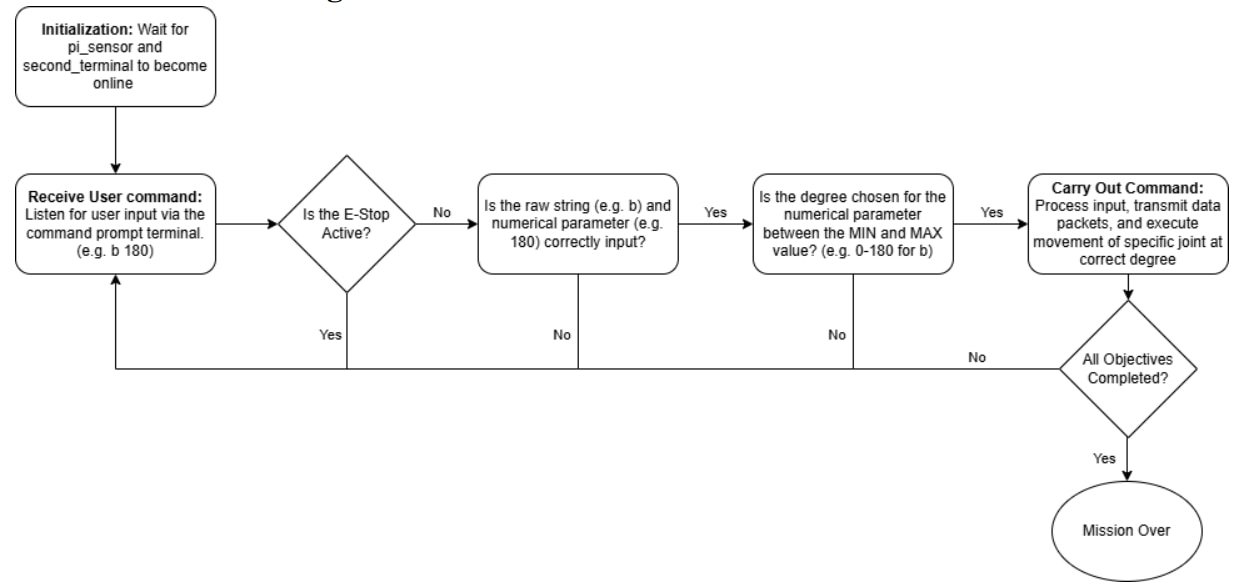
High-Level Software Algorithm Flowchart for Arm Control
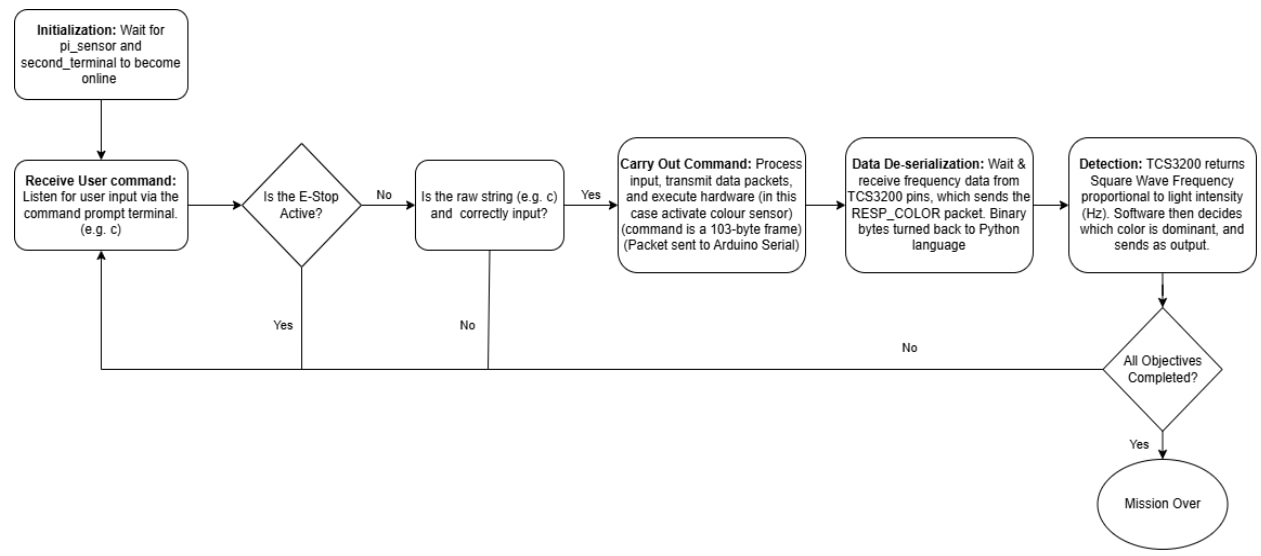
High-Level Software Algorithm Flowchart for Color Sensor
1. Initialisation
Baud Rate Synchronisation: The Raspberry Pi explicitly locks the serial baud rate at 9600 to match the Arduino’s configuration, ensuring stable, error-free UART telemetry between the microcontrollers.
Handshake Protocol: The Pi enters a TCP listening state, waiting for the secondary operator terminal to connect and bind to local port 65432.
Sensor Start (LiDAR): The Pi initialises the LiDAR module via a USB/Serial interface. The SLAM algorithm takes control of the data stream, resetting the occupancy grid and localizing the robot's physical origin to (0,0).
GUI Update: The SLAM interface immediately renders the initial LiDAR scan to the operator's display, establishing situational awareness prior to any locomotion.
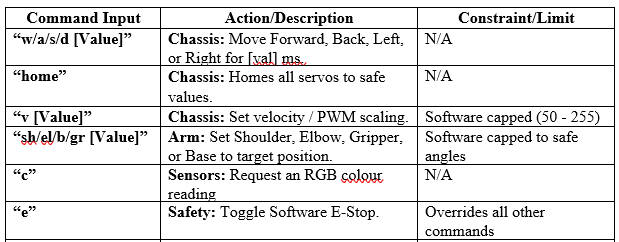
2. Receive User Command (The full list of inputs are provided below)
- E-Stop Safety Architecture (“e”): The system continuously monitors for software safety triggers. When “e” command is sent, a two-step halt sequence occurs:
- Pi (High-Level): Instantly updates its global state to block any new movement commands from being queued, while simultaneously transmitting a priority halt packet to the Arduino.
- Arduino (Low-Level): Upon receipt, the Arduino immediately sets its internal E-Stop state to active, stopping all motor and servo PWM signals. It ignores all subsequent movement packets and sends an acknowledgment packet back to the Pi.
- Chassis Locomotion (“w”, “a”, “s”, “d”): Directional keys are passed with a duration parameter.
- Use case: [value]. For example, “w 5000” makes the robot move forward for 5000 milliseconds
- Velocity Control (“v”): Adjusts the global chassis speed using an 8-bit parameter
- Use case: [value]. e.g. “v 255” makes the robot move at max speed
- The effective duty cycle percentage is calculated via 255 × 100% and implemented using the AFMotor library on the Arduino. Firmware-level limiters automatically cap values exceeding 255.
- Arm Manipulation (“sh”, “b”, “el”, “gr”): Controls the shoulder, base, elbow, and gripper respectively. (This process will be elaborated in the next section)
- Use case: [value]. e.g. “b 180” makes the base turn toward the 180° direction.
- Software limiters restrict the inputs to valid physical ranges, preventing hardware strain and self-collision.
- Colour Detection (“c”): Triggers the TCS3200 sensor to process an RGB frequency reading of the floor marker. (This process will be elaborated in the next section)
Complete and functional project video (https://youtu.be/QglzhW2I7To)
2 most important lessons learned in this project:
- The Challenge of Concurrent Stream Management:
During the integration phase, I realised that relying on sequential, blocking execution is entirely insufficient for a complex, dual-controller robotic system. My Raspberry Pi was tasked with managing high-level processing, which included handling asynchronous data such as LiDAR point clouds, highly restricted camera frames, and real-time commands from two separate operators simultaneously. Relying on blocking code created severe bottlenecks. For instance, a delay in one process such as waiting to fetch one of my limited visual frames would "freeze" the robot. Because the final mission has a strict 8-minute time limit and requires immediate reaction to the physical E-Stop, these freezes were unacceptable for safety and performance risks. This highlighted the absolute necessity of non-blocking, eventdriven programming and prioritised hardware interrupts in real-time embedded systems. - The Criticality of Pre-Implementation Architecture:
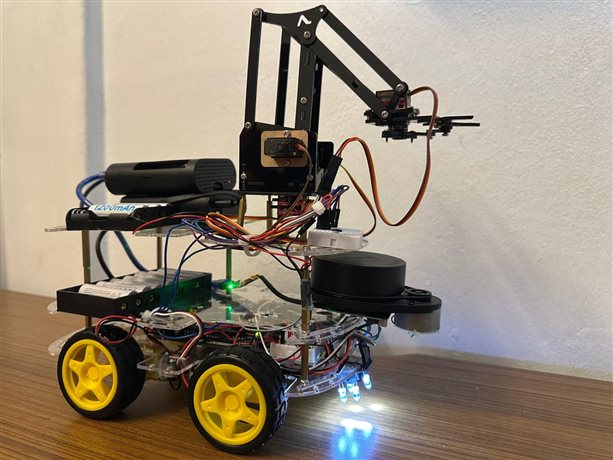
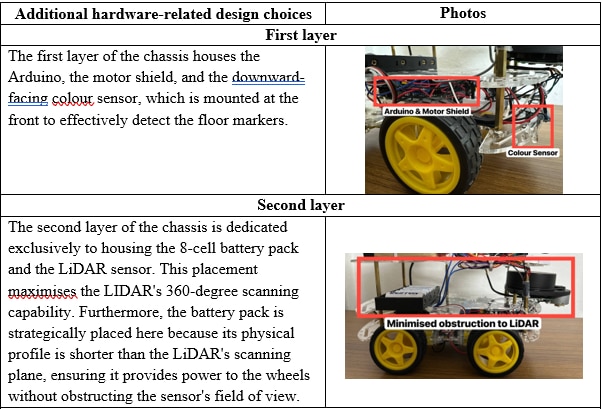
Throughout this project, I learned that the cost and complexity of design changes increase exponentially as integration progresses. My initial ad-hoc software development led to fractured logic that was highly prone to failure and incredibly time-consuming to debug during my trial runs. Furthermore, assembling the hardware without prior spatial planning caused compounding mechanical issues. Because I had to precisely manipulate an 8x5x5cm medpak without touching high walls, sensor visibility was paramount. I repeatedly had to disassemble the chassis to relocate the camera for better gripper visibility and shift towering components that were obstructing the LiDAR's field of view. Ultimately, I learned that rigorous pre-implementation planning, mapping out both software architecture and a physical 3D layout is non-negotiable to prevent wasting critical testing phases on structural rebuilds.
2 greatest mistakes:
- Physical Integration & LiDAR Field of View (FoV):
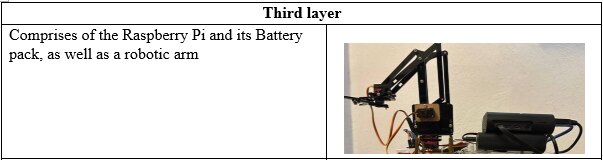
One of my primary hardware oversights was the initial mounting position of my 360° LiDAR unit. I placed the sensor where chassis wiring and structural supports partially obstructed its laser sweep. Because a core mission objective was submitting an accurate, hand-drawn map of the unknown base layout, this oversight was critically damaging. The obstructions created blind spots in my SLAM mapping, causing the robot to misinterpret its distance from walls or fail to detect them entirely, risking heavy penalties for environmental collisions. Moving forward, I implemented a strict "clearance-first" design rule for the third layer of the chassis, ensuring the sensor’s optical path remained entirely unobstructed by objects. - Low-Level Resource Contention (Timer Conflicts):
I initially failed to maintain a comprehensive Timer Resource Map. When I began testing the locomotion system, I realised too late that the PWM signals driving my four independent DC motors via the L293D shield were competing for the same hardware timers used by the 4-DoF arm servos. This conflict rendered some motors completely unresponsive to operator commands. This mistake taught me a vital lesson: bare-metal programming requires a deep, uncompromising understanding of the microcontroller’s datasheet. Peripheral and timer allocation must be planned as strictly as the software logic itself to prevent hardware-level interrupt clashing.
Continuation of half-complete project:
The Hardware Trap and Loss of Momentum
Building a reliable physical foundation for a robotics platform is rarely as straightforward as writing code. The process of sourcing compatible equipment is inherently tedious; in robotics, a single mismatched component can stall the entire build. By the time the compatible hardware actually arrived, my initial excitement had likely faded. The project became a literal box of parts, sitting half-complete while I waited on shipping and logistics, sapping my momentum before the complex assembly even began.
The Intimidation of the System Architecture
The Intimidation of the System Architecture The core of my project inertia stems directly from how daunting the integration phase is. Looking at the high level system architecture of the final system, I realize I'm not just building one thing; I am building distinct sub-systems that must communicate flawlessly. I had to figure out how to make a Raspberry Pi, which handles the high level algorithm for software design like arm control and color detection, communicate with an Arduino, which manages the high level algorithm for the firmware design. Developing the communication protocol to handle the format of messages and responses between these microcontrollers is often the most complex and failure-prone part of a robotics project. It is incredibly common to delay starting because mapping out this protocol feels overwhelming.


