


Where It All Began
Imagine you're at a career fair, suited up, resume in hand, and you've got about 45 seconds before a recruiter moves on to the next student. Your resume has a QR code linking to a video of your best project, but nobody has time to watch it. You can't bring your robot arm. You can't lug a laptop running your firmware demo. So how do you show what you can do, in a room full of engineers in dress clothes, in under a minute?
That question is what started this project.
The answer had to be wearable, something that goes wherever you go, requires no setup, and fits the formality of a career event. At nearly every professional event I attend, I wear a bowtie, they're stylish, sleek, and they stand out as they're not commonly worn. So the idea came together naturally: why not make the bowtie itself the project? But not just any bowtie, one that lights up, listens to you, and talks back!
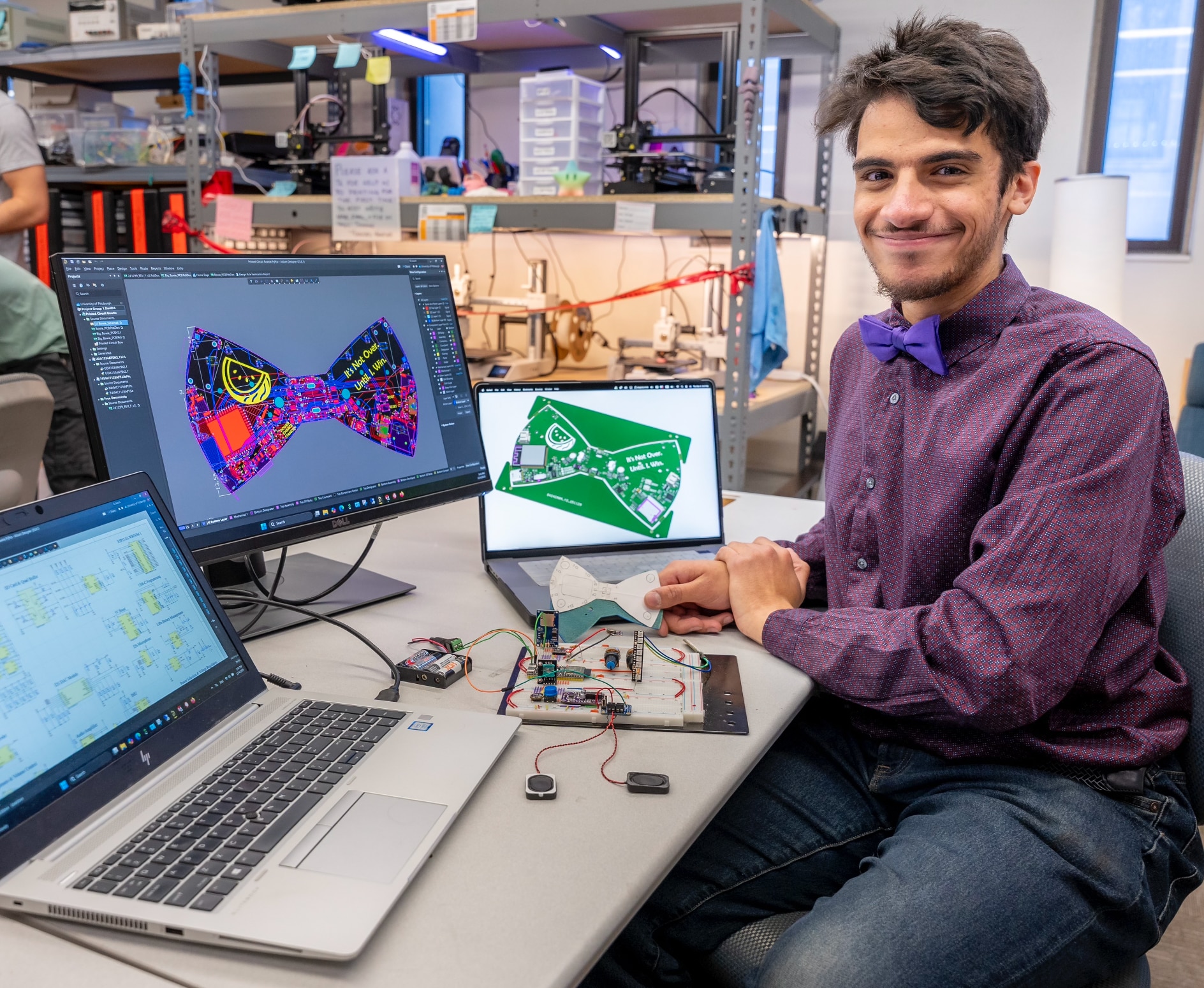
Introducing the PCB: the Printed Circuit Bowtie. A fully custom 4-layer PCB, designed in the shape of a bowtie, powered by an ESP32-S3, acting as a wearable AI personal assistant named Bowie. Ask Bowie a question out loud, and Bowie answers through a speaker built right into the bowtie. This project brings together everything I love about electrical and computer engineering: PCB design, embedded firmware, IoT architecture, and audio systems. All wrapped up in one of the classiest pieces of clothing ever made!
Section 1: Project Background & The Spring Clean Story
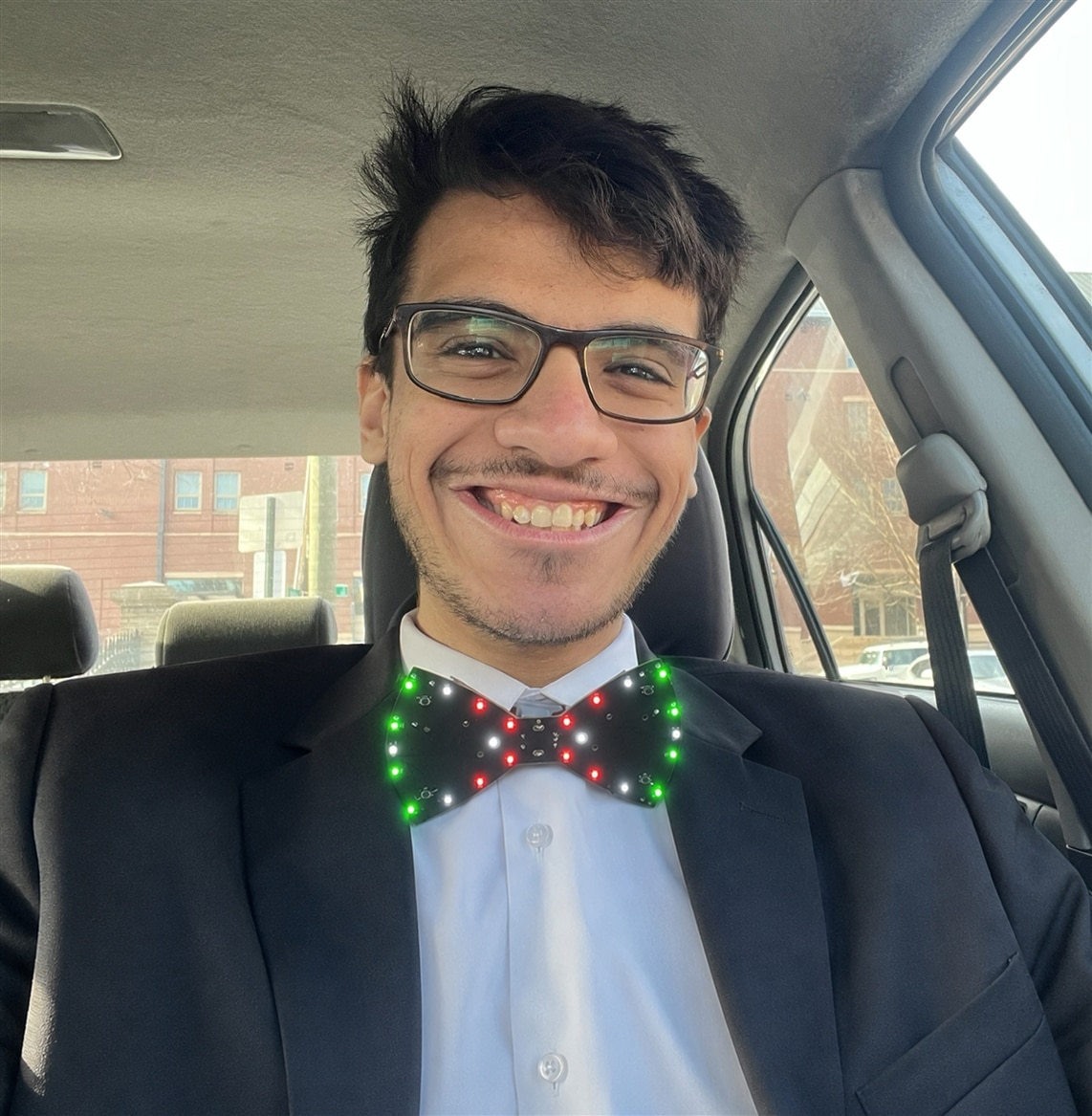
Bowie V1 in action on the way to a networking event! :)
The story of Bowie goes all the way back to December 2024. At that point I was a junior Engineer working on this as a personal project and it was just a very simple breadboard. A microphone, an ESP32, and a cloud backend that could record a voice prompt, send it to a language model, and return an audio response saved to an SD card. The absolute bare bones concept worked, but the execution was nowhere close to done.
A busy semester of engineering school put the project on hold, and it sat untouched until September 2025 which was my last semester. With my senior design project done the semester prior, I picked Bowie back up with a clear mission: design the hardware properly and turn this breadboard proof-of-concept into an actual wearable device.
From September to October, the breadboard had evolved, now including Neopixels, potentiometers, haptic feedback, but most important of all audio output! So from October to November, the full hardware design came together in Altium Designer, an ESP32-S3 as the brain surrounded by all peripherals considered on breadboard but now with additional features that I couldn't breadboard like LiPo battery management, onboard charging, programming through USBC and more. All packed into a 4-layer PCB which I ordered from in late November arriving in January 2026.
And that's where the real work began.
The first version of the board was about 80% successful, but it had a critical flaw: the audio output circuit failed entirely. This was not a small fix and it prevented the bowtie from doing its primary task, talking! So from January through March, it was back to the datasheets, diagnosing what went wrong, correcting the failure, and cleaning up the layout. New boards arrived in March 2026. This time, everything worked: audio, peripherals, battery management, USB-C programming. I had full hardware validation across the board.
Spring Clean 2026 became the deadline to finish what the hardware had been waiting for: a complete, working software stack. From voice capture to Bowie speaking back.
Section 2: System Architecture
Bowie is an IoT device at its core. The bowtie handles all the user-facing hardware, like the microphone, speaker, buttons, Neopixels, while a server running on Digital Ocean handles the heavy processing. This split was a deliberate call as the ESP32-S3 has limited memory and isn't well-suited to running LLM inference or making complex API calls directly, so the device stays lean and offloads intelligence to the cloud.

The end-to-end flow:
- User presses the button to initiate a prompt
- The ICS43434 MEMS microphone captures audio over I2S
- Audio is written chunk-by-chunk to the SD card over SPI
- WAV file is streamed to the Digital Ocean backend over WebSocket
- The backend runs it through AssemblyAI speech-to-text
- The transcript goes to the Claude API, configured with Bowie's persona
- Claude's response goes through ElevenLabs text-to-speech
- The resulting MP3 is sent back to the bowtie over WebSocket
- The ESP32-S3 stores the response on the SD card over SPI
- Two MAX98357A I2S amplifiers play it through two speakers
Section 3: Hardware Design

No way! It's actually a circuit board shaped like a bowtie!!
3.1 Why 4 Layers?

One look and the answer is pretty obvious 
The simplest reason is that the bowtie form factor is unforgiving. Every IC, connector, button, and Neopixel had to fit within the outline of a standard bowtie. With almost 200 components on the board, a 2-layer board simply couldn't route cleanly.
The 4-layer stack up also allowed me to provide a dedicated power and ground plane in the inner layers which helped greatly with routing as well as keeping high speed digital signals well maintained. Even with 4 layers though, routing was challenging to ensure no cross overs, solid ground planes under SPI and I2C signals, and maintaining a critical keep out underneath the ESP32-S3 antenna.
3.2 Embedded Protocols
One of the design challenges of packing this much into a bowtie-sized PCB was managing multiple communication protocols simultaneously. Nearly every pin on the ESP32-S3 is allocated:
| Protocol | Peripheral | Purpose |
|---|---|---|
| I2S (RX) | ICS43434 Microphone | Digital audio capture |
| I2S (TX) | MAX98357A Amplifiers | Digital audio playback |
| SPI | Micro SD Card | WAV write / MP3 read |
| Native USB | USB-C Port | Programming and debug (USB Serial/JTAG) |
| GPIO | Button, Neopixels, Pots, Haptic Motors, etc | User Interface |
3.3 Schematic Overview

Here's an overview of the schematic with PDF below to take a closer look in HD, I will dive deeper into the main elements that make bring Bowie together in this section

Power Management
LiPo batteries were the natural choice for a wearable. They're lightweight, rechargeable, and energy-dense enough to power the ESP32-S3, audio circuits, and 20 NeoPixels comfortably. Two 1000mAh cells wired in parallel double the capacity while keeping the voltage at 3.7V nominal, which feeds cleanly into the onboard LDO.

But LiPo batteries demand respect. Overcharge them and they swell. Over-discharge them and you permanently damage the cell. To handle both, the DW01A battery protection IC monitors the battery continuously, controlling a dual N-channel FS8205 MOSFET sitting in the battery's negative path. If the DW01A detects an over-charge or over-discharge condition, it opens the appropriate FET and cuts current in that direction, protecting both the battery and anything connected to it.
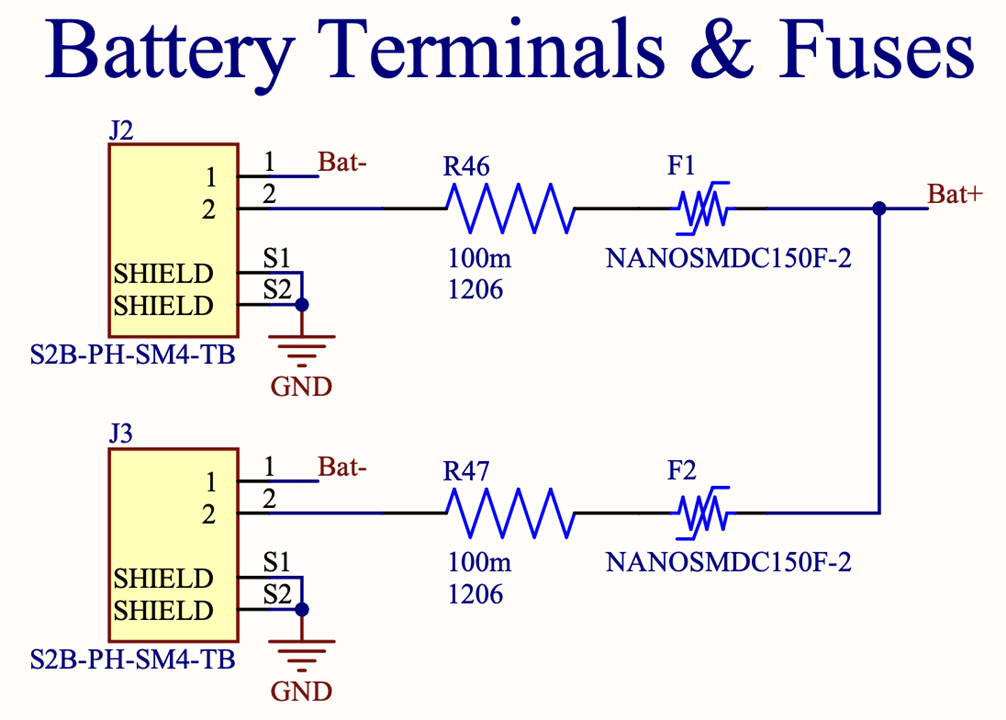
Each battery also has its own dedicated Resettable Polyfuse (F1, F2) right at the connector. The polyfuses act as a first line of defense, if current draw spikes beyond a safe threshold, they trip and self-reset once the fault clears, no replacement needed.
Charging is handled by the TP4056, with a 1.2kΩ PROG resistor setting the charge current, and green/red status LEDs indicating standby and active charging states.

The more interesting design challenge was power selection. The rule for LiPo safety is simple: never let the battery charge and power the load through the same path simultaneously. So my circuit enforces this elegantly using a Schottky diode (D7) and a P-Channel MOSFET (Q2).
When USB is plugged in, VCC is present. The Schottky diode conducts, pulling Q2's gate up toward VCC which is higher than Bat+, bringing VGS close to zero and turning Q2 off. The battery is completely disconnected from the load path. USB powers the device directly, and the TP4056 charges the battery independently on its own path.
When USB is removed, Q2's gate is pulled to ground through R9, making VGS sufficiently negative to turn Q2 on, and the battery takes over powering the device.
The result: plug in USB and the bowtie is simultaneously powered, programmable via USB Serial/JTAG, and charging its batteries. All three happen at once, with no risk of the battery and USB fighting each other on the load path.
Audio Output


V1 Audio Output Design
The first version's audio schematic originally had a separate DAC and Audio amplifier which from the datasheets looked promising, but it effectively failed due to two reasons. First the compact design of the PCB made it difficult to isolate analog and digital grounds with so many other signals running between layers and all over the board, so noise filtering was basically inexistent. Secondly, the DAC I selected was an obsolete component and I simply had not known because I was testing it out on breadboard where it had it's own breakout board, but the IC by itself was nowhere to be found. (I proceeded to order the PCBs knowing the part was obsolete hoping I could desolder the IC from the breakout board and resolder it to my board, but that also failed so it was a hopeless case) The redesign fixed it by having the DAC and Amplifier all in one IC (eliminating the need to struggle with separate grounds) and of course it's a much more popular chip that was in stock.
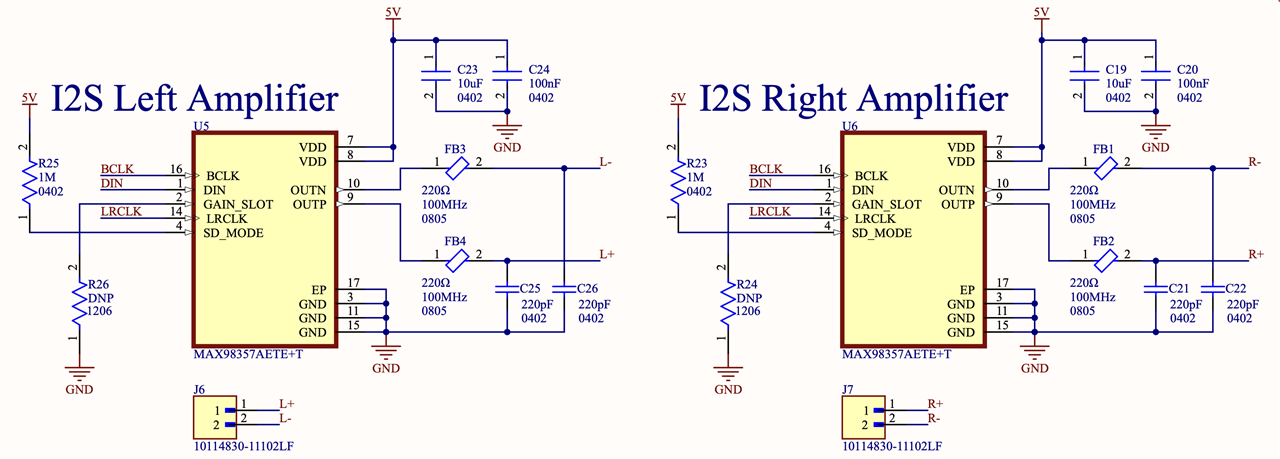
V2 Audio Output Design
Now on V2, playback runs through two MAX98357A filterless Class D I2S amplifiers (one per speaker) with built in DAC that take digital audio directly from the ESP32-S3. They each output up to 3.2W and need very few external components which was perfect for a limited board space like this bowtie.
Audio Input
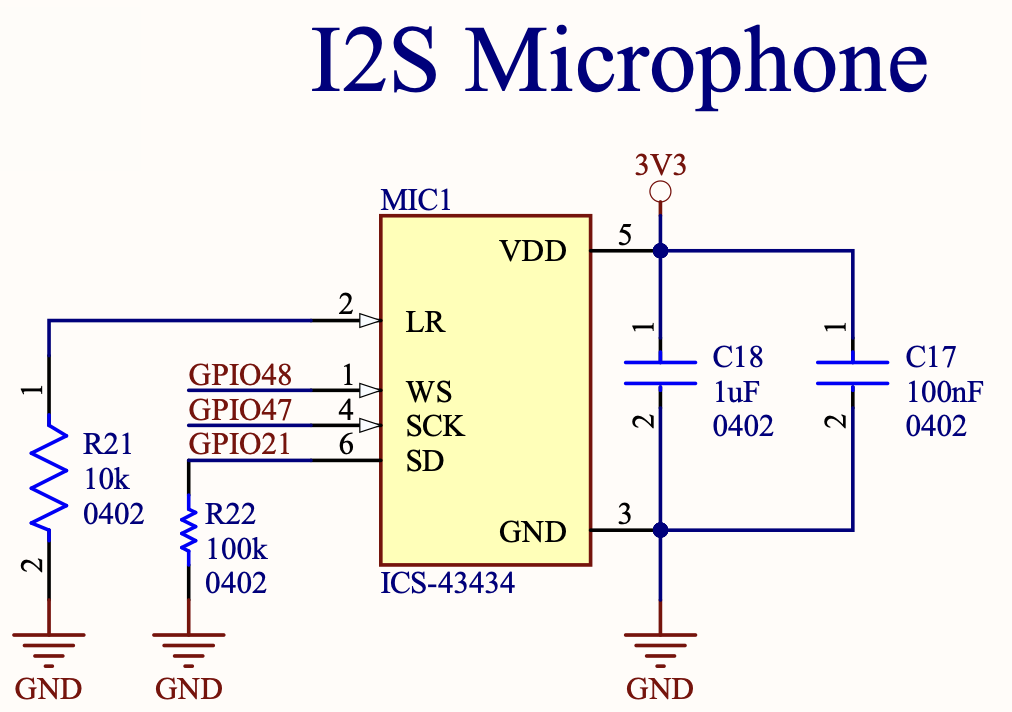
The ICS43434 is a high-performance I2S MEMS microphone chosen specifically for its omnidirectional pickup pattern. On a bowtie, the user isn't holding the mic up to their mouth, so the microphone needed to pick up voice reliably from chest height in a noisy room. Keeping the signal in the I2S digital domain all the way to the ESP32 also avoids the noise floor problems that come with analog mic routing across a dense board.
3.4 PCB Layout
Top Layer: Primary Signal and Power routing; A dense layer with MCU, I2S, SPI, and power management traces
Inner Layer 1: Dedicated ground plane, left unbroken under high speed traces when possible as well as connecting battery grounds together
Inner Layer 2: Dedicated power plane for clean 3.3V distribution as well as 5V rail distribution for Neopixels and Audio Amplifiers
Bottom Layer: Secondary signal routing and ground fills; Sparser than top layer but handles overflow and assists in getting signals from point to point

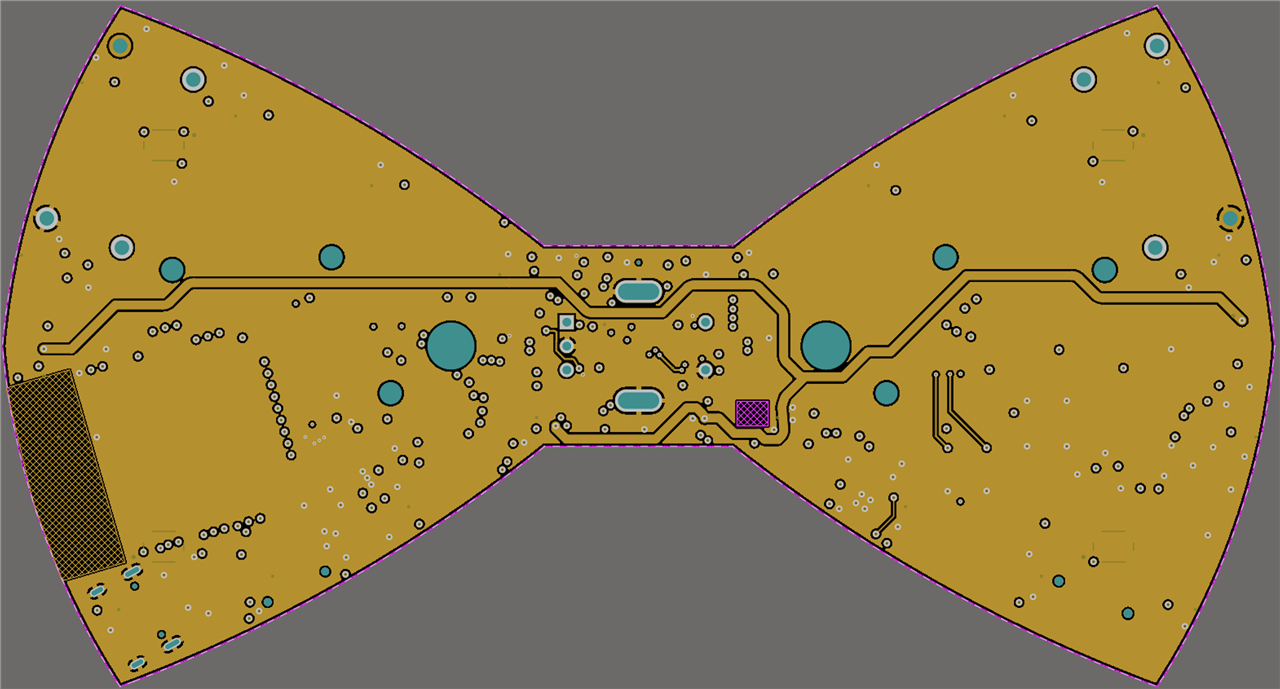


The stackup wasn't arbitrary. Having dedicated ground and power planes on the two inner layers means every signal trace on the outer layers has a reference plane immediately adjacent on both sides. This keeps trace impedance controlled, reduces crosstalk between sensitive signals, and gives the audio circuits a clean ground reference throughout.
3.5 General Bill of Materials
| Component | Part Number | Function | Qty |
|---|---|---|---|
| MCU | ESP32-S3 | Central MCU, WiFi | 1 |
| Audio Amplifier | MAX98357A | I2S Class D amplifier | 2 |
| Microphone | ICS43434 | I2S MEMS microphone | 1 |
| LiPo Charger | TP4056 | Battery charging via USB-C | 1 |
| Battery Protection | DW01A | Over-charge/discharge protection | 1 |
| LiPo Batteries | Liter 102535 | 2× 1000mAh 3.7V in parallel | 2 |
| Micro SD Slot | TF-01A | Audio storage | 1 |
| Speaker | 4Ω 3W Speaker | Audio output | 2 |
| NeoPixels | WS2812B | 20x RGB LEDs, state animations | 20 |
Section 4: The Audio Pipeline
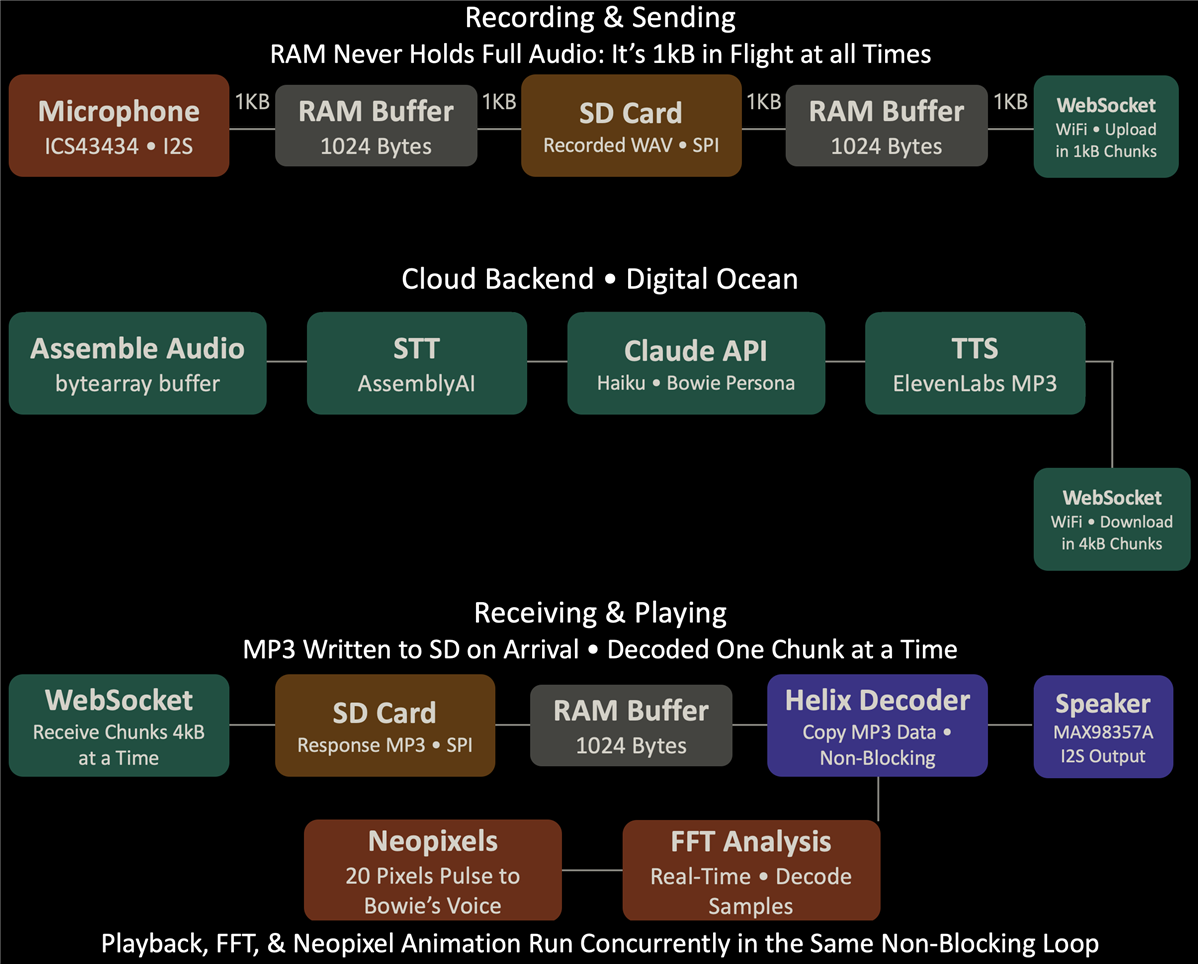
Getting audio to flow reliably end-to-end on a memory-constrained device was the most challenging part of this project. The ESP32-S3 has limited RAM, which means you can't just record audio into a buffer, hold it in memory, and send it as the recording alone would overflow. Everything had to be designed around streaming to and from the SD card, with the RAM acting only as a small in-flight buffer at any given time.
4.1 Recording — Chunk by Chunk
When the button is held, the firmware reads raw I2S samples from the ICS43434 microphone in 1024-byte chunks and writes them directly to the SD card. Nothing accumulates in RAM. The WAV header is written with a placeholder size first, then patched at the end once the final byte count is known:
// Record directly to SD — never holds full audio in RAM
uint32_t dataSize = 0;
while (digitalRead(BTN_PIN) == HIGH && (millis() - startTime) < 10000) {
    size_t bytesRead = 0;
    i2s_read(I2S_MIC_PORT, buffer, BUFFER_SIZE, &bytesRead, pdMS_TO_TICKS(100));
    if (bytesRead > 0) {
        f.write(buffer, bytesRead);
        dataSize += bytesRead;
    }
    recordingAnimation();
    readPots();
}
// Patch WAV header with final size
f.seek(0);
writeWAVHeader(f, dataSize);
f.close();
4.2 Sending — Streaming Off the SD Card
Rather than reading the entire WAV into memory before sending, the firmware reads it back off the SD card in 1024-byte chunks and sends each one immediately over the WebSocket. Memory usage stays flat regardless of recording length:
// Stream WAV from SD card — 1KB at a time, never loads full file into RAM
File f = SD.open("/rec.wav");
while (f.available()) {
    webSocket.loop();
    size_t bytesRead = f.read(buffer, BUFFER_SIZE);
    if (bytesRead > 0) {
        webSocket.sendBIN(buffer, bytesRead);
        totalSent += bytesRead;
    }
    sendingAnimation();
}
f.close();
webSocket.sendTXT("AUDIO_COMPLETE");
4.3 Backend — Assembling and Processing the Audio
On the server side, the audio arrives as a stream of binary WebSocket chunks. The backend accumulates them into a bytearray until the AUDIO_COMPLETE signal arrives, then runs the full AI pipeline:
async for message in websocket:
    # Accumulate binary audio chunks as they arrive
    if isinstance(message, bytes):
        audio_buffer.extend(message)
        received_bytes += len(message)

    elif isinstance(message, str) and message == "AUDIO_COMPLETE":
        # Write assembled audio to disk
        with open("user_audio.wav", "wb") as f:
            f.write(audio_buffer)

        # STT → LLM → TTS pipeline
        transcript = transcriber.transcribe("user_audio.wav")
        user_text = transcript.text
        conversation_log.append({"role": "user", "content": user_text})

        response = clientA.messages.create(
            model="claude-haiku-4-5-20251001", max_tokens=100, system=system_prompt, messages=conversation_log ) bowie_response = response.content[0].text conversation_log.append({"role": "assistant", "content": bowie_response}) audio = client11.text_to_speech.convert( text=bowie_response, voice_id="XrExE9yKIg1WjnnlVkGX", model_id="eleven_turbo_v2_5", output_format="mp3_44100_128", ) with open("response.mp3", "wb") as f: for chunk in audio: f.write(chunk) # Send MP3 back in 4KB chunks with open("response.mp3", "rb") as f: mp3_data = f.read() for i in range(0, len(mp3_data), 4096): await websocket.send(mp3_data[i:i+4096]) await websocket.send("MP3_COMPLETE")
Note that conversation_log is maintained across turns so Bowie remembers the conversation context, not just the most recent prompt.
4.4 Receiving and Playing — Non-Blocking Decode
Audio is sent back as an MP3 rather than WAV to reduce the time it takes to send. When the MP3 arrives back on the device, chunks are written to the SD card as they come in via the WebSocket callback. Once MP3_COMPLETE is received, playback begins, but critically, it's non-blocking. The Helix MP3 decoder processes one small chunk per loop iteration via copier.copy(), which means the main loop stays responsive and the full MP3 is never loaded into RAM at once:
// Non-blocking MP3 playback — one decode chunk per loop iteration
if (isPlaying) {
    if (!copier.copy()) {
        // copier.copy() returns false when the file is exhausted
        audioFile.close();
        decoder.end();
        isPlaying = false;
        enableRecordingMode();  // Switch I2S back to mic mode
    } else {
        processFFT();        // Run FFT on decoded samples
        updatePlaybackLEDs(); // Drive VU meter LEDs from FFT data
    }
    return;
}
The FFT runs on the decoded audio samples in real time during playback, driving the 20 Neopixels to animate the bowtie visually by pulsing to Bowie's voice.
4.5 Bowie's Persona
Bowie isn't a generic voice assistant, it has a specific character defined through the Claude API system prompt. It knows it's a bowtie, knows it was invented by me, keeps responses short and conversational, and always has real-time context injected: current time, date, location, and even my iCloud calendar events. This means Bowie can answer "what's on my schedule today?" accurately, every time, even if I update my calendar between prompts!
system_prompt = f"""You are Bowie, a smart bowtie assistant. You speak in short,
natural responses like a real conversation. I am your inventor — you are a PCB
bowtie I (Oday) invented.

Match your response length to the question:
- Simple questions (time, weather, yes/no): 1 sentence max.
- Casual chat or quick facts: 2-3 sentences max.
- Only give longer responses when truly needed.

{current_context}"""
# current_context includes: time, date, location, and live iCloud calendar events
Section 5: The Spring Clean
To put the scope in perspective, here's what the project looked like before and after:
Before (January 2026):
- V1 PCB in hand with a completely broken audio output
- No working firmware beyond the original breadboard proof-of-concept
- No WebSocket backend (Originally managed by MQTT which was a great start, but much much slower as chunks were smaller)
- No end-to-end audio pipeline
After (May 2026):
- V2 PCB fully validated: Audio, peripherals, battery management, programming all working
- Complete ESP32-S3 firmware: I2S capture, WebSocket streaming, response playback
- Digital Ocean backend: AssemblyAI STT → Claude API → ElevenLabs TTS pipeline live always
- Conversation history maintained across turns
- iCloud calendar integration working
- Designed and 3D printed a small mechanical enclosure to house the speakers and allow the bowtie to be worn comfortably around the neck
- End-to-end: ask Bowie a question, hear Bowie answer :)
Section 6: Demo
Here's a link to the demo on YouTube in case the embedded link doesn't work ;)
Bowie the Printed Circuit Bowtie in Action!
Section 7: What's Next
The hardware is solid. The core pipeline works. But there's a long list of things Bowie still can't do yet, and that's part of what makes this project worth continuing.
- Wake word: Hands-free activation without pressing a button, so Bowie can be summoned naturally at an event
- Faster response time: There's still latency to squeeze out of the WebSocket pipeline; MQTT was tried first and was too slow, WebSockets improved it, but there's more to do
- More integrations: The architecture is set up for additional API connections; calendar is working, but there's more to come (think Jarvis from Ironman!!)
- Neopixel animations: The 20 NeoPixels already run a live FFT animation during playback; more states and animations planned
- I2C Devices use: There are two I2C devices on the board not in use yet, an IMU and a battery level IC; the IMU will help with gesture-based activation and orientation-aware behavior and the battery level IC will of course be there for better UI design.
The bowtie is done, but Bowie is just getting started!
Special thanks to my professor Dr. Samuel Dickerson from the University of Pittsburgh for funding and sponsoring this incredible project from the end of my undergraduate to present day :)
Top Comments