


In Nov 2025, I saw a post on hackster - https://www.hackster.io/news/solder-party-launches-the-keebdeck-a-compact-silicone-keyboard-for-space-constrained-projects-06d01d8d106f that a querty silicone keyboard had been released. I have been a big fan of QWERTY Keyboards, I do most of my typing on Keychron K10 Keyboard. But for my electronics project, I have been limited to using the CardKB from M5Stack https://shop.m5stack.com/products/cardkb-mini-keyboard?srsltid=AfmBOop73BkcZFg_WyZXwfYKMJ5xfTu4PyH3gwLlfR26xpvQzGUErWHu . it did not have any silicone cover or any keymap printed on user facing surface. So this looked so amazing that i impulsively purchased it without thinking or planning for making a project out of it.

It came in around a month, and i forgot about it, until this spring clean competition came. So I quickly started making the PCB for it. My requirements were
- Use Row-Column Scanning to identify the key pressed
- Work as a I2C Slave to share the key pressed, along with an interrupt pin
- Sleep and be woken up by the key press without missing the key pressed
- Also debounce and ensure keypress are not duplicated unnecessary
And for the the MCU i went for STM32U Series. It is extremely low power, I have been exposed to STM32 L and F series, but U series takes power saving even a step further. Even though there are subtle changes in the HAL functions, I still will go with the STM32 HAL Programming
Here is where i did something extremely un-necessary. I modified the footprint of the Keyboard from the one provided in their github repo. The aim was to add ghost preventing diodes. But, it turned out be a disaster as i forgot to wire them properly,
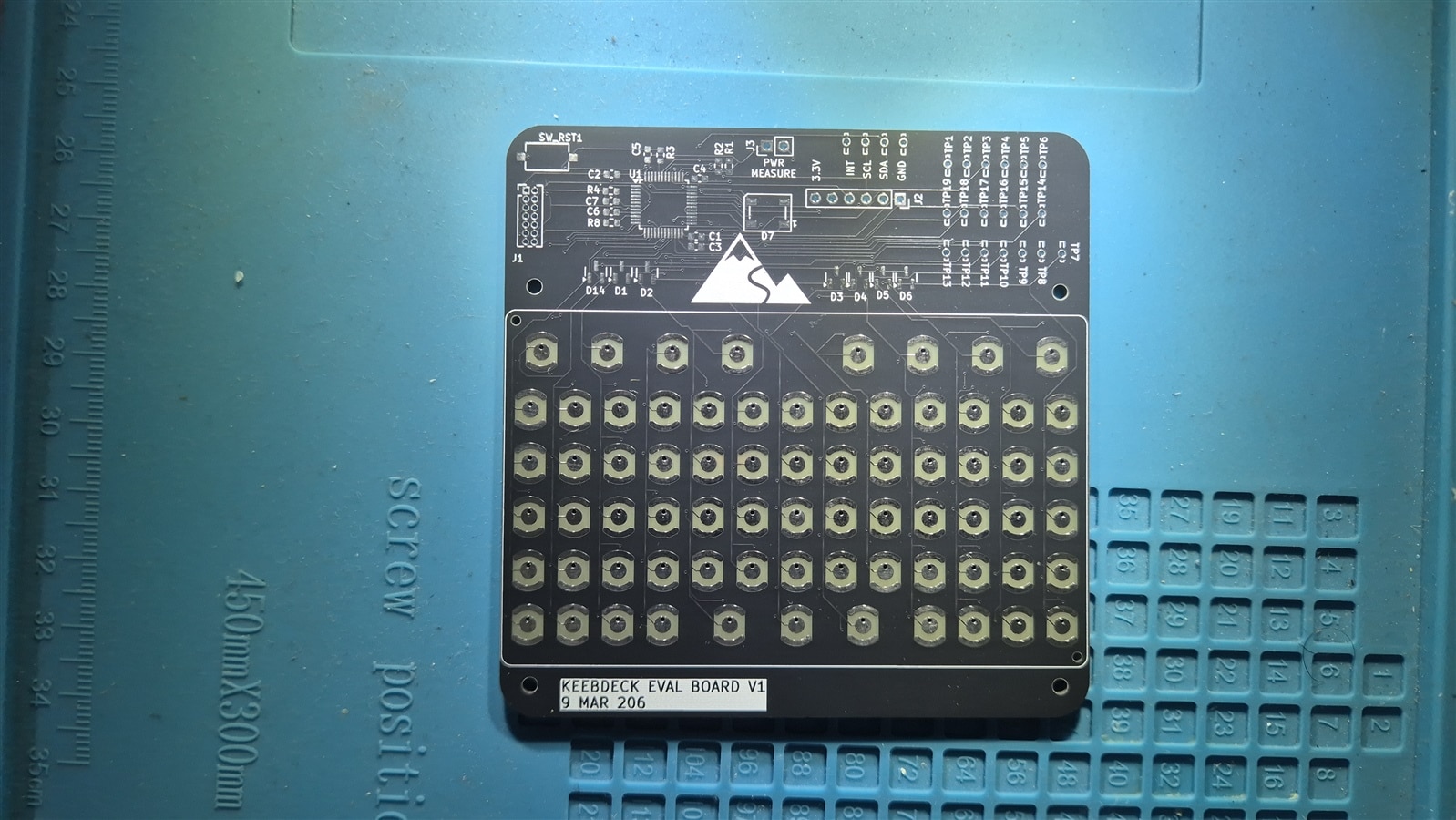
So I had to make another one. But no experiments this time, Stuck to the original footprint.


In this i also added ability for backlighting, although it was a stretch goal for me.
Pin Assignment
| Signal | Pin | Notes |
|---|---|---|
| R0 | PA7 | Row output, PP |
| R1 | PB0 | Row output, PP |
| R2 | PB1 | Row output, PP |
| R3 | PB2 | Row output, PP |
| R4 | PB10 | Row output, PP |
| R5 | PB11 | Row output, PP |
| C0–C2 | PC13–PC15 | Column inputs, pull-down |
| C3 | PA1 | Column input, pull-down |
| C4–C6 | PA4–PA6 | Column inputs, pull-down |
| C7–C10 | PB12–PB15 | Column inputs, pull-down |
| C11–C12 | PA8–PA9 | Column inputs, pull-down |
| WUP | PA0 | EXTI rising edge (wakeup path) |
| LED | PA12 | Status LED output |
| TX/RX | PA2/PA3 | USART2, 115200 8N1 |
The wakeup path is where all the columns lines feed through a BAT54C dual Schottky onto a single line that connects to PA0 (PWR_WKUP1). Before entering Stop1, all rows are driven HIGH. The moment I press a key, the column rises through the diode, the BAT54C passes it to PA0, the EXTI fires, and the MCU wakes.
Firmware Structure
The firmware is generated with STM32CubeMX (GCC/Makefile output) and built with arm-none-eabi-gcc.
keebdeck-keyboard-fw/
├── keebdeck-keyboard-fw.ioc          ← CubeMX project (PA0, USART2, SWD, LED)
├── Makefile                           ← arm-none-eabi GCC build
├── flash.sh                           ← st-flash convenience wrapper
├── STM32U031xx_FLASH.ld               ← 64 KB flash, 16 KB RAM, stack 0x400
├── STM32U031xx_RAM.ld
├── startup_stm32u031xx.s              ← Reset handler, vector table
└── Core/
    ├── Inc/
    │   ├── main.h                     ← All Rx_Pin / Cx_Pin #defines live here
    │   ├── stm32u0xx_hal_conf.h       ← HAL module enable switches
    │   └── stm32u0xx_it.h
    └── Src/
        ├── main.c                     ← Entry point, matrix scan, Stop1 sleep
        ├── stm32u0xx_hal_msp.c        ← MspInit — peripheral clock enables
        ├── stm32u0xx_it.c             ← ISR stubs + EXTI0_1_IRQHandler
        ├── syscalls.c                 ← Newlib syscall stubs
        ├── sysmem.c                   ← Heap via sbrk
        └── system_stm32u0xx.c        ← SystemInit, SystemCoreClock
How the Matrix Scan Works
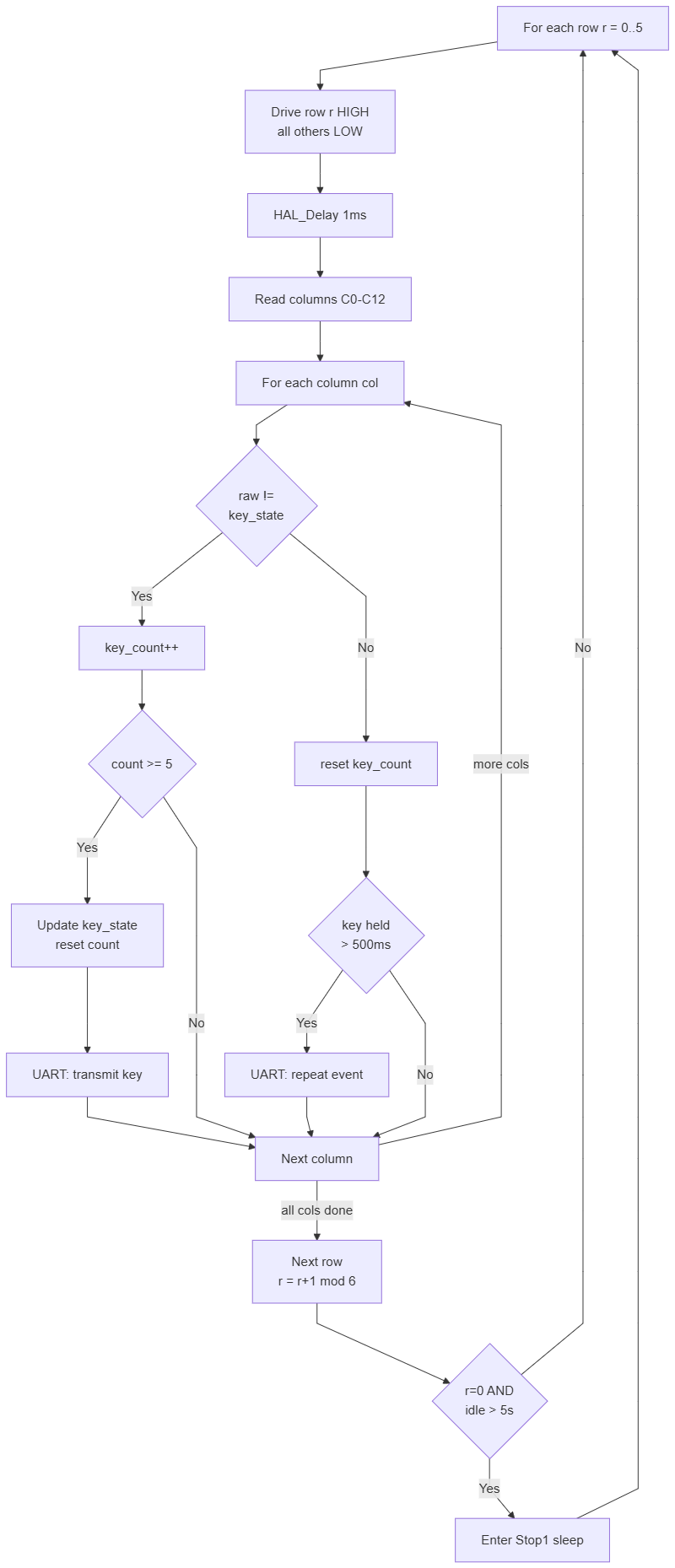
The scan loop is a simple row-at-a-time approach. Each pass through the superloop services one row, then advances to the next. A full 6-row cycle therefore takes 6 loop iterations.
/* Drive only row r HIGH, all others LOW */
for (int i = 0; i < 6; i++)
    HAL_GPIO_WritePin(row_ports[i], row_pins[i], (i == r) ? GPIO_PIN_SET : GPIO_PIN_RESET);

HAL_Delay(1); /* settle */

/* Read all 13 columns */
uint8_t c[13];
c[0]  = HAL_GPIO_ReadPin(C0_GPIO_Port,  C0_Pin)  ? 1 : 0;
/* ... c[1] through c[12] similarly ... */
For each key position, debounce runs as a counter: the raw signal has to agree for DEBOUNCE_COUNT (5) consecutive reads before the state is accepted. Once stable, a key-press fires a USART2 print of the key name. Key-held repeat fires after REPEAT_DELAY_MS (500 ms) and then every REPEAT_RATE_MS (50 ms).
if (c[col] != key_state[r][col])
{
    if (++key_count[r][col] >= DEBOUNCE_COUNT)
    {
        key_state[r][col] = c[col];
        key_count[r][col] = 0;
        if (c[col])
        {
            /* key pressed — log it */
            char buf[16];
            int len = snprintf(buf, sizeof(buf), "%s\r\n", keymap[r][col]);
            HAL_UART_Transmit(&huart2, (uint8_t *)buf, len, 50);
        }
    }
}
Stop1 Sleep and Wakeup

After 5 seconds of no key activity, the firmware puts the MCU into Stop1 mode. Before sleeping, all rows are driven HIGH — this is what arms the wakeup path through the BAT54C. A 10 ms settle delay flushes any transient that might have been captured during the row-HIGH transition, then both the EXTI pending bit and the NVIC pending bit are cleared so a glitch can't cause an immediate false wakeup:
HAL_Delay(10);
wakeup_edge = 0;
__HAL_GPIO_EXTI_CLEAR_IT(GPIO_PIN_0);
NVIC_ClearPendingIRQ(EXTI0_1_IRQn);
on Cortex-M0+, a pending SysTick interrupt will cause WFI to return immediately without entering Stop1 at all. HAL_SuspendTick() takes care of this:
HAL_SuspendTick();
HAL_PWREx_EnterSTOP1Mode(PWR_STOPENTRY_WFI);

/* --- wakes here on PA0 EXTI --- */
SystemClock_Config();   /* restore HSI 16 MHz — Stop1 kills the clock */
HAL_ResumeTick();
HSI is stopped in Stop1, so SystemClock_Config() must be called after wakeup to restore the 16 MHz clock before any HAL function that needs SysTick timing is used (including HAL_UART_Transmit). I learned this the hard way when the UART came back as garbage after the first wakeup.
After wakeup, the debounce counters are primed to DEBOUNCE_COUNT - 1 so the key that triggered the wakeup registers on the very first scan pass rather than sitting through 5 more cycles of debounce while still held:
memset(key_count, DEBOUNCE_COUNT - 1, sizeof(key_count));
Power Analysis
Using Nordic PPK2, I checked the power consumption
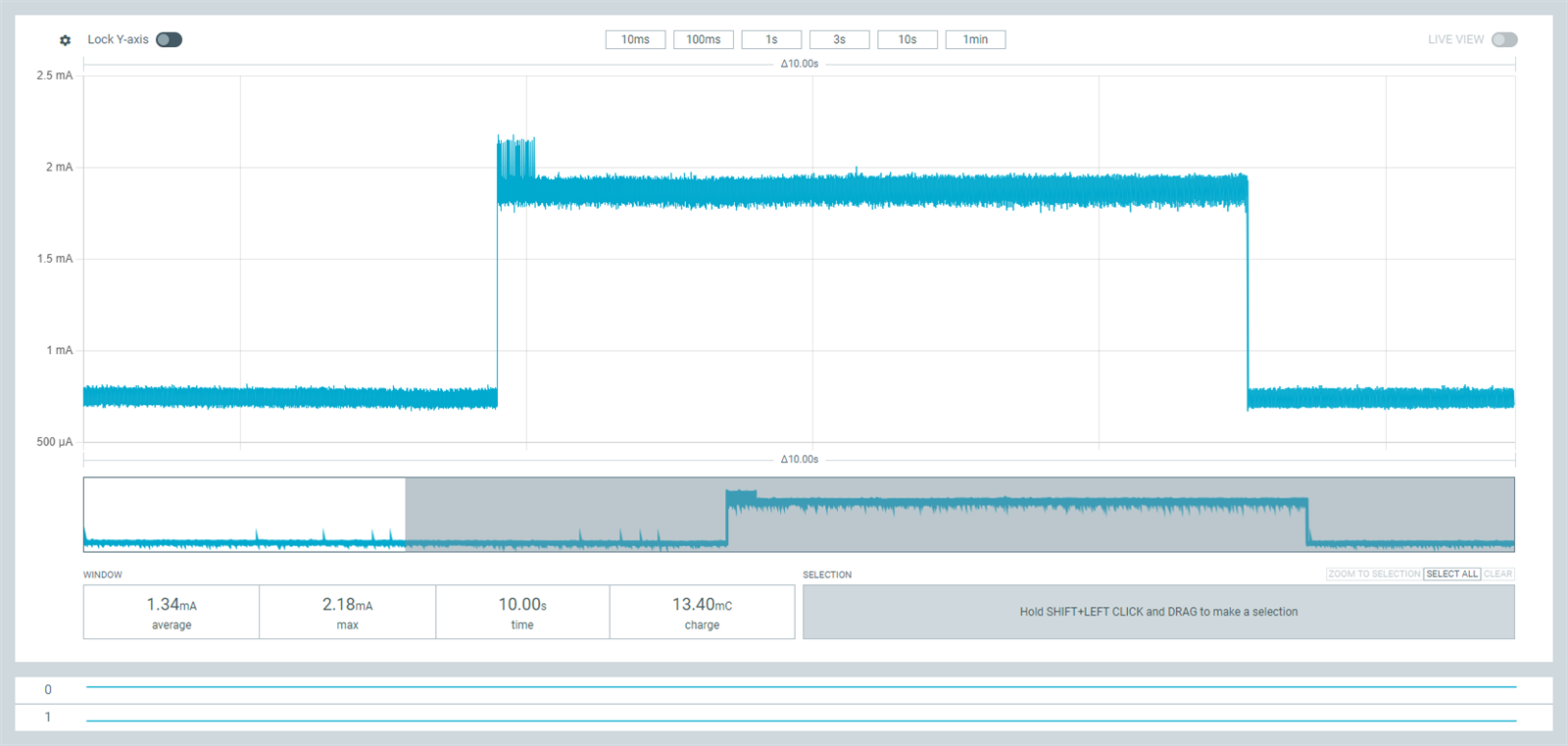
While running, it took 1.34mA and while sleeping it took 0.74mA. I know for a fact, that with further optimization, i can bring it down even more. But that is for another time.
Code
The Code for this project along with the kicad files can be found here : https://github.com/arvindsa/keebdeck-dekboard
Demo Video