


Background: What Is a Lissajous Figure?
When you feed two sine waves into the X and Y inputs of an oscilloscope in XY mode, the resulting trace is a Lissajous figure, a looping pattern determined by the frequency ratio and phase offset between the two signals. A 1:1 ratio at 90° produces a circle. A 2:1 ratio produces a figure eight. Higher integer ratios yield increasingly complex curves. It's a classic physics and math visualization, and genuinely satisfying to watch on a scope screen.

The idea behind this project was a self-contained box that generates both signals with real-time control over ratio and phase with no external function generator required. Just the device, a USB-C cable for power, and two scope probes.
The "Unfinished Project" Problem
This project existed as a working breadboard prototype for longer than I'd like to admit. The ESP32-S3 devkit was wired to a PCM5102A stereo DAC breakout board via jumper wires, with potentiometers dangling off the side and a scope probe clipped to the output. My firmware worked and the signals looked right on the oscilloscope, but then it sat on my desk doing nothing for 6 months.
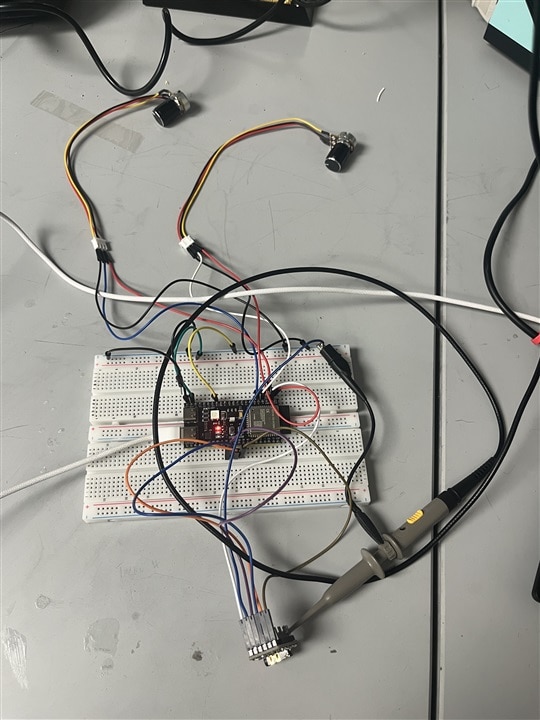
Breadboard prototype - ESP32-S3 devkit, PCM5102A breakout, potentiometers, and oscilloscope probe.
The gap between "it works on a breadboard" and "it's a finished thing" is where most of my projects end up dying. This project was about closing that gap for once, with a custom PCB, proper enclosure, and firmware that doesn't need a laptop attached to run.
Step 1: Firmware Development on the Devkit
Before touching PCB layout, the firmware needed to be fully validated. The firmware is written in Embedded C using the ESP-IDF v5.5.2 framework with FreeRTOS.
Sine wave generation uses a phase accumulator rather than computing sine values from absolute time. Each audio sample increments a floating-point phase register by a step proportional to the desired frequency. This keeps the phase value bounded and avoids any drift over long runtimes.
ADC handling applies an exponential moving average and hysteresis to the potentiometer readings. Raw ESP32 ADC values are noisy enough that without filtering, the frequency ratio and phase would jitter constantly. The EMA smooths the readings; the hysteresis window ensures the output only snaps to a new step when the input has clearly moved there, preventing chatter at the boundaries between positions.
I²S output runs via a FreeRTOS task that fills DMA buffers at audio sample rate. A second FreeRTOS task handles OLED updates over I²C. A state machine manages the two operating modes.
During devkit testing, the left channel output on the PCM5102A breakout was found to be non-functional, a hardware fault on the module, confirmed by swapping the channels in software. A bench signal generator was substituted as the left-channel reference, which was enough to validate the algorithm, I²S configuration, and oscilloscope output before committing to PCB layout.
Rigol DS1102E showing early firmware output - CH1 yellow (signal generator reference), CH2 blue (PCM5102A OUTR), both at 210Hz.
Step 2: Schematic Design in Altium Designer
With the firmware validated, the schematic was captured in Altium Designer across four sheets.
Sheet 1 — Input/Output
Dual USB-C connectors: one for programming via the CP2102-GMR USB-to-UART bridge, one for USB audio (speaker) mode. Phase and frequency potentiometer inputs with RC filtering. DAC output headers with 1kΩ series resistors and 15nF shunt capacitors forming a first-order low-pass filter (cutoff ~10.6kHz). USB D+/D− data lines with 22Ω series resistors for the USB audio path.
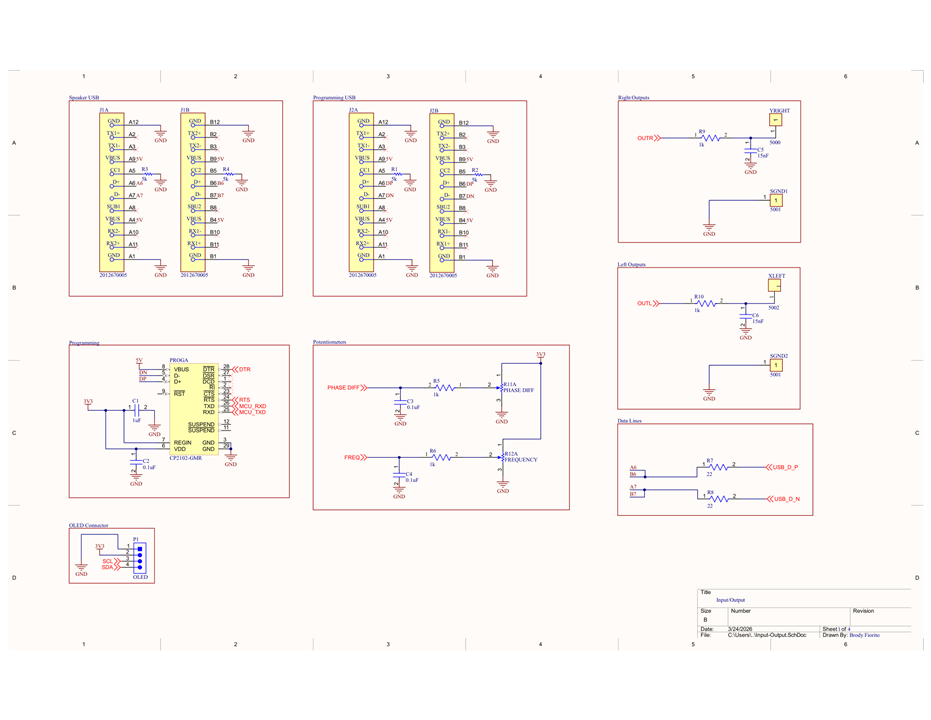
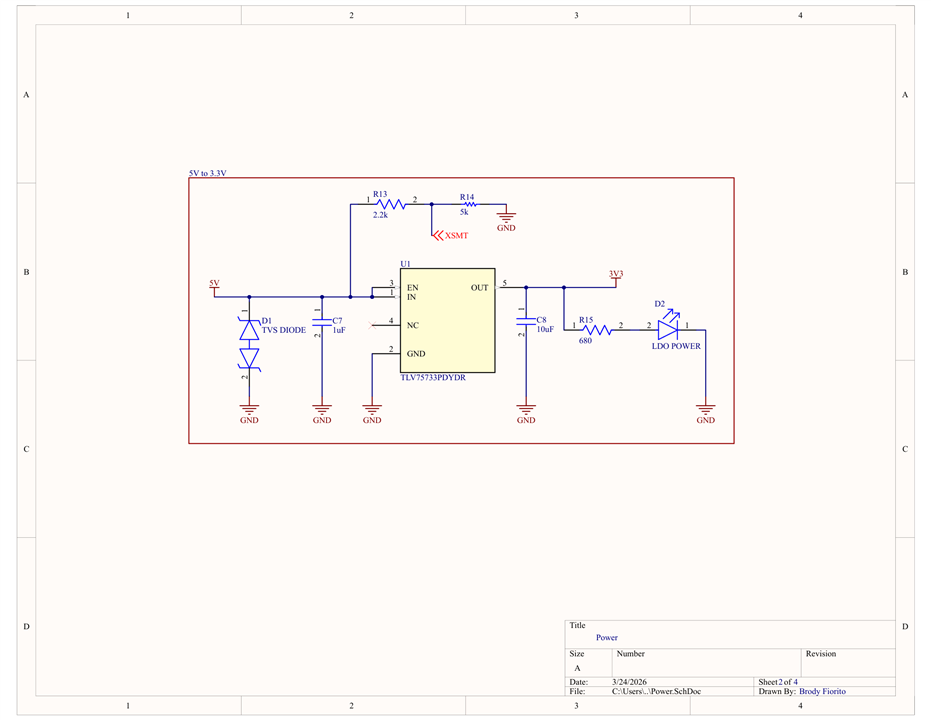
Sheet 2 — Power
5V to 3.3V regulation via the TLV75733PDYDR LDO. The LDO was chosen over a buck converter specifically for noise: a switching regulator at hundreds of kHz would inject noise directly onto the PCM5102A analog output rail. A TVS diode on the 5V input clamps inductive spikes from USB hot-plug events before they reach the LDO. The EN pin is controlled via a resistor divider tied to the PCM5102A XSMT soft-mute signal, so the LDO and DAC enable and mute together.
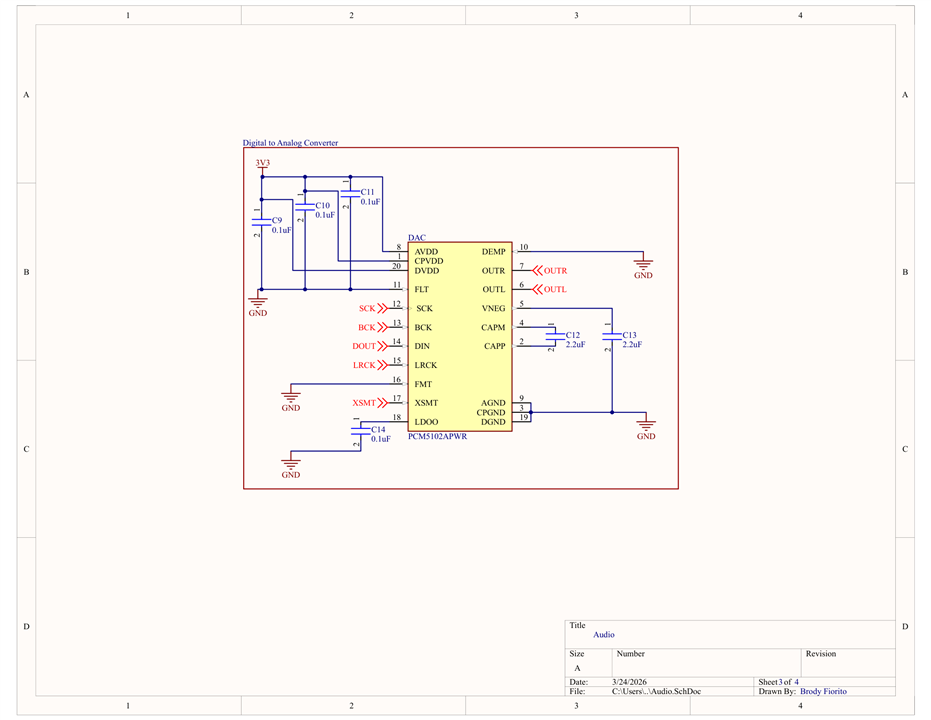
Sheet 3 — Audio
PCM5102A receiving I²S signals (SCK, BCK, DOUT, LRCK) from the ESP32-S3. AVDD, CPVDD, and DVDD all supplied from 3.3V with decoupling. Charge pump capacitors on CAPP and CAPM, the internal charge pump eliminates the need for a negative supply rail. Left and right analog outputs routed to the output header section.
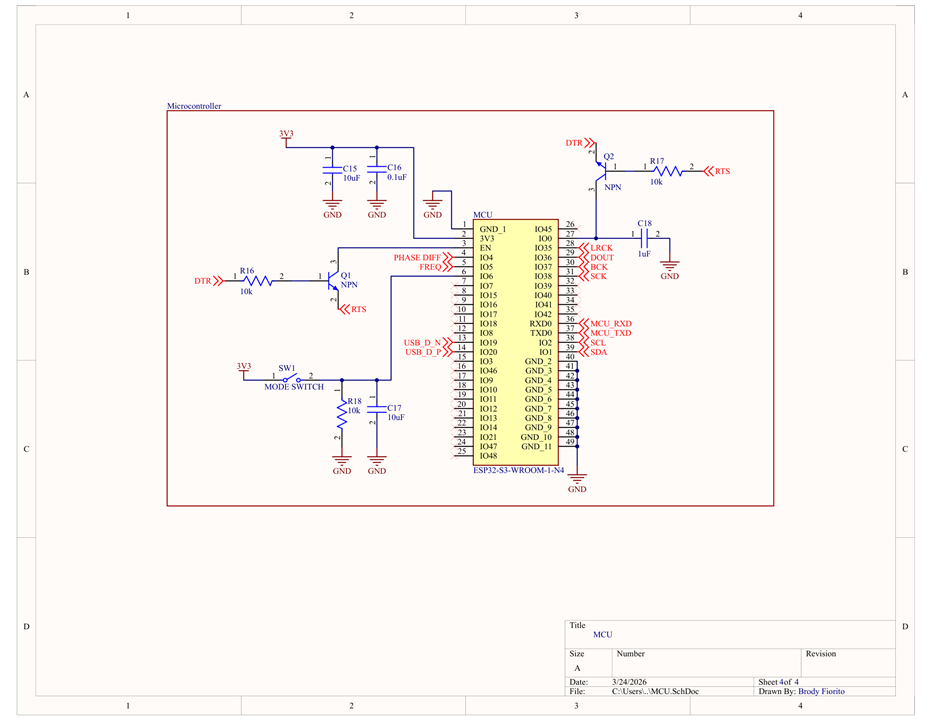
Sheet 4 — MCU
ESP32-S3-WROOM-1-N4 with I²S signals routed to the DAC, UART RX/TX to the CP2102 bridge via an auto-reset circuit. The auto-reset circuit uses NPN transistors driven by RTS and DTR to control the ESP32-S3 EN and IO0 pins, enabling automatic bootloader entry without pressing buttons. USB D+/D− broken out for USB audio mode. ADC inputs for the potentiometers. Mode switch with pull-down resistor and debounce capacitor. I²C lines for the OLED display.
Step 3: PCB Layout
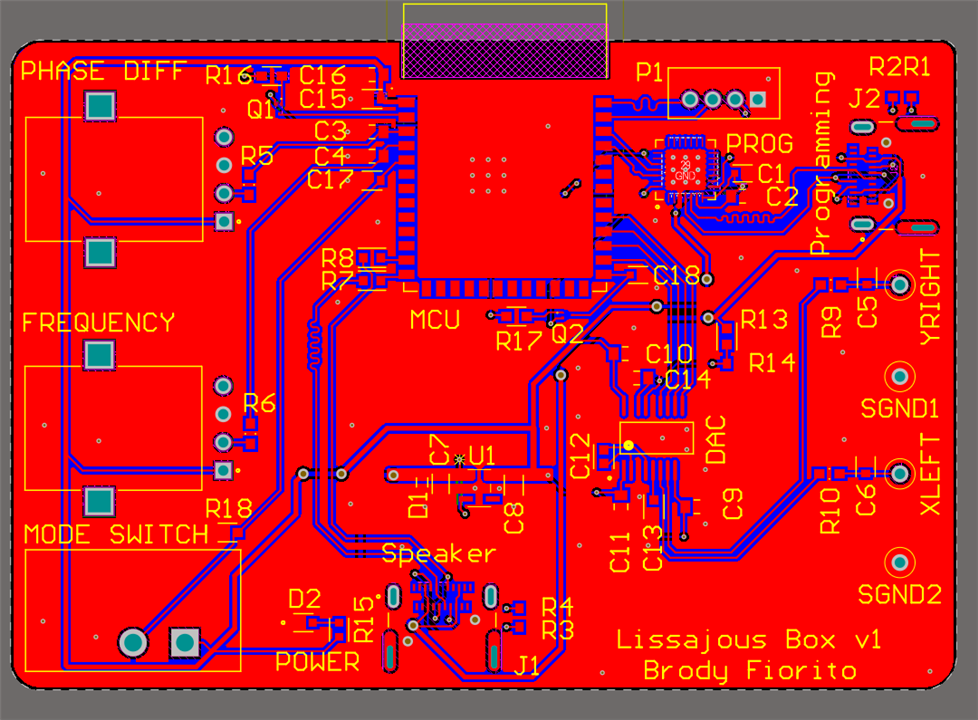
The board is 84mm × 57.7mm, 2-layer, 1.6mm FR4 with HASL finish.
Placement was driven by analog isolation: the PCM5102A and analog output network sit on the right edge of the board, as far as possible from the ESP32 and power circuitry. Decoupling capacitors sit directly at each IC's power pins. The CP2102 is adjacent to the programming USB-C connector to keep the USB differential pair short. The ESP32-S3 module antenna keepout area is free of copper pours and routing on both layers.
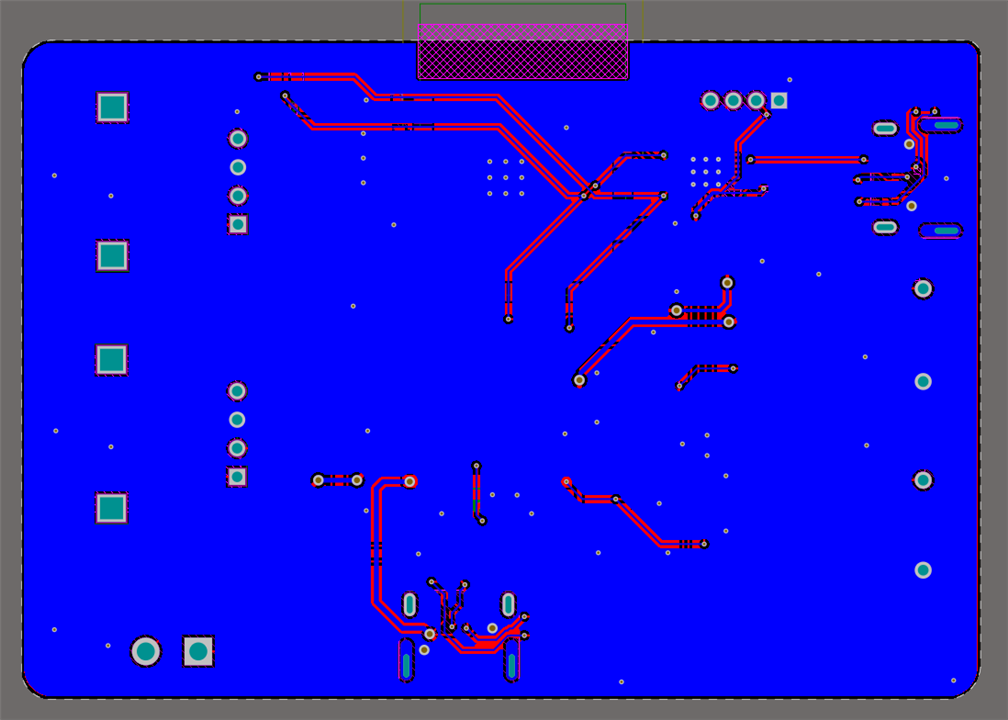
Routing keeps analog output traces away from digital and power traces for the full board length. Signal traces crossing power traces do so at 90° to minimize inter-layer capacitive coupling.
Ground is handled by continuous copper pours on both layers connected by stitching vias across the board, reducing ground impedance and keeping return current loops short.
Top Copper Layer
Bottom Copper Layer
The PCB was fabricated by JLCPCB. Components were ordered from Mouser.
Step 4: Assembly
Components were placed and soldered by hand. The passives and ICs were placed with solder paste and reflowed. Through-hole components (the potentiometers, slide switch, and output headers) were hand-soldered after reflow.
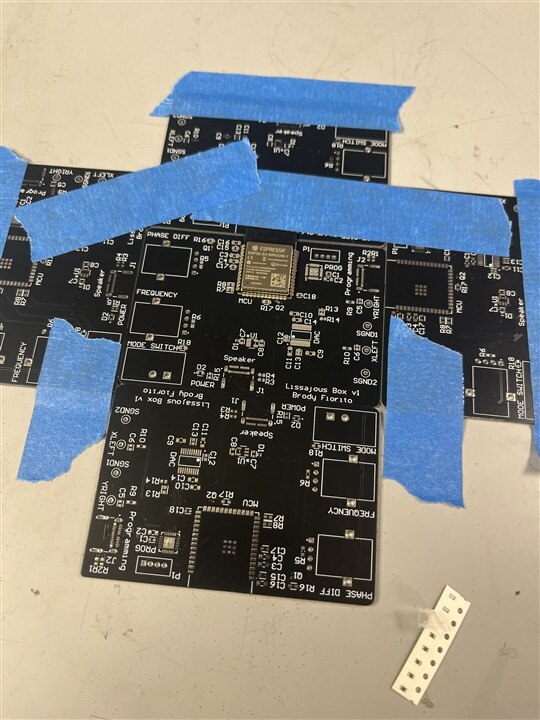
PCB after solder paste application.

Board after reflow, with ICs and passives soldered
One issue surfaced during assembly: the NPN auto-reset transistors (SOT-1123 package) were lost during reflow and couldn't be recovered by hand soldering due to the package size. The auto-reset circuit is non-functional on this revision. Manually pulling EN and BOOT High/Low is required to enter the bootloader. This is documented for a future revision; every other circuit on the board is functional.
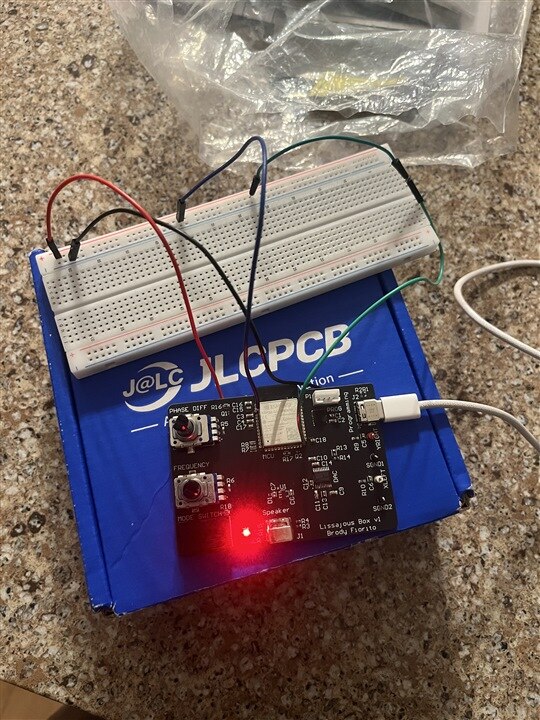
Fully assembled first revision
Step 5: Firmware Flash and Bring-Up
- Mode Switch - Enumerates as a usb audio device in one position, and switches to signal output in the other.
- Potentiometer Control - Frequency and phase difference pots step correctly through all 8 positions on each pot. EMA and hysteresis working properly
- DAC - Both channels confirmed working by oscilloscope

Step 6: Enclosure
The enclosure was modeled in Fusion 360 around the PCB dimensions. It features cutouts for both potentiometers and the mode slide switch on the front face, a window for the SSD1306 OLED display, and openings for the USB-C port and the two oscilloscope output connectors. Unfortunately I was unable to print it before having to leave school, and I have no way of 3D printing the box while at home, but thankfully its purely cosmetic.

Results
The device works exactly as the breadboard prototype proved it would, now in a self-contained package. Dial in a frequency ratio, adjust the phase, connect two scope probes, and you have a Lissajous figure. Switch modes, plug into a laptop, and the scope works as a music visualizer (if you've ever seen Jerobeam Fenderson on youtube) It would look better on an analog oscilloscope, but I don't currently have access to one.
Relating to the Theme
The breadboard prototype answered whether the concept worked. It did, and then sat on the bench for months.
Finishing this project meant going through every step that turns a working circuit into a real object: schematic review, PCB layout, fabrication, component sourcing, assembly, bring-up, firmware debugging on real hardware, enclosure design, and print. None of those steps are hard individually. The hard part is doing all of them instead of stopping after the breadboard.
I'm a rising sophomore studying Electrical Engineering. Most of my coursework so far has been purely foundational (circuits, physics, signals) and this project was about building real hardware experience outside the classroom. Getting something from a breadboard to a finished, working device is exactly the kind of experience I was after, and that's what made actually finishing it matter.
This is the finished version of a project that was genuinely half-complete. The scope traces at the end are from the same firmware that ran on the breadboard, just on hardware worth keeping after I finish the project.
Resources
- GitHub: https://github.com/brodyfiorito/lissajous-box/tree/main
- Firmware: ESP-IDF v5.5.2, FreeRTOS, Embedded C
- Schematic & PCB: Altium Designer, fabricated by JLCPCB
- Enclosure: Fusion 360, FDM printed in PLA
- Key ICs: ESP32-S3-WROOM-1-N4, PCM5102A, TLV75733PDYDR, CP2102-GMR

