


Spring Clean 2026 - From Forgotten Parts to a Daily Tool
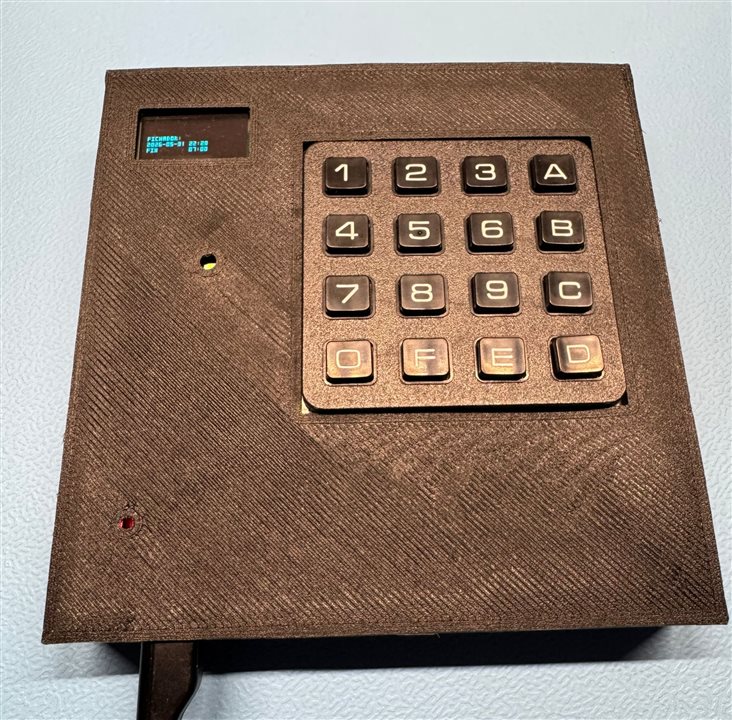
Figure 1: Final desktop workday tracker built from previously unused hardware.
Figure 2: Demonstration of the finished device registering workday events.
1. Introduction
As an engineer, I could build many things just for the sake of building them: Robots, gadgets, sensors, IoT devices... But the projects that give me the most satisfaction are always the ones that solve a real problem the moment it appears. This project was born from a very simple need: keeping track of my working hours.
I wanted something permanently available on my desk. No apps. No subscriptions. No cloud services. No distractions.
Just a dedicated device where I could quickly register the key events of my workday.
At the same time, I had several forgotten components sitting unused in drawers:
- A matrix keypad that I had bought years ago and never used.
- A small SPI OLED display that I had unsuccessfully experimented with using Arduino.
- An ESP32 development board that had recently become my playground for learning Embedded C and FreeRTOS.
Individually, all of them worked. Together, they had never become a real project.
When the Spring Clean competition appeared, it felt like the perfect excuse to revisit this forgotten hardware and finally give it a purpose.
What started as a cleanup exercise ended up becoming a fully functional embedded product that I now use every day.

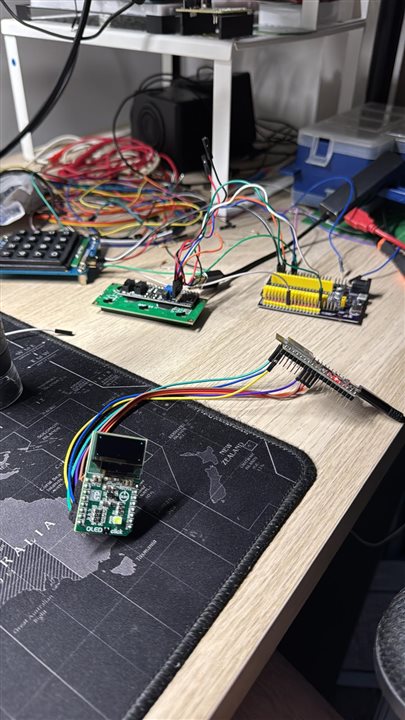
Figure 3: The forgotten hardware that inspired this project — an SPI OLED display, a matrix keypad and an ESP32 development board waiting for a real purpose.
2. The Original Situation
Like many engineering projects, this one started with enthusiasm and then slowly stopped evolving.
The hardware existed.
The ideas existed.
The software partially existed.
But nothing was truly finished.
The OLED display had been tested.
The keypad had been connected.
The ESP32 was already running various experiments.
Everything was scattered across multiple unfinished tests and temporary code.
The project suffered from:
- Messy firmware architecture
- Tight coupling between modules
- Experimental OLED code
- Fragile storage handling
- Temporary wiring
- No enclosure
- Large numbers of compiler warnings
- Inconsistent code quality
Eventually, it became another abandoned prototype.
Spring Clean gave me the motivation to finally finish it properly.
3. The Goal
The objective was intentionally simple.
Create a dedicated desktop device capable of recording the main events of a workday.
The keypad allows registering:
- Start of workday: A key (Spanish message: "Entrada")
- Start of lunch break: B key (Spanish message: "Salida Comida")
- End of lunch break: C key (Spanish message: "Entrada Comida")
- End of workday: D key (Spanish message: "Salida")
Every event is timestamped automatically and stored permanently.
No phone.
No browser.
No notifications.
No distractions.
Just a purpose-built tool.
The device also includes a manual correction mode for situations where I forget to register an event at the correct time.
Manual mode is activated using the E key.
The workflow is intentionally simple:
- Press E to enter manual mode.
- Press the event key (A, B, C or D).
- Enter the desired time using four digits in HHMM format.
For example, entering:
E A 0800
creates a manual "Entrada" event at 08:00 even if it was entered later in the day.
This feature allows correcting forgotten entries while keeping the device simple and entirely keypad-driven.
4. Reused Hardware
One of the things I like most about this project is that it was built almost entirely from hardware I already owned.
4.1. Main Components
The hardware used in this project was intentionally simple:
- ESP32 DevKit
- Matrix keypad
- SPI OLED display
- Existing cables and connectors
- Custom 3D printed enclosure
No new electronics were purchased specifically for this build.
The challenge was transforming forgotten hardware into something genuinely useful.
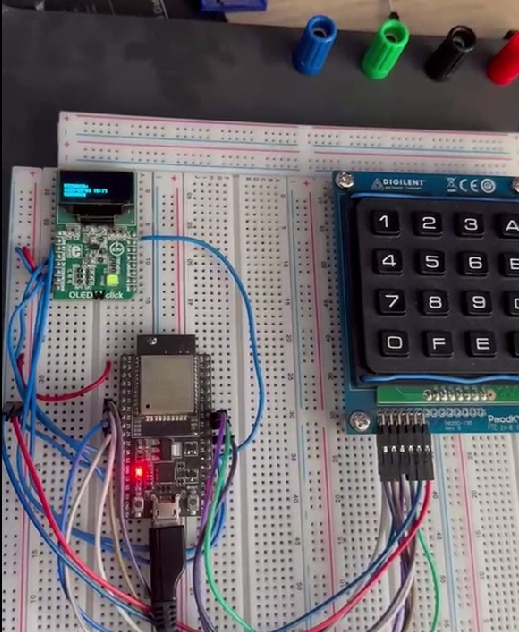
Figure 4: Early breadboard prototype used for firmware and hardware validation.
5. Hardware Integration
The final step was designing and printing a dedicated enclosure.
The enclosure integrates:
- OLED display
- Matrix keypad
- ESP32 board
- Internal wiring
This transformed the project from a collection of development boards into a standalone embedded device.
Several iterations were required to:
- Align the OLED correctly
- Fit the keypad dimensions
- Improve cable routing
- Simplify assembly
The result is compact, portable and robust enough for daily use.
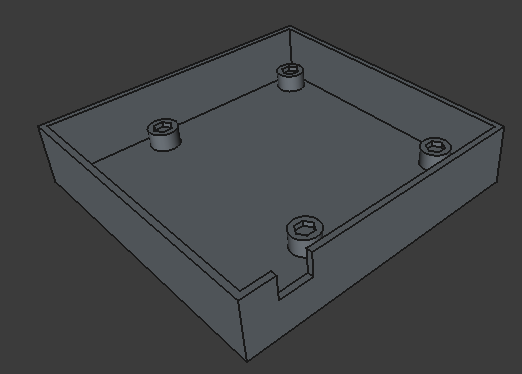
Figure 5: Initial enclosure design used to define the overall mechanical layout.
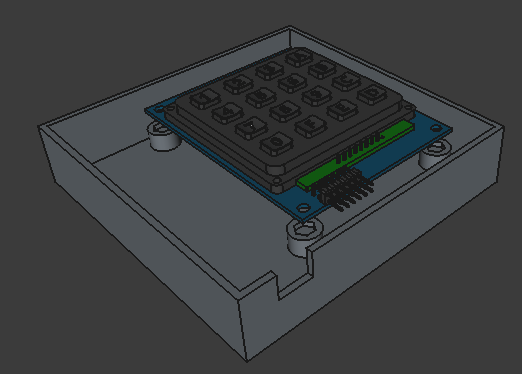
Figure 6: Keypad integration and dimensional validation during enclosure development.
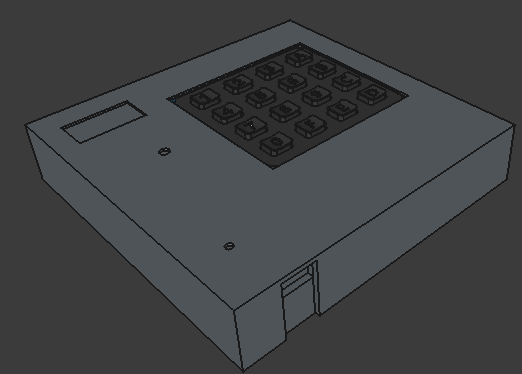
Figure 7: Complete enclosure design including the removable top cover.
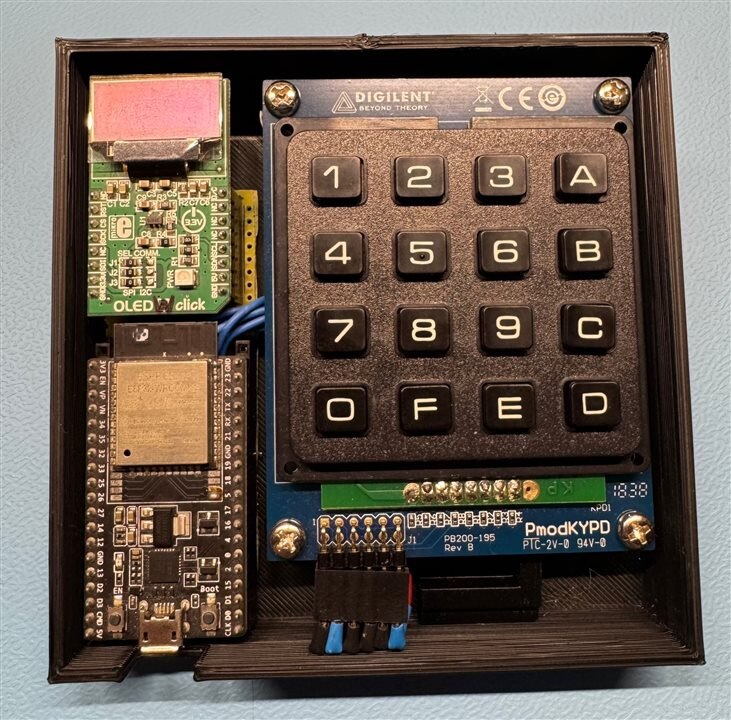
Figure 8: Internal assembly showing component placement and wiring.
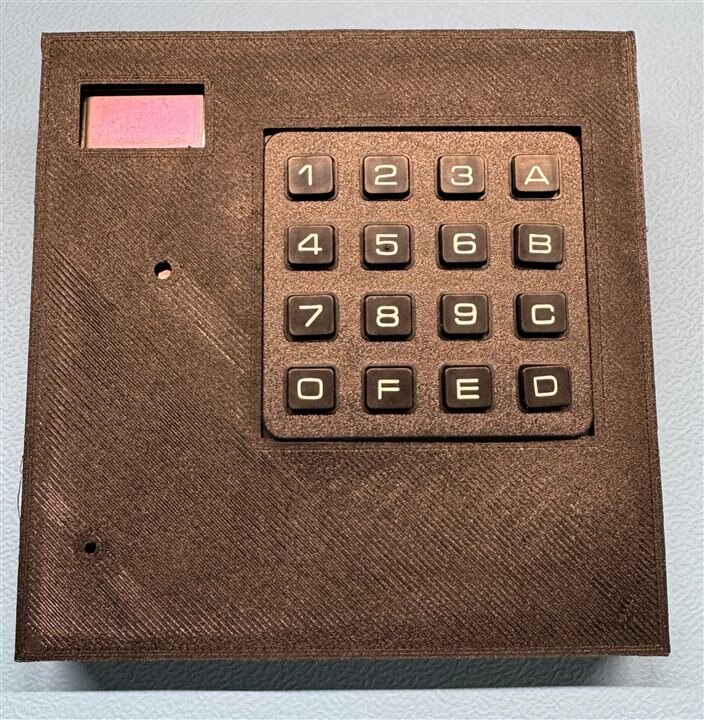
Figure 9: Finished device ready for daily operation.
6. Firmware Architecture
The firmware was completely reorganized using a modular architecture.
6.1. Main Modules
The firmware was organized into independent modules:
- wifi
- keypad
- oled
- storage
- ntp
- httpServer
- common
The system runs on FreeRTOS and uses tasks and synchronization primitives to keep the application responsive.
6.2. Features
- Event-driven Wi-Fi management
- Automatic network retry
- Persistent CSV logging
- HTTP log download
- OLED framebuffer rendering
- NTP synchronization
- Concurrent task execution
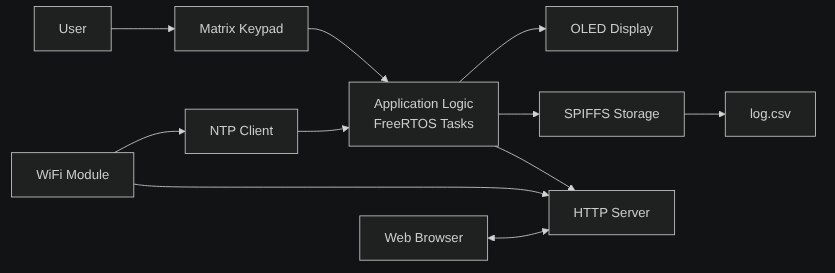
Figure 10: High-level firmware architecture showing the main software modules.
7. Wi-Fi System
One of the largest improvements was the Wi-Fi subsystem.
The device now:
- Tries multiple configured networks
- Automatically reconnects
- Handles disconnect events
- Waits for valid IP acquisition
- Uses FreeRTOS event groups
This transformed what was once a fragile connection mechanism into a reliable subsystem suitable for daily use.
8. The Unexpected OLED Challenge
One of the most interesting surprises came from the OLED display.
The display was not fully functional. Part of the visible area was damaged and unusable. Replacing it would have been the easiest solution.
Instead, I decided to adapt the software. I mapped the remaining functional area of the display and redesigned the rendering layer so that all drawing functions automatically respect the usable region.
As a result:
- The application never attempts to draw outside the valid area.
- The OLED abstraction hides the hardware limitation.
- The rest of the firmware remains completely unaware of the display damage.
This ended up becoming one of the most satisfying engineering challenges of the entire project.
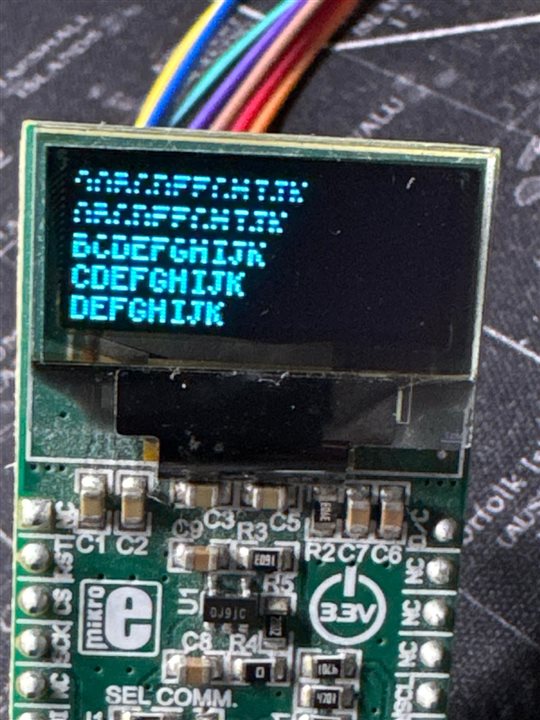
Figure 11: Damaged OLED display used during development. The software was adapted to operate only within the functional display area.
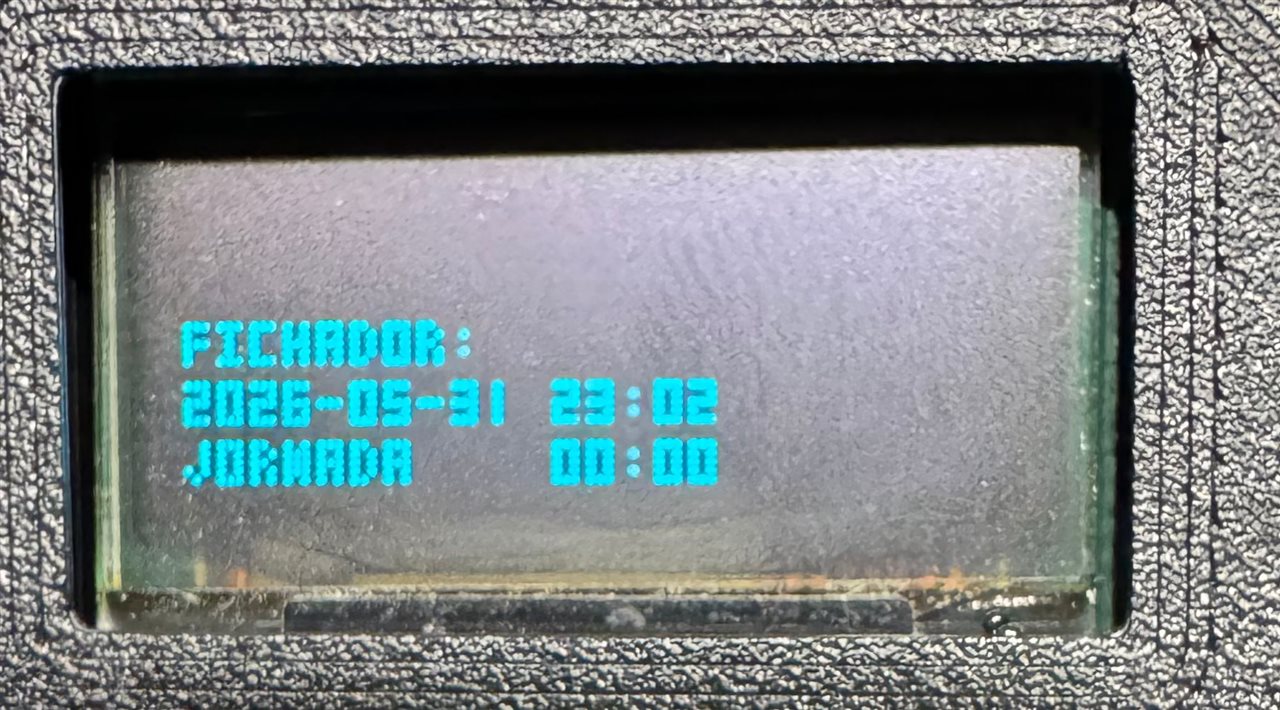
Figure 12: Functional OLED rendering after adapting the software to the usable display region (Example 1).
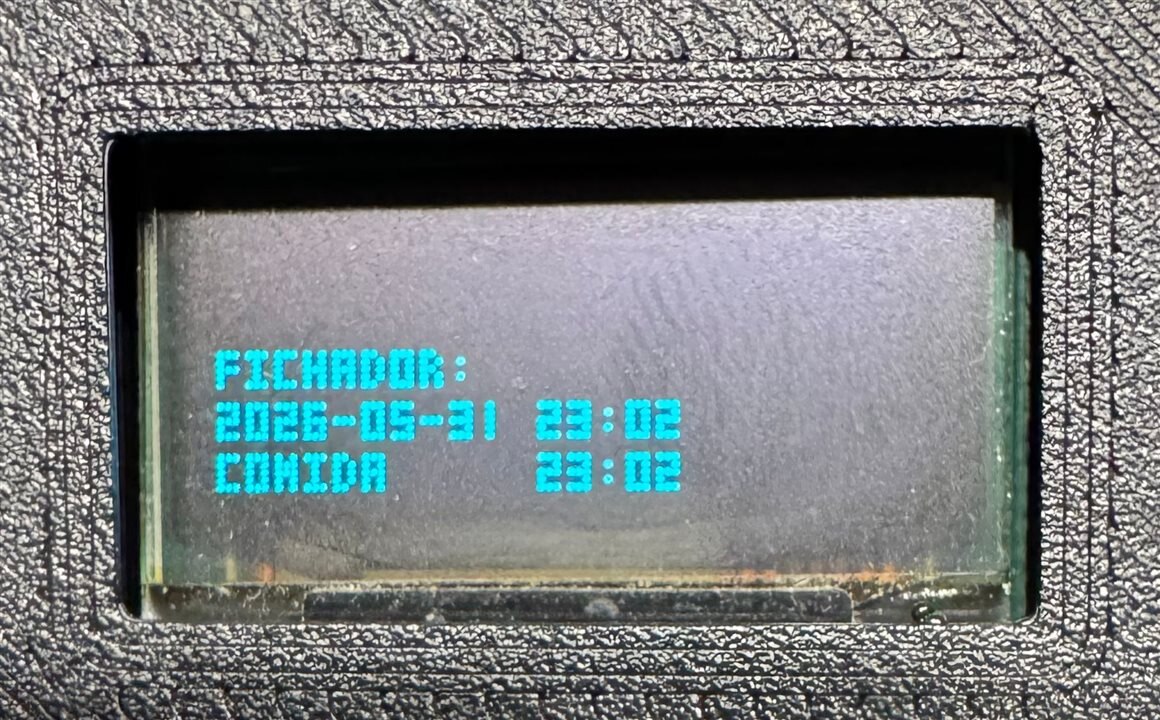
Figure 13: Functional OLED rendering after adapting the software to the usable display region (Example 2).
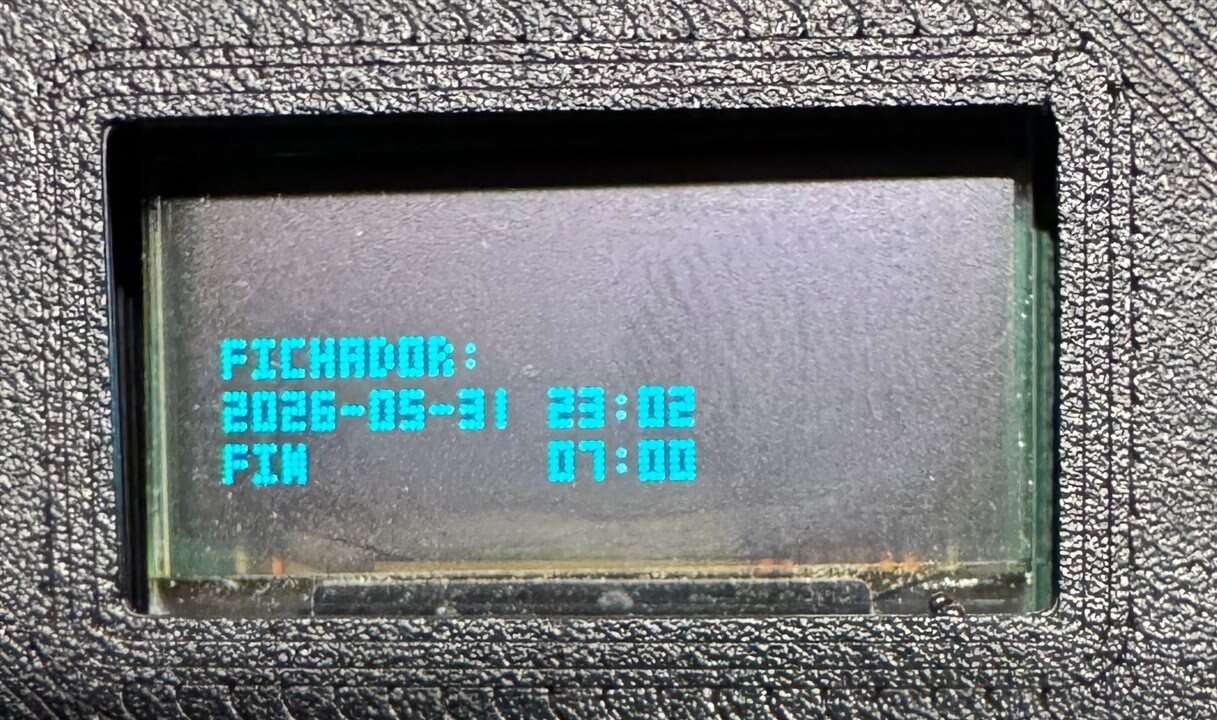
Figure 14: Functional OLED rendering after adapting the software to the usable display region (Example 3).
9. Storage and HTTP Logging
Events are stored inside SPIFFS as CSV files.
Example:
2026-05-22 08:01:00,Entrada
2026-05-22 13:12:00,Salida comida
2026-05-22 14:05:00,Entrada comida
2026-05-22 18:10:00,Fin jornada
The device also includes a lightweight HTTP server exposing:
- Current status
- Downloadable logs
- JSON information
This allows the device to be monitored directly from a browser.
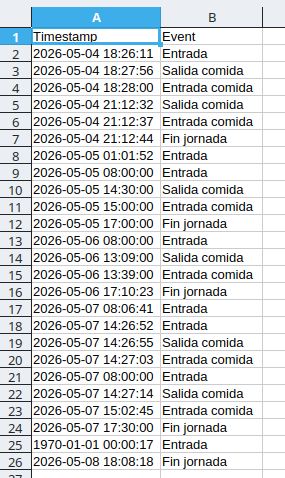
Figure 15: CSV event log generated and stored in SPIFFS.
10. Software Quality Improvements
One of my goals was not only making the device work, but making the code maintainable. During development I spent a considerable amount of time improving software quality.
Actions included:
- Refactoring modules
- Improving naming consistency
- Reducing compiler warnings
- Cleaning legacy code
- Adding Doxygen documentation
- Improving API separation
- Running static analysis
The project now builds with aggressive warning levels enabled and has a much cleaner structure than the original prototype.
11. Results
What began as a collection of forgotten components became a complete embedded product.
The project now provides:
- Dedicated hardware interface
- Reliable Wi-Fi connectivity
- Persistent storage
- HTTP access to records
- OLED user interface
- Custom enclosure
- Maintainable firmware architecture
Most importantly:
I actually use it.
And for me, that is the best indicator of success.
A project stopped being a prototype and became a useful tool.
12. Final Thoughts
Spring Clean 2026 gave me the excuse to revisit hardware that had been sitting unused for years.
The keypad finally got a purpose.
The OLED finally became useful.
The ESP32 evolved from a development platform into a finished product.
More than cleaning a drawer, this project was about finishing something that deserved to be finished. Sometimes the most rewarding engineering projects are not the most complex ones. They are the ones that solve a real problem and end up being used every day.
Thanks for reading.
Top Comments