


How it all Started...
Ever since playing some of the older WWII flight simulators and Star Wars Squadrons, I wanted to understand how joysticks actually worked under the hood — the ADCs, push buttons, USB HID protocol and all. So I set about seeing how hard it would be to design and build a working PC flight joystick from scratch.
The electronics came together, the 3D printed grip took shape, and it even worked on the bench. But this project has been sitting there half-finished for longer than I'd like to admit. The grip was designed, printed and wired up — but the enclosure was never fully closed, the wiring was loose and still roughly connected, nothing felt comfortable to use and it never quite made it to "finished." Spring Clean 2026 was the push I needed to finally get it done. More secure wiring. No more exposed PCB. Just plug it in and ready to take to the skies.
Section 1: Inspiration
After searching around online for reference designs, I came across the Gladiator NXT EVO F-14 Combat Edition (https://vkbsimcontrollers.com/products/gladiator-nxt-evo-space-combat-edition-right-hand-us) — a modern aggressive-looking grip that I wanted to use as design inspiration. Around the same time I had a vintage CH Products FlightStick Pro from an earlier project, so I deconstructed the handle to see what was inside and work out how to design something that would fit the existing base and utilize some of the existing axes/trim knobs
Target games: MetalStorm (PC) and general flight sim use for games like Star Wars Squadrons.
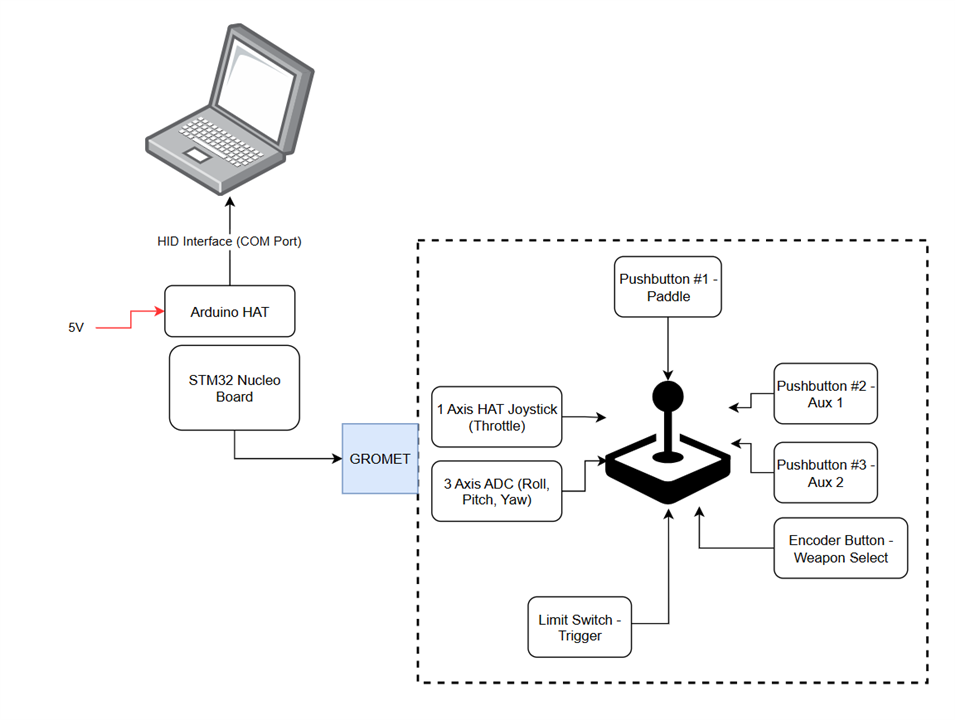
Block Diagram
This block diagram aims to illustrate the major connections and interfaces in this prototype setup
Section 2: Bill of Materials
Kept the parts list simple and low cost:
-
4 x Tactile Pushbutton
-
1 x Rotary Encoder (not programmed in for now)
-
1 x Limit Switch
-
1 x mini Joystick (PSP style)
-
3 x 100kOhm through-hole resistor
-
Nucleo Board STM32G431RB
-
Arduino HAT (neater for soldering)
Section 3: Step-by-step Build
3.1 Mechanical Design
The major difficulties in this design were to get geometry and ergonomics of this flight stick correct and large enough for assembly of internal components, manufacture design and repairs. As a prototype, this was a fun and the most creative part of the design in my opinion.
3.1.1 Flight Stick Body Design
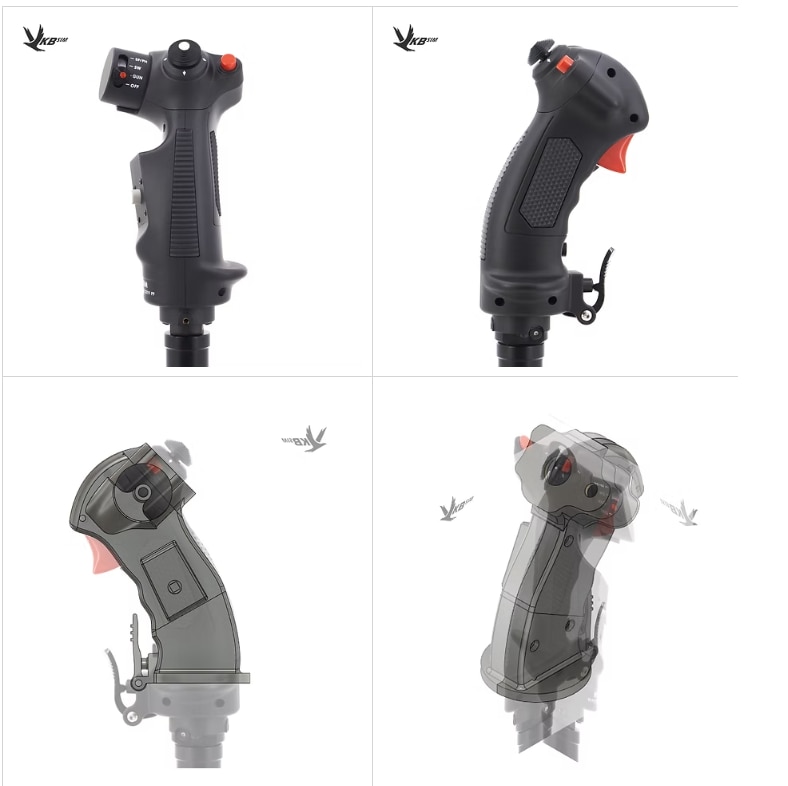
Using Fusion360, I found refence side and rear photos for the F-14 joystick to give the angular shape and design I wanted. Then using the Canvas feature in Fusion360, I began to create the profiles to suit this joystick (top 2 are the original veiws and the bottom 2 are the CAD geometry overlayed onto it) to then be split into two halves for printing and then work out how to locate and mount the other hardware like pushbuttons and encoder internally. This took a long time to get just right, guessing the overall length was around 12-14cm for grip height and nominal sizing. I had to leave space and construction points for the paddle (lower button) and the trigger which was a seperate assembly.
3.1.2 Internal Component Integration
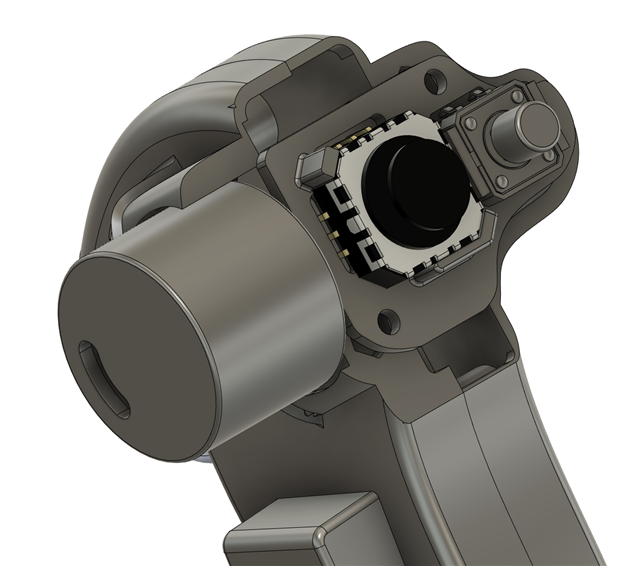
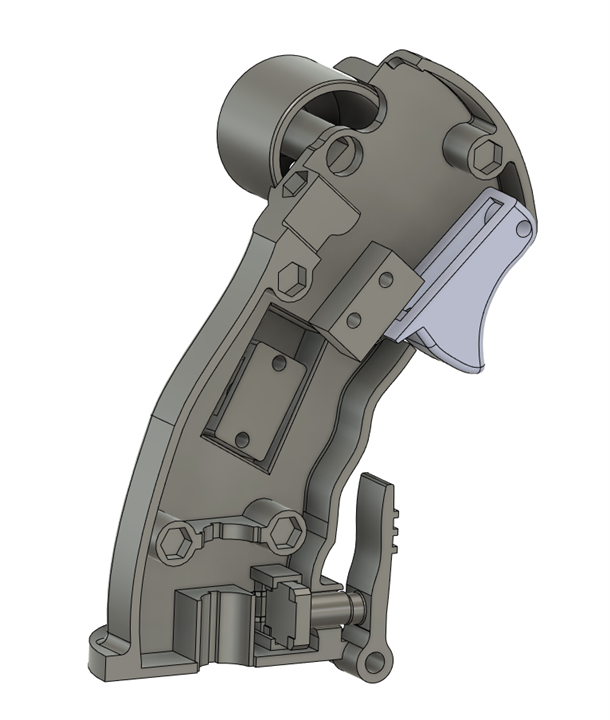
This was the tricky part as some items were not necessarily able to be screwed directly to the body and had to be positioned as part of final assembly, such as the hats on the pushbuttons. The tolerance and bend radius of some of the cables were also considered in the CAD. Being two 'halves', each shell had different parts to be designed, one to act as the 'bottom' of the shell and one to be the 'top' part of the shell - where the screws would enter from. Also, the socket head M3 screws were chosen to give a nice flush appearance and better ergonomics. Some CAD of the other portions such as the control HAT, encoder and the trigger sub-assembly part were also put together and/or glued in. the CAD is not perfect but its manufacturable.
 |
 |
3.1.3 Time to 3D Print!
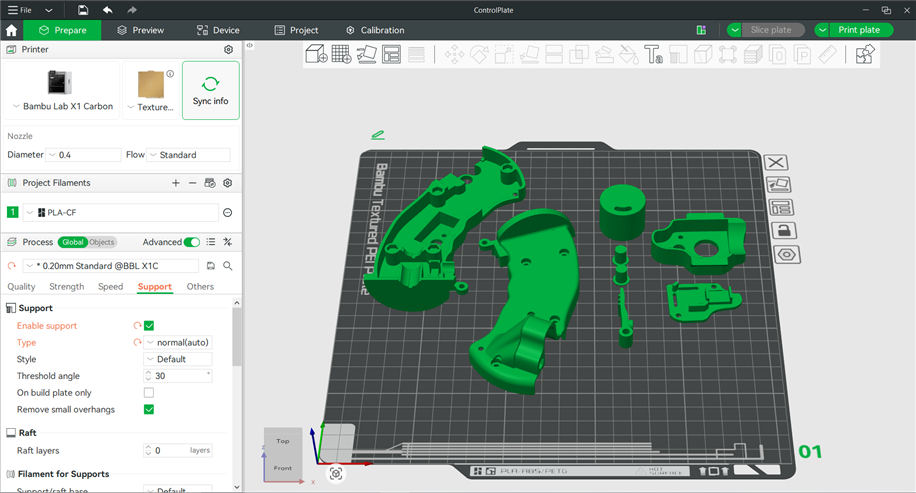
I borrowed my office 3D printer (Bambu Labs) and was lucky to be able to print the two halves and various bits and pieces such as the throttle pull trigger, hats for the momentary pushbutton and paddle were sorted out easily.
3.2 Wiring the Assembly
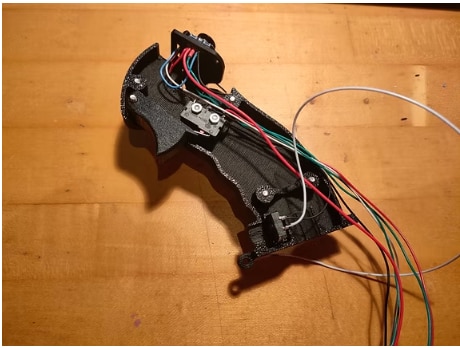
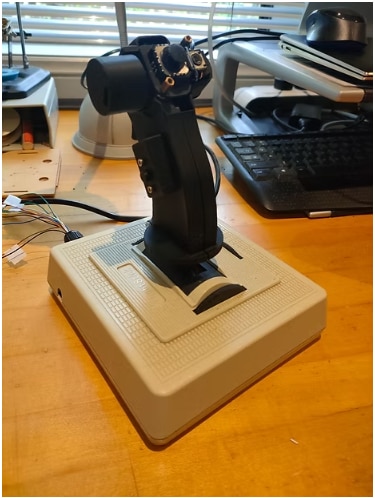
With all the parts printed, it was time to start assembly of the hardware. The use of the Arduino HAT on top of the STM32 Nucleo Board made it easy to check wiring as majority of the wires were female jumper wires. Basically all the cables (ground chained together, switch IO, 3.3V power etc) had to run from the parts in the flight stick internal body down through the flight stick base then into a grommet of sorts to be exposed for STM32 nucleo board connection.
 |
 |
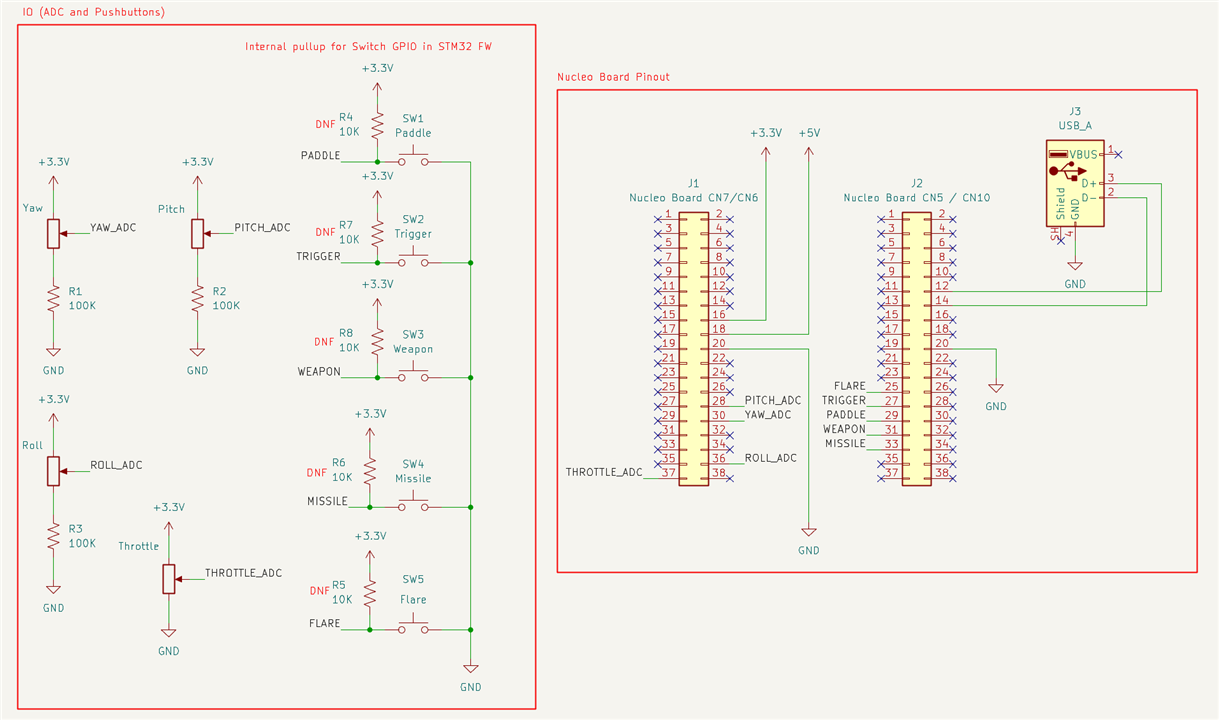
Here is basic schematic in KiCAD to show the electrical connections on the Nucleo board (for possible later full PCBA design, just schematic capture for now):
Eventually all the wires were soldered up and fed out through the grommet to be connected into the Nucleo board (see image below) with each IO pinout carefully labelled to avoid confusion and make debugging easier. Intention was to mainly perform physical pin checking with Nucleo board pinout vs STM32 CUBE IDE mapping

3.3 Software Design
At a very high level, the HID (Human Interface Device) should present the following features to the user. I followed a STM32 USB HID driver setup to give the following functionality (for MetalStorm PC game) similar to example at https://www.hackster.io/voske65/usb-hid-for-nucleo32-cubemx-part-2-edd88f. It is this descriptor which instructs how the device identifies itself to the OS. Then matching STM32 IO to meet this structure, using STM32 CUBE IDE. Initially I tried STM32Duino but this proved difficult as the HID library was not easy to add in so reverted back to the original STM32 IDE for the programming.
- Axes
- 4 x ADC (Roll and Pitch + 1 axis (Position) HAT + Throttle Wheel)
- Buttons
- Top Control Hatch Button = Missile
- Trigger = Trigger
- Side Button = Flare
- Paddle Button = Paddle
- Encoder Button = Weapon Swap
Mapping is as follows in the STM32 CUBE IDE:
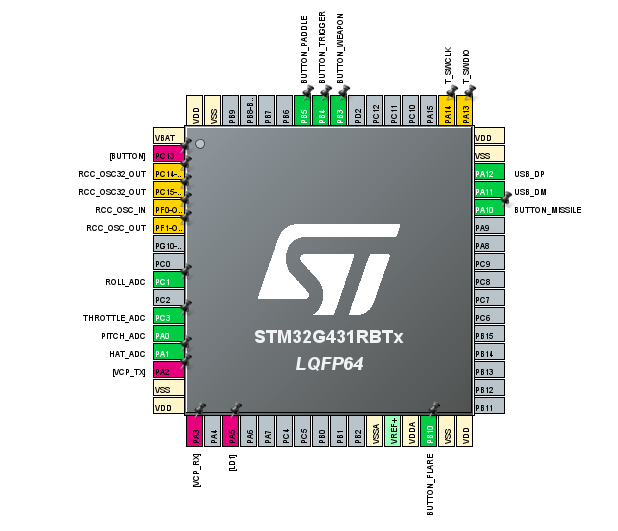
ADC Inputs (ADC1, DMA circular)
| Signal | IOC Label | STM32 Pin | ADC Channel | Nucleo Connector |
|---|---|---|---|---|
| Pitch | PITCH_ADC | PA0 | ADC1_IN1 | CN8 pin 1 (A0) |
| Yaw | HAT_ADC* | PA1 | ADC1_IN2 | CN8 pin 2 (A1) |
| Roll | ROLL_ADC | PC1 | ADC1_IN7 | CN8 pin 5 (A4) |
| Throttle | THROTTLE_ADC | PC3 | ADC1_IN9 | CN8 pin 6 (A5) |
Buttons (GPIO_Input, internal pullup, active low)
| Signal | STM32 Pin | Nucleo Connector |
|---|---|---|
| BUTTON_MISSILE | PA10 | CN9 pin 3 (D3) |
| BUTTON_FLARE | PB10 | CN9 pin 7 (D6) |
| BUTTON_WEAPON | PB3 | CN9 pin 5 (D4) |
| BUTTON_TRIGGER | PB4 | CN9 pin 6 (D5) |
| BUTTON_PADDLE | PB5 | CN9 pin 4 (D3) |
The main steps completed for the software portion of this project were:
i) ADC Setup and Axis Smoothing
When you are flying an aircraft, you would want the axes to be quite stable with less jitter the better (especially when lining up a TIE fighter in the crosshairs!). I put in a Simple Moving Average filter applied to Pitch, Roll and Yaw — smooths out potentiometer noise without adding complex DSP.
#define SMA_SIZE 16 // 16 samples × 10ms = 160ms smoothing window
typedef struct { uint16_t buf[SMA_SIZE]; uint8_t idx; uint32_t sum; uint8_t full;} SMA_t;
static inline uint16_t SMA_update(SMA_t *f, uint16_t input){ f->sum -= f->buf[f->idx]; f->buf[f->idx] = input; f->sum += input; f->idx = (f->idx + 1) % SMA_SIZE; return (uint16_t)(f->sum / SMA_SIZE);}
ii) USB HID
1. The HID Report Descriptor — the heart of the project
The HID report descriptor that tell the OS exactly what this device is and how to read it. No driver installation needed.
__ALIGN_BEGIN static uint8_t HID_MOUSE_ReportDesc[HID_MOUSE_REPORT_DESC_SIZE] __ALIGN_END ={
0x05, 0x01, // USAGE_PAGE (Generic Desktop)
0x09, 0x04, // USAGE (Joystick)
0xA1, 0x01, // COLLECTION (Application)
// Axes: X (Pitch), Y (Roll), Slider (Throttle), Rz (Yaw)
0x05, 0x01, // USAGE_PAGE (Generic Desktop)
0x09, 0x30, // USAGE (X) — Pitch
0x09, 0x31, // USAGE (Y) — Roll
0x09, 0x36, // USAGE (Slider) — Throttle
0x09, 0x35, // USAGE (Rz) — Yaw
0x15, 0x00, // LOGICAL_MINIMUM (0)
0x26, 0xFF, 0x03, // LOGICAL_MAXIMUM (1023)
0x75, 0x10, // REPORT_SIZE (16 bits)
0x95, 0x04, // REPORT_COUNT (4)
0x81, 0x02, // INPUT (Data, Var, Abs)
// Buttons (10)
0x05, 0x09, // USAGE_PAGE (Button)
0x19, 0x01, // USAGE_MINIMUM (Button 1)
0x29, 0x0A, // USAGE_MAXIMUM (Button 10)
0x15, 0x00, // LOGICAL_MINIMUM (0)
0x25, 0x01, // LOGICAL_MAXIMUM (1)
0x75, 0x01, // REPORT_SIZE (1 bit)
0x95, 0x0A, // REPORT_COUNT (10)
0x81, 0x02, // INPUT (Data, Var, Abs)
// Padding (6 bits to fill the byte)
0x75, 0x06, // REPORT_SIZE (6)
0x95, 0x01, // REPORT_COUNT (1)
0x81, 0x03, // INPUT (Cnst, Var, Abs)
0xC0 // END_COLLECTION
};iii) Joystick Task
The full joystick task — reads ADC, applies filtering, builds the 10-byte report and sends it over USB at 100Hz
// Rate limited to 100Hzif (HAL_GetTick() - last_tick < 10) return;last_tick = HAL_GetTick();
// Scale 12-bit ADC to 10-bit HID rangeuint16_t x = ADC_HID_PITCH >> 2;uint16_t y = ADC_HID_ROLL >> 2;uint16_t z = ADC_HID_THROTTLE >> 2;uint16_t rz = ADC_HID_YAW >> 2;
// Apply smoothinguint16_t sx = SMA_update(&sma_pitch, x);uint16_t sy = SMA_update(&sma_roll, y);uint16_t srz = SMA_update(&sma_yaw, rz);
// Build and send reportHID_JoystickReport_t report;report.roll = AXIS_MAX - sx; // inverted to match hardware orientationreport.pitch = sy;report.throttle = z;report.yaw = srz;report.buttons = read_hardware_buttons() & 0x03FF;
USBD_HID_SendReport(&hUsbDeviceFS, (uint8_t*)&report, sizeof(report));
Putting it all together, with the inbuilt STM32 ST-Link, it was very convenient to iterate on the prototype joystick firmware until the raw readings and buttons were debugged and correctly mapped. Latest code is at https://github.com/Jono453/STM32-HID-Joystick
Section 4: Prototype Assembly - It Works!
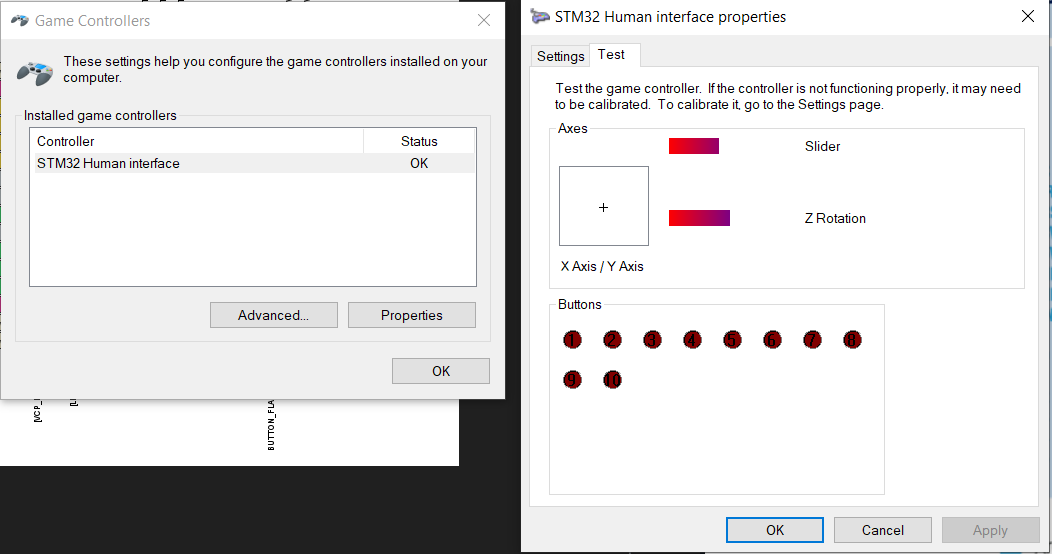
The rough assembly of the components was done. With the software setup and now flashed onto the Nucleo board, it was time to test it out on the computer. The simplest test was to use the USB Game Controller dialog box and see if it appeared as a HID device - ie check all 4 axes and all buttons worked. Moving the three axes on the vintage joystick panel and the buttons and HAT joystick on the flight stick and all bars and buttons activated as required.
Section 5: The Spring Clean: Finishing It Off (Finally)
This is where the project had been stuck for a while....
The core electronics were working — firmware tested, axes responding, buttons registering. But the physical build was far from done. Wiring was basic jumper wires straight into the Nucleo board, the enclosure was open, nothing was strain-relieved and the whole thing felt fragile to use. Not something you'd want to actually game with. The spring clean goal was to turn a working proof-of-concept into a finished, rugged controller you could actually pick up and use.
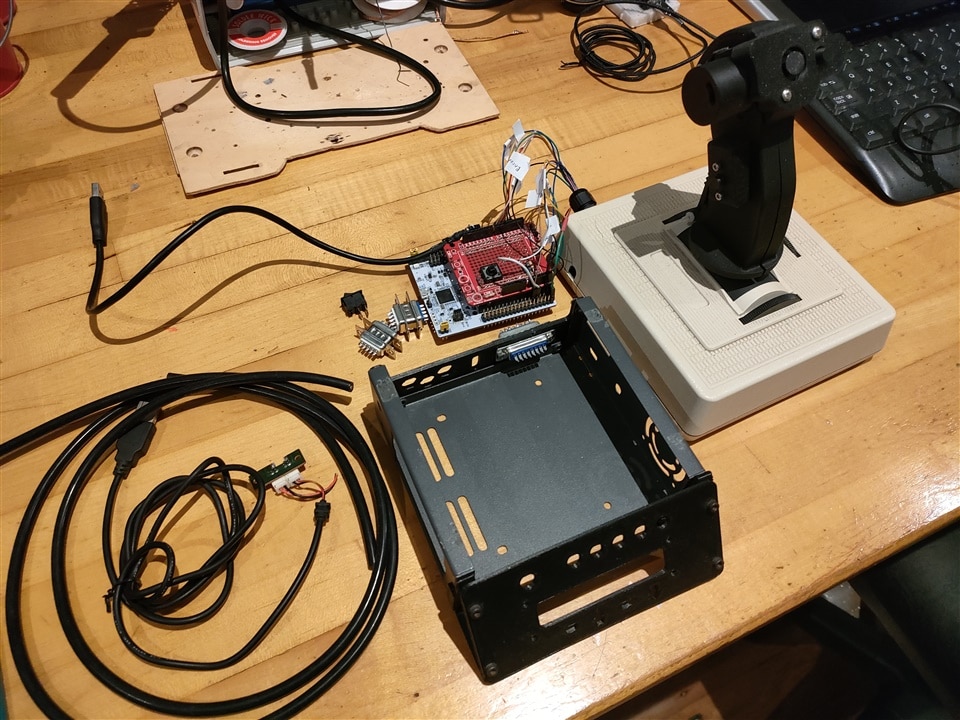
I had an old chassis box from another project which I wanted to use to house some items and make it more complete as a proper flight joystick base structure. Here is the current state of the setup. Ready for the tinkering and final spring clean up and assembly!
The Finishing Touches:
1. Proper extension wiring and making overall wiring more robust. The original wiring was basic — short jumper leads going directly into the Nucleo board headers. Fine for bench testing but not practical for a handheld controller. The grip needs to move freely, which means proper extension cables with enough length to not stress the connections. Replaced the jumper leads with soldered extensions, added heat shrink throughout and made sure nothing was pulling on any connector when the grip moves through its range of motion.
2. Strain relief Every cable exit point through the grip body and base needed proper strain relief so that normal use doesn't gradually work connections loose. An initial grommet was used but since I was intending to use some Dsub 9 pin or Dsub 15 pin connectors, it would be nicer to package these up in a more user-friendly and compact way with some 3D printed parts.
I designed some new parts to better strain relief the cables and tidy up the whole setup, using a spare grommet and a cool guarded arming switch, see CAD below for the assembly, the overall cable was also made more robust with some spare 25pin dsub and spare 15pin dsub connectors used to extend the cable between the joystick itself and the control box for more user friendly lengths. GrabCAD Nucleo board CAD citation - https://grabcad.com/library/stm32-nucleo-64-1. (by Shai Rogel). Gradually finalizing 3D printed components to make the whole setup more rugged and improve connectivity. Add some supports for the 25pin Dsub for the joystick external wires to avoid stress on the cables and also cable-tied the extended harness to make it cleaner. I decided to modify the second front panel to include positions for some tactile rugged switches for future IO.
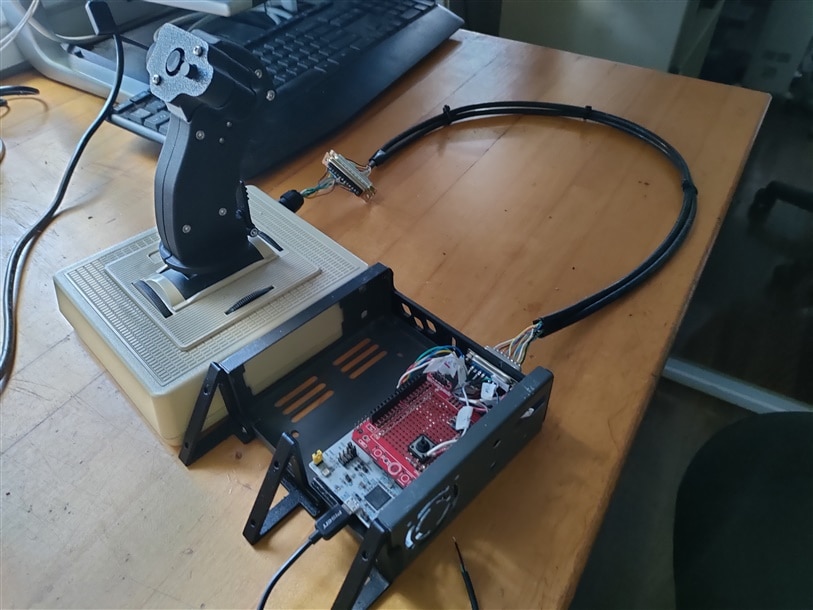
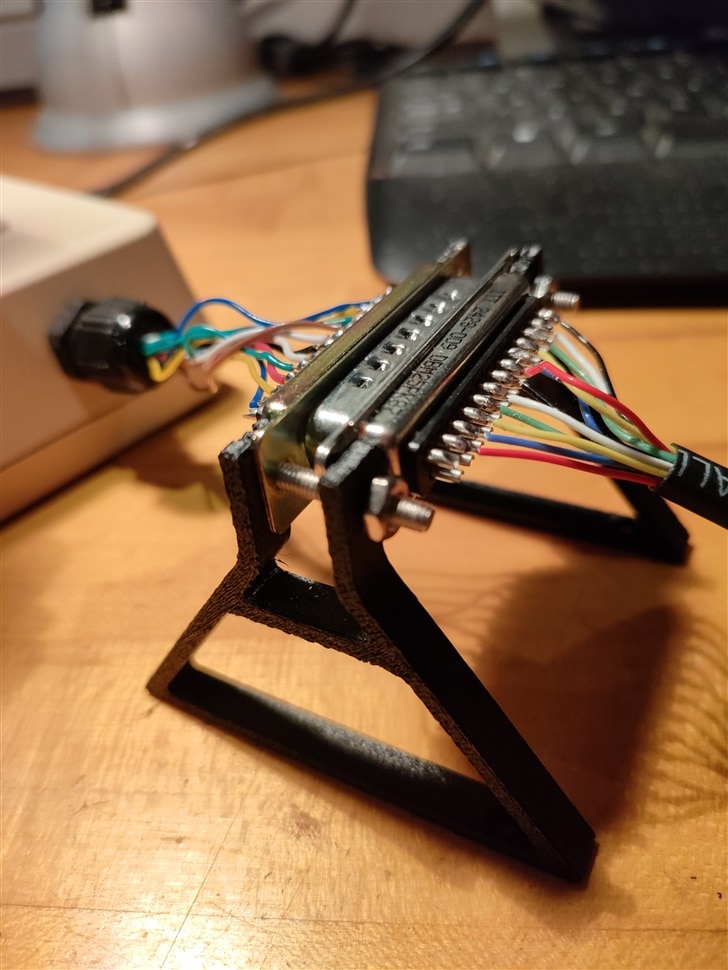
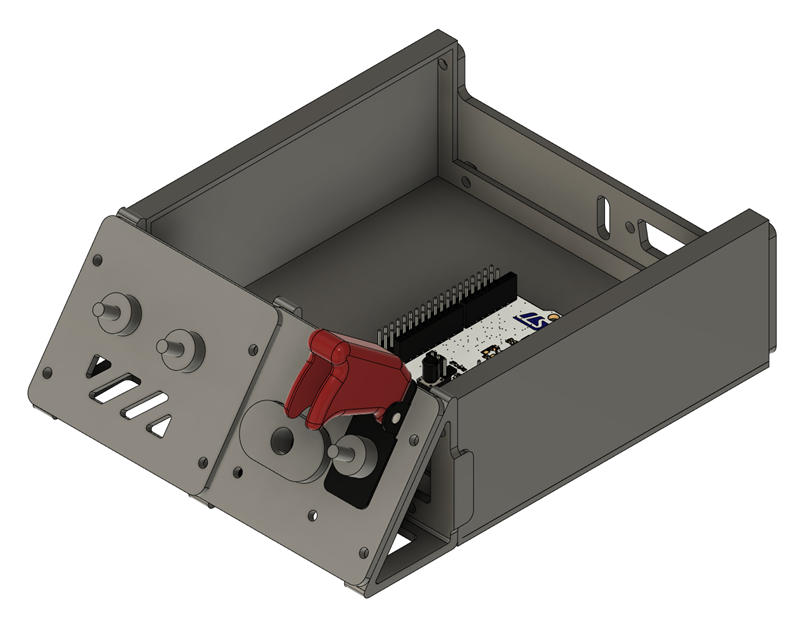
The final assembled HID joystick! Custom vintage joystick flight stick with Dsub extension cable into the 'control' box with the USB and 5V power for the whole gaming setup. Due to some last minute power issues, the STM32 board was not powering up through the power switch so I added the wall-wart 5V/3A supply into the board for final testing.
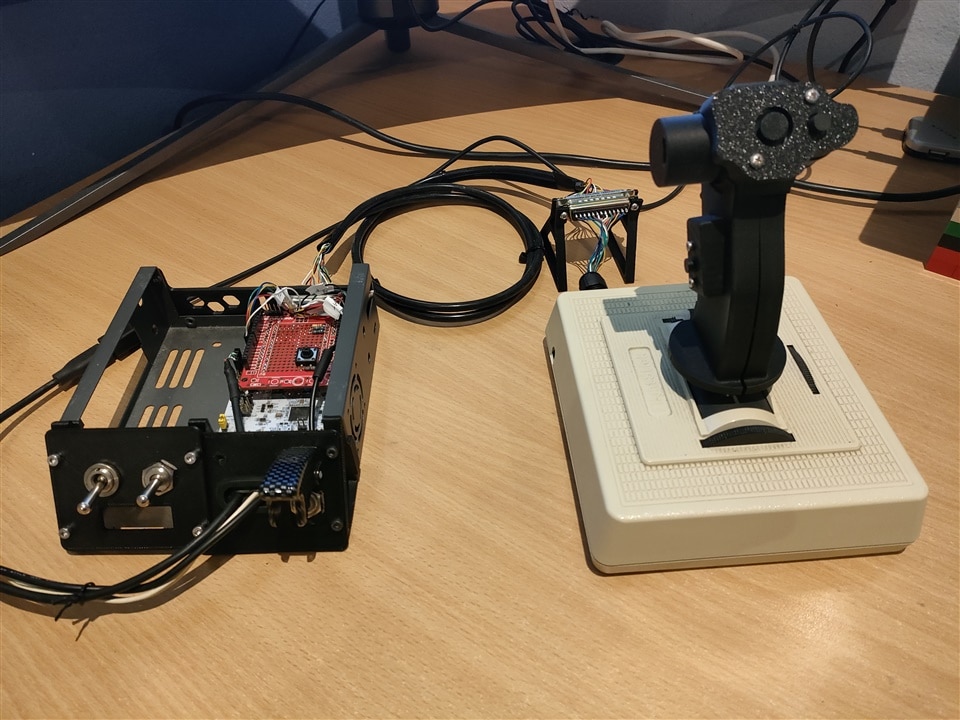
Testing on computer and with Star Wars Squadrons (see video) - was a satisfying experience! Phew phew phew (can be heard over the tactile buttons)
Section 7: Future Work
This project is now deemed 'completed' but there are still some improvements which can be made.
- Designing a proper 'cover' for the control box. See ife a fan is required
- Change grommet to individual threaded grommets for the USB and power cables
Any other ideas let me know.


