


.jpg-1440x400x2.jpg?sv=2016-05-31&sr=b&sig=43fFYGYpl73eFH6hUPvFX4OPbHa2m%2FEPq5fk5o8pPMY%3D&se=2026-10-25T23%3A59%3A59Z&sp=r&_=ufo5nAtVCtxn/vz+edjaaA==)
Introduction
For the last one year or so, I have been working on a project that was based on Nordic Semiconductor Bluetooth chip and IR temperature sensor array. Unfortunately, the project was not finishing due to many reasons. One of them was some technical difficulties to understand the data from their online documentation regarding the hardware layout and PCB design. But also, I had some other projects to complete which made more delays to this project. Hence, for Spring Clean competition this is a good chance for me to post that project.
Why this project for Spring Clean?
I think that Spring Clean is something for a project that we were working on and was not able to finish it due to some issue or any other reason. This project has happened to be the same. It took so many delays in completing. The first thing when I decided to work with some IR sensor array for temperature measurement was that I looked on the internet for available sensors and options.
The first sensor that I bought was MLX90640 and that was cool. But for tiny devices with several hundreds of KB of RAM memory, it was not possible to run the software that it has. There are so many parameter calculations and RAM usage that at some point did not work as expected.
Finally, I decided to create a PCB with Panasonic AMG-8833 I2C sensor. The PCB is with nRF54L15 as the main SoC.
PCB design
I have make the PCB using KiCad. The PCB is on four-layer board. As the main SoC there is Nordic Semiconductor nRF54L15 device.
This is a Bluetooth chip with Cortex-m33 core. It also has RISC-V core inside it as a coprocessor.
There is a chip Antenna from Johanson technologies at the right edge of the PCB. The total impedance of the antenna feed should be ~50 ohms.
The programming can be done using the SWD interface connected on 10-pin 1.27mm connector.
The AMG-8833 is connected over I2C interface.
Note: The schematic is in the attachment.

The sensor
AMG8833 is 8x8 (64 pixels) sensor for IR temperature measurement. The sensor is good for some tasks and is not good for others. There are some applications where this sensor is a good choice. For example, my experience tell me that this sensor may not be suitable to detect human presence. But the sensor is good if someone want to have an application where temperature difference of more than 10 C is evident.
- Fire detection in automotive/industrial applications
- Smart home related applications
- Freezing temperature detection.
- Cooling application for servers, PC, etc.
Expectations v/s Reality
There is always expectations vs reality check. For this project it was quite a match.

The failed attempt
At first, I tried to interface the sensor with nRF52840-DK and the 2.8" Adafruit display shield. I was using LVGL library to do that. I was able to create the canvas and update the display data for heatmap. The only thing was that there is only 254KB of RAM memory on this device which may not be enough to update the display regularly. Here I had to make a design decision.

Programming using MicroPython
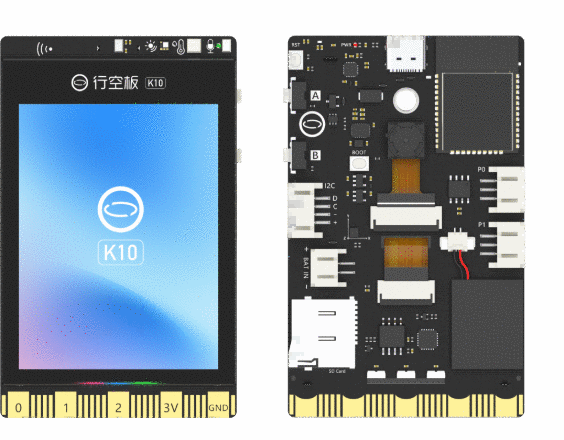
I decided to use Unihiker K10 development board. The k10 is a device with ESP32 s3 chip and various sensors, mic, speaker, camera and display interface. There is a official micropython support from DFRobot for this development board. After installing the Micro python firmware to the development board, we can start the actual programming process.
I will explain the code samples with each section and how it works.
The first thing is to get the I2C device for the AMG8833 sensor. The I2C device on address is at 0x68/0x69. After the device is available, we can set the device with following settings.
In the following code, the device is set with Normal mode with 10 FPS data rate.
After the device is set, we are reading the data continuously in the while() loop from the address 0x80. The data is 12-bit signed value. In the following code, we need to do the bit operations to get the correct sign out of data. Then, we need to multiply the data with (0.25) to get the correct value of the temperature of that particular pixel. This is all for getting and processing 64 pixels data.

from machine import Pin, I2C

# Configure I2C pins and frequency
# Adjust 'scl' and 'sda' pins according to your board
# Example: ESP32 (SCL=22, SDA=21), Raspberry Pi Pico (SCL=1, SDA=0)
i2c = I2C(0, scl=Pin(48), sda=Pin(47), freq=400000)
#Normalmode
i2c.writeto_mem(0x68, 0x00, bytes([0x00]))
time.sleep(0.5)
i2c.writeto_mem(0x68, 0x01, bytes([0x3F]))
time.sleep(0.5)
#10 FPS setting
i2c.writeto_mem(0x68, 0x02, bytes([0x00]))
time.sleep(0.5)

while(True):
    data = i2c.readfrom_mem(0x68, 0x80, 128)
    count = 0
    time.sleep(0.2)
    print('\n')
    print('New Frame')

    incre = 0

    for i in range(0, 127, 2):
        count += 1
        temp = ((data[i+1] << 8 | data[i]) & 0xFFF)
        if(temp & 0x800):
            temp -= 0x1000

        temperature = (temp) * 0.25
        disp_data[incre]=temperature
        incre += 1

        print(temperature, end=' ')
        if (count == 8):
            count = 0
            print()
The next thing is to create a code for display interfacing. The goal is to create a heatmap like display. For that there is already a display library. What we need is to increase the cell_size (number of pixels) representing each of the pixels that we have. So, we can use a rectangle object to create a display with 8x8 pixel array. The following code is doing the same. It calculates the coordinates to draw the rectangular object and then updates the display. Be sure to update the display after the loop is over in order to have faster display update.
Then the code is also calculating the MIN/MAX temperature of the object using the data that we have.
import time
from unihiker_k10 import screen, rgb

def value_to_color_nm(val):
    v = max(0, min(100, val))  # Clamp between 0 and 100
    r = int((v / 100) * 255)
    g = 0
    b = int((1 - v / 100) * 255)
    return r, g, b
while(True):

    #assign values for heatmap
    i=0
    max_temp = max(disp_data)
    print(max_temp)
    min_temp = min(disp_data)
    print(max_temp)

    for row in range(raws):
        for col in range(cols):
            r, g, b = value_to_color_nm(disp_data[i])
            i+=1
            x0 = col * cell_size
            y0 = row * cell_size
            screen.draw_rect(x0+20, y0+70, cell_size, cell_size, r << 16 | g << 8 | b, r << 16 | g << 8 | b)

    screen.draw_text(text="MAX: "+str(max_temp)+" C",x=20,y=2,font_size=24,color=0xFF0000)
    screen.draw_text(text="MIN: "+str(min_temp)+" C",x=20,y=25,font_size=24,color=0xFF0000)
    screen.show_draw()
    # Create a screen
    scr = lv.screen_active()
    time.sleep(0.5)

    if(max_temp > 50):
        rgb.write(num = 0, R=255,G=0,B=0)
        rgb.write(num = 1, R=255,G=0,B=0)
        rgb.write(num = 2, R=255,G=0,B=0)
    elif(min_temp < 5):
        rgb.write(num = 0, R=0,G=0,B=255)
        rgb.write(num = 1, R=0,G=0,B=255)
        rgb.write(num = 2, R=0,G=0,B=255)
    else:
        rgb.clear()
Finally, I have a display with live heatmap on it.

Video
This video shows the demo application in real time. I have a matchstick and a freezing cold-water bottle. When I show the matchstick, the red is indicated on the pixelmap and the RED light is also ON. When I show the water bottle with ice, that is also displayed with Blue pixels on map. Also, the BLUE LED is ON.
Conclusion and future work
For this project, I was quite satisfied that I was able to create a heatmap like display that too on small screen like this. Also, the commercially available devices are quite so expensive. This might be a DIY cheap device. One of the things that I noticed is that for high resolution sensors and display applications we need a SoC with more RAM memory. Which ESP32s3 device has and the nRF52840 do not. But at the cost of relatively high-power requirements.
The project could be extended to add wireless connectivity such as Bluetooth or cellular connection. Also, the project can find it's place in devices that could detect fire and alert users. This can prevent number of fire incidence that we have. For example, in Trains, in Cars engine, in industry or in forbidden zones.