


One of my close family member uses a Cochlear Implant, For daily carry, they had provided a box where in, the speech processor and the spare rechargeable batteries can be kept but over time it started fraying and there was a big usability issues. With 4 Spare batteries, it was hard to keep track of which one is used and which one is fully charged. There were some extra wallet provide but carrying all of these made it very bulky to be used. So my idea is to literally clean up the case by proving it with electronic feedback to provide the state of charge of each battery,


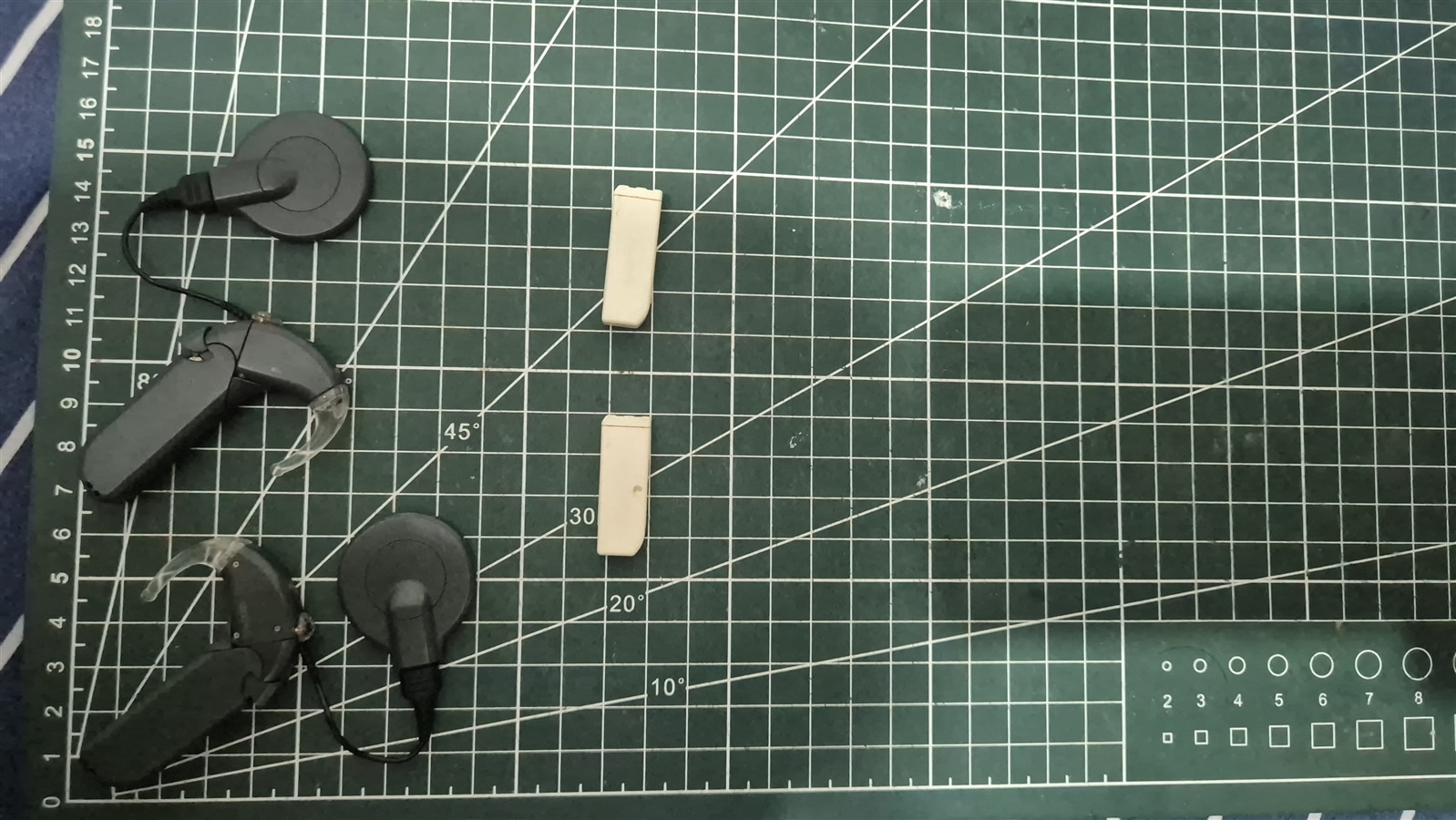
So the requirements
- Ultra low Power MCU - STM32U031C8T6
- ADS1115 To measure the battery ADC in differential mode. Each ADS can measure 2 battery in differential mode, so i need 3. The battery has gold pads which is interfaced with pogo pins.
- WS2812B to show the status of each battery using colors
- 128x64 OLED to show battery status as well as other info (atlease during developmental phase)
- Hall effect sensor to know when the box is opened and then turn on the MCU from wake
- OPT3001 - Light Intensity sensor to adjust the brightness of the LEDs to make it not hurt eyes when opened at night or make it visible when opened in bright sunlight
- Self Battery Charge and SOC measurement using BQ24074 and MAX17048
- Flash Chip - For future use
I started off by measuring the battery
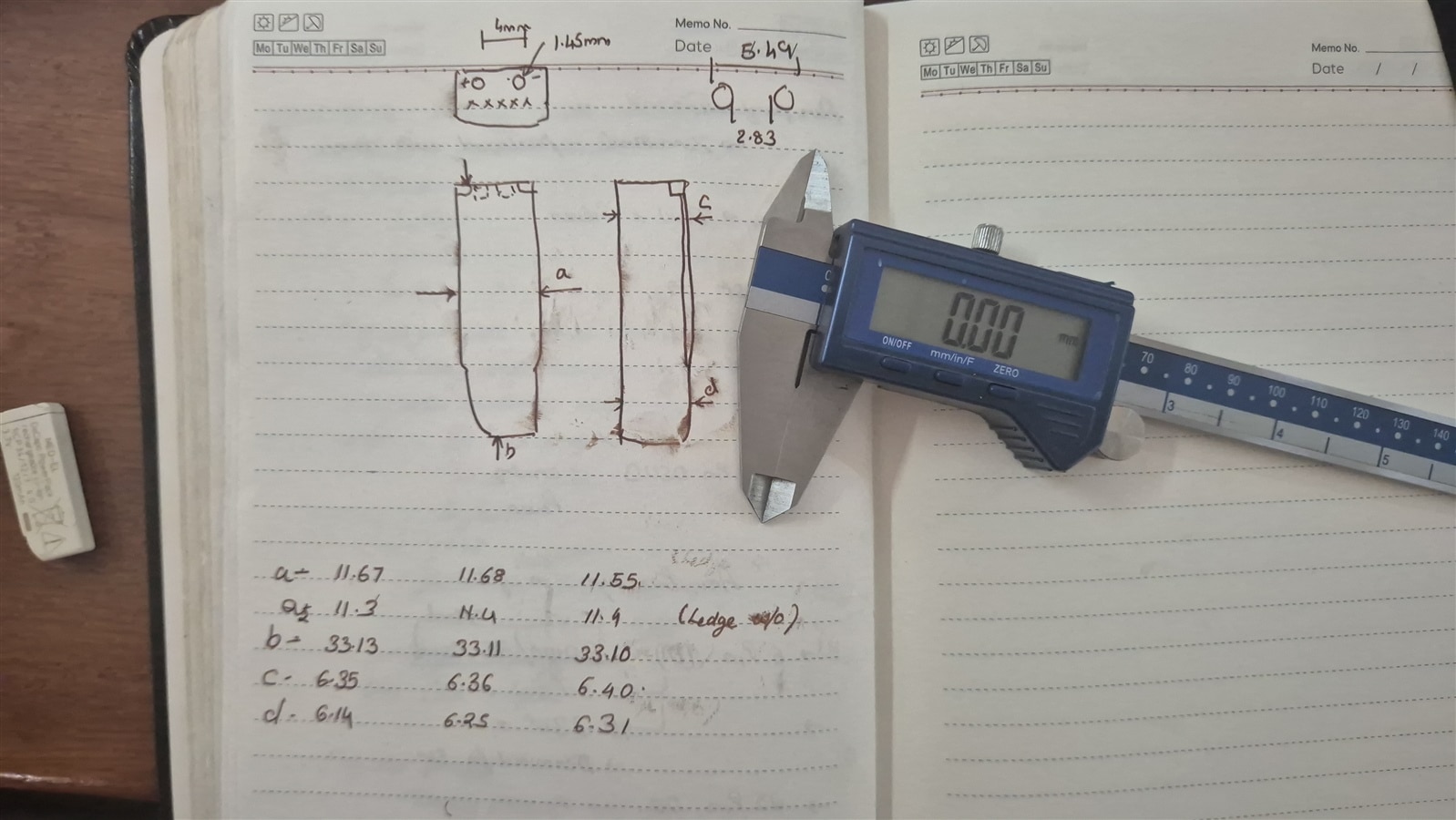
I wanted to make 2 PCB
- Main PCB - Everything except the ADS115, LED and Pogo pins
- Pogo Pin PCB - Each PCB will measure and display stat for two Batteries, with one ADS1115, two WS2812B-2020 LED and 4 Pogo pins in total
Schematis - Main PCB
| {gallery}My Gallery Title |
|---|
|
Main Connections: Of the System |
|
STM32: MCU and Programming Pins |
|
Power: USB, Battery Charger, Fuel Guage and LDO |
|
OPT3001: Light Intensity Sensor |
|
Hall Effect Switch: To wake up the MCU |
|
SSD1306: OLED with Mosfet On/Off |


Schematic for Pogo Pin PCB

PCB Render


Firmware
decabox-fw/
├── Core/
│   ├── Inc/
│   │   ├── app/
│   │   │   ├── battery_map.h   ← voltage thresholds, LED colours, BatState enum
│   │   │   └── display.h       ← OLED update API
│   │   └── drivers/
│   │       ├── ads1115.h
│   │       ├── max17048.h
│   │       ├── opt3001.h
│   │       ├── ssd1306.h
│   │       └── ws2812b.h
│   └── Src/
│       ├── app/
│       │   ├── battery_map.c   ← voltage_to_state(), bat_led_color[]
│       │   └── display.c       ← battery icon drawing, OLED layout
│       ├── drivers/            ← IC drivers (one .c/.h per chip)
│       └── main.c              ← FSM, sleep, sensor loop
State machine
The system has two states: awake and asleep. The hall effect switch (AH1806) tells us which one to be in.
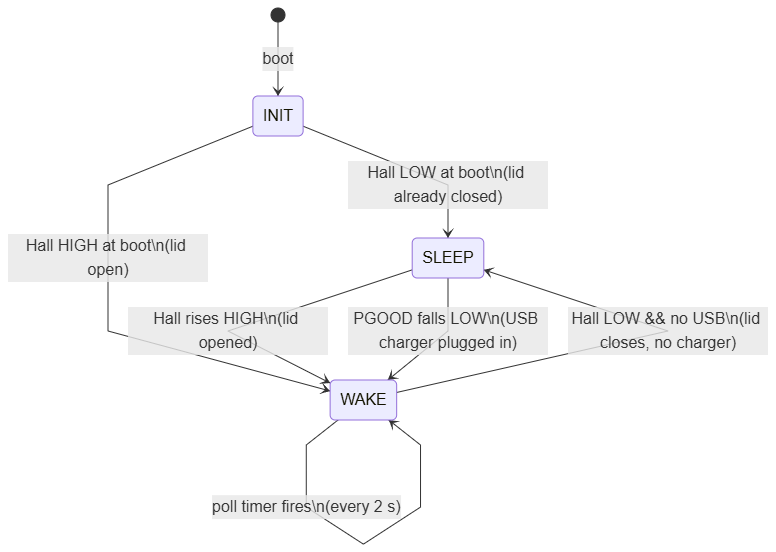
The hall switch (PA0) is active-low: LOW = magnet present = lid closed, HIGH = no magnet = lid open. The firmware reads the GPIO pin directly in the main loop — no debounce state machine needed because we re-read on every iteration. If the pin is LOW and there's no USB, we enter Stop 2 mode immediately.
If USB is plugged in while the lid is closed, the PGOOD interrupt wakes the MCU and the USB-present check keeps it awake so the display shows the charging state. This way you can plug in and monitor overnight without opening the case.
Sleep implementation
Stop 2 on the STM32U031 cuts the main voltage regulator but keeps SRAM, GPIO output latches and the EXTI logic alive. The target is under 15 µA for the MCU. The LP5907 LDO (always-on) adds ~75 µA quiescent, which dominates.
Thing to note, just like my keebdeck keyboard project, a pending SysTick interrupt causes WFI to return immediately without entering Stop 2. You must call HAL_SuspendTick() first and HAL_ResumeTick() after the clock restore. I learned this from a keyboard firmware project on the same MCU family; without it, the chip never actually sleeps.
Similarly, all EXTI pending bits must be cleared before WFI. I write both EXTI->RPR1 and EXTI->FPR1 directly rather than using the HAL macro, which only clears one direction depending on the version.
The SSD1306 must be re-initialised after wakeup because the AO3401 cuts its VCC during sleep. The other I²C peripherals (ADS1115, OPT3001, MAX17048) stay powered through LP5907 and their register values survive Stop 2 — they need no reinit.
Voltage to LED colour
Each of the six WS2812B-4020 LEDs corresponds to one Decapo cell. The mapping has four levels, identical on both the LED and the OLED battery icon:
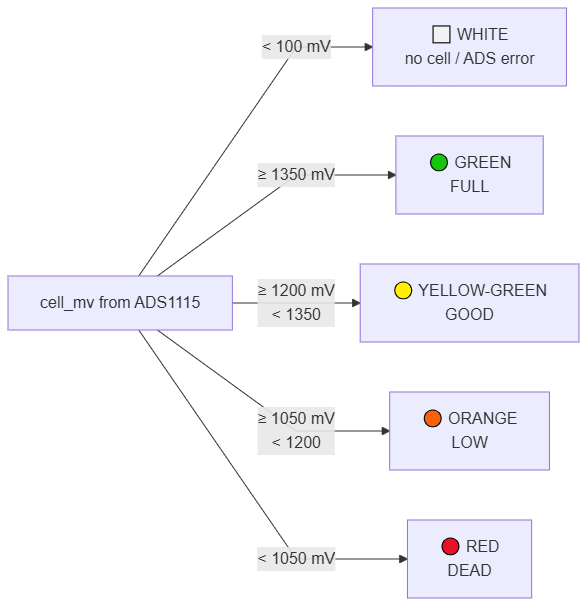
The white state is important: if an ADS1115 chip fails to init, the two cells it would have read stay at 0 mV in the buffer. The < 100 mV guard catches this and lights those LEDs white rather than red, so the user can distinguish "dead battery" from "no battery in this slot" at a glance.
The thresholds are for NiMH chemistry (nominal 1.2 V). Adjust BAT_THRESH_* in battery_map.h once the actual Decapo chemistry and the resistor divider ratio are confirmed on hardware.
Global brightness is set by the OPT3001 lux reading, linearly mapped from 15 % at 1 lux to 50 % at 10 000 lux:
brightness_percent = 15 + 35 × (lux − 1) / (10000 − 1)
This keeps the LEDs dim in a dark bedroom at night and comfortably readable in daylight without blinding anyone.
Main loop timing
The sensor cycle reads OPT3001 (110 ms blocking), then six ADS1115 channels. The poll interval is 2000 ms. As it is received, the LEDs and OLED is updated.
Mechanical Casing
I wanted the battery to be popped in, and it should stay by the force of the pogo pins, with careful measurement of all the dimensions and some experimentation it works. You can see how beautifully the LED is casting the gentle glow on the Battery.
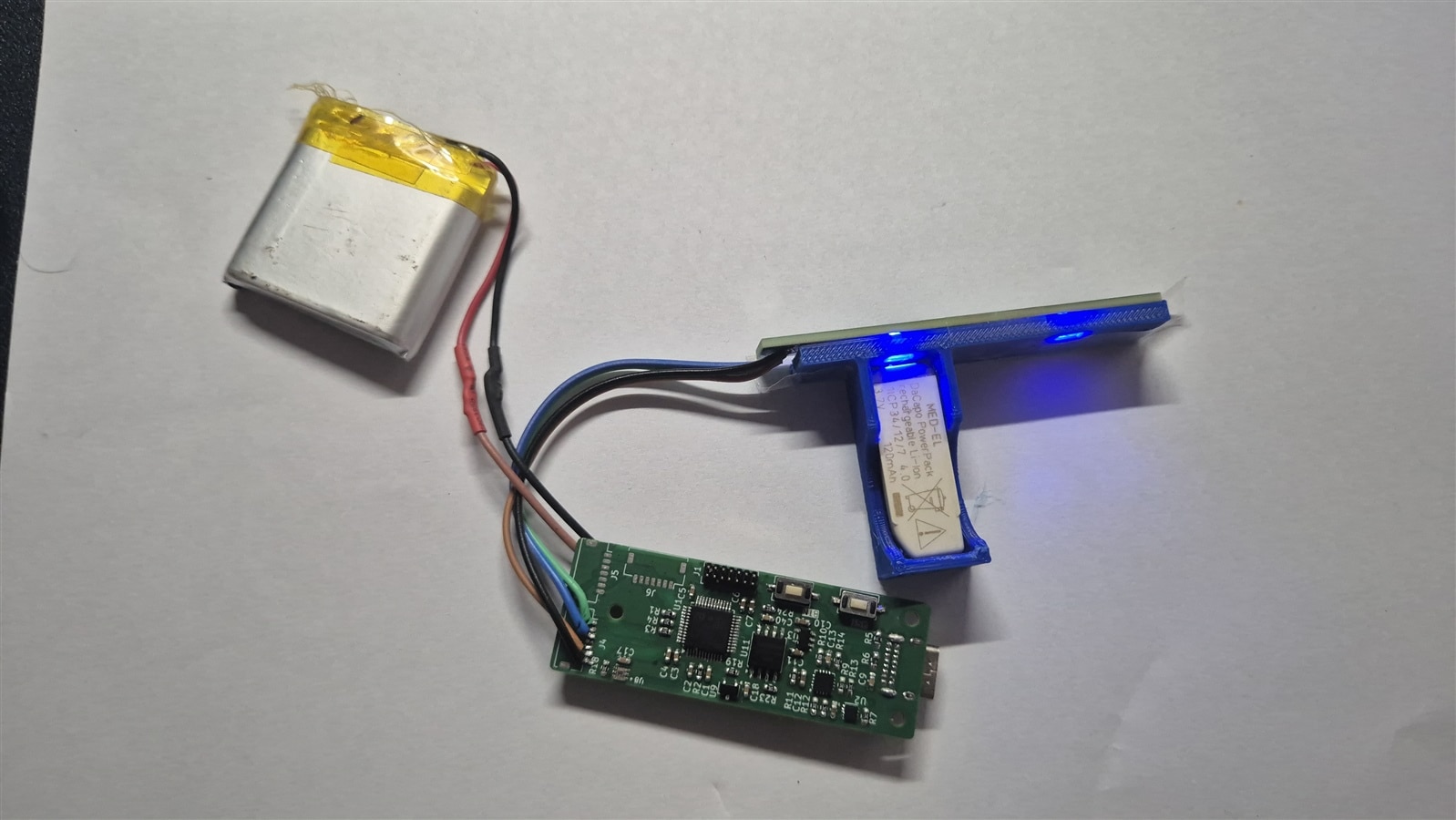
The Code
The code for this projects can be accessed here: https://github.com/arvindsa/decabox
Results so far
The firmware compiles cleanly under STM32CubeIDE and the bring-up tests (RGB colour cycling, lux-brightness, cell voltage reading, OLED update) all worked on . The sleep entry and wakeup sequence works correctly on hardware: closing the lid blanks everything and the serial terminal shows the Stop 2 entry message. Lifting the lid brings everything back within ~200 ms.
Now, I realized a major design flaw. The ADS cannot measure voltage more than the VCC which is 3.3V in this case, So i will have to redesign the Pogo Pin PCB to provide a network bridge enabled by a mosfet for low power usage. This means i coulnt complete the whole project as such but all individual unit test is completed and validated. Hoping to wrap it up by another 15 days.