


Hi makers! 
A little context, I have a pair of speakers that I have never heard music coming out of, I know thi sounds a bit strange, I bought them for a very low price from a thrift store (I couldn't hold myself ), and they seemed unused. After several attempts and checks I still haven't been able to fix them.
Movin on, let's implement the "Do It Yourself" method to bring something back to life, in this case it's speakers and LEDs.
Wouldn't it be a shame to just throw them away? 
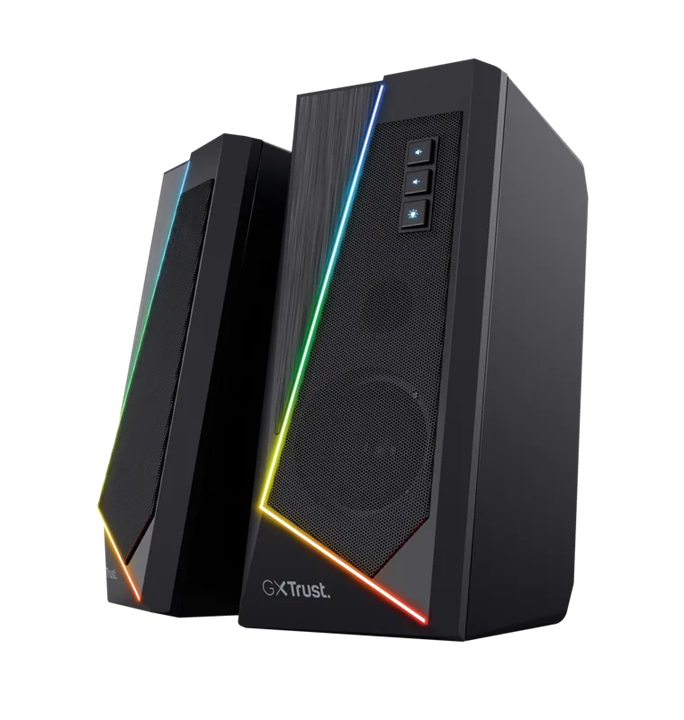
Main parts:
• speakers;
• PAM8403 audio amplifier, later PAM8406;
• microcontroller and addressable LEDs.
I have a pair of PC speakers, powered by 5V, they also have addressable LEDs built in, thus offering a more special look. But these speakers also have problems, the first being a broken LED that I had to replace, easy job, it's like done. The other problem I couldn't solve, something is damaged on the electronic circuit. It mostly contains: audio amplifier, digital volume control and an unencrypted IC but which I think has something to do with LEDs control.
| {gallery}Original circuit board |
|---|
|
IMAGE TITLE: Circuit board |
|
IMAGE TITLE: Circuit board |


Solution in 2 steps
1. Audio amplifier replacement
I applied the DIY version using a PAM8403 (initially) as an audio amplifier (the well-known module that you can buy almost everywhere), and for LEDs control I have a microcontroller.
I designed a circuit in Kicad, then I made a more homemade PCB let's say (given that I only need one piece, it didn't make sense to buy, more) on which I mounted the PAM8403 module and some pin headers to connect with jump wires. I know that this module doesn't have a volume control but I don't mind this, it's basically just made to "sing".
I have a very basic schematic and PCB:
| {gallery}Schematic + PCB |
|---|
|
IMAGE TITLE: Basic schematoc |
|
IMAGE TITLE: PCB |
|
|
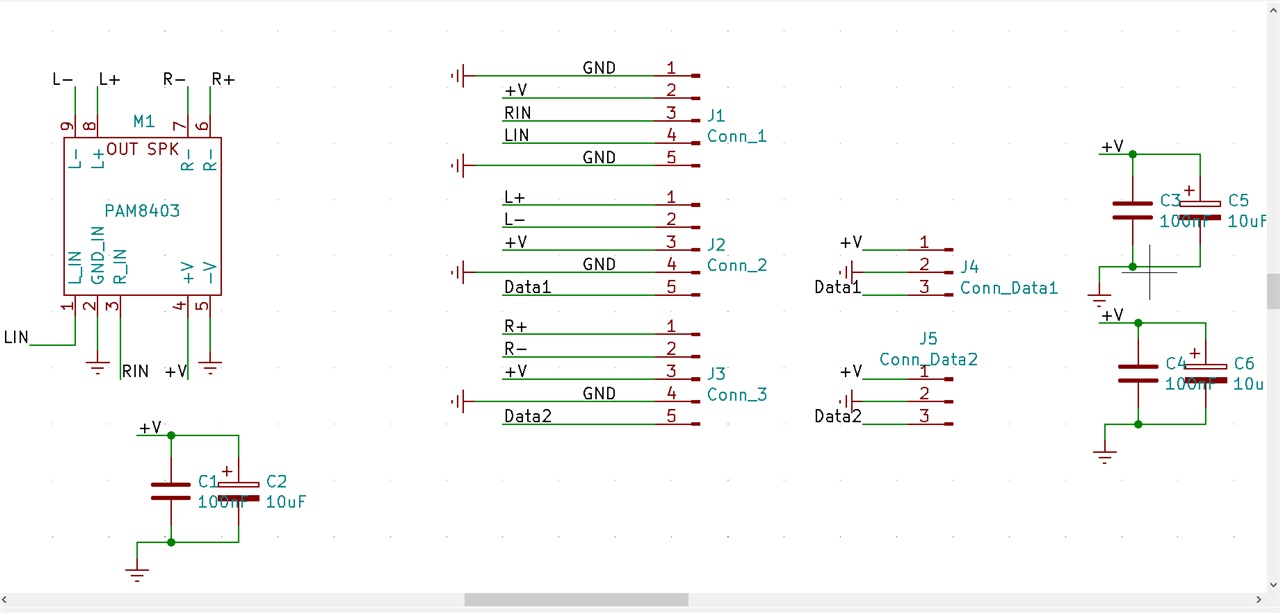
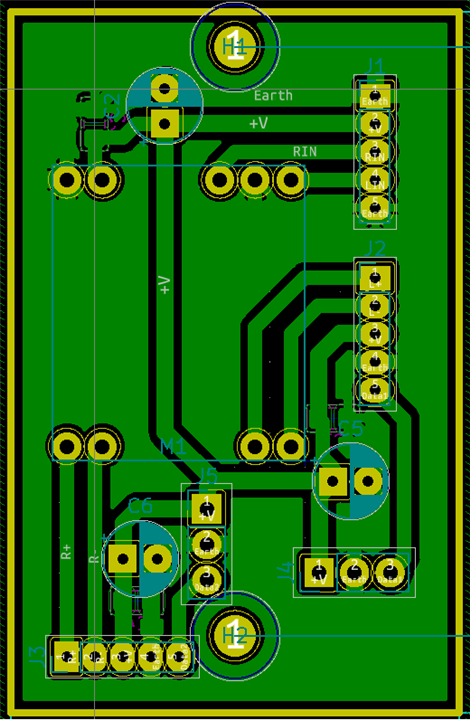
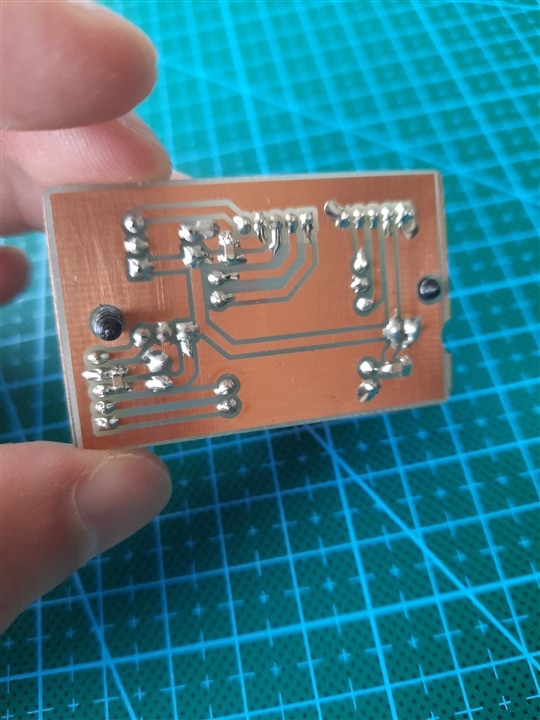
After doing some tests I was quite satisfied, until I added LEDs control. That's how another problem appeared, interference and an unbearable noise that bothers anyone's ear. When the LEDs are on and I apply a light show, a very sharp sound is heard, and without playing music. It's less noticeable during music playback, but otherwise it makes its presence felt. I don't think you want to hear it, I'm very serious.
Noise record.m4a
I can't accept that, so I tried an upgrade to the PAM8406 which, as mentioned in the datasheet, performs better in terms of noise and interference.
Indeed, it is a considerable upgrade, it is not perfect but it is certainly better now. That sharp sound is still audible but weak, only if I put my ears in the speakers.
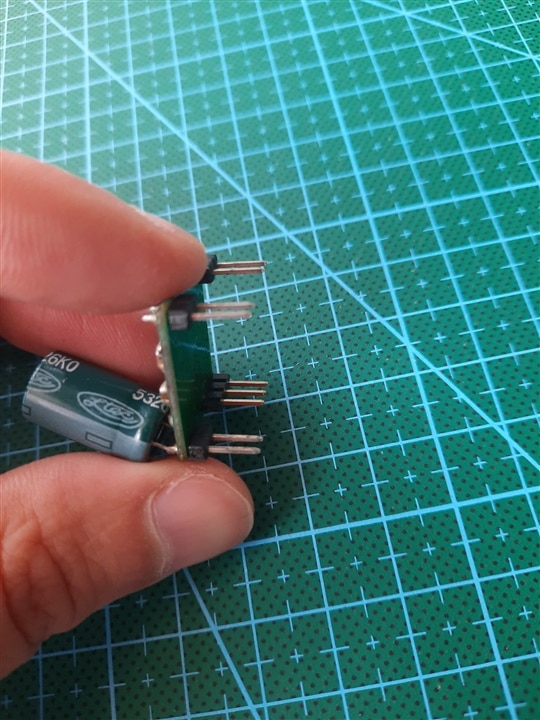
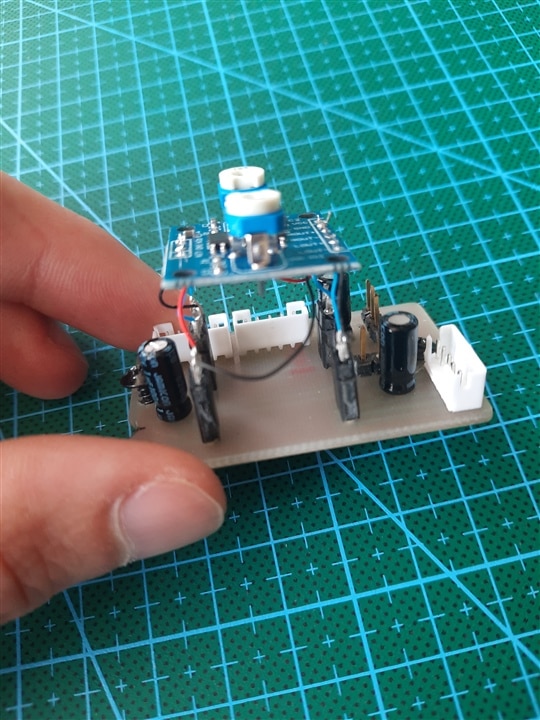
Since I made the original PCB for the PAM8403, I also tested it on this one, basically I improvised by soldering some wires (I mean painstaking work  ).
).
I will leave it as it is until I can make a suitable PCB for the PAM8406.
| {gallery}PAM8403 / PAM8406 |
|---|
|
IMAGE TITLE: PAM8403 |
|
IMAGE TITLE: PAM8403 |
|
IMAGE TITLE: PAM8406 |
|
IMAGE TITLE: PAM8406 |
|
IMAGE TITLE: PAM8406 |



2. WS2812B addressable LED control
As a controller for the LEDs I have an ATMega8 mounted on a simple board, a minimal one. Another option for LED control would have been some simple controllers but since the speakers initially had brightness adjustment I finally opted for a microcontroller because it allows me to use my imagination as well. So I integrated a TTP223 touch button.
We also have a program written in Arduino IDE using the FastLed library. There are 6 operating LED effects: Gaussian pulse, Gaussian ping-pong, meteor effect, random single LED fade and sparkle effect. Using TTP223 I can go through these effects as I want.
In one version the program was too large to be uploaded, so I turned to A.I. for optimizations and finally I managed to upload the program to the microcontroller. 
/*
  ALl In One v3.3.1
  LED effects for speakers
*/

#include <FastLED.h>
#include <avr/pgmspace.h>

// --- Hardware Configuration ---
// These define the pins, LED count and type.
#define LED_PIN_1 11
#define LED_PIN_2 10  // Mirrored output, pins show the same LED pattern
#define NUM_LEDS 7
#define LED_TYPE WS2812
#define COLOR_ORDER GRB
#define BRIGHTNESS 255  // Adjust 0-255 to set global intensity (0 = off, 255 = max)

// --- STEP 1: Optimization - Lookup Table (LUT) ---
// The gaussianLUT stores precomputed brightness weights for a 7-point Gaussian-like pulse.
// Using PROGMEM keeps these values in Flash (program memory) instead of SRAM.
// Values range 0-255 where 255 is full brightness for the color before global brightness scaling.
const uint8_t gaussianLUT[7] PROGMEM = { 13, 71, 190, 255, 190, 71, 13 };

// --- STEP 2: Optimization - PROGMEM Colors ---
// colorArray stores RGB colors as 24-bit hex values in Flash to save SRAM.
// NUM_COLORS must match the number of entries in colorArray.
const uint32_t colorArray[] PROGMEM = {
  0xFF0000,  // #1 Red
  0x00FF00,  // #2 Green
  0x0000FF,  // #3 Blue
  0xFFFF00,  // #4 Yellow
  0xFF00FF,  // #5 Magenta
  0x00FFFF,  // #6 Cyan
  0xFF69B4,  // #7 Pink
  0xFFA500,  // #8 Orange
  0x800080   // #9 Purple
};
const uint8_t NUM_COLORS = 9;

// leds[] is the main buffer used by FastLED. It holds the color for each LED.
//CRGB leds[NUM_LEDS];
CRGB ledsA[NUM_LEDS];
CRGB ledsB[NUM_LEDS];

// --- State Management ---
// currentEffect selects which effect runs in loop()
// EFFECT_COUNT is the number of selectable effects (0..EFFECT_COUNT-1)
uint8_t currentEffect = 0;
const uint8_t EFFECT_COUNT = 6;
volatile bool buttonPressedFlag = false;  // set by checkButton() when a valid press is detected

// Function to fetch color from Flash memory
// idx is wrapped with modulo NUM_COLORS to avoid out-of-range access.
CRGB getColor(uint8_t idx) {
  // pgm_read_dword reads a 32-bit value from PROGMEM; cast to CRGB for FastLED usage.
  return (uint32_t)pgm_read_dword(&(colorArray[idx % NUM_COLORS]));
}

// Copies ledsA reversed into ledsB and then calls FastLED.show()
inline void mirrorAtoB_and_show() {
  for (uint8_t i = 0; i < NUM_LEDS; i++) {
    ledsB[i] = ledsA[NUM_LEDS - 1 - i];
  }
  FastLED.show();
}

// ---------- Button Logic (Debounced) ----------
// BUTTON_PIN uses INPUT_PULLUP so the button should connect the pin to GND when pressed.
const uint8_t BUTTON_PIN = 12;
void checkButton() {
  // lastState remembers the previous digitalRead state to detect changes.
  static uint8_t lastState = HIGH;
  // lastTime stores the last time we accepted a change; used for debouncing.
  static uint32_t lastTime = 0;
  uint8_t reading = digitalRead(BUTTON_PIN);

  // Debounce check: ignores signal noise shorter than 40ms.
  // If the reading changed and more than 40ms passed since last accepted change,
  // we treat it as a real button press/release.
  if (reading != lastState && (millis() - lastTime) > 100) {
    // Because INPUT_PULLUP is used, LOW means the button is pressed.
    if (reading == LOW) buttonPressedFlag = true;
    lastState = reading;
    lastTime = millis();
  }
}

// ---------- Gaussian Rendering Logic ----------
// renderGaussian draws a centered pulse using the gaussianLUT weights.
// head: center position of the pulse (can be outside 0..NUM_LEDS-1 to allow smooth entry/exit).
// colorIdx: index into colorArray to pick the pulse color.
void renderGaussian(int8_t head, uint8_t colorIdx) {
  CRGB color = getColor(colorIdx);

  // For each LED compute its distance to the pulse center and apply the LUT weight.
  for (uint8_t i = 0; i < NUM_LEDS; i++) {
    // dist shifts the head so that LUT index 0 corresponds to the left-most sample.
    // The +3 offset aligns the 7-point LUT around the head position.
    int8_t dist = i - head + 3;

    // If distance is within the LUT range (0..6) read the weight from PROGMEM.
    // Otherwise weight is 0 (LED off).
    uint8_t weight = (dist >= 0 && dist < 7) ? pgm_read_byte(&(gaussianLUT[dist])) : 0;

    // Set the LED color, then scale its brightness by the LUT weight.
    // nscale8_video scales the color in place using an 8-bit scale (0-255).
    ledsA[i] = color;
    ledsA[i].nscale8_video(weight);
  }

  // Mirror ledsA into ledsB (reverse order)
  for (uint8_t i = 0; i < NUM_LEDS; i++) {
    ledsB[i] = ledsA[NUM_LEDS - 1 - i];
  }
  // Push the buffer to the LEDs.
  FastLED.show();
}

// ---------- Effect 0: Moving Gaussian Pulse ----------
// Default effect, this effect moves a Gaussian-shaped pulse from right to left.
// g1_headPos starts off-screen to the right so the pulse enters smoothly.
const int8_t LUT_HALF = 3;                                        // existing alignment offset (7-point LUT -> half = 3)
const int8_t OFFSCREEN_BEFORE = LUT_HALF;                         // -3 before visible LEDs (keep as 3)
const int8_t OFFSCREEN_AFTER = 3;                                 // +3 after visible LEDs (increase this to lengthen pause)
const int8_t HEAD_START = NUM_LEDS + OFFSCREEN_AFTER + LUT_HALF;  // e.g., 7 + 3 + 3 = 13
const int8_t RESET_THRESHOLD = -OFFSCREEN_BEFORE;                 // e.g., -3
int8_t g1_headPos = HEAD_START;
uint8_t g1_colorIdx = 0;
void runGaussianRightToLeft() {
  static uint16_t offscreenPause = 0;
  // PAUSE_FRAMES controls how long the strip stays blank after the pulse fully leaves.
  // Try values 8–20 to find the pause you like.
  const uint16_t PAUSE_FRAMES = 12;  // tune: larger = longer pause
  static uint32_t lastStep = 0;
  // SPEED ADJUST: Change 90 to higher (slower) or lower (faster).
  // This value is the minimum milliseconds between steps.
  if (millis() - lastStep < 90) return;
  lastStep = millis();

  // Draw the pulse at the current head position and then move it left.
  renderGaussian(g1_headPos, g1_colorIdx);
  g1_headPos--;

  // BOUNDARY ADJUST: When the head has moved far enough left that the pulse tail
  // is fully off the strip (head < -3), reset to the starting position.
  if (g1_headPos < RESET_THRESHOLD) {
    // Hold off for a few frames before resetting and changing color
    if (offscreenPause < PAUSE_FRAMES) {
      offscreenPause++;
      return;  // keep returning so the strip stays black (pulse off-screen)
    } else {
      offscreenPause = 0;
      g1_headPos = HEAD_START;
      g1_colorIdx = (g1_colorIdx + 1) % NUM_COLORS;
    }
  }
}

// ---------- Effect 1: Gaussian Ping-Pong ----------
// This effect bounces the Gaussian pulse back and forth across the strip.
int8_t g2_headPos = -3;
int8_t g2_dir = 1;  // direction: +1 = right, -1 = left
uint8_t g2_colorIdx = 0;
void runGaussianPingPong() {
  static uint32_t lastStep = 0;
  // SPEED ADJUST: Change 70 to modify travel speed.
  if (millis() - lastStep < 70) return;
  lastStep = millis();

  renderGaussian(g2_headPos, g2_colorIdx);
  g2_headPos += g2_dir;

  // DIRECTION LOGIC: Reverse when hitting virtual boundaries.
  // Boundaries are chosen so the pulse can fully enter and exit the 7-LED window.
  if (g2_headPos >= 10 || g2_headPos <= -3) {
    g2_dir *= -1;
    // Change color only when it returns to the start position (optional stylistic choice).
    if (g2_headPos <= -3) g2_colorIdx = (g2_colorIdx + 1) % NUM_COLORS;
  }
}

// ---------- Effect 2: Meteor ----------
// A moving head with a fading trail. fadeToBlackBy reduces brightness of all LEDs each step.
int8_t m4_dir = -1;  // +1 = left-to-right as before, -1 = right-to-left
int8_t m4_head = -6;
uint8_t m4_colorIdx = 0;
// Virtual boundaries (symmetric)
const int8_t METEOR_ENTRY = -6;   // head start off-screen
const int8_t METEOR_EXIT = NUM_LEDS + 6; // head fully past right side
void runMeteor() {
  static uint32_t lastStep = 0;
  // SPEED ADJUST: Change 60 for movement speed.
  if (millis() - lastStep < 60) return;
  lastStep = millis();

  // TRAIL ADJUST: fadeToBlackBy reduces each LED's brightness by the given amount.
  // Larger values make the trail decay faster (shorter tail).
  fadeToBlackBy(ledsA, NUM_LEDS, 60);

  // Only set the head LED if it's within the visible range.
  if (m4_head >= 0 && m4_head < NUM_LEDS) {
    ledsA[m4_head] = getColor(m4_colorIdx);
  }
  // Mirror ledsA into ledsB (reverse order)
  for (uint8_t i = 0; i < NUM_LEDS; i++) {
    ledsB[i] = ledsA[NUM_LEDS - 1 - i];
  }
  // Push the buffer to the LEDs.
  FastLED.show();

  // Advance head according to direction
  m4_head += m4_dir;

  // Reset or wrap depending on direction
  if (m4_dir > 0) {
    // moving left-to-right (increasing index)
    if (m4_head >= METEOR_EXIT) {
      m4_head = METEOR_ENTRY;
      m4_colorIdx = (m4_colorIdx + 1) % NUM_COLORS;
    }
  } else {
    // moving right-to-left (decreasing index)
    if (m4_head <= METEOR_ENTRY - 1) {
      m4_head = METEOR_EXIT - 1;
      m4_colorIdx = (m4_colorIdx + 1) % NUM_COLORS;
    }
  }
}

// ---------- Effect 3: Random Single Fade ----------
// A single LED fades in then out, then a new random LED/color is chosen.
uint8_t r3_bri = 0, r3_led = 0, r3_colorIdx = 0;
bool r3_fadingIn = true;
void runRandomSingleFade() {
  static uint32_t lastStep = 0;
  // SPEED ADJUST: Lower than 20 makes the fade smoother/faster (smaller delay between updates).
  if (millis() - lastStep < 20) return;
  lastStep = millis();

  // Clear all LEDs, set the chosen LED to the selected color and scale by brightness.
  fill_solid(ledsA, NUM_LEDS, CRGB::Black);
  ledsA[r3_led] = getColor(r3_colorIdx);
  ledsA[r3_led].nscale8_video(r3_bri);
  mirrorAtoB_and_show();

  // FADE RATE: r3_bri is incremented/decremented by 8 each step.
  // Increase this increment to make the fade faster; decrease to make it slower/smoother.
  if (r3_fadingIn) {
    r3_bri += 8;
    // Use 248 as a near-maximum threshold to avoid overflow when adding 8.
    if (r3_bri >= 248) r3_fadingIn = false;
  } else {
    r3_bri -= 8;
    // When brightness reaches 0, pick a new LED and color for the next cycle.
    if (r3_bri <= 0) {
      r3_led = random(NUM_LEDS);  // Pick new LED for next cycle
      r3_colorIdx = (r3_colorIdx + 1) % NUM_COLORS;
      r3_fadingIn = true;
    }
  }
}

// ---------- Effect 4: Sparkle ----------
// Small independent sparks that fade in then out. Limited to 3 sparks to save RAM.
struct Spark {
  bool active;
  uint8_t led;
  uint8_t colorIdx;
  uint16_t start;  // start time in ms (truncated to 16-bit)
  uint16_t life;   // life duration in ms
};
Spark s5_sparks[3];  // Only 3 sparks active to save memory on ATmega8

void runSparkle() {
  static uint32_t lastStep = 0;
  if (millis() - lastStep < 30) return;
  lastStep = millis();

  // Clear the strip each frame; active sparks will set their LED.
  fill_solid(ledsA, NUM_LEDS, CRGB::Black);

  for (uint8_t i = 0; i < 3; i++) {
    if (!s5_sparks[i].active) {
      // PROBABILITY ADJUST: random8() < 25 gives ~10% chance per frame to spawn a spark.
      // Increase the threshold to make the effect busier.
      if (random8() < 25) {
        // Initialize a new spark with random LED, color and lifetime.
        s5_sparks[i] = { true, (uint8_t)random8(NUM_LEDS), (uint8_t)random8(NUM_COLORS), (uint16_t)millis(), (uint16_t)random(300, 800) };
      }
    } else {
      // Compute how long the spark has been alive.
      uint16_t age = millis() - s5_sparks[i].start;
      if (age >= s5_sparks[i].life) s5_sparks[i].active = false;
      else {
        // TRIANGLE CALCULATION: create a fade-in then fade-out brightness curve.
        // If age is in the first half of life, map 0..half -> 0..255 (fade in).
        // Otherwise map half..life -> 255..0 (fade out).
        uint8_t bri = (age < s5_sparks[i].life / 2) ? map(age, 0, s5_sparks[i].life / 2, 0, 255) : map(age, s5_sparks[i].life / 2, s5_sparks[i].life, 255, 0);
        ledsA[s5_sparks[i].led] = getColor(s5_sparks[i].colorIdx);
        ledsA[s5_sparks[i].led].nscale8_video(bri);
      }
    }
  }
  mirrorAtoB_and_show();
}

void setup() {
  pinMode(BUTTON_PIN, INPUT_PULLUP);

  // Mirroring Setup: Same data buffer sent to both pins.
  // This duplicates the LED output on two physical pins (useful for mirrored strips).
  //FastLED.addLeds<LED_TYPE, LED_PIN_1, COLOR_ORDER>(leds, NUM_LEDS);
  //FastLED.addLeds<LED_TYPE, LED_PIN_2, COLOR_ORDER>(leds, NUM_LEDS);
  // Replace the single addLeds calls with two separate buffers:
  FastLED.addLeds<LED_TYPE, LED_PIN_1, COLOR_ORDER>(ledsA, NUM_LEDS);
  FastLED.addLeds<LED_TYPE, LED_PIN_2, COLOR_ORDER>(ledsB, NUM_LEDS);

  FastLED.setBrightness(BRIGHTNESS);
}

void loop() {
  // Check the button each loop; if pressed, advance to the next effect.
  checkButton();
  if (buttonPressedFlag) {
    buttonPressedFlag = false;
    currentEffect = (currentEffect + 1) % EFFECT_COUNT;
    // Clear old effect data so the new effect starts from a blank state.
    fill_solid(ledsA, NUM_LEDS, CRGB::Black);
    mirrorAtoB_and_show();
  }

  // Effect Selector: call the function for the currently selected effect.
  switch (currentEffect) {
    case 0: runGaussianRightToLeft(); break;
    case 1: runGaussianPingPong(); break;
    case 2: runMeteor(); break;
    case 3: runRandomSingleFade(); break;
    case 4: runSparkle(); break;
    case 5:  // All Off state
      fill_solid(ledsA, NUM_LEDS, CRGB::Black);
      mirrorAtoB_and_show();
      break;
    default: runGaussianRightToLeft(); break;
  }
}
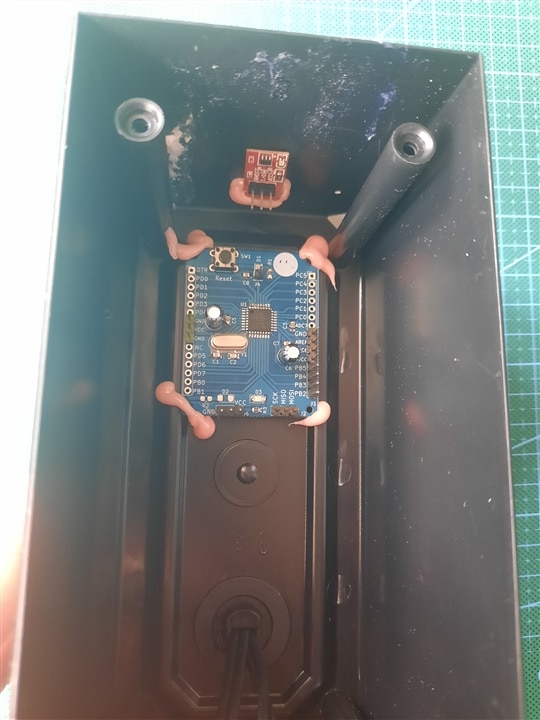
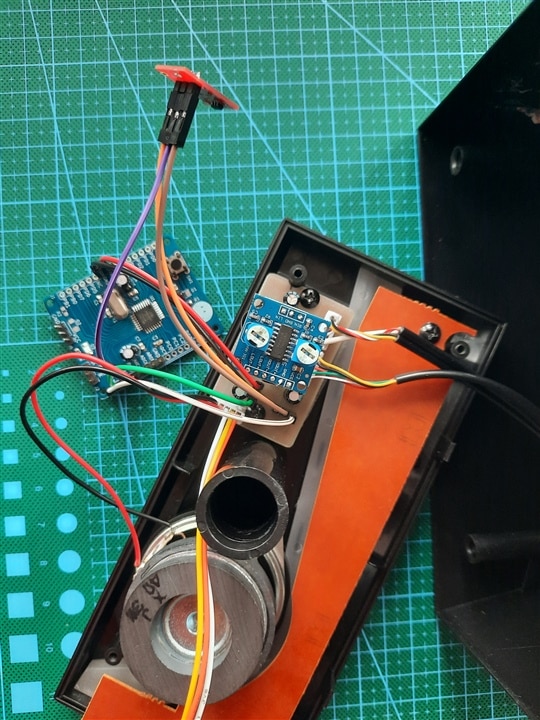
As for assembly, some manual work, nothing special.
| {gallery}Assembly |
|---|
|
IMAGE TITLE: Assembly |
|
IMAGE TITLE: Assembly |
|
IMAGE TITLE: Assembly |
|
IMAGE TITLE: Assembly |
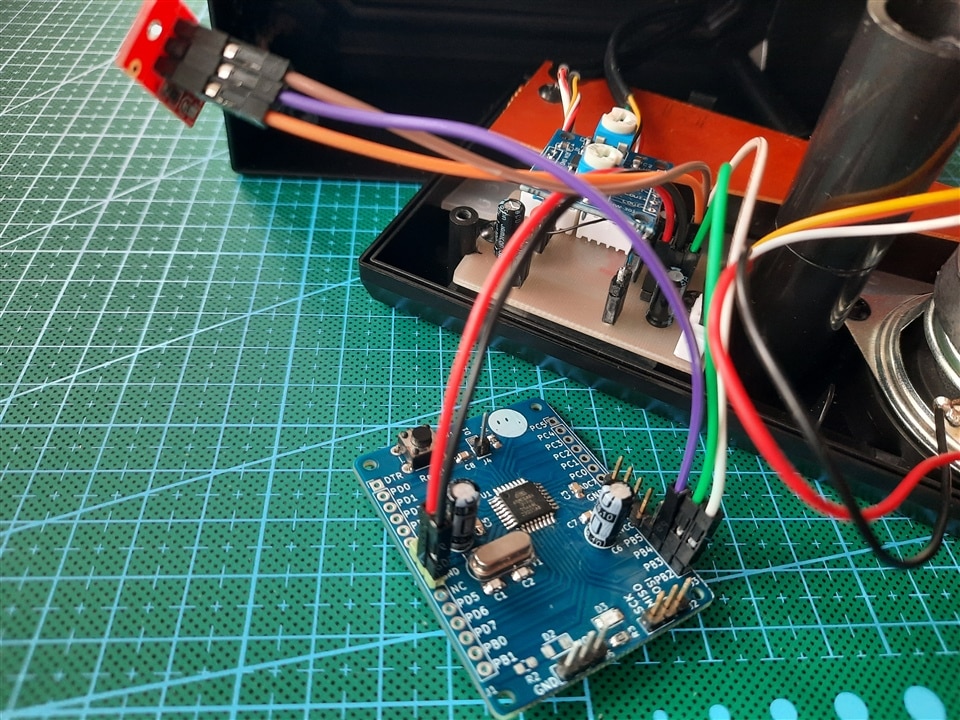
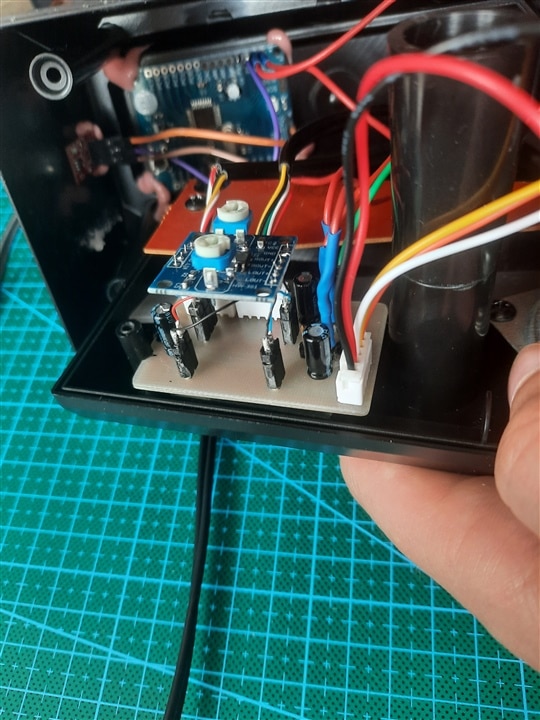
I also leave you a video (not maximum volume, I don't want to disturb the neighbors).
What do you think of my DIY project? 
Thank you and have a good day!