


About a year ago, my mother wanted to start raising chickens at home, so I bought her an egg incubator.
At first, it looked like a fairly simple device: a plastic enclosure, a heating element, a small fan, some basic electronics, and a mechanism to turn the eggs from time to time.
It worked well enough for a while, but after some time it began to fail, so I opened it with the original idea of repairing whatever was wrong and putting it back together.
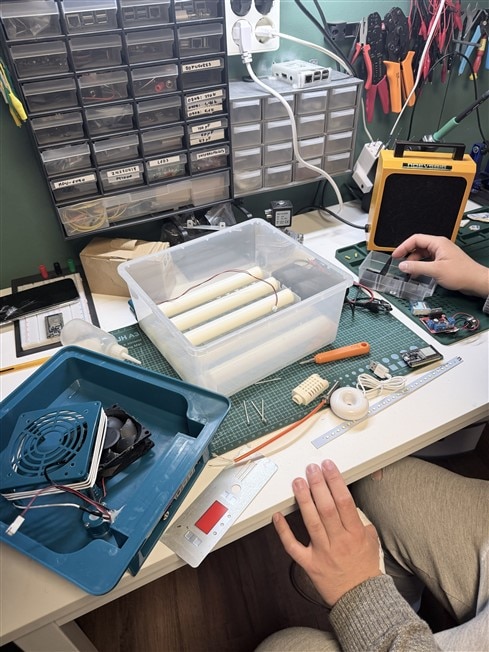
But when I had the incubator open, I started thinking about all the things that could be improved, so “let’s repair this basic incubator” started to sound a lot like “let’s rebuild the control system and make it actually smart”.
The incubator originally had a very basic control system. It could heat the chamber and keep the eggs in a suitable range. It showed the humidity and warned if it was out of the acceptable range, but it didn’t have any automatic way to change it, so we had to check constantly and, if the value was wrong, open the enclosure and spray a little water until the parameters were right again.
For egg incubation, temperature and humidity are not just nice-to-have values but critical variables. If the values oscillate or drift too much from the set values, a lot or even all the chicks will simply not be born, or in other words, they will die, which is really sad. And that happened a few times to my mother when she tried to raise hers.
And this is how this project started to become a small embedded control project. The goal was not to build a professional-grade incubator, but to improve it so the success rate of chickens being born from the eggs would be higher.
But as usually happens, I let this project rot for a long time until this challenge gave me the motivation to get back to it again.
So this time, the first major improvement I made was temperature control.
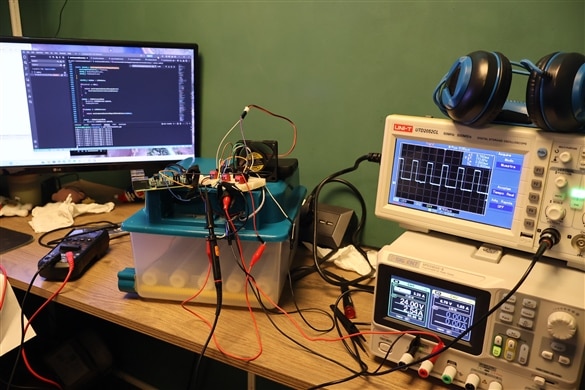
The original incubator behaved more like a basic thermostat, and even though this type of control can work, it often produces larger oscillations because the heater is simply switched on or off based on the measured temperature and, as I said, that’s not desired.

I wanted something smoother, so I implemented a PID controller that calculates the heater output based on the difference between the target and the measured temperatures. Instead of just turning it fully on or off, the PID output value is converted into a PWM duty cycle.

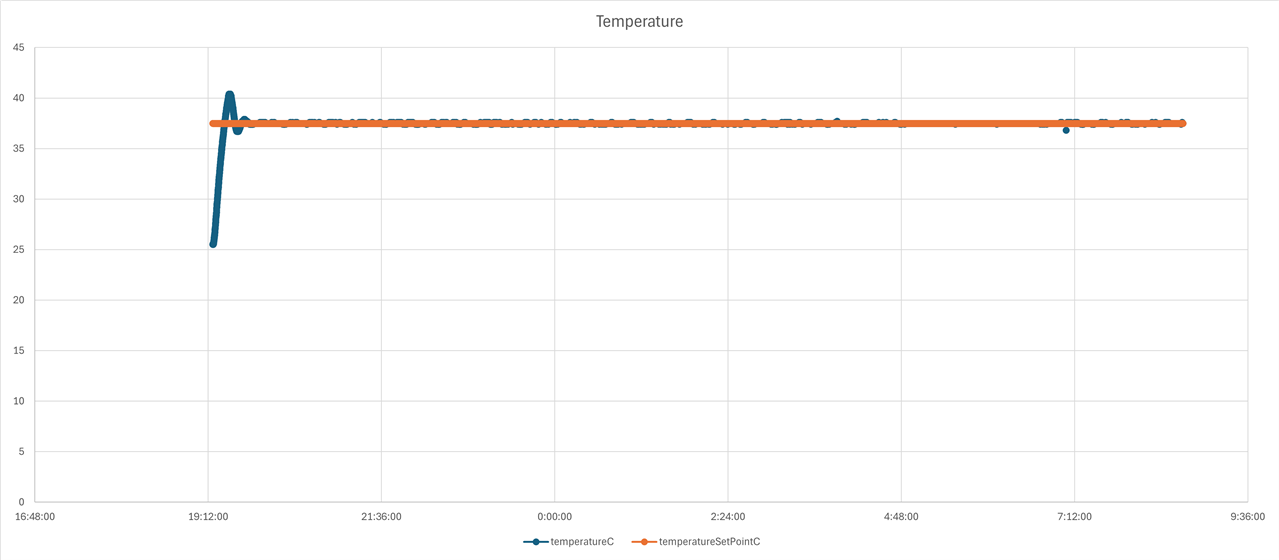
The graph above shows how the system maintains the temperature close to the configured setpoint (37.5C). This improvement might sound silly and a little basic, but it is actually one of the most critical parts of the project, and even though I don’t have data to show from the “before”, I can assure you the difference is brutal. The code below shows the simple PID implementation used to calculate the PWM duty cycle.
static float enviromentalPidCompute(
    enviromentalPid_t *pid,
    float setpoint,
    float measuredValue,
    float deltaTimeSeconds
)
{
    float error = 0.0F;
    float derivative = 0.0F;
    float output = 0.0F;

    float proportionalTerm = 0.0F;
    float integralTerm = 0.0F;
    float derivativeTerm = 0.0F;

    if((pid == NULL) || (pid->initialized != true))
    {
        return 0.0F;
    }

    if(deltaTimeSeconds <= 0.0F)
    {
        return 0.0F;
    }

    error = setpoint - measuredValue;

    pid->integral += error * deltaTimeSeconds;

    pid->integral = enviromentalControlClampFloat(
        pid->integral,
        -1000,
        1000
    );

    derivative =
        (error - pid->previousError) / deltaTimeSeconds;

    proportionalTerm = pid->kp * error;
    integralTerm = pid->ki * pid->integral;
    derivativeTerm = pid->kd * derivative;

    output =
        proportionalTerm +
        integralTerm +
        derivativeTerm;

    output = enviromentalControlClampFloat(
        output,
        pid->outputMin,
        pid->outputMax
    );

    pid->previousError = error;

    return output;
}
One detail that I had to fix while tuning the PID was the integral term. The incubator does not reach the target temperature instantly, so if the error is accumulated without any limit, the integral part can grow too much during the warm-up phase. Then, when the temperature finally gets close to the setpoint, the controller may still think it needs a lot of power and push the heater harder than it should. In other words: a perfect recipe for turning a smart incubator into a very small egg cooker. To avoid that, I limited the accumulated integral error, which prevents integral windup and keeps the PID response under control even when the system takes some time to reach the desired temperature.
The next point I wanted to touch on was humidity control.
Since the incubator originally only showed the humidity value but didn’t have any system to control it, I decided to add a water atomizer so it can go off when the enclosure starts to get dry.
The system reads the humidity sensor value and activates the atomizer when humidity drops below the configured threshold. For this part, a hysteresis-based control strategy is good enough. There’s no need to overkill it.
I also added a small water tank that allows me to refill the water for the atomizer whenever needed without opening the incubator, and the tube is placed in a smart way so we always know the water level from outside.

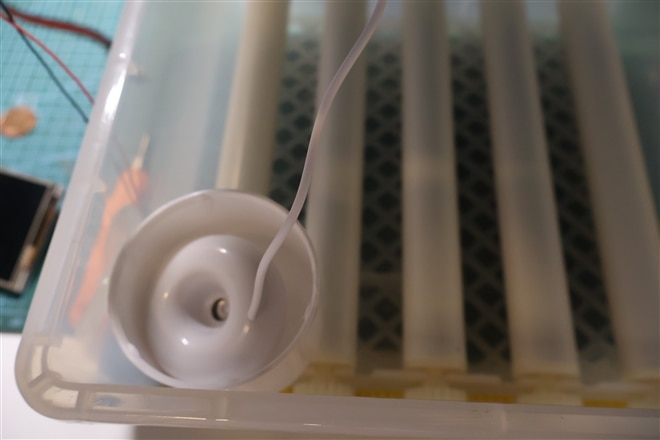

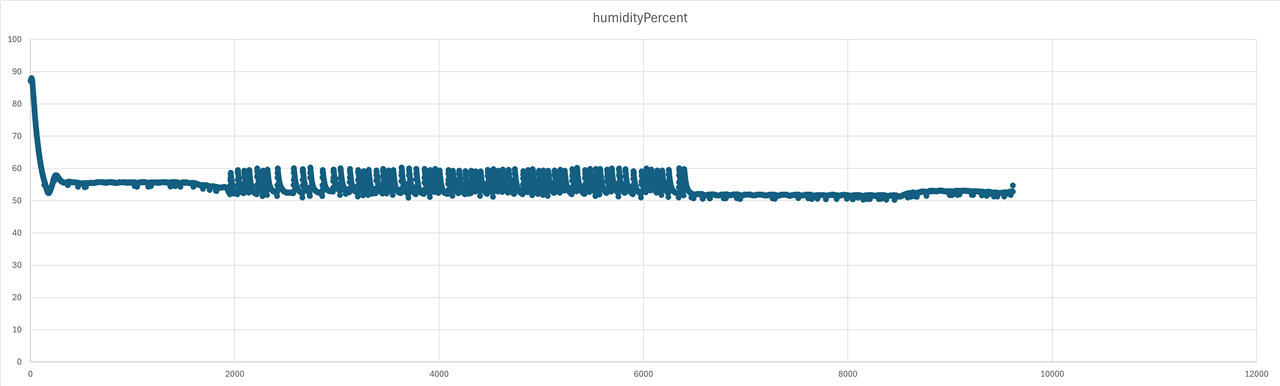
This was a very interesting part of this project because humidity behaves differently from temperature. The response when the atomizer goes off is not instant, and other factors like the physical placement of the atomizer, the kind of water, the airflow, and the position of the sensor can greatly affect how the system behaves.
Temperature and humidity are the most critical parts for an egg to hatch, but another important thing is turning the eggs from time to time. Chickens, and I guess other birds too, do this in their nests.
This incubator had a small motor to rotate a set of rollers, which gently move the eggs. Instead of controlling this manually, as it was before, I started to keep track of the incubation time so the motor can be turned on at configured intervals.
This system can also adapt the turning behavior depending on the incubation stage, for example disabling it during the final days when the soon-to-be-born chicks are big enough.
This update is not that critical, but more of a quality-of-life upgrade since it removes the need for the manual labor of turning the eggs around.
All these new parts of the incubator wouldn’t work as they should without a proper electronic interface. I’m using a Raspberry Pi as the brain of this project, but the board shouldn’t directly power the heater, the motor, or the atomizer since its GPIO pins are only meant to provide control signals. To handle all the switching, I designed a small PCB that uses transistor-based stages to control the different loads from the Raspberry Pi GPIOs. This is safer for the Raspi, cleaner than a breadboard full of wires, and also easier to debug, maintain, and make more reliable in the long term when I give the incubator back to my mother.

This schematic shows the different transistor stages used to control each actuator.


I could have left the project here since the incubator was already handling the temperature and humidity better and automatically turning the eggs. But then I thought, why stop here when I can do the obvious thing and start monitoring this remotely instead of having to check with my eyeballs every day or every few days how the process is going? So I added an interface that shows the current state of the system.
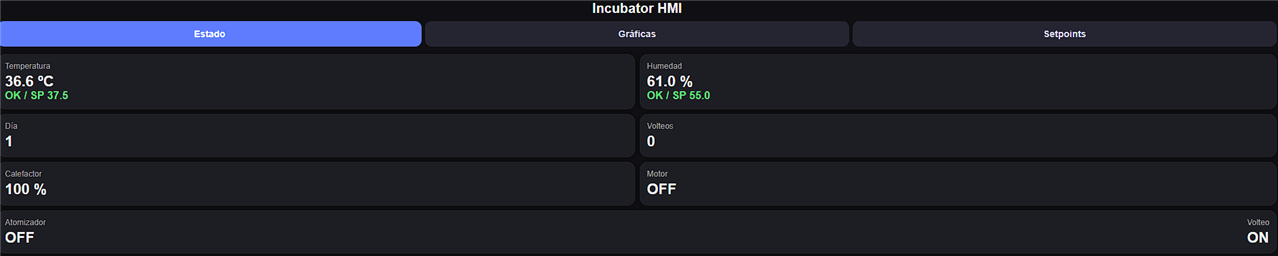


This was totally not necessary, but it made it so much easier to supervise how the incubation process is going, and it also helped a lot during the testing phase because I was able to detect errors at any moment. Observability might not be critical, but it sure makes a difference.
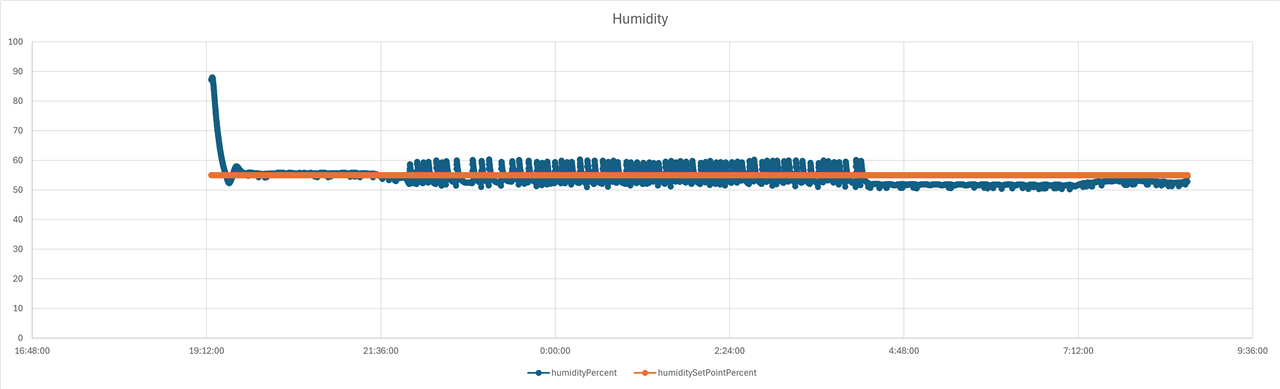
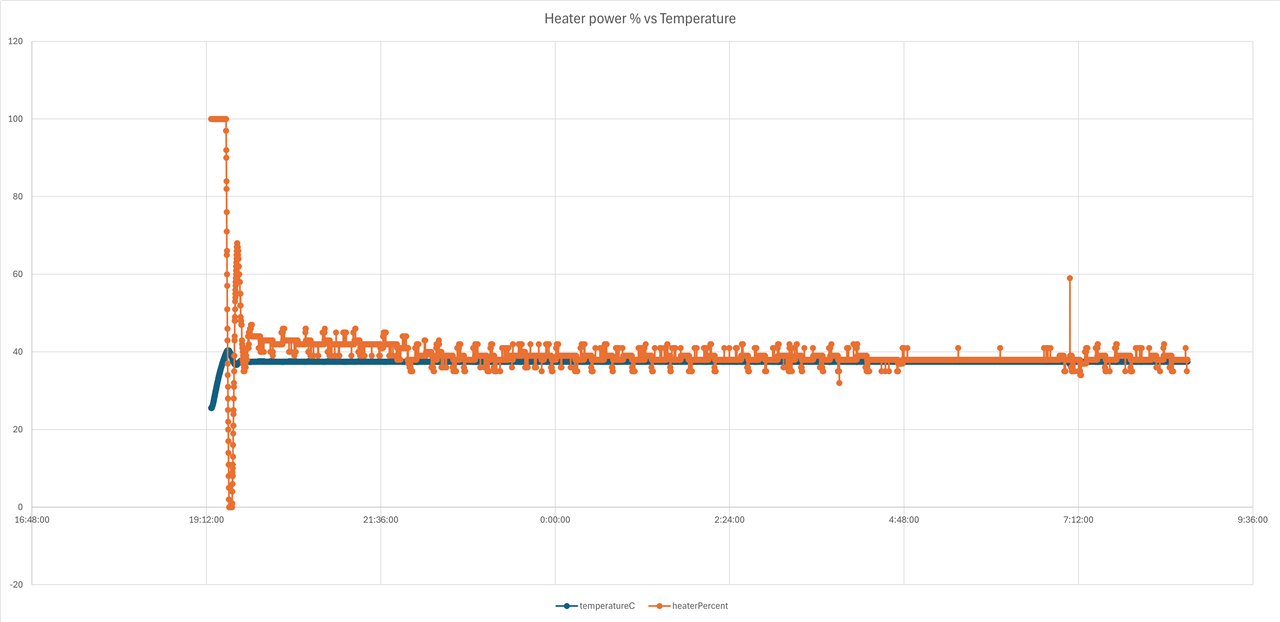
Since I wanted to submit this project for the Spring Clean challenge here, I decided to stop adding new things and start monitoring how well the system works, collecting some data from the incubator over time.
One small detail that made the project much easier to debug was the error encoding system. Instead of returning simple true or false values, each module can return an encoded error that identifies both the origin of the problem and the specific reason why it happened.
In a project like this, where the temperature sensor, humidity control, GPIOs, PWM output and task logic all interact with each other, this helped a lot. When something failed, I could quickly know whether the issue came from a missing initialization, an invalid pointer, a GPIO problem or another specific part of the system.
#ifndef ERROR_ENCODING_H
#define ERROR_ENCODING_H
#include <stdint.h>


#define ERROR_CODE_POSITION 0U
#define ADAPTER_ID_POSITION 8U
#define DRIVER_ID_POSITION 16U
#define LIBRARY_ID_POSITION 24U
#define TASK_ID_POSITION 32U

#define CREATE_ADAPTER_ERROR_CODE(adapterId, errorCode) \
        (((uint64_t)adapterId << ADAPTER_ID_POSITION) | ((uint64_t)errorCode << ERROR_CODE_POSITION))

#define CREATE_DRIVER_ERROR_CODE(driverId, errorCode) \
        (((uint64_t)driverId << DRIVER_ID_POSITION) | (uint64_t)(errorCode))


#define CREATE_LIBRARY_ERROR_CODE(libraryId, errorCode) \
        (((uint64_t)libraryId << LIBRARY_ID_POSITION) | (uint64_t)(errorCode))


#define CREATE_TASK_ERROR_CODE(taskId, errorCode) \
        (((uint64_t)taskId << TASK_ID_POSITION) | (uint64_t)(errorCode))


#endif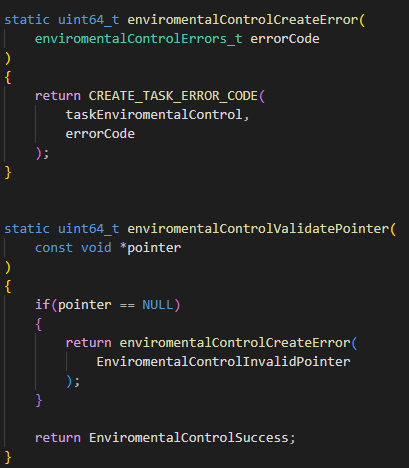
Of course, no embedded project is complete without a GitHub repository where future me can try to remember why past me made certain decisions.
I published the source code here:
https://github.com/afernandezLuc/smart-incubator-controller
The repository contains the Raspberry Pi software, the PID temperature controller, the PWM-based heater control, the humidity control logic, the egg-turning automation, and the remote monitoring interface.
I also tried to keep the code structured in a way that makes the different parts of the system easy to follow: sensors, actuators, setpoints, timing, control loops, and the web interface.
This is not a polished commercial product. It is a real project built around real hardware, with all the debugging, testing, small mistakes, and improvements that come with it. But that is also what makes it interesting.
If you are curious about the implementation, feel free to check the repository, open an issue, suggest improvements, or simply judge my GPIO decisions from a safe distance.
Sadly, I don’t have any fertilized eggs nor time to wait for a chick to be born, because that would for sure make a statement, but these graphs were really useful for validating the behavior of the system and being able to say the improvements were a success, not only at one instant but over time.
Does this mean that everything went perfectly fine from the start? Of course not, duh, it couldn’t even be called a real project if so. I had to spend a lot of time adjusting the PID so I wouldn’t get boiled eggs instead of chicks, I had to battle with the soldering of the PCB and go back and forth with the multimeter to see what exactly was wrong, and of course I found problems when compiling the software because of my own wrongdoings both in the code and in the compilation, with the CMakeLists configuration and library links. It was frustrating at times, but it feels more rewarding now that it’s finally done.
I feel like there’s more that can be done, of course, but I also think I accomplished my goal with this incubator, and I’m happy with the results;
I hope you like the project and enjoy the process. Feel free to ask any questions and, of course, I promise I’ll come back with visual evidence when the first batch of hatchlings are born!
Finally I print a case cover with my ender 3 to protect all of the cables and boards.
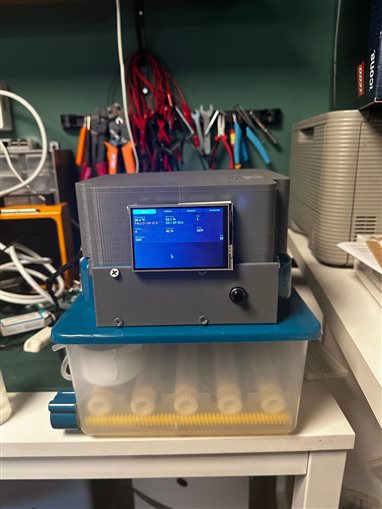
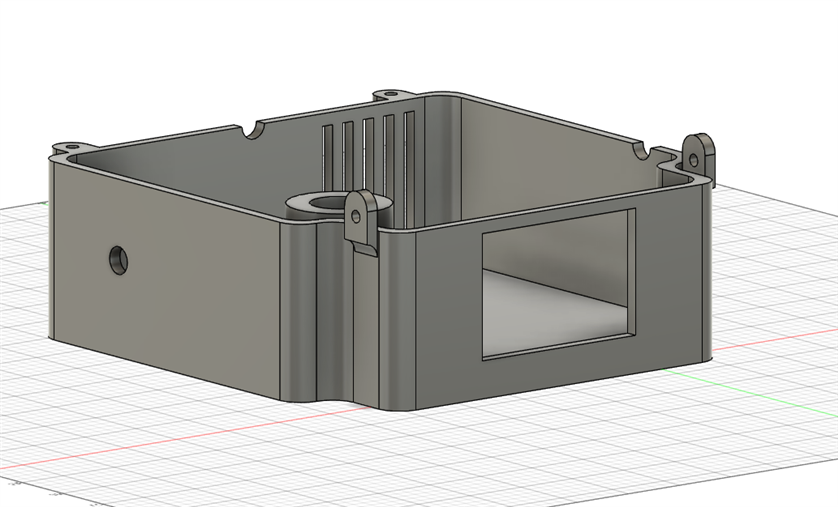
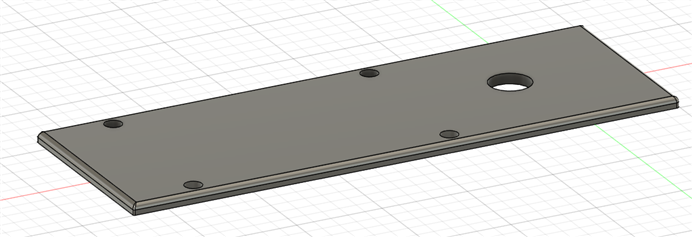
I have an spi touch screen from old project and I decided to added it to monitor and control the incubator.


I also added a 3W high intensity led to check if eggs are fertilized with a push button for the activation.

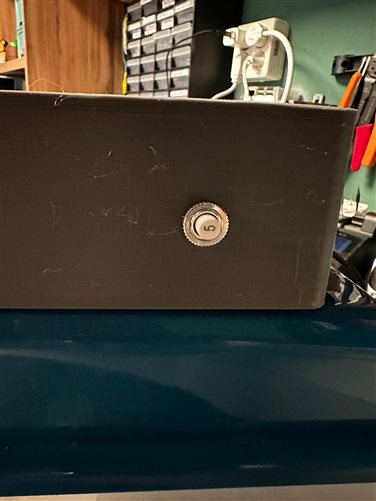
To improve safety and protect the whole system, I added a 5A circuit breaker to prevent potential short circuits that could harm the chickens or damage the electronics  .
.
List of Materials:
- 2 IRF540 transistor
- 2 100k resistor
- 3 BC548 transistor
- 3 1K resistor
- 3 330 resistor
- 1 Push button
- 1 5A DC braker
- 1 Pierced PCB
- 1 12V Fan
- 1 Previous incubator (as the base)
- 1 Raspberry pi 4
Top Comments