


I really love these Spring Clean Projects. They help me try to get something accomplished. Alas, like many, one project begets another - or a diversionary mini-project, at least. They can multiply like tribbles if it weren't for the reality that some ideas dissipate before one reaches the notebook. Or they are replaced by other thoughts. This is the story of one such mini-project. It's a bit of a wandering story - but I think we all can relate.
While looking for an HDMI to mini-HDMI cable that I just knew that I had... I came across a plethora of protoboards that I had used for other projects. Some of them I even remembered what the project was. In the spirit of Spring Clean, I asked myself "What are you really going to do with these?" - like the six Pi Pico bases with voltage divider resistors and NRF24L01+ hook-ups that I used for Experimenting with Thermistors.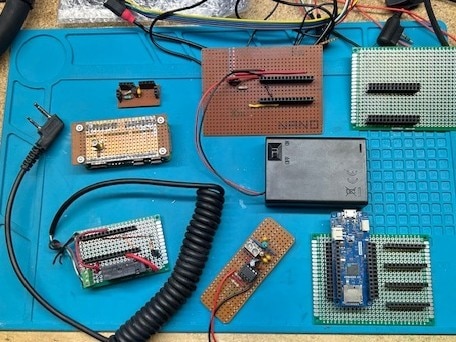 These are just a few.
I decided - again, in the spirit of Spring Clean - that I could "sacrifice" some of them for a dedicated purpose device. It would be whatever it was - until it stopped working. I could even "sacrifice" a microcontroller - as I looked at my Digistump Oaks and Particle Xenons that I didn't use while they were still supported and now may never find a purpose in life.
New scene: When I retired last year, I told myself that I was going to finally learn Morse Code. On one of the forums I follow, a member mentioned "vband". It's an online Morse Code gathering point with a practice channel - and you don't need an amateur radio license to use it. You can use the keyboard to mimic a Morse Code key OR... you can make/buy an adapter and use a real Morse Code key.
I tried the keyboard. WOW! I am bad at Morse Code! I ordered the official, supported adapter. I figured that I could wait for it to arrive.
Nope!
While I wait for the official adapter to arrive, I can do this with an Arduino - or Raspberry Pi Pico. Maybe I could use a Digistump Oak! No to the Oak. It's an ESP8266 with no USB - other than for power. But I have those Picos from Experimenting with Thermistors.
You know... I saw an article where you could shorten a Pico and it would still work.
I always wanted to try that.
Sounds like a good application of Spring Clean 2026!
So... I cut the protoboard to the reduced size. I cut the Pico after GPIO11 and tested it. It still worked. I installed a 1/8" stereo jack between the female headers on the protoboard and connected the jack to GPIO9 and GPIO 22 - because they were the closest pins. I also connected GND. Now I just needed to program the Pico.
EVERYTHING that I found online was over-engineered. I just want simple. "Simple" was not to be found - so I had to make it. Arduino IDE and the keyboard library.
Easy enough, right?
Until I plugged the mono plug for the straight (traditional Morse Code) key in instead of the stereo plug for the paddle. Dooh! Constant "Send". Think. Think. Think.
The solution for me was to look for that "send" connection during boot and, if it was there, assume that a mono plug was in the jack instead of a stereo plug and treat the input as a traditional straight key. I would call the logic pseudo State Machine in that the program either looks at one or both inputs based on the state of the inputs at boot. If one of the inputs is grounded at boot, the program doesn't look at that input again - until the adapter is power cycled.
// Simple VBand Adapter for the Raspberry Pi Pico


#include <Keyboard.h>

const int rightKey = 9;   // stereo ring.  Right Hand convention. Dah.
const int leftKey = 22;   // stereo tip.  RH convention. Dit.
bool straightKey = false;   // mono plug = straight key

// setup the IO and keyboard
void setup()
{
  pinMode(leftKey, INPUT_PULLUP);   // set as input with pullup
  pinMode(rightKey, INPUT_PULLUP);   // set as input with pullup
  pinMode(LED_BUILTIN, OUTPUT);   // use the built in LED to show input
  Keyboard.begin();   // initialise keyboard

  if (digitalRead(rightKey) == LOW)   // check to see if mono jack is plugged into adapter
  {
    straightKey = true;   // only use dit
  }
}

void loop()
{
  // straight key
  if (straightKey == true)
  {
    dit();   // only read tip to gnd pin
  }

  else
  {
    dit();
    dah();   // read both inputs
  }

  Keyboard.releaseAll();
  digitalWrite(LED_BUILTIN, LOW);

}   // end main loop

void dit()
{
  if (digitalRead(leftKey) == LOW)
  {
    Keyboard.press('[');
    digitalWrite(LED_BUILTIN, HIGH);
    while (digitalRead(leftKey) == LOW)
    {
      delay(10);
    }
    delay(10);
    Keyboard.releaseAll();
    digitalWrite(LED_BUILTIN, LOW);
    delay(10);

  }
  return;
}

void dah()
{
  if (digitalRead(rightKey) == LOW)
  {
    Keyboard.press(']');
    digitalWrite(LED_BUILTIN, HIGH);
    while (digitalRead(rightKey) == LOW)
    {
      delay(10);
    }
    delay(10);
    Keyboard.releaseAll();
    digitalWrite(LED_BUILTIN, LOW);
    delay(10);

  }
  return;
}
I then wrapped the Pico and board in heat shrink tubing. Freeing the BOOLSEL button and trying to make the LED_BUILTIN visible went horribly bad - so they don't exist any more - but the Pico still works.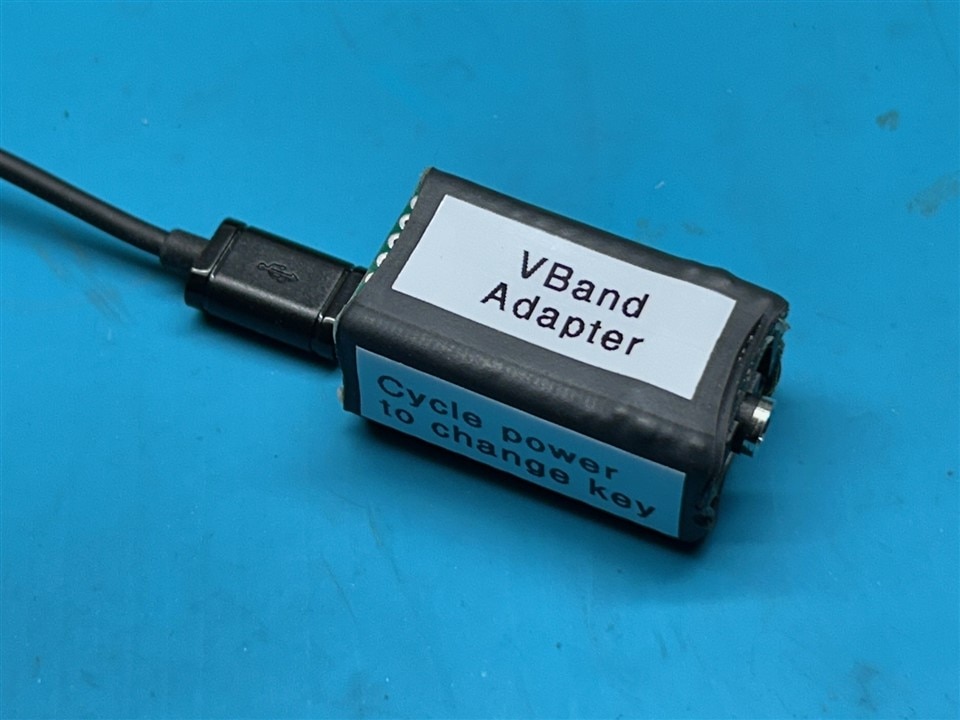
SO... while there was no vision to create this adapter, I did use a couple of components that were languishing in parts bins and created something that I have actually used. I'm still terrible at sending Morse Code, but I'm improving slowly. I'm relearning Arduino coding AND... I actually did find that HDMI cable. It's longer than I remember. 
To take artistic liberties with Clem's catch phrase... I gotta go. There's my original project waiting for me. Still. 
UPDATE: April 22, 2026
The official VBand adapter has finally arrived. ...I'm disappointed. It can't handle the mono plug of an old straight key. I told myself that buying their adapter was how I was going to support their effort. Well... I'm going to follow through with my commitment. I'm just having a hard time dealing with the fact that my DIY adapter is cooler than the one I spent $31 on.
Top Comments