element14 Community
element14 Community
    Register Log In
  • Site
  • Search
  • Log In Register
  • Community Hub
    Community Hub
    • What's New on element14
    • Feedback and Support
    • Benefits of Membership
    • Personal Blogs
    • Members Area
    • Achievement Levels
  • Learn
    Learn
    • Ask an Expert
    • eBooks
    • element14 presents
    • Learning Center
    • Tech Spotlight
    • STEM Academy
    • Webinars, Training and Events
    • Learning Groups
  • Technologies
    Technologies
    • 3D Printing
    • FPGA
    • Industrial Automation
    • Internet of Things
    • Power & Energy
    • Sensors
    • Technology Groups
  • Challenges & Projects
    Challenges & Projects
    • Design Challenges
    • element14 presents Projects
    • Project14
    • Arduino Projects
    • Raspberry Pi Projects
    • Project Groups
  • Products
    Products
    • Arduino
    • Avnet & Tria Boards Community
    • Dev Tools
    • Manufacturers
    • Multicomp Pro
    • Product Groups
    • Raspberry Pi
    • RoadTests & Reviews
  • About Us
    About the element14 Community
  • Store
    Store
    • Visit Your Store
    • Choose another store...
      • Europe
      •  Austria (German)
      •  Belgium (Dutch, French)
      •  Bulgaria (Bulgarian)
      •  Czech Republic (Czech)
      •  Denmark (Danish)
      •  Estonia (Estonian)
      •  Finland (Finnish)
      •  France (French)
      •  Germany (German)
      •  Hungary (Hungarian)
      •  Ireland
      •  Israel
      •  Italy (Italian)
      •  Latvia (Latvian)
      •  
      •  Lithuania (Lithuanian)
      •  Netherlands (Dutch)
      •  Norway (Norwegian)
      •  Poland (Polish)
      •  Portugal (Portuguese)
      •  Romania (Romanian)
      •  Russia (Russian)
      •  Slovakia (Slovak)
      •  Slovenia (Slovenian)
      •  Spain (Spanish)
      •  Sweden (Swedish)
      •  Switzerland(German, French)
      •  Turkey (Turkish)
      •  United Kingdom
      • Asia Pacific
      •  Australia
      •  China
      •  Hong Kong
      •  India
      •  Japan
      •  Korea (Korean)
      •  Malaysia
      •  New Zealand
      •  Philippines
      •  Singapore
      •  Taiwan
      •  Thailand (Thai)
      •  Vietnam
      • Americas
      •  Brazil (Portuguese)
      •  Canada
      •  Mexico (Spanish)
      •  United States
      Can't find the country/region you're looking for? Visit our export site or find a local distributor.
  • Translate
  • Profile
  • Settings
The World in Motion
  • Challenges & Projects
  • Project14
  • The World in Motion
  • More
  • Cancel
The World in Motion
Blog Pulse Width Modulation a Speed Equalizer(4): Theory at the bench
  • Blog
  • Forum
  • Documents
  • Events
  • Polls
  • Files
  • Members
  • Mentions
  • Sub-Groups
  • Tags
  • More
  • Cancel
  • New
Join The World in Motion to participate - click to join for free!
  • Share
  • More
  • Cancel
Group Actions
  • Group RSS
  • More
  • Cancel
Engagement
  • Author Author: colporteur
  • Date Created: 30 Jul 2022 9:12 PM Date Created
  • Views 2173 views
  • Likes 8 likes
  • Comments 6 comments
  • motor projects
  • worldinmotionch
  • pwm
Related
Recommended

Pulse Width Modulation a Speed Equalizer(4): Theory at the bench

colporteur
colporteur
30 Jul 2022

The third blog installment for this challenge presented the theory for pulse width modulation. The post talked about the concept of duty cycle and provided static waveform drawings to reinforce the concept. This post further enforces the PWM theory by providing a bench demonstration of the operation using some basic Arduino code and an oscilloscope.

The L298N driver library for the Arduino supports a method of setting the speed of a motor.
The speed range is from 0 to 255.

  // Change speed
  motor.setSpeed(45);

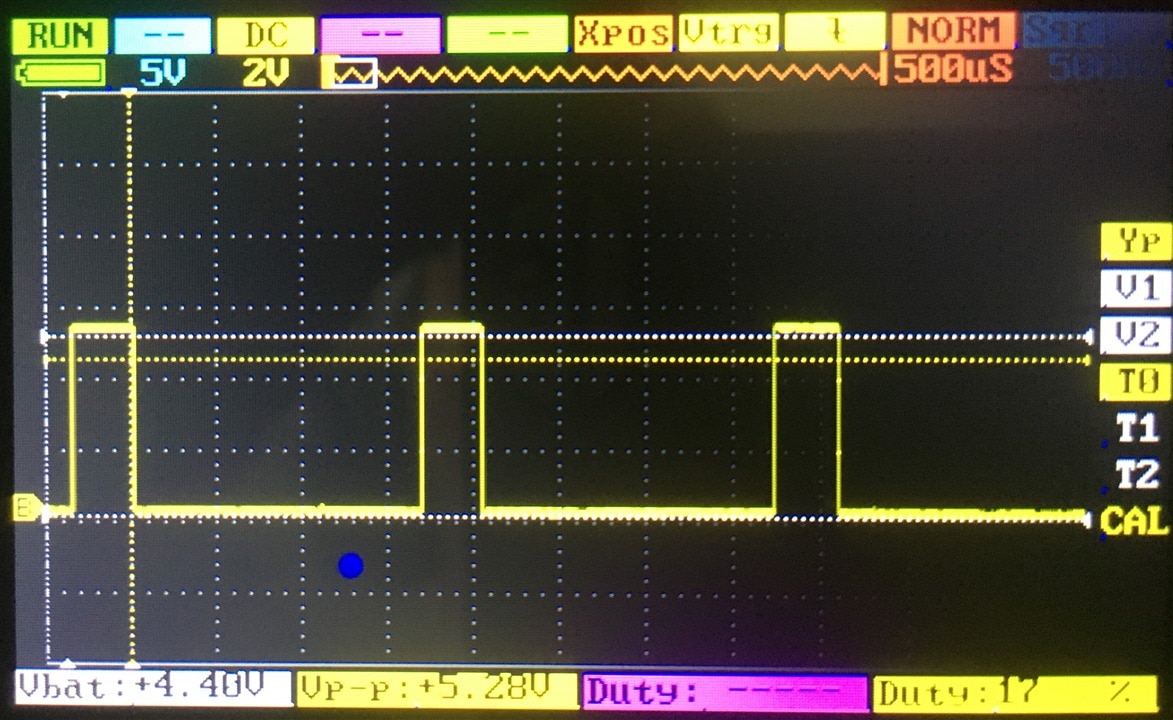
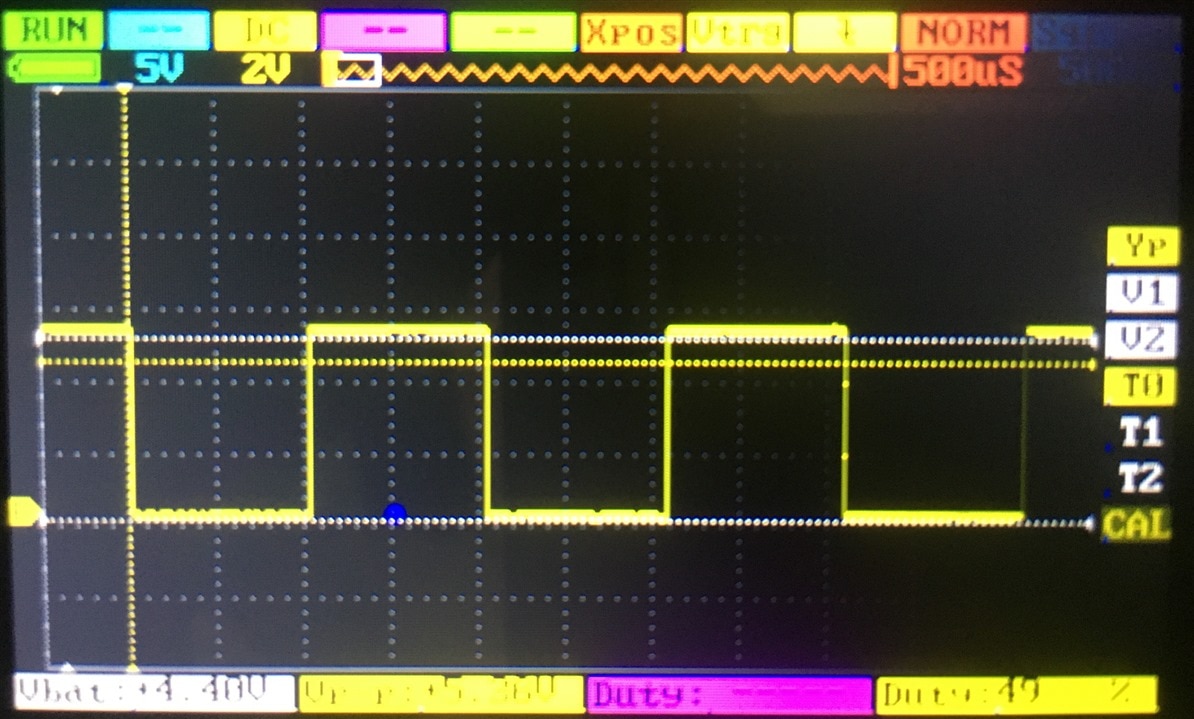
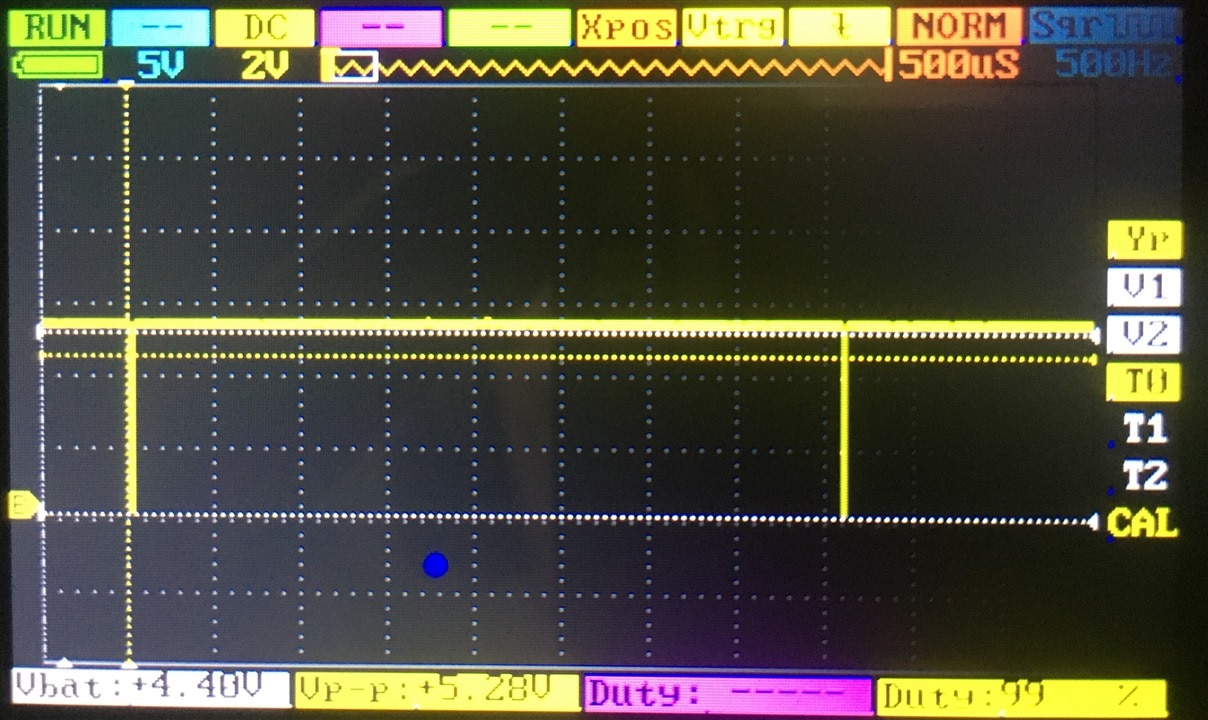
Three different speed values were tested 45, 127 & 254. An oscilloscope sample was taken at each value.

The oscilloscope was attached to the Arduino output that produces the PWM signal to the L298N module.

As the value in the code changed so did the width of the pulse change as seen on the oscilloscope. As the value in the code changed so did the duty cycle of the waveform change. As the value in the code changed so does the motor speed change.

{gallery}Oscilloscope PWM Outputs

image

setSpeed(45): 17% duty cycle

image

setSpeed(127): 49% duty cycle

image

setSpeed(254): 99% duty cycle


The value of 45 in the code was the first entry that resulted in any movement for the motor. The value of 127 is half of the maximum value of 255. The value of 254 is the maximum that could be set and the oscilloscope still displays the waveform. This testing was done with a 12VDC motor. The code value to establish the required train speed will need to be determined on the track.

Well, that completes the bench work. I'm reasonably confident I have everything that I need to now start testing with a locomotive.

  • Sign in to reply
  • shabaz
    shabaz over 4 years ago

    Hi Sean,

    Maybe it's unnecessary, although a future luxury add-on could be an encoder, and then the speed can be controlled down to (say) very slow settings, with no motor stalls. I don't know if that's needed or not, or even if such a thing is possible to retrofit to train motors. fmilburn has some Arduino code for it here in case it gives ideas: /products/arduino/b/blog/posts/simple-arduino-dc-motor-control-with-encoder-part-1

    • Cancel
    • Vote Up 0 Vote Down
    • Sign in to reply
    • More
    • Cancel
<
element14 Community

element14 is the first online community specifically for engineers. Connect with your peers and get expert answers to your questions.

  • Members
  • Learn
  • Technologies
  • Challenges & Projects
  • Products
  • Store
  • About Us
  • Feedback & Support
  • FAQs
  • Terms of Use
  • Privacy Policy
  • Legal and Copyright Notices
  • Sitemap
  • Cookies

An Avnet Company © 2026 Premier Farnell Limited. All Rights Reserved.

Premier Farnell Ltd, registered in England and Wales (no 00876412), registered office: Farnell House, Forge Lane, Leeds LS12 2NE.

Follow element14

  • X
  • Facebook
  • linkedin
  • YouTube