element14 Community
element14 Community
    Register Log In
  • Site
  • Search
  • Log In Register
  • Community Hub
    Community Hub
    • What's New on element14
    • Feedback and Support
    • Benefits of Membership
    • Personal Blogs
    • Members Area
    • Achievement Levels
  • Learn
    Learn
    • Ask an Expert
    • eBooks
    • element14 presents
    • Learning Center
    • Tech Spotlight
    • STEM Academy
    • Webinars, Training and Events
    • Learning Groups
  • Technologies
    Technologies
    • 3D Printing
    • FPGA
    • Industrial Automation
    • Internet of Things
    • Power & Energy
    • Sensors
    • Technology Groups
  • Challenges & Projects
    Challenges & Projects
    • Design Challenges
    • element14 presents Projects
    • Project14
    • Arduino Projects
    • Raspberry Pi Projects
    • Project Groups
  • Products
    Products
    • Arduino
    • Avnet & Tria Boards Community
    • Dev Tools
    • Manufacturers
    • Multicomp Pro
    • Product Groups
    • Raspberry Pi
    • RoadTests & Reviews
  • About Us
    About the element14 Community
  • Store
    Store
    • Visit Your Store
    • Choose another store...
      • Europe
      •  Austria (German)
      •  Belgium (Dutch, French)
      •  Bulgaria (Bulgarian)
      •  Czech Republic (Czech)
      •  Denmark (Danish)
      •  Estonia (Estonian)
      •  Finland (Finnish)
      •  France (French)
      •  Germany (German)
      •  Hungary (Hungarian)
      •  Ireland
      •  Israel
      •  Italy (Italian)
      •  Latvia (Latvian)
      •  
      •  Lithuania (Lithuanian)
      •  Netherlands (Dutch)
      •  Norway (Norwegian)
      •  Poland (Polish)
      •  Portugal (Portuguese)
      •  Romania (Romanian)
      •  Russia (Russian)
      •  Slovakia (Slovak)
      •  Slovenia (Slovenian)
      •  Spain (Spanish)
      •  Sweden (Swedish)
      •  Switzerland(German, French)
      •  Turkey (Turkish)
      •  United Kingdom
      • Asia Pacific
      •  Australia
      •  China
      •  Hong Kong
      •  India
      •  Japan
      •  Korea (Korean)
      •  Malaysia
      •  New Zealand
      •  Philippines
      •  Singapore
      •  Taiwan
      •  Thailand (Thai)
      •  Vietnam
      • Americas
      •  Brazil (Portuguese)
      •  Canada
      •  Mexico (Spanish)
      •  United States
      Can't find the country/region you're looking for? Visit our export site or find a local distributor.
  • Translate
  • Profile
  • Settings
Essentials
  • Learn
  • Learning Center
  • Essentials
  • More
  • Cancel
Essentials
Documents The Basics of Connectors
  • Forum
  • Documents
  • Polls
  • Files
  • Members
  • Mentions
  • Sub-Groups
  • Tags
  • More
  • Cancel
  • New
Join Essentials to participate - click to join for free!
Actions
  • Share
  • More
  • Cancel
Engagement
  • Author Author: joeman
  • Date Created: 7 Apr 2016 2:54 PM Date Created
  • Last Updated Last Updated: 4 May 2023 5:25 PM
  • Views 24461 views
  • Likes 20 likes
  • Comments 319 comments
Related
Recommended

The Basics of Connectors

essentials logo Connectors Series - Part 1 - Basics

A connector system performs the all important role of interconnecting a product’s printed circuit boards (PCBs), power supplies, control panels and other sub-assemblies. While connectors may appear to play a passive role in an end-product’s performance, in reality, they influence the safety, reliability, and ease-of-maintenance of a product. To select the ideal type of connector for a specific design or application, a design engineer can benefit from a basic knowledge of connector technology.
Related Components | Test Your Knowledge test link

sponsored by image

Vote for the next Learning Module subject!

2. Objectives


The objective of this learning module is to provide you with the essentials of connector technology. You will first learn the purpose, function, and components of a connector. In the later sections, you will gain a deeper understanding of the types, materials, features, and applications of PCB, Card/Slot and I/O connectors.

Upon completion of this module, you will be able to:

  • Define what connectors are and the purpose they serve;
  • Discuss the primary functions of a connector;
  • Describe the anatomy of a connector;
  • Identify the most common types of connectors.

3. Definition

Back to Top

image

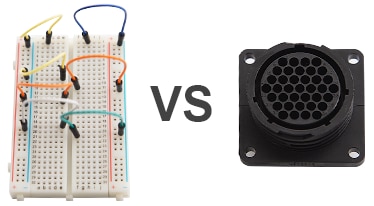
What is a connector? Is a connector simply a means to connect two electrical points of a circuit, or is its purpose broader in scope? To understand the purpose of a connector, let us consider a jumper wire. Is a typical jumper wire – one that connects circuit components together on a prototyping breadboard – a connector?

A jumper wire can connect two points of a circuit together, but lacks the mechanical integrity or environmental protection required in an end-product that is subjected to vibrations, abuse, corrosion or water sprays. In this respect, a connector provides more than a means of electrical connection, but should offer a durable mechanical or mating connection as well. So, maybe a jumper wire falls short as a connector.
image

If a jumper wire isn’t a connector, then what exactly is? Let’s look at the definition of connector to find out:

A connector is a device that is capable of connecting two circuit points, signals, or sub-systems with electrical integrity, mechanical durability, environmental protection and safety.

  • Electrical Integrity - when connectors mate two points of a circuit with a very low contact resistance and provide protection from electromagnetic interference (EMI) and/or electrostatic discharge (ESD).
  • Mechanical Durability - when a connector can withstand vibrations or environmental abuse without causing a failure in electrical integrity.
  • Environmental Protection - when a connector’s design meets the IP (Ingress Protection) ratings defined in the international standard EN/IEC 60529 for preventing the ingress of water, dust, debris, and other contaminants that would otherwise interfere with the electrical integrity of the connection.
  • Safety - when a connector is designed with features that eliminate personnel hazards, or the risk of fire, shock or electrocution.

4. Function

Back to Top

To understand the function of a connector, let’s imagine for a moment a world without connectors. What would be the practical outcome of such a scenario?
image

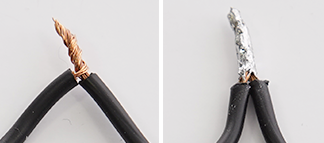
In such a world, all electronic components, sub-assemblies and electrical power would be connected by bare metal wiring. This means everything would be soldered, mechanically attached or twisted together. Doesn’t sound convenient, does it?

It would be pretty hard to design products with high-circuit densities in a “No Connectors Allowed” world. Smart phones would probably be a lot bigger. And forget about portable charging stations or even your handy power adapter!

What about electrical safety? Would a ”No Connectors Allowed” world be safer for a user? Could you safely connect the 120/230V mains to your home appliance without sparks flying?  (Probably not!) It’s time to go back to a world with connectors and learn the primary functions of a connector.

The primary functions of a connector are:

  • Quick Connection/Disconnection: Connectors provide a safe, quick and convenient means for connecting and disconnecting components, modules, systems and sub-assemblies during prototyping, manufacturing, installation, operation, or maintenance.
  • Efficient Manufacturing: Connectors allow for the efficient production of products by eliminating many time-consuming tasks such as soldering.
  • Easy Upgrades/Configurations: Connectors enable users to easily upgrade products or quickly configure new devices for these products.
  • Eliminate Safety Hazards: Connectors shield users from hazardous currents that could pose a shock or electrocution hazard.

5. The Anatomy of a Connector

Back to Top

There are many types and styles of connectors, yet they all share common characteristics. In this section, we will discuss the common components and features of a connector.

The three main parts of a connector are:

  • Housing
  • Shell
  • Contact

- 5.1 Description of a Housing
image

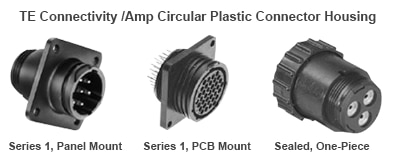
The housing is the component that provides a connector the mechanical durability, environmental protection and electrical insulation for the contact terminals.

Connector housings have the following characteristics:

  • Materials: Housings are made of stabilized, heat resistant, self-extinguishing thermoplastic material.
  • Locking: Housings often have a locking tab to prevent connector housing halves from disconnecting and interrupting a circuit.
  • Polarization: Housings are polarized to ensure the connector halves are mated correctly.
  • Keying: Housings are keyed or arranged so only compatible contacts or circuits can be mated with one another.
  • Environmental Protection: Housing often have shrouds or seals (depending upon the specifications of a connector) to prevent the ingress of dust, moisture, chemicals and other contaminants that could degrade the electrical integrity of the connection.
  • Mounting: Housings can be mounted in a variety of ways, including PCB, panel, and wire-to-wire configurations.
  • Fire Safety: High-performance composite materials help meet the low smoke, toxicity and flammability (UL 94V-0 rated) requirements of the application.

- 5.2 Description of a Shell

image

The shell encloses the connector housing thereby offers added strength and protection to the housing. Since shells are made of a nickel-plated, zinc alloy, they also offer excellent corrosion resistance.

- 5.3 Description of Contacts and Terminals

image image

The contact consists of highly conductive material with very low resistance that allows the easy flow of electrical current through the two mated contacts.

While the contact is the point where circuit current flows, the terminal is the means by which the contact is attached (or terminated) to a circuit’s conductor.  Often times the functions of both the contact and terminal are combined in one device. In this case, the word terminal and contact maybe used interchangeably.

Contact terminals have the following characteristics:

  • Materials: A variety of materials or alloys are used for electrical contacts and terminals based upon cost, electrical and thermal properties, resistance to oxidation (corrosion) and durability. The most common contact metals include: brass, phosphor bronze, and high copper alloy. Contacts are often plated for added strength, better conductivity and corrosion resistance. Plating materials include gold, silver nickel, tin, and palladium-nickel.
  • Types: Contacts are constructed in the form of insertable/removable pins and sockets (informally referred to as “male” and “female,” respectively).
  • Locking: Terminals often have locking wing tabs to securely hold the terminal in the connector’s housing.

- 5.4 Description of Terminations

Terminations are the manner by which the circuit’s conductors are attached to the connector’s contact terminals. The quality of the terminations is critical to the proper functioning of the circuits connected by a connector.

Electrically sound terminations maintain a desirable low contact resistance at the point of connection. Conversely, terminations that are not electrically sound —opened, shorted, or high resistance points —can be detrimental to the proper functioning of the circuit.  This is a particular concern in high vibration environments (industrial machinery or automotive applications).

The common types of terminations include:

image
AMPLIMITE* HDP-20 Connectors with Solder Cup Contacts

Solder Cup

a type of termination where individual circuit wires are soldered on the connector’s “cup” terminals.

image
TE Connectivity’s AMP  Wire-To-Board Connector, AMP CT Series, Crimp, Receptacle

Crimping

a type of termination that creates a secure and separable connection between the contacts and terminal wires.

image
TE Connectivity’s AMP Circular Plastic Connector, Series 1, PCB Mount

PCB Solder

a type of termination where the contact terminals are soldered directly onto a PCB via through-holes.

image
TE Connectivity 1735690-1  SAS Receptacle, Press-Fit

Press Fit

a type of termination where connector’s contact terminals are pressed through plated-through holes on a printed circuit board (PCB). The primary advantages include eliminating thermal stresses of PCB soldering and enabling higher density circuit applications.

image
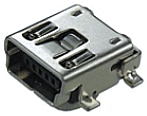
TE Connectivity’s AMP Mini USB, 2.0 Type A, Receptacle, Surface Mount

Surface Mount

a type of termination where the connector is mounted to the surface of a PCB and bonded to conductive pads via soldering.

image
TE Connectivity’s AMP Wire-To-Board Connector, AMPMODU Series, IDC Plug

Insulation Displacement Termination (IDC)

a type of termination that connects insulated wire without requiring the pre-stripping of the insulation.

6. Types of Connectors

Back to Top

There are a wide variety of connector-types used by design engineers and employed in prototypes and end-products. In general, connectors are grouped into the following main categories:

  • PCB
  • Card/Socket
  • Input/Output

- 6.1 PCB Connectors


image
TE Connectivity 1744057-5 wire-to-board connector, Economy Power

Wire to Board

a type of connector that offers a separable connection between electronic sub-assemblies, PCBs, and rack/panels. Benefits include saving PCB space, enabling high-density connections, and providing design flexibility.

image
TE Connectivity 3-2041390-9 ZIF Flexible Printed Circuit Connector

Zero Insertion Force (ZIF)

a type of wire-to-board connector that minimizes the insertion or extraction force, reducing contact wear. It is used with flat flex ribbon cable and has a mechanical arm that locks the contacts in place upon connection.

  image
TE Connectivity Board to Board Connector, Fine Pitch

Board to Board

a type of connector that connects one PCB to another in a stacking configuration. These connectors are for low-profile, tight-packaging or backplane connector applications.

image
TE Connectivity Ribbon Cable Connectors

Ribbon

a type of connector used with flat ribbon cable to connect internal peripherals in computers, such as hard drives, CD drives and floppy drives. The ribbon connector is typically attached to the cable via insulation displacement rather than crimping or soldering, which allows for the mass termination of contacts.

- 6.2 Card/Socket Connectors


image
TE Connectivity AMP Card Edge Connector Receptacle
1761465-3

Card Edge

a multi-circuit receptacle (female) that mates with the header (male) that's formed out of the traces that run to the edge of a PCB. They are primarily used in personal computers for connecting expansion cards, cartridges and computer memory to the system bus.

image
TE Connectivity’s AMP IC & Component Socket, 800 Series, DIP

Package to Board (IC Socket)

a connector that provides a separable connection between an IC chip and a PCB via a through-hole soldered socket.

image
TE Connectivity 1939870-1 SD Card Connector EMBOSS ASSY

Memory Card

a type of connector that connects microSD, SD, SIM, and/or MMC memory cards to portable or remote devices. They offer a variety of ejector types (e.g., push-push and push-pull) and provide polarization features to prevent improper card insertion.

- 6.3 Input/Output Connectors


image
TE Connectivity’s AMP Circular Plastic Connector Housing, Series 1, Panel Mount and Metal-Shell Circular Plastic Connector Housing, Panel Mount
208473-1

Circular Plastic/Circular Metal

a type of customizable, sealed or unsealed, commercial connector designed for power and signal connections and used in industrial, automotive, signal processing, power management and computer applications.  Both CPC and CMC connectors are made of stabilized, heat resistant, self-extinguishing thermoplastic material. CMC connectors have an additional metal shell to add greater strength and durability.

image
TE Connectivity’s AMP DIN Audio Video Connector PCB Mount
5749230-1

S-Video

an audio/visual connector used for transmitting Super-Video (S-Video) signals. The connector separates luminance and chrominance for a better picture and also to eliminate dot crawl.

image
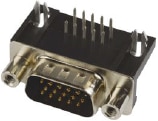
TE Connectivity’s AMP Standard D Sub Connector Amplimite HD-22 Series DE-15
5749768-1

Video Graphics Array (VGA)

an analog, audio/visual connector for connecting PC displays. In graphics mode, the resolution is either 640 by 480 (with 16 colors) or 320 by 200 (with 256 colors). The original VGA standard has evolved over time to provide better resolution and more colors (e.g., SVGA and XGA).

image
TE Connectivity 1734148-1  DVI Digital Video Interface Connector, Integrated Analog & Digital (DVI-I), PCB Mount

Digital Visual Interface (DVI)

a digital video connector used as an interface between computers, LCD monitors, projectors and other digital display equipment. It's based on the standard created by the Digital Display Working Group (DDWG) for converting analog signals into digital signals. It uses differential pairs for higher quality and better resolutions than VGA. It has RGB pins for backwards compatibility. It comes in a variety flavors, including DVI-D single link, DVI-D dual link, DVI-I single link, DVI-I dual link and DVI-A, analog.

  image
TE Connectivity HDMI Connector Type A PCB Mount
1746679-1

High-Definition Multimedia Interface (HDMI)

an uncompressed, all-digital, audio/video interface/connector between any audio/video source, such as a set-top box, DVD player or A/V receiver, and an audio/video monitor such as a digital television (DTV). Unlike DVI, HDMI is both an audio and visual interface. HDMI has the capacity to support existing high-definition video formats such as 720p, 1080i, and 1080p, among others.

image
TE Connectivity’s AMP DisplayPort Digital Audio Connector Receptacle PCB Mount
2040210-1

Display Port

a digital display connector that employs packetized data transmission to connect a video source to an high definition (HD) video display. Developed by the Video Electronics Standards Association (VESA), it's an evolution of HDMI that supports higher resolutions as well as daisy-chaining. DisplayPort is backward compatible with VGA and DVI through the use of adapters.

image
TE Connectivity’s AMP Standard D Sub Connector AMPLIMITE HD-20 Series DE Receptacle 9
3-1634222-2

D-subminiature (D-sub)

a peripheral connector commonly used for connecting RS-232 serial communication devices It contains a D-shaped metal shield that provides mechanical support ensures correct orientation and offers some level of EMI protection It is easy to work with and solder and its pin numbers are labeled on the connector But it is not as popular as in the past It also takes up a lot of space and has limited mounting options

USB

a connector based on the Universal Serial Bus specification, developed by the USB Implementers Forum, to standardize the connection of computer peripherals to personal computers, for both communicating and supplying electric power. The current types include:

  image
TE Connectivity 2129691-1  USB, 3.1 TYPE C
USB Type-C

the new standard plug or receptacle providing a multi-function, reversible, single cable solution for USB, power, and audio/video.

  image
TE Connectivity’s AMP 1981568-1 MICRO USB 2.0 TYPE B, RCPT, SMT
Micro USB 2.0

mostly used in mobile devices and is the smallest connector series in the USB family.

image
TE Connectivity USB 3.0 TYPE A RECEPTACLE SMTT
1932258-1
USB 3.0

support a 5Gbps data rate for fast syncing on the go—a 10x performance increase over USB 2.0.

Coaxial

an I/O connector that’s designed to work at radio frequencies in the multi-megahertz range.

RF Products Overview (click on image to enlarge)

image
All products are RoHS compliant Based on product type, design and manufacture to comply with standards: MiL-C-39012, Mil-STD-348, CECC, IEC for features and applications visit TE.com

Modular Jack

used to connect telephone systems or Ethernet networks. Common examples are RJ11 (telephone) and RJ45 (Ethernet) jacks.

image
TE Connectivity’s AMP CONN RJ45 CAT6
2170668-1
*Trademark. TE Connectivity, andTE Connectivity Corporation are trademarks of TE Connectivity Ltd. Other logos, product and/or company names may be trademarks of their respective owners.
Profile image
Shop our wide range of power, signal and data connectors, accessories and adapters.
Shop Now

Test Your Knowledge

Back to Top

Connector Skills 1

Connector Skills 1
Complete our Essentials: Connectors I course, take the quiz and leave your feedback to earn...

Are you ready to demonstrate your Connectors knowledge? Then take a quick 15-question multiple choice quiz to see how much you've learned from this Essentials Connectors 1 module.

You'll see your score at the end of the quiz. If you score 100%, you're on your way to earning your Connectors Skills 1 badge, and 100 points. To fulfil all the requirements for earning the badge, you will also need to post a feedback comment on this Essentials Connectors 1 page to let us know what you thought of the module, and bookmark this page so you’re the first to hear when Module 2 is published.

To learn more about connectors click the next button for more educational modules.

  • connectors
  • contact
  • pin
  • interconnect
  • te
  • industrial connectors
  • Environmental protection
  • housing
  • connector
  • wire to board
  • board to board
  • PCB connector
  • I/O connector
  • te connectivity
  • essentials
  • Mechanical Durability
  • keying
  • IP ratings
  • ingress protection
  • zero insertion force
  • polarization
  • quick connect
  • receptacle
  • industrial_connectors
  • econ
  • ribbon
  • electrical integrity
  • Card Slot connector
  • shell
  • vga
  • card edge
  • dvi
  • locking
  • safety
  • circular connector
  • ess_module
  • Share
  • History
  • More
  • Cancel
  • Sign in to reply

Top Comments

  • Instructorman
    Instructorman over 9 years ago +5
    I've been teaching electronics for 25 years, so I feel compelled to note a few things. Could use larger images for the connector types. The small images don't show enough detail, and it would be nice if…
  • spannerspencer
    spannerspencer over 9 years ago in reply to shabaz +4
    I always liked the idea of the SCART cable, and there was a noticeable improvement in image quality with the separated RGB lines, but the connector itself was horrible! It'd never stay in place because…
  • Dudley
    Dudley over 8 years ago in reply to mcb1 +4
    Our gravity is upside down compared to yours!
Parents
  • balearicdynamics
    balearicdynamics over 9 years ago

    I liked very much this small course ad it focuses very well almost the entire connectors range in a simple and very understandable way. I was already aware of what are all the types of connectors shown and described but to find them all in a single place, explained and correctly named includes for me a number of advantages:

    • One of the most difficulties to find a connector for buying is to name it correctly instead of making a too generic research in the online shop (e.g. Farnell, but also the other big distributors as well). You can spend hours to find the right way to describe a connector and "catch" the exact key feature to find them on top of the search page.
    • Some things was not totally known and one extremely useful part is the main (and correct) usage. It is true that some connectors costs so much that in the prototyping phase some compromises will be accepted but it is also true that I see in some of my past projects and also in other board projects that assume to be professional the usage of a totally wrong connector
    • Nice to have a all-in-one guide.

    The most difficult part IMHO in this kind of "courses" is just the creation of the final questions. I wrote a number of books on technical arguments with this educational structure and the biggest difficult I met was just the creation of the final questions. The point is that every question should be almost complex to require the explained knowledge but in the meantime impossible to equivocate.


    Supposing that the user read and learn the document then try to answer honestly to the questions, the point

    12) What type of wire termination does NOT require the pre-stripping of wire insulation?

    Sounds confusing: there is not only just a single correct answer (IDC) that can be understood. Maybe that this is the better, but if someone has a minimal experience in cable creation in his life why not answer crimping ? Typical is the assembly of network cables, that does NOT require pre-stripping of wire insulation, as well as the flat cables that are assembled with another crimping machine just pressing the top of the connector to the button with the cables in the middle. To be more confuse also thinking to the connectors like - to refer to a real world well-known example - the flat cable to connect the PI Camera to the Rapspebrry PI or the touch display these are connectors that hosts a special flat cable that does not require any kind of stripping.


    As my consideration above may depend most by my ignorance instead of a seeing the things in the right perspective it will be great is someone confirm or contradict me about this.


    Enrico

    • Cancel
    • Vote Up +1 Vote Down
    • Sign in to reply
    • More
    • Cancel
  • COMPACT
    COMPACT over 9 years ago in reply to balearicdynamics

    IDC doesn't involve crimping but pressing and the IDC contacts do not (overly) deform. That's why the tools are often called connector presses.

    Crimping is the deformation of the contact lug (usually the terminal) to form a mechanical restraint and contact with the wire.

    There are some connectors that use IDC and crimping. The IDC portion remains non-deformed but the crimp section is deformed for mechanical strength.


    This video uses the term Press.


    You don't have permission to edit metadata of this video.
    Edit media
    x
    image
    Upload Preview
    image


    The video implies that you have to have French polished nails.


    Here's another (for non French manicured and polished nails).

    You don't have permission to edit metadata of this video.
    Edit media
    x
    image
    Upload Preview
    image


    Both videos imply that the wearing of a metal bracelet or wrist watch is mandatory.


    FPC cables have often have exposed ends and don't need any insulation to be displaced. They are placed into their mating connector whether they are ZIF or friction fit.

    There are also crimped IDC connectors for FPC cables (usually of larger pitches).

    • Cancel
    • Vote Up +3 Vote Down
    • Sign in to reply
    • More
    • Cancel
  • balearicdynamics
    balearicdynamics over 9 years ago in reply to COMPACT

    Thank you, it is a very good clarification. Remain the fact (maybe my prejudice?) that - one example for a lot of cases - the network cables never require other than the right wires positioning inside the connector then the only option you have is crimping them. it is rare and probably the exception, a case where you should solder something to make a network cable, if you exclude the coax one that I remember on the historical NE2000 Novell network boards. But this was another age image


    Enrico

    • Cancel
    • Vote Up 0 Vote Down
    • Sign in to reply
    • More
    • Cancel
  • COMPACT
    COMPACT over 9 years ago in reply to balearicdynamics

    Hi Enrico,

    It's good to know that I can be still helpful.


    Just remember that UTP network cables are use Modular connectors and the way they are wired up may conform to the a suitable RJ (registered jack) standard.

    So there's not such thing as an RJ45 connector it is a 8P8C (8 position, 8 connection) modular connected up to the RJ45 standard.


    Those not aware of the proper wiring will likely experience connection instability.

    Electrically the connections may be right but from the Characteristic Impedance and crosstalk rejection may be unacceptable.

    • Cancel
    • Vote Up +1 Vote Down
    • Sign in to reply
    • More
    • Cancel
Comment
  • COMPACT
    COMPACT over 9 years ago in reply to balearicdynamics

    Hi Enrico,

    It's good to know that I can be still helpful.


    Just remember that UTP network cables are use Modular connectors and the way they are wired up may conform to the a suitable RJ (registered jack) standard.

    So there's not such thing as an RJ45 connector it is a 8P8C (8 position, 8 connection) modular connected up to the RJ45 standard.


    Those not aware of the proper wiring will likely experience connection instability.

    Electrically the connections may be right but from the Characteristic Impedance and crosstalk rejection may be unacceptable.

    • Cancel
    • Vote Up +1 Vote Down
    • Sign in to reply
    • More
    • Cancel
Children
  • balearicdynamics
    balearicdynamics over 9 years ago in reply to COMPACT

    Hello image

    Thank you again. My questions is: by the exclusively point of view of


    does NOT require the pre-stripping of wire insulation


    Are not these equivalent? It is the point I can't focus. Why we should not consider an RJ45 as well as a flat cable connector (not the models for soldering) all not requiring pre-stripping? This is what occurs. If not, what we should strip before assembling the connector?

    • Cancel
    • Vote Up +1 Vote Down
    • Sign in to reply
    • More
    • Cancel
  • shabaz
    shabaz over 9 years ago in reply to balearicdynamics

    Hi Enrico!


    Ah, I see your point, basically the language varies a bit, for example people say 'crimping an RJ45 connector' which also means using a tool to assemble the modular plug which uses IDC.

    The outer jacket (cream/white color in the photo below) is cut/stripped back, but the wire insulation is not stripped.

    The manufacturers themselves refer to the tool as having a crimp action anyway. There is some metal deformation for IDC connectors, so it isn't so bad to call it a crimping operation.


    Generally if someone says they are 'crimping up a network cable' it is usually understandable from context.


    They are amongst my favourite connectors, because they are compact, and the pre-assembled cablespre-assembled cables are so cheap, they can be used for many non-networking scenarios like RS232 or UART connections or anything you like pretty much (can also carry a decent amount of power) and naturally polarized etc., and the pre-assembled cables are already pre-twisted so useful for carrying balanced signals too. Plus every office has them, so you're never short of a cable.

    Although I have an assembly tool, it isn't essential, invariably I'll use the pre-assembled cables where possible simply because they are low-cost. Usually long runs terminate in a socket connection anyway (e.g. patch panel) so the short connections do not need the tool when pre-assembled cables are available at low cost for the short patches. For custom cables I chop them in half and stick on whatever desired connector:

    image

    Although there are self-assembly push-fit 'kits' like this too (the black shell has the socket on the right side, so any network cable can be plugged into it without needing to chop it):

    image

    But for personal use the 9-pin D receptacle connectors9-pin D receptacle connectors are low-cost, so I generally just solder them up myself.

    • Cancel
    • Vote Up +2 Vote Down
    • Sign in to reply
    • More
    • Cancel
  • balearicdynamics
    balearicdynamics over 9 years ago in reply to shabaz

    Hey Shabaz! The small finesse finally has been caught ! : D


    Nice explanation, a sort of great and useful appendix to the course. It is the worth that pchan consider this option.


    BTW in this world of connectors I am thinking to the IBM 360 / AS 400 and so big coax cables, the channel networking if I am not wrong. There was a curious method, the connectors was able to be injected i a cable to make a "Y" duplication or "T" or just to connect more together. I have always saw this method with a certain respect for its originality. Maybe something proprietary of IBM. Archaeology ...


    Thanks! Enrico

    • Cancel
    • Vote Up +1 Vote Down
    • Sign in to reply
    • More
    • Cancel
  • shabaz
    shabaz over 9 years ago in reply to balearicdynamics

    Hi Enrico,

    Thanks!

    That's interesting, I did hear there were connections that could be literally tapped directly into big coax cable at any point along the length of it. When I first started to work the first year I saw the thinner coax and BNC connectors and T-adapters etc, using the CSMA procedures. It disappeared and was replaced with the RJ45 with UTP cable quickly so I didn't get to see it long enough, but I do remember frequently banging head underneath table trying to connect up computers to the BNC socket : )

    • Cancel
    • Vote Up +1 Vote Down
    • Sign in to reply
    • More
    • Cancel
  • beacon_dave
    beacon_dave over 9 years ago in reply to shabaz

    That would be a 10Base5 vampire tap. For 'hot' installs or more commonly for those not trusted to terminate coax properly with the alternative type N connectors image

    • Cancel
    • Vote Up +2 Vote Down
    • Sign in to reply
    • More
    • Cancel
  • phoenixcomm
    phoenixcomm over 9 years ago in reply to beacon_dave

    Shabaz, Dave is only correct that it is 10Base5 vampire tap. But sorry the rest is just not true. Back in the day We used to lay a backbone cable, and then add nodes. which contained a kit, for making this connection. In the photo you see the "Backbone" cable with a node. The "tap" is contained in the cable clamp portion, and the MAU (Medium Attachment Unit) is a transceiver which converts signals on an Ethernet cable to and from AUI (Attachment Unit Interface). The AUI was a DB-15 connector. image


    Cris H

    • Cancel
    • Vote Up +1 Vote Down
    • Sign in to reply
    • More
    • Cancel
  • beacon_dave
    beacon_dave over 9 years ago in reply to phoenixcomm

    What's not true ?


    In the late 80's the 10Base5 transceivers came with either a vampire tap or alternatively a type N tap with a type N coax connector at either end.


    http://techmattmillman.s3.amazonaws.com/wp-content/uploads/2014/04/ST500-02a.jpg


    http://techmattmillman.s3.amazonaws.com/wp-content/uploads/2014/04/AMP_221914-1.jpg

    • Cancel
    • Vote Up 0 Vote Down
    • Sign in to reply
    • More
    • Cancel
  • phoenixcomm
    phoenixcomm over 9 years ago in reply to beacon_dave

    Dave "more commonly for those not trusted to terminate coax properly" what crud. The vampire tap system was the preferred method of tapping a live backbone! The kit consisted of 2 halves of the cable clamp, the tap its self, and an MUA/AUI. Oh, I almost forgot  the coring drill/tool (this shows a red installation device) Mine was a nice chrome T-handle affair. It should be in my tool draw, but it may have been tossed.  And just for grins what where all those black stripes on the cable, Oh, yes that's where they had to go.  Never closer than on strip away. "imageimage

    And just for grins what were all those black stripes on the cable?

    Oh, yes that's where they had to go.  Never closer than on strip away.

    "Transceivers may be installed only at precise 2.5-metre intervals. This distance was chosen to not correspond to the wavelength of the signal; this ensures that the reflections from multiple taps are not in phase.[4] These suitable points are marked on the cable with black bands. The cable must be one continuous run; T-connections are not allowed."


    Cris H.

    • Cancel
    • Vote Up +3 Vote Down
    • Sign in to reply
    • More
    • Cancel
  • COMPACT
    COMPACT over 9 years ago in reply to phoenixcomm

    From memory both N connector and vampire tap 10Base5 systems were used.

    The N connectors weren't used as T connectors but as tap points into the segment effectively having the trunk as one continuous run.


    TDRs were used to check the quality of the network installations. One could see the discontinuities.


    To extend the Ethernet repeaters were used. Up to a maximum of 4, having a total of 5 network segments with 3 node populated segments and 2 unpopulated segments.

    A maximum of 100 nodes could be installed on populated segments.


    There were other horrible networking systems around where repeaters were not supported and the entire trunk had to be replaced if its length required extension.


    MAU MAU MAU MAU!


    But that's beyond the scope of this discussion.

    • Cancel
    • Vote Up 0 Vote Down
    • Sign in to reply
    • More
    • Cancel
  • balearicdynamics
    balearicdynamics over 9 years ago in reply to phoenixcomm

    Hi Cristina! Your posts send me back in the past... image


    Nice job. Enrico

    • Cancel
    • Vote Up 0 Vote Down
    • Sign in to reply
    • More
    • Cancel
element14 Community

element14 is the first online community specifically for engineers. Connect with your peers and get expert answers to your questions.

  • Members
  • Learn
  • Technologies
  • Challenges & Projects
  • Products
  • Store
  • About Us
  • Feedback & Support
  • FAQs
  • Terms of Use
  • Privacy Policy
  • Legal and Copyright Notices
  • Sitemap
  • Cookies

An Avnet Company © 2026 Premier Farnell Limited. All Rights Reserved.

Premier Farnell Ltd, registered in England and Wales (no 00876412), registered office: Farnell House, Forge Lane, Leeds LS12 2NE.

ICP 备案号 10220084.

Follow element14

  • X
  • Facebook
  • linkedin
  • YouTube