


 | Enter Your Electronics & Design Project for Your Chance to Win a $100 Shopping Cart! | Project14 Home |
| Monthly Themes | ||
| Monthly Theme Poll |

Teachers Pet ... Robotics Challenge
http://www.element14.com/community/roadTests/1417
| Teachers Pet Challengers | Teacher's Pet Students' Robotics Challenge Finalists |
| Introduction | Teachers Pet Students Robotics Challenge .. Introduction |
| previous post | Robotics |
"What is a BOE Robot"?
As I said back in my introduction, I first met the BOE (Board Of Education) robot in 2005, when I was asked to assist our local school in a Robot Maze Challenge.
I had no idea of exactly what it was, how it worked or anything else until I started searching the Internet.
It struck me that others might also need some educating on what it was, and more importantly how the various bits work together to make a "Robot" as we defined last post.
The BOE robot consists of a base plate, two continuous servos, an Arduino shield with a prototyping area, and a battery holder.
They generously include the feelers and some resistors, LED's, IR sensors, Photo transistors, Buzzer, jumpers and all the hardware to put it together.

source https://www.parallax.com/product/130-35000
You need to add an Arduino and some batteries.
So that clears up what a BOE Robot is ....
I'm still none the wiser!
If I read that and looked at the pictures, I would also remain confused, so you're not alone.
Base Plate
Base Plate is an interesting term ... I'd have said chassis.
Either way it is something to mount/attach the various parts to.
You can make one from Plastic, Wood, Aluminum, Metal, Lego, or even 3D print one.
In the past I've made mine from either very light aluminum (for reduced weight) or 4mm thick so I could drill and tap the necessary mounting holes.
BOE has a base plate made from 1.5mm Aluminum with additional slots and holes to allow other parts to be attached.
Parallax have supplied a drawing https://www.parallax.com/sites/default/files/downloads/700-00022-Boe-Bot-Chassis-Dimensions.pdf

source https://www.parallax.com/product/700-00022
I've seen it take hefty knocks and not get bent.
IMO for a general purpose or Educational robot, the base plate or chassis needs to be able to take some knocks.
You're not going to enter it into speed or agility competitions, so why try to make it too light.
After you've fine tuned it and perfected what you want to do, then you can replicate it with lighter materials and faster motors, etc.
Servos
I'm not 100% on the history of servos, but they are mostly used in Radio Control as a simple method of adjusting something.
In RC cars they control the steering and in older versions also the speed.
Servos come in different physical sizes, along with movement speed, and power.
They connect using three wires (power, ground and signal) and the controller sends a certain length pulse to 'instruct' what angle (usually between 0 and 180 degs) it should go to.
The Seattle Robotics Society has a fairly simple explaination here Whats a servo: A quick tutorial
So put simply ..... they include electronics that controls a geared motor to make the output angle match a certain pulse length.
The output shaft connects to a potentiometer, which feeds back to the electronics when the output is at the same angle as the instruction.
Generally 1.5mS is regarded as the zero point (or 90 degs)
In an RC car this would be straight ahead, or stopped for the speed.
Often on Gas powered cars or racing cars where they don't go backwards, they change this 'zero point' to give a wider throttle response.
Continous Servos
At some stage someone discovered that they could modify them and have a very simple motor, with built in controller.
Unlike the normal servo, there is no feedback from the Output shaft so the motor keeps spinning to try to match the angle 'instruction'.
You control the direction and speed by changing the pulse length.
1.5mS = stop/rest while 1.3mS and 1.7mS are full speed forward or reverse.

source Parallax Continuous Rotation Servo | learn.parallax.com
Most servos can be modified for continuous by removing the stop on the output shaft and disconnecting the mechanism that drives the potentiometer.
http://www.instructables.com/id/Continous-Rotation-Servo-Mod-Adjustable-Method/
The BOE continuous servos also feature an adjustment for the zero point.
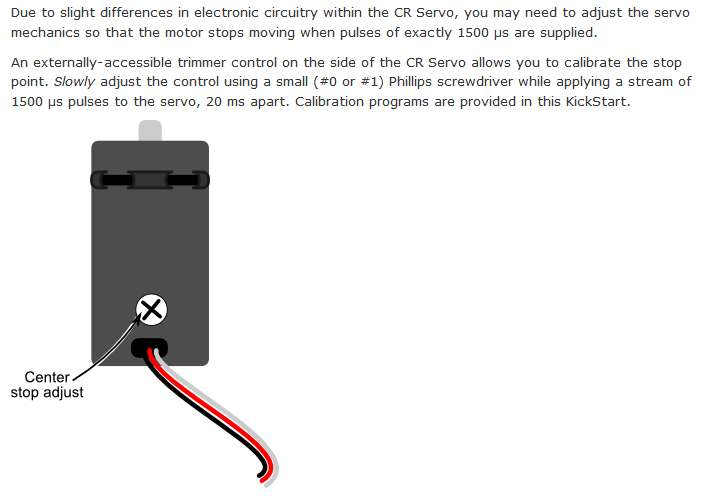
source Parallax Continuous Rotation Servo | learn.parallax.com
What else do I need to know?
it wouldn't be fair if we didn't mention some technical details.
From the Parallax website, these are the details for the servos.

source Parallax Continuous Rotation Servo | learn.parallax.com
The site also said the speed was 0-50 rpm.
So now we know how powerful they are, what their speed is and how fast two servos will drain the batteries (at full load) ....
Wheels
By our definition it wouldn't be a 'Robot" if it didn't move, so they have included two wheels.
The pictures above show a different wheel than the ones supplied.
These look like the came off some old metal wheeled tractor, until you realise there is an O-Ring to fit, and the spikes are there to hold it in place.

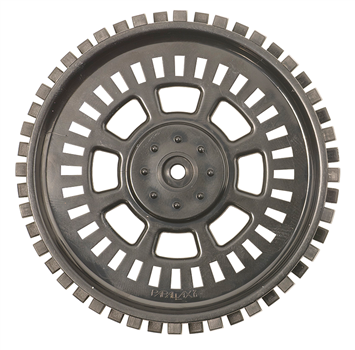
source https://www.parallax.com/product/28114
Now we've seen the wheel, the site tells us the diameter is 66mm
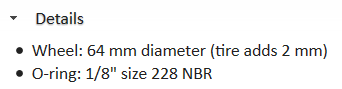
A bit of maths will tell us the maximum speed is Speed = (RPM (diameter * PI) / 60)
speed =( 50(66 * 3.141)/60) = 172.75 mm/sec at full speed.
(Just to be sure I went here to verify it Online Conversion - Surface Speed of a Wheel)
There are some other features worth noting.
- The mounting hole (other side of the images) has splines to fit the servo output shaft.
- There are 32 encoder slots if you wanted to measure the actual speed of rotation.
- The O-Ring presents a very small contact patch with the surface, meaning it will lose in a pushing match, but friction should be lower.
- There is absolutely no give in the 'tyre' so vibrations from the surface will be transmitted to the base plate and components.
If you intend to use these as 'SumoBots' then this wheel combination might be better https://www.parallax.com/product/28109
Shield
This sounds like something used for fighting!
You would be correct in thinking that, but in the world of Arduino, a shield is something that fits over the controller board.
They can have motor controller electronics, connectors, sensors, displays, in fact nearly anything you think of has been made into a shield.
Most of the shields have the parts arranged so that they can be stacked.
This is a little extreme, but shows you can stack a few ...
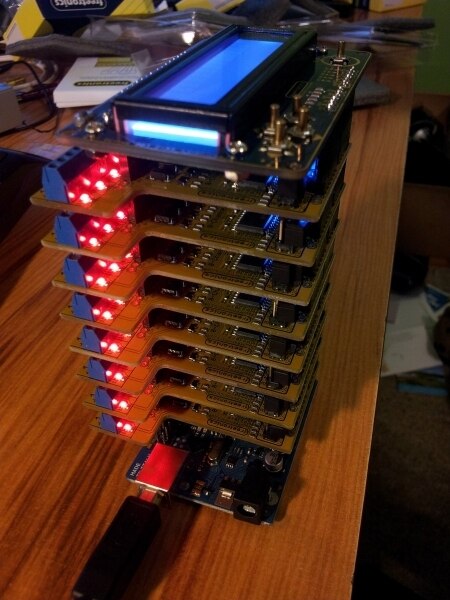
source Luxcity UV Tonic Control System | mbedded.ninja
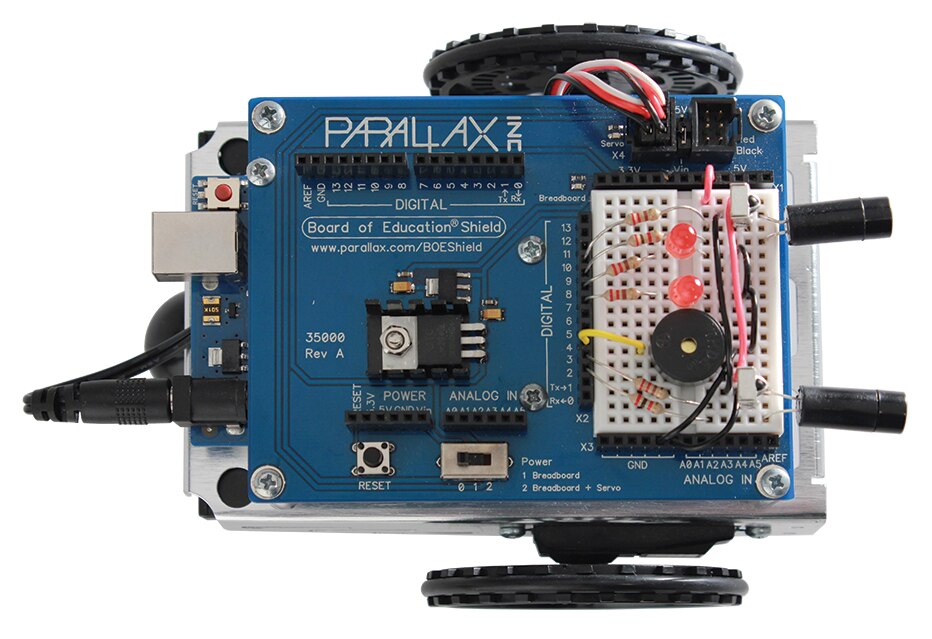
The BOE shield is mounted to the chassis and the Arduino plugs onto it, hanging underneath.
As well as the connections for the servos, and the protyping breadboard, it has a 5v 1A regulator for the power used on the shield.
The battery is 5 x 1.5 = 7.5v and the Arduino can handle anything up to 12v, but to run the servos at 200mA each, you really should have a seperate regulator.
It also has a seperate 3v3 250mA regulator to provide power for accessories.
A reset button (since the one on the Arduino is hidden), an on/off switch for the shield power and some leds.
Very sensibly the Arduino socket layout is duplicated on the top and to the side to allow you to plug extra shields on for other functions.

source https://www.parallax.com/product/35000
As the photo shows the connectors are well labelled, and its a relatively simple device.
The one thing that appears to be lacking is a power switch to isolate the battery.
The battery power is fed into the Arduino, which then feeds it to the shield using the VIN and Ground pins.
To isolate the battery you need to remove the 2.1mm jack, which hangs out the rear.
So now you know what a BOE Robot is.
Mark
My original plans for the blogs got thrown a curve ball last week.
It appears I am travelling abroad for work in early Aug for 4 weeks, which compresses my time available.
Because of the nature of the work, I will be unable to blog while away, so I'm busy looking at a new plan.
What I'm very pleased with is the detailed work that already exists for this kit from Parallax. 

Check it out at Robotics with the Board of Education Shield for Arduino | learn.parallax.com
Top Comments