


Due to the time constraints of this RoadTest I haven't had time to investigate the possibilities of all the projects which I outlined in my previous blog post. Therefore I have decided to do the only one that is achievable in the current timeframe - the Garden Wildlife NightCam. My original idea was to make this a wireless system running at the bottom of my small garden some 15 metres from the house. I did investigate setting up the Rapsberry Pi up to be a wireless access point running a webserver which I could access through the Safari browser on an iPad Mini or by SSH. This setup allowed everything to run on rechargeable batteries and is portable, but I found the system to be unreliable when used outside the house in cold weather - the Wi-Pi dongle repeatedly dropped the signal. However it did work quite well inside the house over short distances.
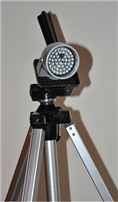
I very quickly realised that to do this project I was going to need some form of infrared illumination so I bought a 48 infrared LED array as used in CCTV camera systems. This came in a metal housing with a movable bracket that I could mount on an old camera tripod and this allowed me to position the infrared light from the LEDs easily - it can be seen on the photograph to the right. The unit runs off a 12 volt power supply from one of my monitor screens and so I needed a source of mains electricity to power it. I did buy a 12v battery holder before realising that I'd need eight rechargeable batteries and I didn't have enough as well as their performance likely to be poor in cold weather.
I also found that even when the Raspberry Pi was powered off mains electricity the Wi-Pi dongle's signal strength was not good enough to reach my home network some 15 metres away inside the house and so I then opted for a (very long) wired network cable. My final solution however was to run a single mains electricity cable with a four gang socket at the end from the house to the bottom of the garden where it could be used to power the Raspberry Pi, the infrared LED array and a HomePlug network socket through which I could have a wired network connection to the Pi from the house. HomePlug is a system for sending a network data through standard mains electricity cables.
I'll now document some of my investigations into various software packages for the standard Raspberry Pi Camera and the Pi NoIR. The main packages I considered were:
- Motion
- Picamera
- BerryCam
- RPi Cam Control (formerly RPi Web Interface)
Update: I've run out of time to do an in-depth review of the tests I carried out using the above software packages. Therefore I will briefly summarize my findings and give reasons why I selected the RPi Cam Control package as the best one to use for my project.
I taped the Raspberry Pi case containing the PiNoIR on top of a rechargeable battery pack and mounted this on a camera tripod with a tilt and pan video head. This allowed me to position the camera's field of view accurately. The photograph to the right show this assembly, but it also covered in white tape to hide the Raspberry Pi's status lights from shining through the case and alarming the wildlife. It doesn't look very pretty, but it works!
RPi Cam Control is a package which runs on the Raspberry Pi providing an Apache webserver with a browser-based graphical front end to the RaspiCam and Motion video capture software. The RPi Cam Control used in conjunction with the hardware I have described above allowed me to sit in the house and monitor the images from the PiNoIR through a web browser on my laptop. This was ideal because I could keep all the windows and doors shut (it was particularly cold at this period of time!) and still monitor what was happening outside. The mains cable was running out of the house through my catflap!
Here is the main RPi Cam Control web interface as seen in a browser window. As you can see from the screenshot, there are buttons to start and stop the video capture manually, to take a single still image, to take a sequence of still images in the form of a timelapse, to trigger video capture by detecting motion and to stop the camera completely. The PiNoIR is some 20 metres away at the bottom of the garden pointed at a bird feeder whilst I am sitting in the warmth of my house viewing the images on my laptop.
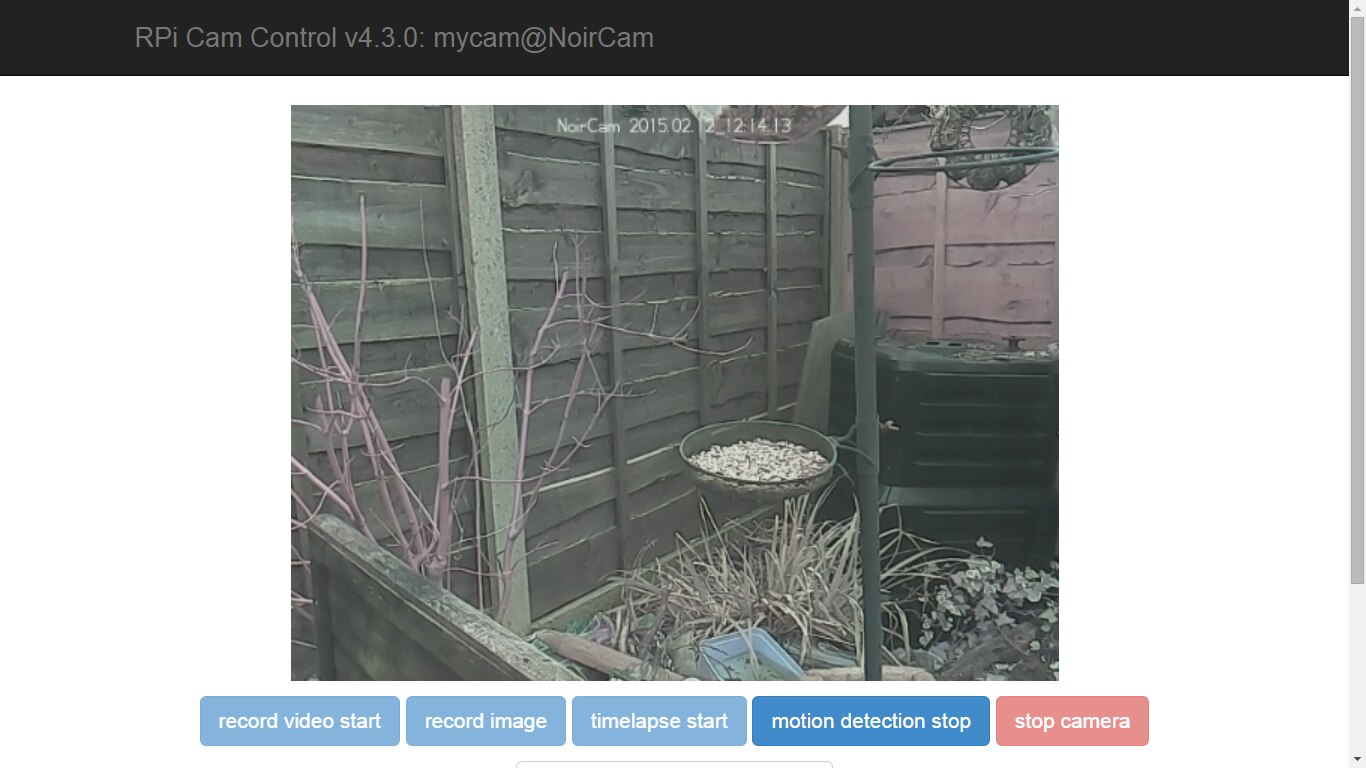
Here are some of the images these first tests produced:

As you can see from the above photo, there is a distinct purple cast to images the PiNoir takes in visible light.
This video capture was triggered by the RPi Cam Control's 'Motion Detect' function. Unfortunately the video's duration is too shor tand so I need to investigate how to lengthen it.
The above video was captured manually using the software's 'Record Video' function.
Again this video was captured manually using the RPi Cam Control buttons in the browser
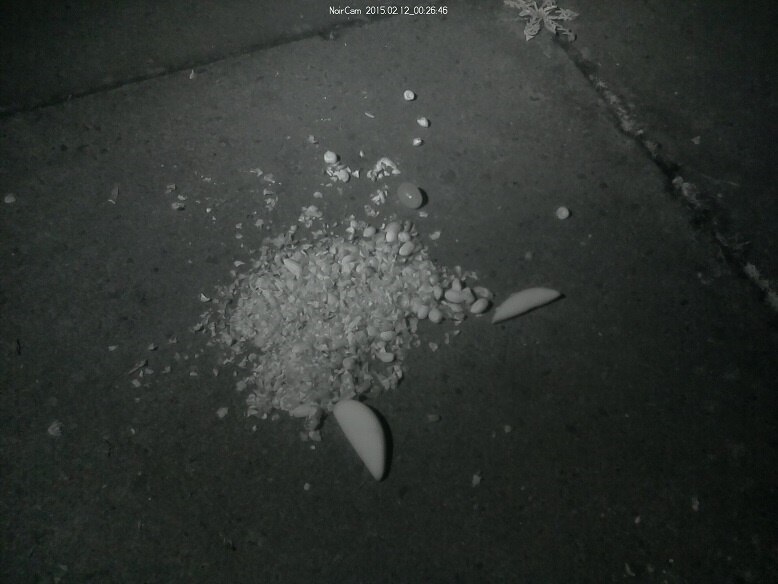
This is the first test image taken in the dark by the PiNoIR under infrared illumination. It's some peanuts and fruit to attract garden wildlife.
The is the first test video capture using the 'Motion Detect' function under infrared illumination. Our cat is investigating the food I've put down, which now includes some bacon fat. It is important to realise that these last two images were taken by the PiNoIR in darkness - it was pitch black outside!