element14 Community
element14 Community
    Register Log In
  • Site
  • Search
  • Log In Register
  • Community Hub
    Community Hub
    • What's New on element14
    • Feedback and Support
    • Benefits of Membership
    • Personal Blogs
    • Members Area
    • Achievement Levels
  • Learn
    Learn
    • Ask an Expert
    • eBooks
    • element14 presents
    • Learning Center
    • Tech Spotlight
    • STEM Academy
    • Webinars, Training and Events
    • Learning Groups
  • Technologies
    Technologies
    • 3D Printing
    • FPGA
    • Industrial Automation
    • Internet of Things
    • Power & Energy
    • Sensors
    • Technology Groups
  • Challenges & Projects
    Challenges & Projects
    • Design Challenges
    • element14 presents Projects
    • Project14
    • Arduino Projects
    • Raspberry Pi Projects
    • Project Groups
  • Products
    Products
    • Arduino
    • Avnet & Tria Boards Community
    • Dev Tools
    • Manufacturers
    • Multicomp Pro
    • Product Groups
    • Raspberry Pi
    • RoadTests & Reviews
  • About Us
  • Store
    Store
    • Visit Your Store
    • Choose another store...
      • Europe
      •  Austria (German)
      •  Belgium (Dutch, French)
      •  Bulgaria (Bulgarian)
      •  Czech Republic (Czech)
      •  Denmark (Danish)
      •  Estonia (Estonian)
      •  Finland (Finnish)
      •  France (French)
      •  Germany (German)
      •  Hungary (Hungarian)
      •  Ireland
      •  Israel
      •  Italy (Italian)
      •  Latvia (Latvian)
      •  
      •  Lithuania (Lithuanian)
      •  Netherlands (Dutch)
      •  Norway (Norwegian)
      •  Poland (Polish)
      •  Portugal (Portuguese)
      •  Romania (Romanian)
      •  Russia (Russian)
      •  Slovakia (Slovak)
      •  Slovenia (Slovenian)
      •  Spain (Spanish)
      •  Sweden (Swedish)
      •  Switzerland(German, French)
      •  Turkey (Turkish)
      •  United Kingdom
      • Asia Pacific
      •  Australia
      •  China
      •  Hong Kong
      •  India
      • Japan
      •  Korea (Korean)
      •  Malaysia
      •  New Zealand
      •  Philippines
      •  Singapore
      •  Taiwan
      •  Thailand (Thai)
      • Vietnam
      • Americas
      •  Brazil (Portuguese)
      •  Canada
      •  Mexico (Spanish)
      •  United States
      Can't find the country/region you're looking for? Visit our export site or find a local distributor.
  • Translate
  • Profile
  • Settings
STEM Projects
  • Learn
  • Learning Center
  • STEM Academy
  • STEM Projects
  • More
  • Cancel
STEM Projects
Blog Raspberry Pi Educators Roadtest: Side Project 2 - Snow Timelapse
  • Blog
  • Forum
  • Documents
  • Events
  • Polls
  • Files
  • Members
  • Mentions
  • Sub-Groups
  • Tags
  • More
  • Cancel
  • New
Join STEM Projects to participate - click to join for free!
  • Share
  • More
  • Cancel
Group Actions
  • Group RSS
  • More
  • Cancel
Engagement
  • Author Author: nbizzell
  • Date Created: 28 Jan 2015 10:37 AM Date Created
  • Views 303 views
  • Likes 1 like
  • Comments 0 comments
  • snow
  • raspberry pi educators design challenge
  • education
  • timelapse
  • raspberrypi
  • raspberry_pi_educator
  • pi educators sub space
  • raspberrypi_education
Related
Recommended

Raspberry Pi Educators Roadtest: Side Project 2 - Snow Timelapse

nbizzell
nbizzell
28 Jan 2015

We had a little snow this week so whilst I was experimenting with timelaspe I thought I would try capturing the snow in our garden melting.


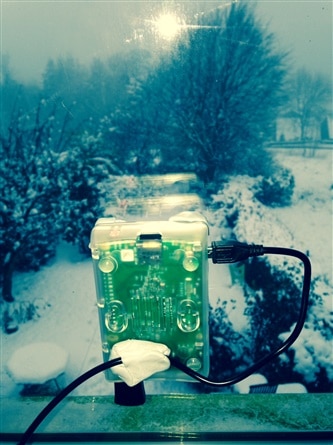
I attached the Raspberry Pi and the camera module fixed into the supplied case to my bedroom widow facing the garden.
image


As you can see there was no space to attach a monitor , keyboard and mouse so i used the Wi-PI 802.11n wifi adapter to connect to the RPi using SSH and VNC.


For some reason the first run (when using Raspistill -tl x -t x) crashed and I only had a few pictures from the first evening. With a restart and a change to using a bash file with and a cron job set to take picture each minute I set the camera off again.


To do this I created a very simple bash file called `timelase.sh` with the following code:


#!/bin/bash
DATE=$(date +"%Y-%m-%d_%H%M")
raspistill -o /home/pi/camera/$DATE.jpg


Then I added a cron job using


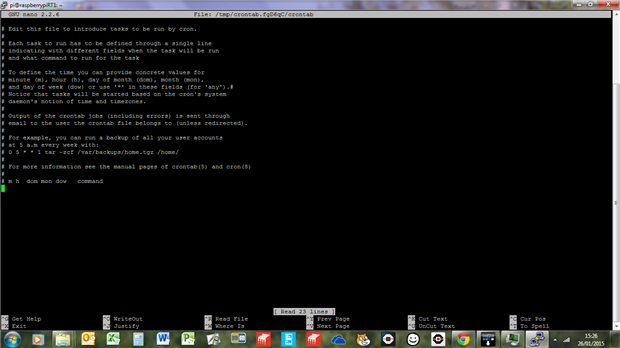
sudo crontab -e
 

image


The last line of the comments show the format of the line you need to add. I wanted to run the file every minute so the line I added was:


* * * * * /home/pi/timelapse.sh 2>&1


If you wanted to change the interval of the pictures you could change the line with the time interval for example for the file to be run every 15 minutes the line would be:


*/15 * * * * /home/pi/timelapse.sh 2>&1


Once this is set up the pi will run the command every minute (or every 15 if you used the second command) and the files will be saved.


So now all that remains is to wait whilst the pictures are taken.


As the supplied card was only 8Gb and the pictures are around 2.4mb each the space on the card is only sufficient for a period of around 12 hours (when taking a picture every minute). To ensure the space was sufficient I logged in via VNC every now and again and transferred the filed onto a USB stick. This can be done automatically by setting up the location to save the files to the USB stick rather than the RPi SD card.


Once the photography was completed I used the files to test the video editing software I had available to see which would be best for the crystal experiment.


Before the photographs were compile i did a quick compile with Windows movie maker live


You don't have permission to edit metadata of this video.
Edit media
x
image
Upload Preview
image


For some strange reason the files were not imported in the correct order so the footage is a little jerky and loops back again (shadows moving left to right then start at the left again).


This appears to be an issue with the file naming i have used and for some reason the option to sort files by date taken is hidden somewhere in the version of Window Movie maker that I currently have installed. I will have to look into this and find a better way to organise the files as the full version has 2900 pictures so i do not want to be arranging them individually. Once I have this problem rectified I will post the full version.


As the snow mainly melted overnight I didn't get theresults I planned but it is still quite nice with clouds moving, the lights coming on a night etc. Apparently it is going to snow again this week so I may try again.

  • Sign in to reply
element14 Community

element14 is the first online community specifically for engineers. Connect with your peers and get expert answers to your questions.

  • Members
  • Learn
  • Technologies
  • Challenges & Projects
  • Products
  • Store
  • About Us
  • Feedback & Support
  • FAQs
  • Terms of Use
  • Privacy Policy
  • Legal and Copyright Notices
  • Sitemap
  • Cookies

An Avnet Company © 2026 Premier Farnell Limited. All Rights Reserved.

Premier Farnell Ltd, registered in England and Wales (no 00876412), registered office: Farnell House, Forge Lane, Leeds LS12 2NE.

ICP 备案号 10220084.

Follow element14

  • X
  • Facebook
  • linkedin
  • YouTube