element14 Community
element14 Community
    Register Log In
  • Site
  • Search
  • Log In Register
  • Community Hub
    Community Hub
    • What's New on element14
    • Feedback and Support
    • Benefits of Membership
    • Personal Blogs
    • Members Area
    • Achievement Levels
  • Learn
    Learn
    • Ask an Expert
    • eBooks
    • element14 presents
    • Learning Center
    • Tech Spotlight
    • STEM Academy
    • Webinars, Training and Events
    • Learning Groups
  • Technologies
    Technologies
    • 3D Printing
    • FPGA
    • Industrial Automation
    • Internet of Things
    • Power & Energy
    • Sensors
    • Technology Groups
  • Challenges & Projects
    Challenges & Projects
    • Design Challenges
    • element14 presents Projects
    • Project14
    • Arduino Projects
    • Raspberry Pi Projects
    • Project Groups
  • Products
    Products
    • Arduino
    • Avnet & Tria Boards Community
    • Dev Tools
    • Manufacturers
    • Multicomp Pro
    • Product Groups
    • Raspberry Pi
    • RoadTests & Reviews
  • About Us
  • Store
    Store
    • Visit Your Store
    • Choose another store...
      • Europe
      •  Austria (German)
      •  Belgium (Dutch, French)
      •  Bulgaria (Bulgarian)
      •  Czech Republic (Czech)
      •  Denmark (Danish)
      •  Estonia (Estonian)
      •  Finland (Finnish)
      •  France (French)
      •  Germany (German)
      •  Hungary (Hungarian)
      •  Ireland
      •  Israel
      •  Italy (Italian)
      •  Latvia (Latvian)
      •  
      •  Lithuania (Lithuanian)
      •  Netherlands (Dutch)
      •  Norway (Norwegian)
      •  Poland (Polish)
      •  Portugal (Portuguese)
      •  Romania (Romanian)
      •  Russia (Russian)
      •  Slovakia (Slovak)
      •  Slovenia (Slovenian)
      •  Spain (Spanish)
      •  Sweden (Swedish)
      •  Switzerland(German, French)
      •  Turkey (Turkish)
      •  United Kingdom
      • Asia Pacific
      •  Australia
      •  China
      •  Hong Kong
      •  India
      • Japan
      •  Korea (Korean)
      •  Malaysia
      •  New Zealand
      •  Philippines
      •  Singapore
      •  Taiwan
      •  Thailand (Thai)
      • Vietnam
      • Americas
      •  Brazil (Portuguese)
      •  Canada
      •  Mexico (Spanish)
      •  United States
      Can't find the country/region you're looking for? Visit our export site or find a local distributor.
  • Translate
  • Profile
  • Settings
STEM Projects
  • Learn
  • Learning Center
  • STEM Academy
  • STEM Projects
  • More
  • Cancel
STEM Projects
Blog RPi B+ Camera Kit: Out of the box impressions
  • Blog
  • Forum
  • Documents
  • Events
  • Polls
  • Files
  • Members
  • Mentions
  • Sub-Groups
  • Tags
  • More
  • Cancel
  • New
Join STEM Projects to participate - click to join for free!
  • Share
  • More
  • Cancel
Group Actions
  • Group RSS
  • More
  • Cancel
Engagement
  • Author Author: fisher0251
  • Date Created: 22 Dec 2014 6:40 AM Date Created
  • Views 410 views
  • Likes 3 likes
  • Comments 2 comments
  • raspberry pi educators design challenge
  • camera
  • raspberry_pi_educator
  • pi educators sub space
  • raspberrypi_education
Related
Recommended

RPi B+ Camera Kit: Out of the box impressions

fisher0251
fisher0251
22 Dec 2014

This week I received the Raspberry Pi Model B+ Camera Kit as part of the element14 Raspberry Pi Educators Roadtest. In this blog I'd like to share a bit of my background and then talk about this kit's included parts and setup.


I am a STEM educator in Minnesota, teaching high school physics and middle school science. I also help coach our extracurricular science team. My interest in DIY electronics has grown over the past year and I've explored both Arduino and Raspberry Pi projects. My favorite so far is a backyard weather station created with various sensors and run by a Python script on the Raspberry Pi Model B. I also taught a Raspberry Pi programming class last summer for elementary aged kids using Minecraft Pi. I was really excited to hear about the improvements made to the RPi B+ but haven't gotten my hands on one until now. So, I'd like to share a few thoughts about this Camera Kit from the perspective of an educator who is familiar with the Raspberry Pi and wants to see what this kind of kit could offer to my students.


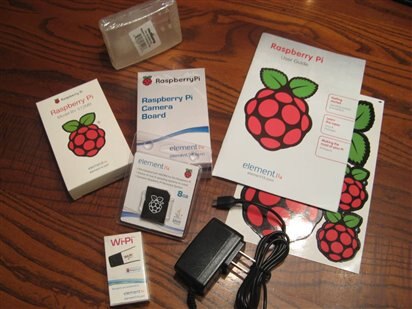
Out of the box, the B+ Camera Kit provides a basic setup to get one started fast. First off, my experience in the past has involved downloading the large Raspbian image and creating my own SD card. This worked fine, but of course the download is considerable and it was a bit of a learning curve the first time (I was new to both Linux distributions as well as the Raspberry Pi). This kit comes with the NOOBS 8Gb SD card ready to go. I know that teachers are busy creatures, and finding the time to tinker through the process of manually creating these boot cards can be a barrier to trying out the Raspberry Pi. This time, the pre-flashed card took away all the hassle and is great to have in a kit like this. I chose to install Raspbian since I am familiar with it, although other distros are included with NOOBS. Plus, I can always re-install a clean image if I mess anything up! image

While I avoided the initial download, I did take the time to run:


sudo apt-get update

sudo apt-get upgrade


This takes some time and requires downloads on the order of hundreds of Mb. But, the included Wi-Pi wifi dongle was plug-and-play and connected to my home network without a snag.


I really notice the extra USB ports on the Model B+ (4 of them, compared with 2 on the Model B). I use a USB dongle to connect to wireless keyboard/mouse (not included in this kit), and another for the wifi. I actually have TWO MORE left open on the B+! Also included is the power supply, which is a nice 2100mA. It feels really solid, not flimsy and cheap. This might seem a trivial feature, but it's good to have a "wall wart" I can trust that will provide more than enough juice for any USB peripherals I choose.


I'll mention two more things that I appreciate about this kit. First, the included element14 manual goes beyond "how do you plug this in." It includes a description of how to use raspi-config, how to start the GUI, and some basic command line commands. It is a nice introduction split into sections that are printed in glossy full-color and nicely laid out to be non-intimidating. I know it took me a while as a new Linux user just to get the darn thing to turn on and off! This book is something I would use directly with students. And having it in a hard copy makes it immediately useful.


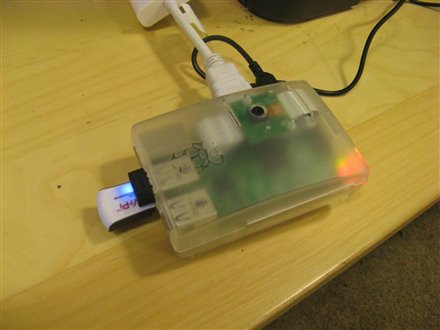
Second, the included RPi B+ case has holes for mounting the camera inside of it. The case itself is a straightforward snap together deal, but the camera board is screwed in with two included screws so that is faces out on the top of the case. This means the whole thing can be mounted to the wall or a stand and the camera is already nicely tucked away. I installed the camera module right away, even though I haven't used it yet.image
 

In future blog posts, I intend to tinker with the camera to create a time lapse (something I haven't tried before). I'll also explore the lower power capabilities of the B+ compared to the Model B. I am interested in using this RPi in a high altitude balloon this spring to collect atmospheric data with my students. This will necessarily be battery powered, and the B+ will likely make this work better.


image

  • Sign in to reply

Top Comments

  • gsimerlink
    gsimerlink over 10 years ago +1
    Great post! Happy to hear the kit made it out quickly and that you're happy with what you've seen so far! We're looking forward to seeing your future posts! - Greg
Parents
  • gsimerlink
    gsimerlink over 10 years ago

    Great post! Happy to hear the kit made it out quickly and that you're happy with what you've seen so far! We're looking forward to seeing your future posts!
    - Greg

    • Cancel
    • Vote Up +1 Vote Down
    • Sign in to reply
    • More
    • Cancel
Comment
  • gsimerlink
    gsimerlink over 10 years ago

    Great post! Happy to hear the kit made it out quickly and that you're happy with what you've seen so far! We're looking forward to seeing your future posts!
    - Greg

    • Cancel
    • Vote Up +1 Vote Down
    • Sign in to reply
    • More
    • Cancel
Children
No Data
element14 Community

element14 is the first online community specifically for engineers. Connect with your peers and get expert answers to your questions.

  • Members
  • Learn
  • Technologies
  • Challenges & Projects
  • Products
  • Store
  • About Us
  • Feedback & Support
  • FAQs
  • Terms of Use
  • Privacy Policy
  • Legal and Copyright Notices
  • Sitemap
  • Cookies

An Avnet Company © 2025 Premier Farnell Limited. All Rights Reserved.

Premier Farnell Ltd, registered in England and Wales (no 00876412), registered office: Farnell House, Forge Lane, Leeds LS12 2NE.

ICP 备案号 10220084.

Follow element14

  • X
  • Facebook
  • linkedin
  • YouTube