element14 Community
element14 Community
    Register Log In
  • Site
  • Search
  • Log In Register
  • Community Hub
    Community Hub
    • What's New on element14
    • Feedback and Support
    • Benefits of Membership
    • Personal Blogs
    • Members Area
    • Achievement Levels
  • Learn
    Learn
    • Ask an Expert
    • eBooks
    • element14 presents
    • Learning Center
    • Tech Spotlight
    • STEM Academy
    • Webinars, Training and Events
    • Learning Groups
  • Technologies
    Technologies
    • 3D Printing
    • FPGA
    • Industrial Automation
    • Internet of Things
    • Power & Energy
    • Sensors
    • Technology Groups
  • Challenges & Projects
    Challenges & Projects
    • Design Challenges
    • element14 presents Projects
    • Project14
    • Arduino Projects
    • Raspberry Pi Projects
    • Project Groups
  • Products
    Products
    • Arduino
    • Avnet & Tria Boards Community
    • Dev Tools
    • Manufacturers
    • Multicomp Pro
    • Product Groups
    • Raspberry Pi
    • RoadTests & Reviews
  • About Us
  • Store
    Store
    • Visit Your Store
    • Choose another store...
      • Europe
      •  Austria (German)
      •  Belgium (Dutch, French)
      •  Bulgaria (Bulgarian)
      •  Czech Republic (Czech)
      •  Denmark (Danish)
      •  Estonia (Estonian)
      •  Finland (Finnish)
      •  France (French)
      •  Germany (German)
      •  Hungary (Hungarian)
      •  Ireland
      •  Israel
      •  Italy (Italian)
      •  Latvia (Latvian)
      •  
      •  Lithuania (Lithuanian)
      •  Netherlands (Dutch)
      •  Norway (Norwegian)
      •  Poland (Polish)
      •  Portugal (Portuguese)
      •  Romania (Romanian)
      •  Russia (Russian)
      •  Slovakia (Slovak)
      •  Slovenia (Slovenian)
      •  Spain (Spanish)
      •  Sweden (Swedish)
      •  Switzerland(German, French)
      •  Turkey (Turkish)
      •  United Kingdom
      • Asia Pacific
      •  Australia
      •  China
      •  Hong Kong
      •  India
      • Japan
      •  Korea (Korean)
      •  Malaysia
      •  New Zealand
      •  Philippines
      •  Singapore
      •  Taiwan
      •  Thailand (Thai)
      • Vietnam
      • Americas
      •  Brazil (Portuguese)
      •  Canada
      •  Mexico (Spanish)
      •  United States
      Can't find the country/region you're looking for? Visit our export site or find a local distributor.
  • Translate
  • Profile
  • Settings
STEM Projects
  • Learn
  • Learning Center
  • STEM Academy
  • STEM Projects
  • More
  • Cancel
STEM Projects
Blog Virtual Eye System -- Post #3 -- Reading Analog output, Distance formula derivation
  • Blog
  • Forum
  • Documents
  • Events
  • Polls
  • Files
  • Members
  • Mentions
  • Sub-Groups
  • Tags
  • More
  • Cancel
  • New
Join STEM Projects to participate - click to join for free!
  • Share
  • More
  • Cancel
Group Actions
  • Group RSS
  • More
  • Cancel
Engagement
  • Author Author: nikhil22
  • Date Created: 13 Aug 2015 5:25 PM Date Created
  • Views 837 views
  • Likes 3 likes
  • Comments 10 comments
  • mcp3008
  • teachers_pet
  • virtual_eye_system
  • spi
  • 3d_mapping
  • teachers pet robotics design challenge
  • sharp_ir_distance_formula
Related
Recommended

Virtual Eye System -- Post #3 -- Reading Analog output, Distance formula derivation

nikhil22
nikhil22
13 Aug 2015

Hi folks!!!

In the last blog post, I've provided directions on how to get started with the Raspberry pi, setting it up and a brief introduction and characteristics of the Sharp IR distance sensor GP2Y0A710K. If you are not sure on setting up raspberry pi, please refer to my previous post before proceeding further or feel free to ask for clarifying doubts, if any.

Well, in this blog post we will be concentrating on how to take analog readings from the Sharp IR distance sensor, which has an analog output and manipulate the readings to get the approximate value of distance from the obstacle or object. The Raspberry Pi is not equipped with provision to take analog readings directly with GPIO pins, so we use an Analog-to-Digital converter, MCP3008, a 10-bit 8- channel ADC and connect to the SPI peripheral on Raspberry Pi hardware. The understanding of SPI communiaction, the details of the pin-out of MCP3008 and the integration of the ADC with raspberry pi is given in this tutorial.  The gist of that tutorial is mentioned below:


SPI COMMUNICATION:


The Serial Peripheral Interface (SPI) is a synchronous serial data link that you use to interface one or more slave peripheral devices to a single master SPI device. SPI uses three signal lines common to all slave peripherals:

  • Master in slave out (MISO). Data is moved from slave to master on this wire.
  • Master out slave in (MOSI). Data is moved from master to slave on this wire.
  • Serial clock (SCLK). The master SPI device generates this clock.

image

Each slave peripheral is wired to an individual chip-select or slave-transmit enable line. During SPI communication, the master selects only one slave device at a time. Any other slave on the bus that has not been activated using its chip-select line must disregard the input clock and MOSI signals. It also must not drive the MISO line.

You can determine if the SPI is enabled on your Raspberry Pi hardware by inspecting the AvailableSPIChannels property of the raspi object.

clear rpi

rpi = raspi();

rpi.AvailableSPIChannels

If the SPI peripheral is not enabled, you will see an empty cell array. To enable the SPI peripheral execute the following command.

enableSPI(rpi);

After you execute the preceding command, inspecting the AvailableSPIChannels property of the rpi object should yield 'CE0' and 'CE1' SPI channels listed as available.


OVERVIEW of ADC:


MCP3008 is a 10-bit, 8-channel analog to digital converter (ADC) with an SPI interface.

image

As seen in this diagram, pins 1 through 8 are analog input channels. Pin 16 is the digital supply voltage and pin 9 is the digital ground. Vref and Agnd are the pins used for reference voltage level for analog measurements. The digital 10-bit voltage measurement value is scaled so that a value of 0 corresponds to Agnd and a value of 1023 (2^10 - 1) corresponding to Vref. Pins 10 through 13 are connections for SPI interface.

Connect MCP3008 to the Raspberry Pi hardware as seen in the following circuit diagram.

image

Connect the analog output pin of distance sensor to the CH0 pin of the ADC instead of the variable resistor as shown in the above diagram. And connect the 4 SPI connections between Raspberry Pi and ADC as shown. Finally connect the power supply connections of 3.3 V and gnd accordingly.


Overview of Distance sensor connection:


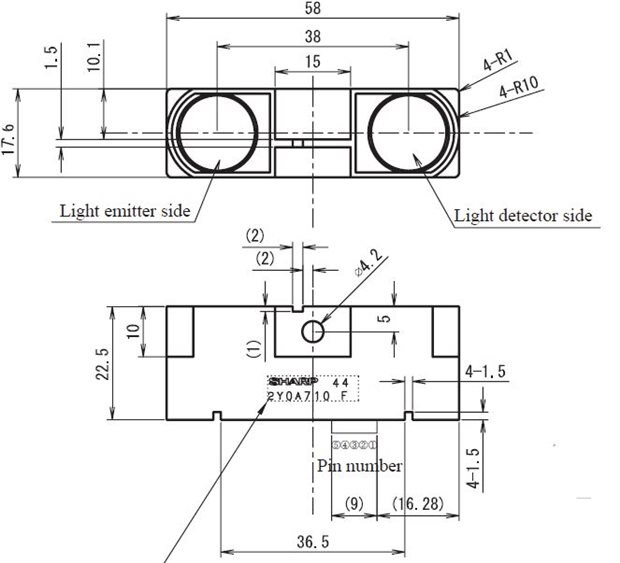
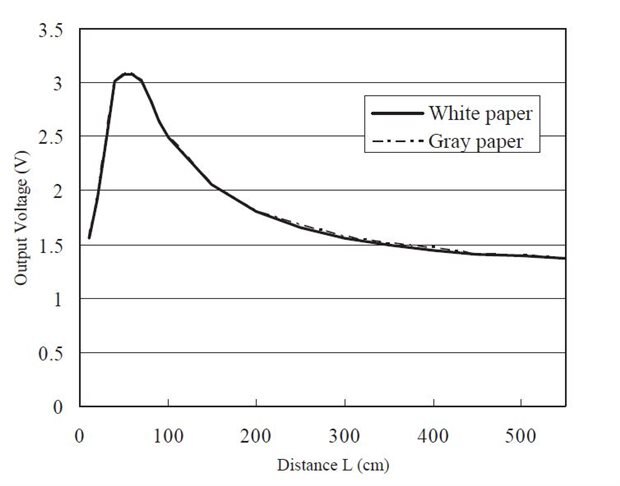
The sharp IR distance sensor GP2Y0A710K, has a good detection range from 100 cm to 550 cm with a decreasing exponential response with increasing distance. There are 5 pins on the sensor to be connected. These are 2 x supply voltage,2 x gnd and an output analog pin. The pin configuration is shown below.

imageimage

The pin 4 of distance sensor is connected to the pin 1 Channel 0 of ADC MCP3008.

Understanding calculation of Distance measurement:


The distance sensor GP2Y0A710K, has a detection range from 100 cm to 550 cm and considering the analog output values of the sensor at the extreme distance values of 100 cm and 550 cm, we have,

image

Distance (m)Analog Voltage (v)Digital value (0 to 2^10-1)
                                      1                                          2.5                                512
                                    5.5                                          1.4                                286

and we can thus put down an equation for approximating the analog output into distance.

We have a linear equation of digital value and distance.


(512-digValue)/(1/100-1/distance)=(512-286)/(0.01-0.002)

=> distance=28250/(digValue-229.5);

Here,

digvalue= voltage * (1023/5)>>> It indicates converting 0-5 V to 0-1023 i.e. a 10 bit resolution.

Hence, the appropriate formula is given by,

Distance=28250÷(DigValue−229.5) centimeters.


But, you might be wondering about the contradiction that there is an another formula mentioned in the previous post for distance calculation. Yes, that is also a valid formula but, it is calculated by considering entire range of distances irrespective of the working range of 1-5.5 m. Hence, you might find that the one mentioned in the previous post is a bit erroneous compared to the present one.


Let us see how to program the Arduino and the Raspberry Pi to get the distance value from the sensor in the next blog.

  • Sign in to reply

Top Comments

  • DAB
    DAB over 10 years ago +1
    Are you sure you are using the right units. 550 cm is 5.5meters. I have not seen an optical diode pair reach that kind of distance. DAB
  • madhugovindarajan
    madhugovindarajan over 10 years ago +1
    Great job on the post, Is there a specific reason why you did not consider this a piece-wise linear function and chose Linear through out? Will be great to see your progress :-)
  • dragonstyne
    dragonstyne over 10 years ago in reply to dragonstyne +1
    Under the heading, Understanding calculation of Distance measurement: You have, "considering the analog output values of the sensor at the extreme distance values of 1 m and 550 m, we have," It should…
  • madhugovindarajan
    madhugovindarajan over 10 years ago in reply to nikhil22

    Yep I agree, the difference should be minimal and hope your application is not sensitive to those errors.

    • Cancel
    • Vote Up +1 Vote Down
    • Sign in to reply
    • More
    • Cancel
  • DAB
    DAB over 10 years ago in reply to DAB

    Wow, I am impressed, I had no idea they made optical sensors with this type of range.


    It is perfect for an idea that I have.


    Thanks

    DAB

    • Cancel
    • Vote Up 0 Vote Down
    • Sign in to reply
    • More
    • Cancel
  • nikhil22
    nikhil22 over 10 years ago in reply to dragonstyne

    Nice observation......thanks for correcting me........I'll edit it anyways.....image

    • Cancel
    • Vote Up +1 Vote Down
    • Sign in to reply
    • More
    • Cancel
  • nikhil22
    nikhil22 over 10 years ago in reply to madhugovindarajan

    Good question.......I first though of applying it for ranges of 100cm each....i.e. like 1 formula for 100-200...1 for 200-300 and so on.....but when I saw the results.....it was more or less approximate and the main point to notice over here is that for my application I will be using like 100-150 or 200 cm range only, which is pretty much a straight line.....so I was satisfied with this outcome...if at all I feel that there is more deviation compared to actual, I will change it by calculating it from 100-150 cm for increased accuracy.


    There could have been another solution to your question.....which is to form an equation of that parabolic part, which according to me is time consuming and I feel to adopt simple strategy when you have other options.....


    In my next post, I will be uploading my program, which performs the measurement of the distance and averages it to get the most agreeing values.


    I hope I answered your question.........I will be doing most of the blog posting part in the coming week and I am glad that people are interactive here.

    • Cancel
    • Vote Up +1 Vote Down
    • Sign in to reply
    • More
    • Cancel
  • dragonstyne
    dragonstyne over 10 years ago in reply to dragonstyne

    Under the heading,

    Understanding calculation of Distance measurement:


    You have, "considering the analog output values of the sensor at the extreme distance values of 1 m and 550 m, we have,"


    It should be, 1 cm and 550 cm.


    Otherwise, great job.


    [][][]Steve

    • Cancel
    • Vote Up +1 Vote Down
    • Sign in to reply
    • More
    • Cancel
>
element14 Community

element14 is the first online community specifically for engineers. Connect with your peers and get expert answers to your questions.

  • Members
  • Learn
  • Technologies
  • Challenges & Projects
  • Products
  • Store
  • About Us
  • Feedback & Support
  • FAQs
  • Terms of Use
  • Privacy Policy
  • Legal and Copyright Notices
  • Sitemap
  • Cookies

An Avnet Company © 2025 Premier Farnell Limited. All Rights Reserved.

Premier Farnell Ltd, registered in England and Wales (no 00876412), registered office: Farnell House, Forge Lane, Leeds LS12 2NE.

ICP 备案号 10220084.

Follow element14

  • X
  • Facebook
  • linkedin
  • YouTube