element14 Community
element14 Community
    Register Log In
  • Site
  • Search
  • Log In Register
  • Community Hub
    Community Hub
    • What's New on element14
    • Feedback and Support
    • Benefits of Membership
    • Personal Blogs
    • Members Area
    • Achievement Levels
  • Learn
    Learn
    • Ask an Expert
    • eBooks
    • element14 presents
    • Learning Center
    • Tech Spotlight
    • STEM Academy
    • Webinars, Training and Events
    • Learning Groups
  • Technologies
    Technologies
    • 3D Printing
    • FPGA
    • Industrial Automation
    • Internet of Things
    • Power & Energy
    • Sensors
    • Technology Groups
  • Challenges & Projects
    Challenges & Projects
    • Design Challenges
    • element14 presents Projects
    • Project14
    • Arduino Projects
    • Raspberry Pi Projects
    • Project Groups
  • Products
    Products
    • Arduino
    • Avnet & Tria Boards Community
    • Dev Tools
    • Manufacturers
    • Multicomp Pro
    • Product Groups
    • Raspberry Pi
    • RoadTests & Reviews
  • About Us
    About the element14 Community
  • Store
    Store
    • Visit Your Store
    • Choose another store...
      • Europe
      •  Austria (German)
      •  Belgium (Dutch, French)
      •  Bulgaria (Bulgarian)
      •  Czech Republic (Czech)
      •  Denmark (Danish)
      •  Estonia (Estonian)
      •  Finland (Finnish)
      •  France (French)
      •  Germany (German)
      •  Hungary (Hungarian)
      •  Ireland
      •  Israel
      •  Italy (Italian)
      •  Latvia (Latvian)
      •  
      •  Lithuania (Lithuanian)
      •  Netherlands (Dutch)
      •  Norway (Norwegian)
      •  Poland (Polish)
      •  Portugal (Portuguese)
      •  Romania (Romanian)
      •  Russia (Russian)
      •  Slovakia (Slovak)
      •  Slovenia (Slovenian)
      •  Spain (Spanish)
      •  Sweden (Swedish)
      •  Switzerland(German, French)
      •  Turkey (Turkish)
      •  United Kingdom
      • Asia Pacific
      •  Australia
      •  China
      •  Hong Kong
      •  India
      •  Japan
      •  Korea (Korean)
      •  Malaysia
      •  New Zealand
      •  Philippines
      •  Singapore
      •  Taiwan
      •  Thailand (Thai)
      •  Vietnam
      • Americas
      •  Brazil (Portuguese)
      •  Canada
      •  Mexico (Spanish)
      •  United States
      Can't find the country/region you're looking for? Visit our export site or find a local distributor.
  • Translate
  • Profile
  • Settings
STEM Academy
  • Learn
  • Learning Center
  • STEM Academy
  • More
  • Cancel
STEM Academy
Documents Electrical Engineering Students Wishlist
  • Blog
  • Forum
  • Documents
  • Events
  • Polls
  • Files
  • Members
  • Mentions
  • Sub-Groups
  • Tags
  • More
  • Cancel
  • New
Join STEM Academy to participate - click to join for free!
Actions
  • Share
  • More
  • Cancel
Engagement
  • Author Author: e14phil
  • Date Created: 8 Sep 2021 2:49 PM Date Created
  • Last Updated Last Updated: 1 Apr 2023 2:09 PM
  • Views 11580 views
  • Likes 3 likes
  • Comments 60 comments
Related
Recommended

Electrical Engineering Students Wishlist

What should Electrical Engineering students buy for their first semester?


Electrical Engineering (EE) is a field that encompasses a wide range of specialties, but for students learning the basics, there are some tools that apply to almost everything, and make learning more interesting and fun.

We've put together a wish list with all the fundamental items needed to set you up for a life in Electrical Engineering.


The Basics


Basic Tools

As an EE student, you'll want to have your own basic set of tools to make your life easier. These are some of tools that every EE needs, no matter what their specialty:


Needle-nose Pliers -

Electronic components are tiny and wiring up those tiny connectors is something our hands are just not built for. Needle-nose pliers are essential for any kind of circuit building.

 

image

Needle Nose Pliers


Wire Stripper

One of my lab partners use to strip wires with his teeth. With a few bites, a twist, and a pull, he'd have any gauge wire stripped and ready to go. For us regular people, wire strippers are mandatory.

image

Wire Strippers


Loupe or Magnifying Glass

Loupes or magnifying glasses are incredibly helpful when soldering or working with a breadboard.

image

Loupe or Magnifying Glass


Tweezers

I don't envy anyone who has to modify a circuit made up of surface mount components, but for those types of jobs, eagle eyes, steady hands, patience, and a good set of tweezers are required.

image

Tweezers Six Pack


Breadboard

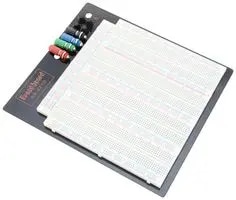
A breadboard is a quick prototyping tool where you can plug components and wires into holes to quickly connect them. Most labs will provide the necessary breadboard, but having one at your disposal is very handy.
image

Multicomp 1mm ABS Breadboard


DC Power Supply

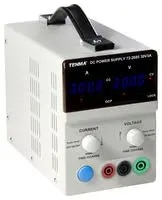
Circuits need a power source and for classroom projects, 5-12V should be sufficient.
image

Bench Power Supply


Soldering

Every EE should keep their soldering tools handy. Whether it's building cables or modifying/repairing equipment, soldering tools get a lot of use on the workbench.


Soldering Iron -

Soldering starts with a good iron. Because they're main task is melting things, they need to have enough power; 40W should do the job. A higher wattage iron doesn't get hotter, it maintains its temperature better. Every time an iron melts solder, it cools down. A higher wattage iron will heat back up more quickly. There's not much that's more frustrating than blobs of solder are taking forever to melt because the iron isn't getting hot fast enough.

image


Soldering Iron


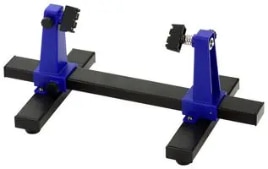
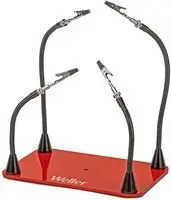
Helping Hand and Circuit Board Holder - You can always tell who likes to solder by the burn marks on their knees. We've all done it; holding a PCB or connector between our knees, with a soldering iron in one hand and a wire in the other. No matter how careful you are, you're going to hit your knee at some point! Growing a third arm is the best solution, but since science isn't quite there yet, save your knees with a Helping Hand setup or a circuit board holder.
 

image

Helping Hand -

Helping Hands


image

Circuit board holder -

Circuit Board Holder


Wicks and Desoldering Pumps -

Sometimes things won't go right, and you'll find that you accidentally shorted two pins on an IC. Use a wick or a desoldering pump (or both) to remove that extra solder after you've heated it up.

 

image

Solder Wick

Solder Wick


image

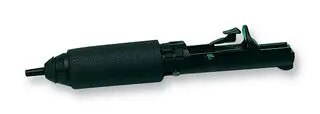
Desoldering pump

Desoldering pump


Soldering Iron cleaner -

Soldering irons quickly get oxidized. To keep them clean, brass shavings are more effective than a wet sponge (although a wet sponge does make that cool sizzling sound).

image

Soldering Iron Tip Cleaner


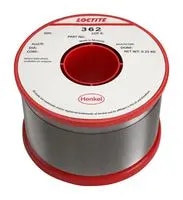
Solder - Of course, don't forget the solder!
image

Solder


Test Equipment

Testing is tricky with complex circuits. In order to make sure the different parts of the circuit are doing what you want them to, you need tools to measure the signal at each point.


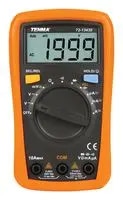
Multimeter -

Multimeters measure voltage, resistance, and current, the basic and most important measurements in electronics. Want to know if a component is broken? Measure across it; if the voltage drop is 0V, then it's broken.
image

Digital Multimeter


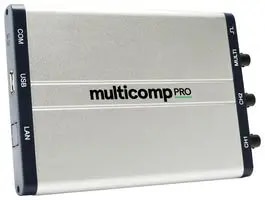
Oscilloscope - Oscilloscopes measure electrical signals mapped against time, useful for viewing the outputs of capacitors and inductors, distortion and noise, and clocked digital signals.


PC USB Oscilloscope -
image

USB Oscilloscope


Software

A big part of electrical engineering in the modern world is software. Most designs can be modeled and optimized before the first resistor even gets plugged into the breadboard.


PSpice - a SPICE (Simulation Program with Integrated Circuit Emphasis) circuit simulator that lets you design and simulate circuits built from a library of almost every component and IC available.

https://www.pspice.com


MATLAB - MATLAB (MATrix LABoratory) is used by many EEs to solve the complex math that arises from engineering problems. MATLAB simplifies matrix manipulations, graphing, creating algorithms, and with add-on toolkits, differential equations and linear algebra.

https://www.mathworks.com


Simulink - Simulink is a GUI add-on for MATLAB from Mathworks, the maker of MATLAB. It lets you combine graphical and textual programming, making MATLAB easier to use.

https://www.mathworks.com


LabVIEW - LabVIEW (Laboratory Virtual Instruments Engineering Workbench) from National Instruments is software that connects with measurement devices in order to control, retrieve, and analyze their data.

Labview


PI Expert - PI Expert from Power Integrations is a free tool that lets you design power supplies based on the specifications you need. It's a great learning tool in that you can switch parts in and out to see their effect on the circuit. It can even automatically optimize your design.

https://www.power.com/piexpert/


3D Printer

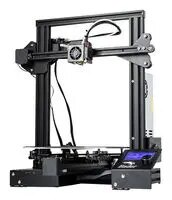
3D printers are on everyone's wishlist, but for EEs, they are especially useful. EEs are always in need of custom enclosures, mounts, risers, shims, and more. 3D printers can even print out entire sets of tools for the workbench. Because of advancing technology, prices have come down in recent years.
image

Ender 3 PRO 3D Printer


Microcontrollers and Single Board Computers

The integration of hardware and software has produced some of the most innovative devices out there. Microcontrollers and single board computers (SBC) are powerful learning tools to get you familiar with combining software and hardware.


Arduino

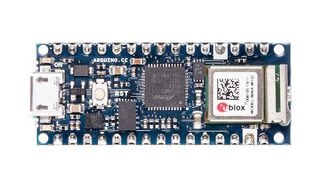
Arduino is a microcontroller that functions as an interface for a variety of hardware, including sensors, robots, displays, and more. It comes with its own development environment where you can write code (C++) to control the hardware attached to it. You can find Arduinos everywhere, from classrooms to automated factory floors.
image

Arduino Nano 33 IoT


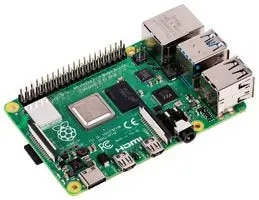
Raspberry Pi is entire computer packed onto a single board, capable of running any software compatible with the Linux operating system. Several manufacturers build "hats", small boards designed to interface with Pi that connect specifically to different types of hardware.
image

Raspberry Pi 4 2GB


Scientific Calculator

Last but not least, a good scientific calculator is mandatory for any EE student.

Mine was the legendary Hewlett Packard 28S (https://www.hpmuseum.org/hp28c.htm).

This $235 beast did everything, graphing, unit conversions, and it was the first Reverse Polish Lisp (RPL) (https://www.hpmuseum.org/rpl.htm) calculator.


However, the feature you really need as an EE student is solving matrices; any basic circuits class will have you solving hundreds. No one wants to solve matrices by hand! Luckily, these days, you don't need to pay $200 for a scientific calculator. Whether you're using iOS or Android, pop on your App Store and search for "scientific calculator" to pull up some low cost or even free alternatives to the monster HP.

  • what should i buy?
  • students
  • stem
  • electrical engineering
  • wishlist
  • Share
  • History
  • More
  • Cancel
  • Sign in to reply

Top Comments

  • maxpowerr
    maxpowerr over 4 years ago +4
    I figured out what was missing on this list.
  • kmikemoo
    kmikemoo over 4 years ago in reply to maxpowerr +2
    maxpowerr That got an audible laugh! That's funny!
  • phoenixcomm
    phoenixcomm over 4 years ago +2
    I have a bone to pick with you and your choice of wire strippers. both of these strippers do a better job with no twisting, razor blades, etc. ~~ Cris BTW By the best iron, you can afford. A ten - 20 hobby…
  • hvidales221
    hvidales221 over 4 years ago

    1) KVL, KCL, V = IR, Resistors in series and parallel.

    2) FPGA board, Microcontroller, Electronics Kit, Laptop, Some textbooks on Circuit Analysis, C programming, and Digital Logic Design.

    • Cancel
    • Vote Up 0 Vote Down
    • Sign in to reply
    • More
    • Cancel
  • robogary
    robogary over 4 years ago

    EVERYONE HAS MISSED THE MOST IMPORTANT TOOL !!!


    An E14 coffee mug to fill to the rim with expresso for those all night homework and study sessions.


    image

    • Cancel
    • Vote Up 0 Vote Down
    • Sign in to reply
    • More
    • Cancel
  • dougw
    dougw over 4 years ago in reply to robogary

    I hear the Sigrok project is very good and it supports a huge array of hardware.

    The Sigrok project aims at creating a portable, cross-platform, Free/Libre/Open-Source signal analysis software suite.

    Here is a video of it being used with a $30 Geekcreit LHT00SU1 Logic Analyzer

    • Cancel
    • Vote Up 0 Vote Down
    • Sign in to reply
    • More
    • Cancel
  • robogary
    robogary over 4 years ago

    1)  First thing at EE learned was ohms law, which I use constantly, but I knew ohms law long before EE school.

    One thing that stuck with me was a class on Electromagnetic Field Theory.

    Prof Huang was supposedly the best EE prof on campus, and EMF theory was more of a math class with 3D vectors, E fields and Mag fields, cross products, dot products, etc......a weeder course alot of people took multiple times.

    Dr Huang was also dryly hilarious with a deadpan delivery.  

    Dr Huang would say in doing homework problems " sometimes to solve the problem you must use brute force method" . Imagine hearing that advice with a thick chinese accent.

    but he was right, there often is not some elegant math solution to solve a problem in 3  magical steps, or some variable matrix that the solution drops out.

    The solution is to be persistent and grind it out.


    2. The DVM listed is OK, I'd suggest a student have something better that auto ranges and can measure capacitance.

    One thing missing:  an LRC component kit.  Thats EE 001 - resistors, caps, and inductors.

    Arduinos and Raspberry Pis are nice, but please include USB cables, and the RPi needs a starter kit with power supply & SD card.


    Is that  LOGIC ANALYZER & SIGNAL GENERATOR, logic analyzer applicable to troubleshooting I2C and SPI ?  Please advise, I may get that one for my own tool collection. Any other recommendations for I2C debugging tool ?

    • Cancel
    • Vote Up 0 Vote Down
    • Sign in to reply
    • More
    • Cancel
  • vinayyn
    vinayyn over 4 years ago

    1.. From the Beginning of technical college to Current job I will stuck some time in Kirchhoff's Current Law.

    2. In the List Connecting wires, Solder paste , Screw drivers are Missing

    • Cancel
    • Vote Up 0 Vote Down
    • Sign in to reply
    • More
    • Cancel
  • dougw
    dougw over 4 years ago in reply to kmikemoo

    We were taught the answer was supposed to be in furlongs per fortnight. image

    The lecture where they taught us about dimensional analysis, as a check on our methodology, was really useful.

    • Cancel
    • Vote Up 0 Vote Down
    • Sign in to reply
    • More
    • Cancel
  • fmilburn
    fmilburn over 4 years ago in reply to kmikemoo

    When I was an engineering student at Texas A&M in the '70s the problem-solving outline we used varied among classes a bit but was along the lines of Given, Required, Assumed (problems were often intentionally somewhat vague), Solution (referencing the equations, tables, nomogram, etc. used), and Answer.  Sometimes we added Check at the end for reasonableness.  Sounds very similar to what you were taught.

    • Cancel
    • Vote Up 0 Vote Down
    • Sign in to reply
    • More
    • Cancel
  • kmikemoo
    kmikemoo over 4 years ago

    My "engineering" school was the Army Corps of Engineers Prime Power School - formerly the Nuclear Power Plant Operators School.  You got a lot of a lot - pretty quickly, I might add.

    The first thing I learned that stuck with me was their problem solving method.  They called it the Given & Find Format and you had to follow it.  It started out with math problems but we learned to apply it to machines and systems.

    List the Given.  What do you know?  What are the quantities?  What are the measured values?  What are the operating characteristics?

    Define the Find.  What are we trying to determine?  Start with the end in mind.  The "Givens" can take you in a lot of different directions.  How will you know if you've solved the problem if you don't know what the solution might be?  If you're looking for bushels of apples and you determine joules per fortnight... you have missed the mark.

    The next step was to list the equations, options, methods and possibilities that might connect the Given to the Find.  Then work to connect the dots.

    I know that there are a lot of names for this process.  This was the one I learned - and it was probably the most important thing I learned - how to solve a problem.


    My vote for what's missing from the list is wire cutters - the electronic kind that I would call nips (https://www.newark.com/techspray/170lx/esd-safe-lead-cutter/dp/83K3388 like fmilburn mentioned) and one of those cool tool cases that shabaz listed.  Also - as rsjawale24 said, components and hookup wire; resistor kit, inductor kit, capacitor kit, wires with Dupont connectors.  Finally, an LCR meter (https://www.newark.com/tenma/72-8155/lcr-meter-with-hfe-transistor/dp/45M5528).  There's not much cooler than getting your circuit simulator and your breadboard to agree.

    • Cancel
    • Vote Up 0 Vote Down
    • Sign in to reply
    • More
    • Cancel
  • pandoramc
    pandoramc over 4 years ago

    1. What was the first thing you learned in engineering school that stuck with you throughout your career?

    My carrer was a bit strange because professor mentioned topics for future semesters in the general course. From this, I remember a small practice at the middle of the year, "You need made a PCB for a simetrical power supply". It was relatively easy, the professor provided a mask for part assembly but we had a huge challenge, How can we do it? With our limited experience, that was made with transfer and acid method, but a lot of try and error was involved.


    2. What is missing from this list?

    It cannot be a basic tool, but a milling machine for PCB and case fabrication could be useful, consequently, I think this kind of machines are missing in the list according to the EE teaching infrastructure.

    • Cancel
    • Vote Up 0 Vote Down
    • Sign in to reply
    • More
    • Cancel
  • javagoza
    javagoza over 4 years ago

    The first thing I learned I am somewhat ashamed to admit. My drawing teacher came to class the first day, an engineer in his early 70s, and he told us this:


    "You have to build the worst possible admissible."

    "The engineer's unit of measurement is money."


    He must have had some reason but one was waiting to be taught that he had to do things with the best possible quality.


    While I studied electrical engineering in Spain I only needed a programmable calculator, first the TI-59 until it was stolen and then at the end of my degree the HP-48 that I continue to use regularly. That and a lot of material for technical drawing. I never needed lab equipment at home, practically lived in the university labs as an intern while studying.

    Now I have a daughter finishing electrical engineering and many of the labs that used to be with tangible material have been converted by the pandemic into labs with PC simulators to do from home. They should have been more proactive and negotiated with a distributor for a small home learning kit.

    • Cancel
    • Vote Up 0 Vote Down
    • Sign in to reply
    • More
    • Cancel
<>
element14 Community

element14 is the first online community specifically for engineers. Connect with your peers and get expert answers to your questions.

  • Members
  • Learn
  • Technologies
  • Challenges & Projects
  • Products
  • Store
  • About Us
  • Feedback & Support
  • FAQs
  • Terms of Use
  • Privacy Policy
  • Legal and Copyright Notices
  • Sitemap
  • Cookies

An Avnet Company © 2026 Premier Farnell Limited. All Rights Reserved.

Premier Farnell Ltd, registered in England and Wales (no 00876412), registered office: Farnell House, Forge Lane, Leeds LS12 2NE.

ICP 备案号 10220084.

Follow element14

  • X
  • Facebook
  • linkedin
  • YouTube