


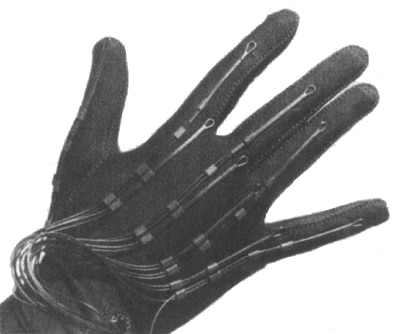
Sayre Glove, from 1977. An early gesture sensor device (via Electronic Visualization Laboratory)
Standard PC user interfaces (as we know them today) such as the keyboard and mouse have been around since the 60’s and have served us well. Could advancements in gestural user interfaces could rival those standards and, over time, do away with them all together?
Gestural interfacing came about in the late 70’s with the introduction of the Sayre Glove by Electronic Visualization Laboratory, which was a ‘wired data glove’ using light-based sensors in flexible tubes that would track finger movement by the amount of light registered on a photocell receptor. Technology has certainly advanced since then, and gestural interfacing has taken on multiple forms of implementation such as depth-aware cameras (such as the ZCam webcam from 3DV Systems), stereo cameras (using a lexian-stripe or infrared emitters to gain a 3D representation), Controller-based devices (such as the Wii Remote) or single camera implementation (such as the Flutter app that transforms a simple webcam into a gestural interface). However, none have been as popular since the introduction of Microsoft’s Kinect sensor device which has been used in some form or another for gestural control such as gaming and even robotics but that could change with Microsoft Researches Digits project.

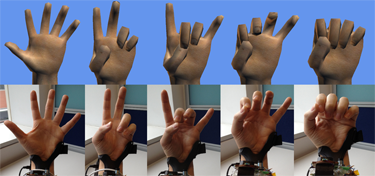
Microsoft Digit
While the Kinect sensor tracks whole-body movement (depending on what you’re doing) Digits focuses its attention on the hand only. According to Microsoft Research, the device is ‘a wrist-worn sensor for freehand 3-D interactions on the move’ which enables the wearer to use their hand in a virtual environment without the use of a glove even at a mobile setting. All the electronics are worn on the wrist like a watch and uses an infrared diffuse illuminator to detect hand movement. When the hand moves, it changes the IR signal which is picked up by an IR camera which decodes the signal and generates a fully articulated skeletal 3D model of the wearer’s hand. This is accompanied by an infrared laser-line projector, which deploys a thin laser across the hand to measure the distance of the fingers and thumb, to determine the angle the digits are bent which further facilitates a real-time 3D rendering of the hand. An inertial measurement unit increases the sensitivity of the tracking and further provides for free movement in a 3D environment. According to Microsoft the device will interact wirelessly to PC’s and mobile devices such as tablets and smartphones. For instance, you could interact with your smartphone without touching it, such as dialing phone numbers just by pushing buttons on an invisible number-pad in the air or playing guitar hero with an air guitar rather than using a controller. As it stands the prototype is rather bulky, but researcher’s state that as new technology becomes available Digits will be reduced to the size of an ordinary wrist watch.
Microsoft Research's Digits isn’t the only device that implements a gestural interface that’s gloveless. LeapMotion is set to unleash their "Leap interface" on the masses. Like the Digits device, Leap uses a gloveless gestural interface to interact with PC software, however, that’s where the similarities end as Leap isn’t exactly portable or meant for use with mobile devices (although I suspect you could adapt it somehow). The Leap device is about the size of an Apple iPod and tracks users hand movements when positioned over-head. According to the company, the device is 200 times more accurate than other motion sensing devices on the market and can track hand and finger movement down to 1/100th of a millimeter in a space of 8 cubic meters directly in front of a laptop or PC. While not much is known about Leap’s internals (other than it uses a USB connection), some speculate that it uses a type of sonar to accurately track movements. While the Leap won’t make the use of a keyboard obsolete it will give the mouse a run for its money and is already set to be introduced to the consumer market as LeapMotion is currently taking pre-orders for $75.98 US (shipping included in price). It’s safe to say that gestural interfaces will one day phase-out the keyboard and mouse. With recent developments in technology, that day could come very soon. Not only are they becoming more precise and functional over their counterparts, but they can reduce the risk of injury associated with using them such as repetitive strain injury and carpal tunnel syndrome, which has afflicted about 5.5 million adults in the US alone.
Cabe
