element14 Community
element14 Community
    Register Log In
  • Site
  • Search
  • Log In Register
  • Community Hub
    Community Hub
    • What's New on element14
    • Feedback and Support
    • Benefits of Membership
    • Personal Blogs
    • Members Area
    • Achievement Levels
  • Learn
    Learn
    • Ask an Expert
    • eBooks
    • element14 presents
    • Learning Center
    • Tech Spotlight
    • STEM Academy
    • Webinars, Training and Events
    • Learning Groups
  • Technologies
    Technologies
    • 3D Printing
    • FPGA
    • Industrial Automation
    • Internet of Things
    • Power & Energy
    • Sensors
    • Technology Groups
  • Challenges & Projects
    Challenges & Projects
    • Design Challenges
    • element14 presents Projects
    • Project14
    • Arduino Projects
    • Raspberry Pi Projects
    • Project Groups
  • Products
    Products
    • Arduino
    • Avnet & Tria Boards Community
    • Dev Tools
    • Manufacturers
    • Multicomp Pro
    • Product Groups
    • Raspberry Pi
    • RoadTests & Reviews
  • About Us
  • Store
    Store
    • Visit Your Store
    • Choose another store...
      • Europe
      •  Austria (German)
      •  Belgium (Dutch, French)
      •  Bulgaria (Bulgarian)
      •  Czech Republic (Czech)
      •  Denmark (Danish)
      •  Estonia (Estonian)
      •  Finland (Finnish)
      •  France (French)
      •  Germany (German)
      •  Hungary (Hungarian)
      •  Ireland
      •  Israel
      •  Italy (Italian)
      •  Latvia (Latvian)
      •  
      •  Lithuania (Lithuanian)
      •  Netherlands (Dutch)
      •  Norway (Norwegian)
      •  Poland (Polish)
      •  Portugal (Portuguese)
      •  Romania (Romanian)
      •  Russia (Russian)
      •  Slovakia (Slovak)
      •  Slovenia (Slovenian)
      •  Spain (Spanish)
      •  Sweden (Swedish)
      •  Switzerland(German, French)
      •  Turkey (Turkish)
      •  United Kingdom
      • Asia Pacific
      •  Australia
      •  China
      •  Hong Kong
      •  India
      • Japan
      •  Korea (Korean)
      •  Malaysia
      •  New Zealand
      •  Philippines
      •  Singapore
      •  Taiwan
      •  Thailand (Thai)
      • Vietnam
      • Americas
      •  Brazil (Portuguese)
      •  Canada
      •  Mexico (Spanish)
      •  United States
      Can't find the country/region you're looking for? Visit our export site or find a local distributor.
  • Translate
  • Profile
  • Settings
Publications
  • Learn
  • More
Publications
Blog Ever Stronger Passwords
  • Blog
  • Documents
  • Events
  • Files
  • Members
  • Mentions
  • Sub-Groups
  • Tags
  • More
  • Cancel
  • New
Join Publications to participate - click to join for free!
  • Share
  • More
  • Cancel
Group Actions
  • Group RSS
  • More
  • Cancel
Engagement
  • Author Author: gervasi
  • Date Created: 17 Oct 2011 9:33 PM Date Created
  • Views 500 views
  • Likes 0 likes
  • Comments 1 comment
  • security
  • cgervasi:dit
  • authentication
Related
Recommended

Ever Stronger Passwords

gervasi
gervasi
17 Oct 2011

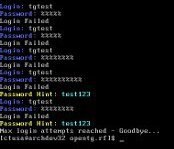
The modern practice of website password authentication is breaking down.  I first began using passwords in the 80s to log on to BBS.  I selected a password that was four letters, all lower case.  In college, the university VAX required five characters, so I selected a new password.  Later another system at college required at least six characters.  I remember thinking that this was getting crazy. The trend continued.  Here is a list completely from my memory on which years and systems I first encountered new password strength requirements. image
 

Year
System
Required Password Strength
1980sDialup BBSs4 characters
1993University VAX5 characters
1995University Math Department6 characters, not a word in the dictionary
1999Online Brokerage6 characters, one number, separate 4-digit PIN
2001Online Payment8 characters, one number
2007Bank6 characters, one number, a registration cookie, a login shibboleth screen
2008Company Login6 characters, one number, one special character, at least one capital and one lower case
Future?

10 characters, one number, one extended ASCII character,

max 3 contiguous letters or numbers, shibboleth screen, PIN

Definitions:

Shibboleth screen - A word I made up to describe a distinctive picture and phrase that the website displays after user name is entered but before the password is entered.  If the shibboleth screen does not appear, users are not supposed to enter their password because the website may be spoofed.
Registration cookie - Some websites require additional challenge questions when you log in on a new computer.  After that it leaves a cookie that tells the website only to require user name and password.


I invented my “future” password strength requirement out of whole cloth, but I would not be at all surprised to see that those requirements on a website tomorrow.


To remember a complicated password, it’s easiest to use the same password for all websites.  I imagine reputable websites store passwords encrypted in such a way that it requires trivial computing power to verify if a user-entered password is right but that would requires enormous time to extract a password given only the file.  Most websites submit passwords via a secured webpage so no one can steal the password on its way to the server. image
 

The trouble with this is if any website fails to encrypt its password and users use the same password at every site, someone with that unencrypted list can log into every website the user is registered on.  That risk defeats the entire purpose of requiring strong passwords.  Unique requirements such as a separate PIN help until other websites adopt the practice and render it no longer unique.  This leads to a race to maximum password complexity.


Software can store the passwords, but then the user is dependent of access to that software to log into the all websites.  Anyone who authenticates with that software automatically has access to all the user’s websites.  I hope websites move to something like fingerprint or face recognition.  This opens the risk of someone providing a recorded fingerprint or face image.  Devices that read them will have to have additional authentication to show the image data is authentic.  No system will be foolproof.  What we do now, though, is unwieldy and not all that secure.


Does anyone have a website authentication suggestion that would be easier to use and at leaset as secure as what we do today?

  • Sign in to reply
Parents
  • Catwell
    Catwell over 14 years ago

    I saw this chart a while ago compiled from what so called "hackers" and analysts say about the difficulty of cracking a password.


    image


    As computers get more powerful, these numbers decrease.


    C

    • Cancel
    • Vote Up 0 Vote Down
    • Sign in to reply
    • More
    • Cancel
Comment
  • Catwell
    Catwell over 14 years ago

    I saw this chart a while ago compiled from what so called "hackers" and analysts say about the difficulty of cracking a password.


    image


    As computers get more powerful, these numbers decrease.


    C

    • Cancel
    • Vote Up 0 Vote Down
    • Sign in to reply
    • More
    • Cancel
Children
No Data
element14 Community

element14 is the first online community specifically for engineers. Connect with your peers and get expert answers to your questions.

  • Members
  • Learn
  • Technologies
  • Challenges & Projects
  • Products
  • Store
  • About Us
  • Feedback & Support
  • FAQs
  • Terms of Use
  • Privacy Policy
  • Legal and Copyright Notices
  • Sitemap
  • Cookies

An Avnet Company © 2025 Premier Farnell Limited. All Rights Reserved.

Premier Farnell Ltd, registered in England and Wales (no 00876412), registered office: Farnell House, Forge Lane, Leeds LS12 2NE.

ICP 备案号 10220084.

Follow element14

  • X
  • Facebook
  • linkedin
  • YouTube