element14 Community
element14 Community
    Register Log In
  • Site
  • Search
  • Log In Register
  • Community Hub
    Community Hub
    • What's New on element14
    • Feedback and Support
    • Benefits of Membership
    • Personal Blogs
    • Members Area
    • Achievement Levels
  • Learn
    Learn
    • Ask an Expert
    • eBooks
    • element14 presents
    • Learning Center
    • Tech Spotlight
    • STEM Academy
    • Webinars, Training and Events
    • Learning Groups
  • Technologies
    Technologies
    • 3D Printing
    • FPGA
    • Industrial Automation
    • Internet of Things
    • Power & Energy
    • Sensors
    • Technology Groups
  • Challenges & Projects
    Challenges & Projects
    • Design Challenges
    • element14 presents Projects
    • Project14
    • Arduino Projects
    • Raspberry Pi Projects
    • Project Groups
  • Products
    Products
    • Arduino
    • Avnet & Tria Boards Community
    • Dev Tools
    • Manufacturers
    • Multicomp Pro
    • Product Groups
    • Raspberry Pi
    • RoadTests & Reviews
  • About Us
  • Store
    Store
    • Visit Your Store
    • Choose another store...
      • Europe
      •  Austria (German)
      •  Belgium (Dutch, French)
      •  Bulgaria (Bulgarian)
      •  Czech Republic (Czech)
      •  Denmark (Danish)
      •  Estonia (Estonian)
      •  Finland (Finnish)
      •  France (French)
      •  Germany (German)
      •  Hungary (Hungarian)
      •  Ireland
      •  Israel
      •  Italy (Italian)
      •  Latvia (Latvian)
      •  
      •  Lithuania (Lithuanian)
      •  Netherlands (Dutch)
      •  Norway (Norwegian)
      •  Poland (Polish)
      •  Portugal (Portuguese)
      •  Romania (Romanian)
      •  Russia (Russian)
      •  Slovakia (Slovak)
      •  Slovenia (Slovenian)
      •  Spain (Spanish)
      •  Sweden (Swedish)
      •  Switzerland(German, French)
      •  Turkey (Turkish)
      •  United Kingdom
      • Asia Pacific
      •  Australia
      •  China
      •  Hong Kong
      •  India
      • Japan
      •  Korea (Korean)
      •  Malaysia
      •  New Zealand
      •  Philippines
      •  Singapore
      •  Taiwan
      •  Thailand (Thai)
      • Vietnam
      • Americas
      •  Brazil (Portuguese)
      •  Canada
      •  Mexico (Spanish)
      •  United States
      Can't find the country/region you're looking for? Visit our export site or find a local distributor.
  • Translate
  • Profile
  • Settings
Community Hub
Community Hub
Member's Forum Need help limited vision problem
  • Blog
  • Forum
  • Documents
  • Quiz
  • Events
  • Leaderboard
  • Polls
  • Files
  • Members
  • Mentions
  • Sub-Groups
  • Tags
  • More
  • Cancel
  • New
Join Community Hub to participate - click to join for free!
Actions
  • Share
  • More
  • Cancel
Forum Thread Details
  • State Suggested Answer
  • Replies 9 replies
  • Answers 7 answers
  • Subscribers 574 subscribers
  • Views 888 views
  • Users 0 members are here
  • frontpage
Related

Need help limited vision problem

marcus57
marcus57 over 8 years ago
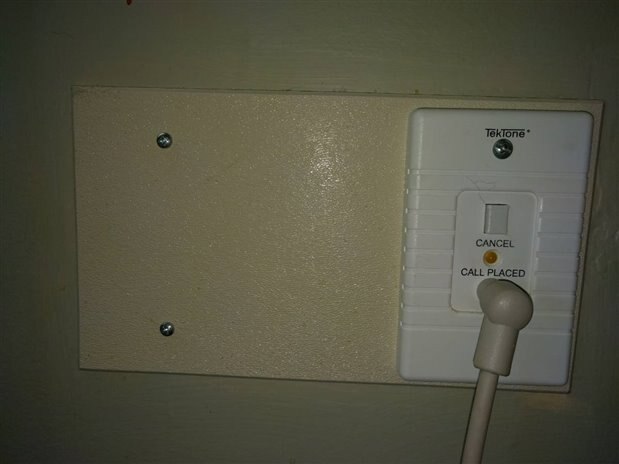
I am currently a resident in a nursing home and have difficulty with what they have as a call light. When you press the button by your bed a small LED light comes on above the bed. The problem is I am visually impaired and cannot see if the small led Is on. After waiting a while I'm always having to press the button not knowing whether the light is on or not.
I would like to find some kind of light sensor that I could place over the small LED and have it BUZZ or give some kind of audible sound so I know the button has been pressed,
I do have my desktop computer a few feet away and thought about having some kind of USB device that could have my computer produces sound,
I am enclosing a picture of the wall plate where the LED is located.
I have had dreams of since it was hooked to my computer I would be able to keep a log of how long the light was on each time it's on
Thank you in advance for any help


I am basically looking for something as simple as a Light detector to sense When that small  LED is activated I need a buzzer to let me know that my call light is on
image


Photo


6 plus ones

6


21 comments

21


  • Sign in to reply
  • Cancel

Top Replies

  • jw0752
    jw0752 over 8 years ago +6 suggested
    Hi Mark, I built something similar for my mom who was in a nursing home. When she was in bed she could not see whether the light had been activated or not. I built a sensor that sat on top of the little…
  • rachaelp
    rachaelp over 8 years ago in reply to marcus57 +3 suggested
    Hi Mark, How about using an Arduino? Monitor the output from the light sensor on an analog input to determine whether the light is on or off. Then depending on the state send a serial message indicating…
  • beacon_dave
    beacon_dave over 8 years ago in reply to marcus57 +3 suggested
    Velleman do an educational kit (EDU005 USB Tutor Board) which may be of interest. https://www.vellemanusa.com/products/view/?country=us&lang=enu&id=525980 It has a LDR light sensor on board and has example…
  • jw0752
    0 jw0752 over 8 years ago

    Hi Mark,

    I built something similar for my mom who was in a nursing home. When she was in bed she could not see whether the light had been activated or not. I built a sensor that sat on top of the little green light on the panel and when ever it was lit a circuit would turn on a flashing red and blue LED. Mom could see the flashing of the LED on her ceiling. The nursing home would not let me tap into the circuit so I made the unit totally isolated from the system. Here is a link to the project.


    https://www.element14.com/community/people/jw0752/blog/2016/01/15/building-an-led-amplifier-for-mom?sr=search&searchId=c33c3adb-c11b-46ff-99c9-b2cd22c6188f&searchIndex=0


    Instead of making an LED flash this circuit could drive a small piezo buzzer which would make the sound that you are looking for.


    John

    • Cancel
    • Vote Up +6 Vote Down
    • Sign in to reply
    • Verify Answer
    • Reject Answer
    • Cancel
  • jw0752
    0 jw0752 over 8 years ago

    Hi Mark,

    In thinking about your situation over night I have a couple of questions. Do you really want a sound that would continue for what might be a quite long time. If your nursing facility is anything like my Mom's was you may be waiting a half hour or more. How would you power the sensor module? In Mom's room there was a real shortage of outlets and their placement was poor. The facility would not let us multiple tap an outlet so we were always having to deal with batteries. They also might prohibit use of a device that is not UL approved so batteries might be the only option. The module that I built ran on batteries and we got about 3 months out of a set of batteries. Adding sound to the module would probably cut this time in half. Are you planning on building the device yourself or do you have a friend that will build it for you? My skills are able to design a unit like the one illustrated in my link but I do not have the skills to tie it to your laptop. A timer could also probably be added but this again would consume the batteries much faster and make the design of the project a much bigger deal.

    John

    • Cancel
    • Vote Up 0 Vote Down
    • Sign in to reply
    • Verify Answer
    • Reject Answer
    • Cancel
  • marcus57
    0 marcus57 over 8 years ago in reply to jw0752

    I do have my desktop computer 3 feet from the wall mounted LED. I leave my computer on 24/7 because it records what is going on in my room in case something happens. I have tried to think of a solution of some kind of  sensor that would monitor the LED using USB And use my computer to trigger a sound. I had hoped to find some kind off light sensor to USB that would be simple and use the power of my computer nearby.

    Any ideas are greatly appreciated;

    • Cancel
    • Vote Up +1 Vote Down
    • Sign in to reply
    • Verify Answer
    • Cancel
  • rachaelp
    0 rachaelp over 8 years ago in reply to marcus57

    Hi Mark,


    How about using an Arduino? Monitor the output from the light sensor on an analog input to determine whether the light is on or off. Then depending on the state send a serial message indicating that state over to your computer. You could then use something like Processing (https://processing.org/) to read and interpret your serial data and create a clear display on your computer.


    Best Regards,


    Rachael

    • Cancel
    • Vote Up +3 Vote Down
    • Sign in to reply
    • Verify Answer
    • Reject Answer
    • Cancel
  • beacon_dave
    0 beacon_dave over 8 years ago in reply to marcus57

    Velleman do an educational kit (EDU005 USB Tutor Board) which may be of interest.

    https://www.vellemanusa.com/products/view/?country=us&lang=enu&id=525980


    It has a LDR light sensor on board and has example programs that you can run and adapt on your PC to read the sensors on a PC over the USB connection.

    • Cancel
    • Vote Up +3 Vote Down
    • Sign in to reply
    • Verify Answer
    • Reject Answer
    • Cancel
  • rsc
    0 rsc over 8 years ago

    Seems kinda crazy to require a computer to monitor a LED.......however.....


    I had to do this once when my furnace was acting up.  I took a length of fiber optic cable and glued it to the furnace next to the fault LED and ran the fiber cable upstairs to my bedroom.  I attached the fiber to the edge of my bed headboard so if the furnace fault LED turned on, I could see it through the fiber next to my pillow.  At 3am it was bright enough to tell me when the furnace wouldn't light up.  A length of fiber optic cable might be all you need to "see the light" - no batteries required.


    ...or ...program a robot droid to go find the nurse and bring them back.....


    Scott

    • Cancel
    • Vote Up +3 Vote Down
    • Sign in to reply
    • Verify Answer
    • Reject Answer
    • Cancel
  • marcus57
    0 marcus57 over 8 years ago in reply to rsc

    Good idea I had never thought of that

    • Cancel
    • Vote Up +1 Vote Down
    • Sign in to reply
    • Verify Answer
    • Cancel
  • dougw
    0 dougw over 8 years ago

    Would it be possible for a cheap webcam to simply be parked right in front of the LED and you could run an app that would audibly indicate whether the LED was on whenever you wanted to know its status? Or it could audibly beep once per minute as long as the LED is on.

    • Cancel
    • Vote Up +2 Vote Down
    • Sign in to reply
    • Verify Answer
    • Reject Answer
    • Cancel
  • mcb1
    0 mcb1 over 8 years ago in reply to rachaelp

    Or a Digispark and use the USB.


    Another really cheap easy solution I saw was hacking a computer mouse.

    In this case the software detected one of the buttons and did whatever it needed to do. The electronics simply provided a closed circuit (opto coupler) across the button.


    Mark

    • Cancel
    • Vote Up +3 Vote Down
    • Sign in to reply
    • Verify Answer
    • Reject Answer
    • Cancel
element14 Community

element14 is the first online community specifically for engineers. Connect with your peers and get expert answers to your questions.

  • Members
  • Learn
  • Technologies
  • Challenges & Projects
  • Products
  • Store
  • About Us
  • Feedback & Support
  • FAQs
  • Terms of Use
  • Privacy Policy
  • Legal and Copyright Notices
  • Sitemap
  • Cookies

An Avnet Company © 2026 Premier Farnell Limited. All Rights Reserved.

Premier Farnell Ltd, registered in England and Wales (no 00876412), registered office: Farnell House, Forge Lane, Leeds LS12 2NE.

ICP 备案号 10220084.

Follow element14

  • X
  • Facebook
  • linkedin
  • YouTube