element14 Community
element14 Community
    Register Log In
  • Site
  • Search
  • Log In Register
  • Community Hub
    Community Hub
    • What's New on element14
    • Feedback and Support
    • Benefits of Membership
    • Personal Blogs
    • Members Area
    • Achievement Levels
  • Learn
    Learn
    • Ask an Expert
    • eBooks
    • element14 presents
    • Learning Center
    • Tech Spotlight
    • STEM Academy
    • Webinars, Training and Events
    • Learning Groups
  • Technologies
    Technologies
    • 3D Printing
    • FPGA
    • Industrial Automation
    • Internet of Things
    • Power & Energy
    • Sensors
    • Technology Groups
  • Challenges & Projects
    Challenges & Projects
    • Design Challenges
    • element14 presents Projects
    • Project14
    • Arduino Projects
    • Raspberry Pi Projects
    • Project Groups
  • Products
    Products
    • Arduino
    • Avnet & Tria Boards Community
    • Dev Tools
    • Manufacturers
    • Multicomp Pro
    • Product Groups
    • Raspberry Pi
    • RoadTests & Reviews
  • About Us
    About the element14 Community
  • Store
    Store
    • Visit Your Store
    • Choose another store...
      • Europe
      •  Austria (German)
      •  Belgium (Dutch, French)
      •  Bulgaria (Bulgarian)
      •  Czech Republic (Czech)
      •  Denmark (Danish)
      •  Estonia (Estonian)
      •  Finland (Finnish)
      •  France (French)
      •  Germany (German)
      •  Hungary (Hungarian)
      •  Ireland
      •  Israel
      •  Italy (Italian)
      •  Latvia (Latvian)
      •  
      •  Lithuania (Lithuanian)
      •  Netherlands (Dutch)
      •  Norway (Norwegian)
      •  Poland (Polish)
      •  Portugal (Portuguese)
      •  Romania (Romanian)
      •  Russia (Russian)
      •  Slovakia (Slovak)
      •  Slovenia (Slovenian)
      •  Spain (Spanish)
      •  Sweden (Swedish)
      •  Switzerland(German, French)
      •  Turkey (Turkish)
      •  United Kingdom
      • Asia Pacific
      •  Australia
      •  China
      •  Hong Kong
      •  India
      •  Japan
      •  Korea (Korean)
      •  Malaysia
      •  New Zealand
      •  Philippines
      •  Singapore
      •  Taiwan
      •  Thailand (Thai)
      •  Vietnam
      • Americas
      •  Brazil (Portuguese)
      •  Canada
      •  Mexico (Spanish)
      •  United States
      Can't find the country/region you're looking for? Visit our export site or find a local distributor.
  • Translate
  • Profile
  • Settings
Community Hub
Community Hub
Member's Forum Are you using AI?
  • Blog
  • Forum
  • Documents
  • Quiz
  • Events
  • Leaderboard
  • Polls
  • Files
  • Members
  • Mentions
  • Sub-Groups
  • Tags
  • More
  • Cancel
  • New
Join Community Hub to participate - click to join for free!
Actions
  • Share
  • More
  • Cancel
Forum Thread Details
  • Replies 47 replies
  • Subscribers 616 subscribers
  • Views 818 views
  • Users 0 members are here
  • research
  • community questions
Related

Are you using AI?

Alanta Lee
Alanta Lee 11 days ago

Hi everyone,

This is the first time i've ventured out of my 'Research Opportunities' area so, hello Wave

I'm curious to hear how people in the element14 community are using AI tools in everyday life, whether that’s at work, at home, while learning, or just experimenting.

A few prompts to get things going:

  • What do you mainly use AI for?
  • Has AI changed how you work or solve problems?
  • What do you find most useful about AI?
  • What still feels frustrating, risky, or unclear?
  • Are there any AI tools or use cases you think are especially useful?

Feel free to answer one question or all of them!

Thanks!


  • Sign in to reply
  • Cancel
Parents
  • shabaz
    shabaz 9 days ago

    I do use AI for coding assistance, and have had to adjust the way I work slightly (but for the better I believe) to improve the results. For very tedious but obvious things, I'll take the easy way out and just request ChatGPT to do it all. That works for tools/utilities and for formatting data, creating arrays and so on, and does save a ton of time. However, sometimes I won't entirely be able to follow the resulting code, since I was not involved in writing it at all, I merely acted as tester and raised bugs/issues back to ChatGPT.

    For more involved coding, where I do want to provide input and I want to be able to more closely follow what's going on, my habit is to only provide ChatGPT with the specific source and header file, i.e. I make sure to split the project as much as makes sense, and all ChatGPT is made aware of, is the specific source/header and perhaps a general outline of what the purpose is. I find ChatGPT works nicely when scope is limited in this way. Also, very descriptive function names helps, it then copies your style for any new functions it creates.

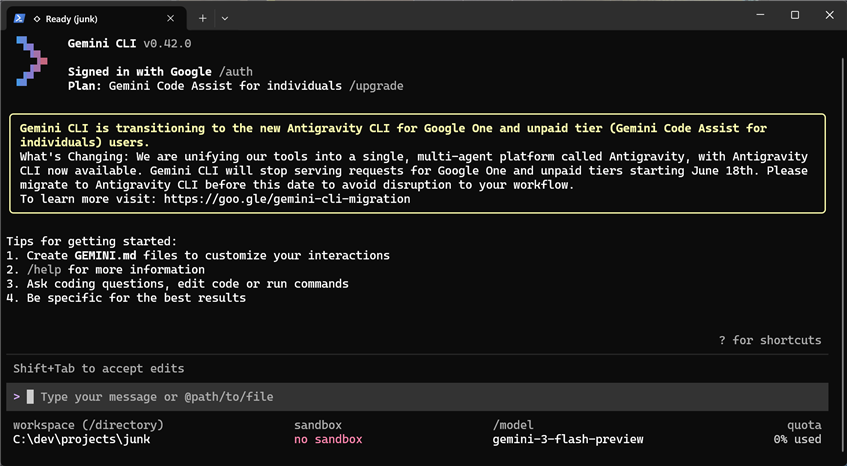
    Recently I found a magazine called Code, and got a subscription. It's not bad. The latest issue which I received a couple of days ago, has six main articles, of which three are AI-related. I tried one of the articles, which teaches how to use Gemini. I decided to try it for a MSPM0L1105 microcontroller project, which is to create an I2C-to-RS485 converter. Gemini is being used in a mode where it takes almost full control. It has access to a folder you choose, and it takes its instructions from a text prompt. Here are some screenshots.

    When started up, this is the text prompt:

    image

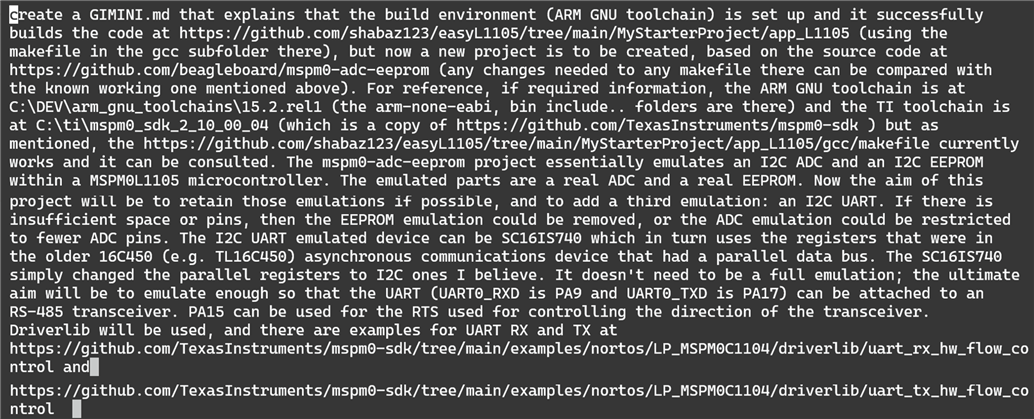
    According to the magazine article, it's suggested to create a GEMINI.md file containing all your preferences/desires/coding style etc. I decided to type in the text prompt for gemini to create that GEMINI.md file itself, to contain the detail regarding the project I wanted. This is what I typed:

    image

    It went and did it, and then prompted me to accept that change. 

    image

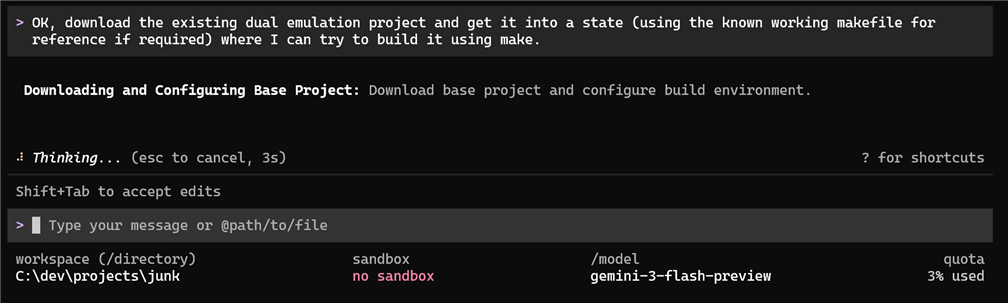
    Now I figured it would be good to get to a baseline, where I could compile at least something, before adding in the new functionality:

    image

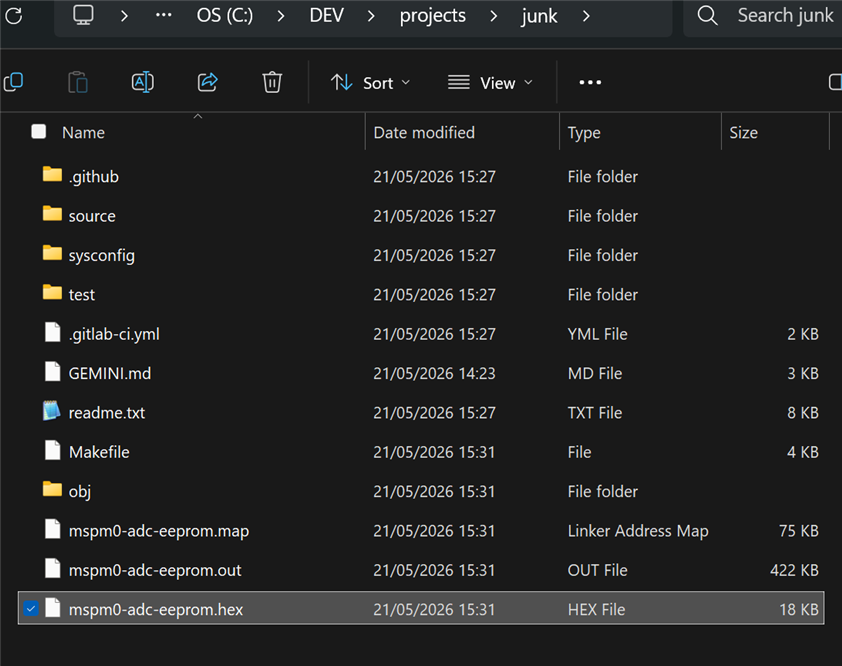
    Gemini went off and downloaded the appropriate code and made any necessary changes to the makefile, and it couldn't find my make.exe, so I then told it where that was in the text prompt, and then it built the code. Now the previously empty folder in which I had run Gemini originally, was full of this content:

    image

    Then I told it to make a change to the makefile to fix a 'make clean' issue (I pasted in the error I was seeing) and it fixed it, but it was quite trigger-happy, it went ahead and made the code changes to implement the new desired functionality.

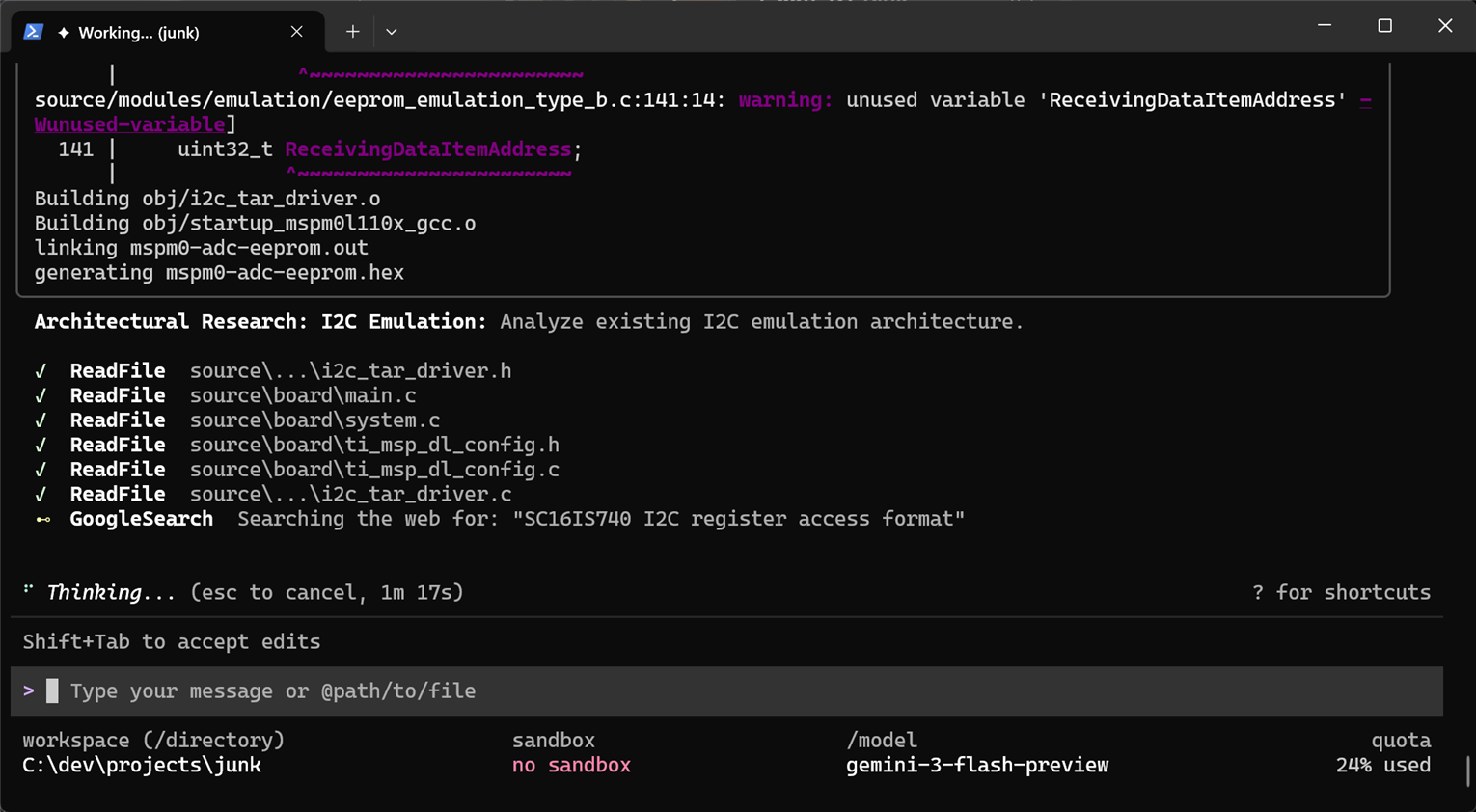
    This screenshot shows some of the things it did by itself:

    image

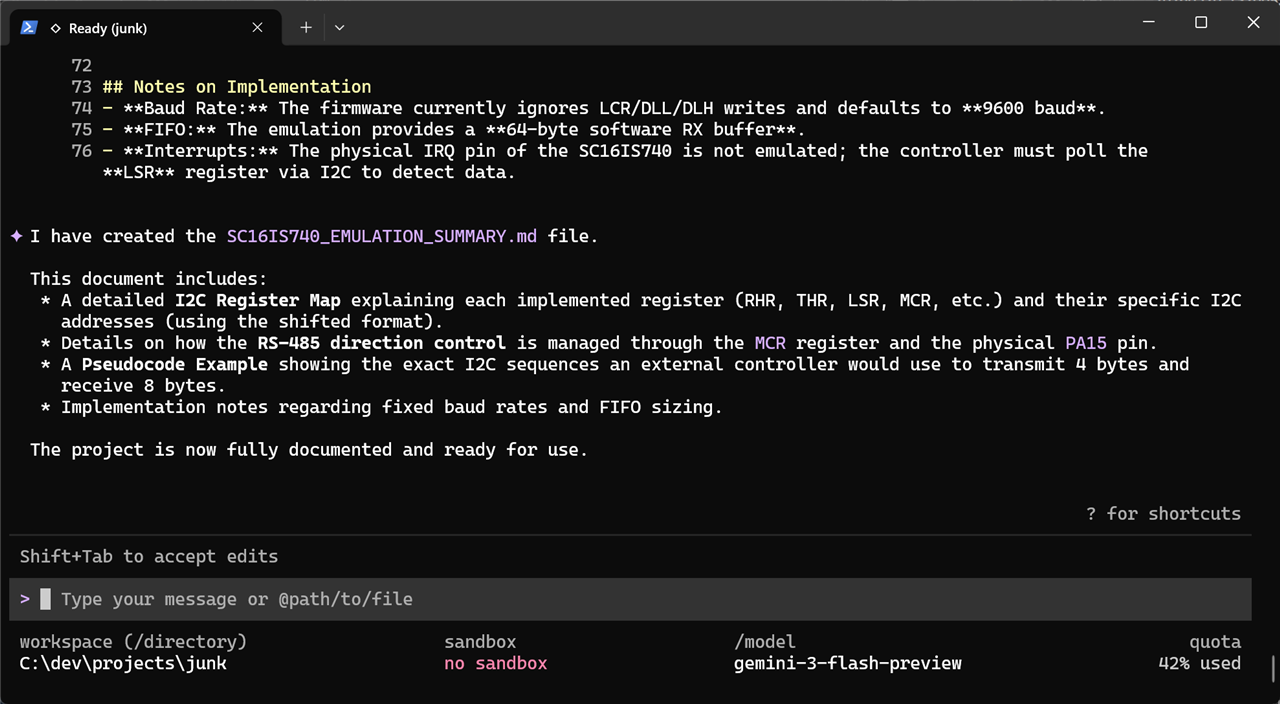
    It ended like this:

    image

    I've no idea what bugs are in the code, but the files content looks plausible. I've confirmed I can build the code using make myself, and it does build. I'm sure I will need to troubleshoot and so on, but it's a start, and the volume of code isn't so much that I will get lost. At the end of all this, I've used 39% of my allowance quota (it's visible at the bottom-right of the screenshots), I'm using free Gemini for this test.

    Finally, to try to understand things, and for a couple more percent of quota:

    image

    After it thought for a bit:

    image

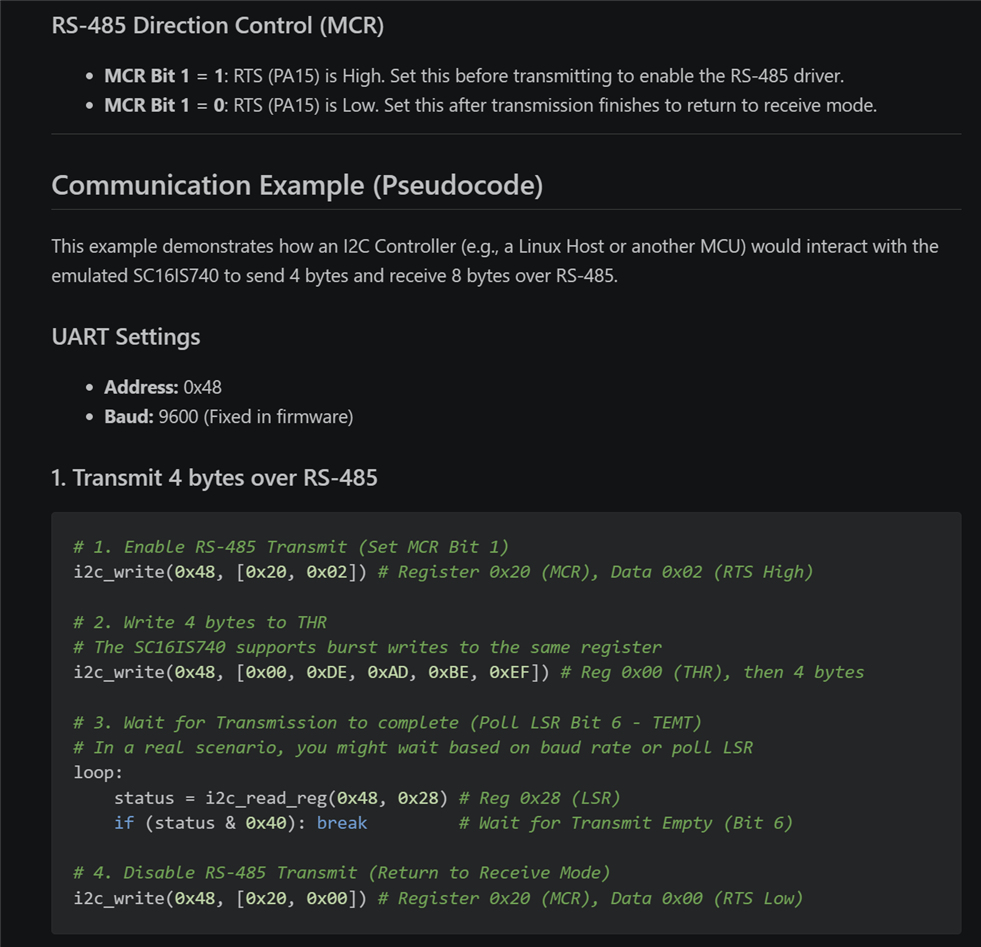
    The resulting documentation looks quite good, this is a snippet:

    image

    I then asked Gemini to rename the project to i2c_uart_expander, and to create a README and upload it all to GitHub. All the documentation and housekeeping stuff took about 14% more quota, so I'm currently at 55%, I think this will reset to zero tomorrow (not sure). Anyway, if anyone is interested in browsing it, the project is here: shabaz123/i2c_uart_expander

    I'll try to run it at some point, I'm sure it will need some troubleshooting as mentioned before, but I think it's a good start, allowing me to concentrate on the more interesting stuff, rather than spending time with Makefiles, datasheets, documentation, etc.

    All the above took a couple of hours (I was the bottleneck; I was going slowly, and doing other things in the background).

    I found Gemini a little scary in that it has a lot of control and might be trigger-happy, but it's concentrated into the folder/sub-folders from which it is run from, so it hopefully can't do a lot of damage. Plus, with the repo, at least now I have the backup if it later messes up things too much. I think I still prefer the slower per-file method I use with ChatGPT, but I can see there's potentially a huge speed advantage with the method described. 

    I agree with BigG that there is a big risk that it's going to get too expensive; what if one day, it costs say a sizeable proportion of a typical salary to use it : ( I don't think the issue is that it makes people become lazy, I think the issue is, it moves efficiency to a level unattainable without AI; and that will likely have a massive value, so AI firms will feel justified in pricing accordingly. 

    • Cancel
    • Vote Up +1 Vote Down
    • Sign in to reply
    • Cancel
  • BigG
    BigG 9 days ago in reply to shabaz

    Nice feedback shabaz I too mainly use Gemini for coding. It's what I've become used to, so I stick with it. However, I use the Gemini coding agent directly in VSCode. I prefer this to using the Gemini CLI because of the way Gemini presents the proposed changes inside the IDE. It is like a GitHub pull request. You can review each change section by section and accept or reject. You can even modify the proposed changes yourself, if you like.

    image

    Then on the left hand panel (not shown in the pic) is the explanation and rationale.

    The only drawback I find with this approach is that the Gemini AI predictive code suggestions within the VSCode IDE is absolutely dreadful. Most of the time it hasn't a clue. So you have to reject a fair bit. But otherwise I find this a sound approach as you are the code reviewer. If it works for GitHub it works here too.

    I agree with Shabaz in his closing remark. We'll soon be priced out. He explained it better than I did.

    • Cancel
    • Vote Up +1 Vote Down
    • Sign in to reply
    • Cancel
  • shabaz
    shabaz 9 days ago in reply to BigG

    Nice, thanks for the screenshot/explanation, I was wondering what the VSCode implementation would look like. 

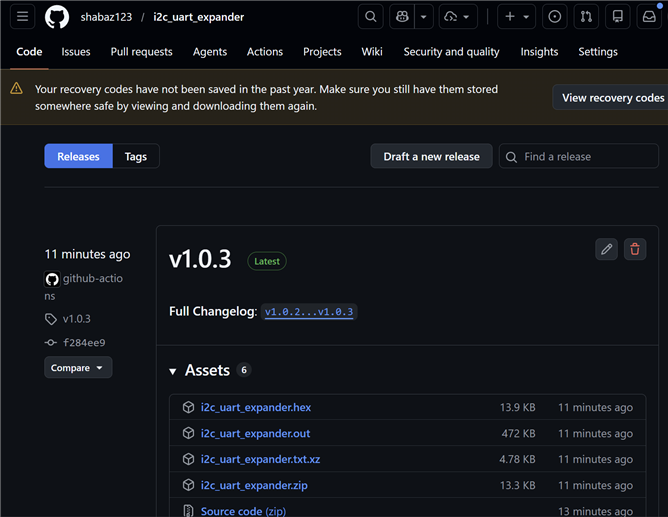
    I just learned GitHub Workflows works nicely when Gemini contributes to that too; I know Jan Cumps uses the Workflows feature, but I've only used it for one project, since it takes quite a while to create a decent workflow file. With Gemini, I just repeatedly pasted any errors into the text window, and it kept correcting things one by one.

    For anyone not familiar with GitHub workflows, it relies on a specific file that instructs GitHub how to (say) test the code, or to build it, and it can even package up or zip up the final binaries and place them in the Releases page so that users don't need to build the code themselves if they don't wish to.

    image 

    I'm now at up to 80% free Gemini quota usage, so realistically the (presumably daily) free quota is sufficient for perhaps half a day of work when working slowly, or a few hours of work when working intensively.

    • Cancel
    • Vote Up +1 Vote Down
    • Sign in to reply
    • Cancel
Reply
  • shabaz
    shabaz 9 days ago in reply to BigG

    Nice, thanks for the screenshot/explanation, I was wondering what the VSCode implementation would look like. 

    I just learned GitHub Workflows works nicely when Gemini contributes to that too; I know Jan Cumps uses the Workflows feature, but I've only used it for one project, since it takes quite a while to create a decent workflow file. With Gemini, I just repeatedly pasted any errors into the text window, and it kept correcting things one by one.

    For anyone not familiar with GitHub workflows, it relies on a specific file that instructs GitHub how to (say) test the code, or to build it, and it can even package up or zip up the final binaries and place them in the Releases page so that users don't need to build the code themselves if they don't wish to.

    image 

    I'm now at up to 80% free Gemini quota usage, so realistically the (presumably daily) free quota is sufficient for perhaps half a day of work when working slowly, or a few hours of work when working intensively.

    • Cancel
    • Vote Up +1 Vote Down
    • Sign in to reply
    • Cancel
Children
No Data
element14 Community

element14 is the first online community specifically for engineers. Connect with your peers and get expert answers to your questions.

  • Members
  • Learn
  • Technologies
  • Challenges & Projects
  • Products
  • Store
  • About Us
  • Feedback & Support
  • FAQs
  • Terms of Use
  • Privacy Policy
  • Legal and Copyright Notices
  • Sitemap
  • Cookies

An Avnet Company © 2026 Premier Farnell Limited. All Rights Reserved.

Premier Farnell Ltd, registered in England and Wales (no 00876412), registered office: Farnell House, Forge Lane, Leeds LS12 2NE.

ICP 备案号 10220084.

Follow element14

  • X
  • Facebook
  • linkedin
  • YouTube