


An e-reader with only part of its screen still working now runs Sudoku, a clock, a battery level and a warm pulsing light.
Don't throw it away: how a broken e-reader became a tiny Sudoku machine
My e-reader's screen was broken. Most of it stayed frozen on its last image, with lines running through it. By any normal measure it was e-waste. One afternoon later, the part that still works plays Sudoku.
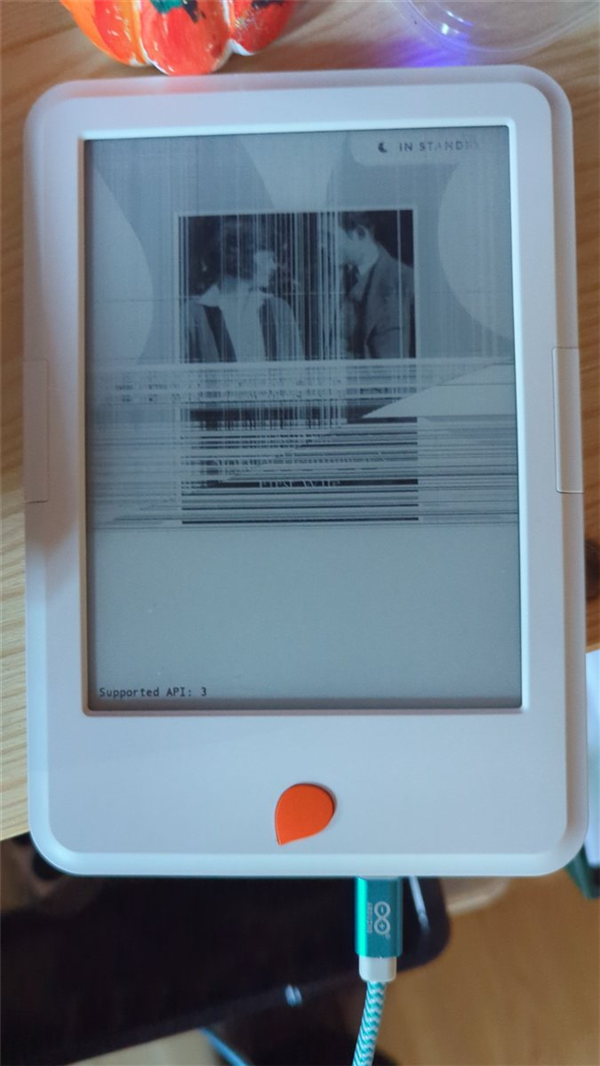
Before: most of the screen is frozen, and only the bottom part still redraws.
What it does now
- Sudoku with Easy, Medium and Hard puzzles, a score, hints and a saved game
- A clock and battery level on a second working patch of screen
- Light and warmth sliders, plus a slow warm pulse for winding down
After: Sudoku in the working strip and a clock in the working triangle.

All the game's settings fit in the same strip.
How it was done:
The reader is a second-generation Mofibo/Storytel Reader, an Android 6 device built to run one app. In normal use it doesn't appear on a PC at all. What made this possible is StorytelReaderMods by Niklas Therning. It documents a USB mode you reach by holding the orange button while plugging in, and a patched boot image that turns on ADB.
- Test first. Before installing anything, I checked whether the broken area could still redraw. It couldn't, which ended my tablet idea and gave me a smaller, better goal.
- Back up. I read 10 partitions from the reader, twice each, and compared the copies.
- Change as little as possible. I flashed only the boot partition, then read it back and compared it before restarting.
- Build for the hardware you have. A small Android app of about 33 KB draws only in the working strip.
- Map what's left. I suspected another patch of screen still worked. Painting the dead area black revealed a small triangle, and that's where the clock lives now. The battery level sits just above a broken row of pixels.

Fixed the battery % pill here:

The second working patch. This version of the battery pill crosses a broken row of pixels, so I moved it higher and made it smaller.
I worked with Claude Code Opus 5.5 on Ultracode as my engineering partner. It did the research, compared the firmware and wrote the app. I held the buttons, ran the flash and photographed the screen, because the reader's own screenshots came back black. My phone camera and my eyes became the debugging tool.
What didn't work 
The game still won't start by itself. The home-screen prompt has no "Always" option, root wasn't available, and my startup trigger never launched the app. After a restart I need a PC to reopen it. The frozen image also stays on the top of the screen, though a piece of dark card would hide it.
What I'd pass on:
- Broken doesn't mean finished. Ask what still works, then design around that.
- Run the cheapest test first. Mine cost nothing and changed the whole plan.
- Back-up before you change anything.
- Credit the people whose work you stand on, as we all love to inspire and get aknowledgement.
If you try this: flashing can leave a device dead, and others have reported stuck readers. The patch also adds root and unrestricted ADB, so anyone with USB access could control the reader. Read the project's guide first, and go ahead only with a device you can afford to lose, and as we know that there is nothing else that the device can be used for so might as well try it.
What's sitting in your drawer that only looks finished?
What I and Claude Code Opus 5.5 did:
The reader went from invisible on USB to running a custom app in about roughly 2 hours, but I lost track on time to be honest, and with nothing written to it until a verified backup existed.
|
Stage |
What happened |
Result |
|---|---|---|
|
Find the reader |
Windows showed no device in normal use. The reader's boot settings have USB set to |
Not visible |
|
Reach the USB mode |
Holding the orange button while plugging in showed USB ID |
Visible, but unstable |
|
Test the screen |
When you turned the reader on, only the bottom of the screen changed. |
General tablet ruled out |
|
Install the driver |
WinUSB through Zadig kept the reader connected for as long as we needed. |
Stable connection |
|
Check the partitions |
The reader's partition table matched the project's published one exactly. |
Safe to continue |
|
Back up |
10 partitions, about 1.8 GB, were each read twice and compared. It took about 6.5 minutes with no failures. |
Verified backup |
|
Compare the firmware |
The reader runs a March 2025 build and the patched image comes from February 2023. The startup files differed only where expected, but the kernel also differed. |
Risk accepted |
|
Flash |
Only the boot partition was written, then read back and compared before restarting. |
Worked first time |
|
Connect over ADB |
ADB appeared as |
Working |
|
Build the app |
A Sudoku app built without Gradle, using |
Displays and responds to touch |
|
Add light controls |
The app writes directly to the reader's white and warm light channels. Levels read back correctly over ADB. |
Sliders work; pulse levels confirmed |
|
Map the screen |
Drawing the dead area black with a numbered grid revealed a working triangle and a thin band above the board. |
Second usable area found |
|
Use the triangle |
Added a framed clock and a battery pill, which moved above a broken pixel row after your close-up photo. |
Finished look |
Where it went wrong!
• Auto-start failed. The home-screen prompt offers only "Just once" and appears in the dead area. pm disable-user had no effect, adb root gave no root, and su was denied. A boot receiver didn't launch the app either, and the logs don't explain why.
• Screenshots were useless. screencap returned an all-black image, so my photos were the only way to check the screen for Claude, costing extra on tokens.
• Some of my guesses were wrong. I first suspected the cable, then that USB was blocking screen updates. Neither looks right now.
• Research cost too much. One multi-agent research run used about 658,000 tokens and took about 27 minutes, after Claude said that it will take only a few minutes. My free screen test then decided more than that research Claude did, but that is just how it goes.
What is still missing? 
The biggest gap is auto-start: after a restart, the game needs a PC to reopen it. Everything else below is either unconfirmed or a known limit.
|
Item |
Status |
Detail |
|---|---|---|
|
Auto-start |
Not working |
An accessibility service might solve it, but it's untested, and turning it on needs a security setting you would change yourself. |
|
Difficulty levels |
Not confirmed |
Built, but not yet tried on the reader. They set how many squares are removed, so they only roughly reflect difficulty. |
|
Warm pulse |
Partly confirmed |
Light levels rise and fall over about 10 seconds. How it looks on the screen hasn't been checked. |
|
Side buttons |
Not confirmed |
The app expects them to move the selected square, but they haven't been tried. |
|
Standby and wake |
Not tested |
The clock's behaviour after standby is also unknown. |
|
Scoring |
Not confirmed |
+10 for a correct number, -5 for a wrong one, -10 for a hint, plus a finishing bonus of 50, 100 or 200. The score has only been seen at 0. |
|
Clock accuracy |
Unknown |
The reader's time was correct during the work, but it stays off Wi-Fi and may drift. |
|
System updates |
Risk remains |
The update service is still on the reader and could overwrite the patched boot on Wi-Fi, so keep it offline. |
|
Upper screen |
Permanent limit |
That area doesn't redraw, so software can't change it. Only a cover or a replacement panel could help, and I couldn't confirm a compatible panel. |
|
Backup coverage |
Partial |
|
Technical reference
These are the details people are most likely to ask about. Screen positions are specific to this reader's damage and were measured from photos, so treat them as approximate.
Device
|
Item |
Value |
|---|---|
|
Model |
Mofibo/Storytel Reader, second generation (reports itself as "Reader 2") |
|
Chip |
Rockchip RK3128, according to the project |
|
Memory |
1 GB RAM and 8 GB storage, according to the project |
|
System |
Android 6.0.1, build dated 5 March 2025 |
|
Display |
758 × 1024 e-ink |
|
Touch |
|
|
Front light |
White and warm channels, each 0-255, in |
|
USB IDs |
|
Working screen areas
|
Area |
Position in pixels |
Used for |
|---|---|---|
|
Bottom strip |
y from 720 to 1024 |
Board, number pad and menu |
|
Thin band |
y from about 709 to 720 |
Black divider above the board |
|
Triangle |
x from about 488 to 758, y from about 415 to 514 |
Clock and battery level |
|
Broken row |
y of about 459, across the triangle |
Avoided by the battery pill |
Tools
|
Tool |
Purpose |
Source |
|---|---|---|
|
|
Reading and writing partitions |
StorytelReaderMods, unsigned, no published checksum |
|
|
Patched boot image that turns on ADB |
StorytelReaderMods release, no published checksum |
|
Zadig 2.9 |
WinUSB driver for the orange-button mode |
Official site, valid signature |
|
Android SDK |
ADB, |
Already installed |
|
Temurin JDK 17.0.21 |
Compiling the app |
Adoptium, checksum matched |
|
Claude Code with Claude Opus 5.5 |
Research, checks, scripts, firmware comparison, the app and this write-up |
Anthropic, in the Claude desktop app; model ID claude-opus-5.5 |
|
Claude research agents |
One multi-agent research and fact-check run, about 658,000 tokens |
Same model as the main session |
Run rkflashtool from Command Prompt, because PowerShell can silently corrupt binary output!

