element14 Community
element14 Community
    Register Log In
  • Site
  • Search
  • Log In Register
  • Community Hub
    Community Hub
    • What's New on element14
    • Feedback and Support
    • Benefits of Membership
    • Personal Blogs
    • Members Area
    • Achievement Levels
  • Learn
    Learn
    • Ask an Expert
    • eBooks
    • element14 presents
    • Learning Center
    • Tech Spotlight
    • STEM Academy
    • Webinars, Training and Events
    • Learning Groups
  • Technologies
    Technologies
    • 3D Printing
    • FPGA
    • Industrial Automation
    • Internet of Things
    • Power & Energy
    • Sensors
    • Technology Groups
  • Challenges & Projects
    Challenges & Projects
    • Design Challenges
    • element14 presents Projects
    • Project14
    • Arduino Projects
    • Raspberry Pi Projects
    • Project Groups
  • Products
    Products
    • Arduino
    • Avnet & Tria Boards Community
    • Dev Tools
    • Manufacturers
    • Multicomp Pro
    • Product Groups
    • Raspberry Pi
    • RoadTests & Reviews
  • About Us
  • Store
    Store
    • Visit Your Store
    • Choose another store...
      • Europe
      •  Austria (German)
      •  Belgium (Dutch, French)
      •  Bulgaria (Bulgarian)
      •  Czech Republic (Czech)
      •  Denmark (Danish)
      •  Estonia (Estonian)
      •  Finland (Finnish)
      •  France (French)
      •  Germany (German)
      •  Hungary (Hungarian)
      •  Ireland
      •  Israel
      •  Italy (Italian)
      •  Latvia (Latvian)
      •  
      •  Lithuania (Lithuanian)
      •  Netherlands (Dutch)
      •  Norway (Norwegian)
      •  Poland (Polish)
      •  Portugal (Portuguese)
      •  Romania (Romanian)
      •  Russia (Russian)
      •  Slovakia (Slovak)
      •  Slovenia (Slovenian)
      •  Spain (Spanish)
      •  Sweden (Swedish)
      •  Switzerland(German, French)
      •  Turkey (Turkish)
      •  United Kingdom
      • Asia Pacific
      •  Australia
      •  China
      •  Hong Kong
      •  India
      • Japan
      •  Korea (Korean)
      •  Malaysia
      •  New Zealand
      •  Philippines
      •  Singapore
      •  Taiwan
      •  Thailand (Thai)
      • Vietnam
      • Americas
      •  Brazil (Portuguese)
      •  Canada
      •  Mexico (Spanish)
      •  United States
      Can't find the country/region you're looking for? Visit our export site or find a local distributor.
  • Translate
  • Profile
  • Settings
Community Hub
Community Hub
Member's Forum Reference Gerber Viewer
  • Blog
  • Forum
  • Documents
  • Quiz
  • Events
  • Leaderboard
  • Polls
  • Files
  • Members
  • Mentions
  • Sub-Groups
  • Tags
  • More
  • Cancel
  • New
Join Community Hub to participate - click to join for free!
Actions
  • Share
  • More
  • Cancel
Forum Thread Details
  • Replies 6 replies
  • Subscribers 566 subscribers
  • Views 828 views
  • Users 0 members are here
Related

Reference Gerber Viewer

pvermeulen
pvermeulen over 6 years ago

Hi all


Let me first introduce myself: I'm the lead developer of the 'Reference Gerber Viewer'. This cloud-based viewer is created by Ucamco, custodian of the Gerber format, and given to the Gerber community as a free tool to view and check all your (X2) Gerber files. (see https://gerber.ucamco.com)


As always, your input is of great value to us: What do you think about the viewer? What can we do better? Any missing features?

We welcome all your questions and remarks.


thanks for your help,

Peter Vermeulen

  • Sign in to reply
  • Cancel

Top Replies

  • pvermeulen
    pvermeulen over 5 years ago in reply to pvermeulen +3
    Hi all, we keep improving our Reference Gerber Viewer. New in the latest version (which you still find at https://gerber.ucamco.com ): - increased accuracy while measuring - measure object will show you…
  • pvermeulen
    pvermeulen over 6 years ago in reply to pvermeulen +2
    Just a quick note... Our viewer now also shows the exact locations of any object of your PCB design. Just hover over the object. regards, Peter Vermeulen Ucamco
  • shabaz
    shabaz over 5 years ago in reply to pvermeulen +2
    Hi Peter, It's becoming great for quickly checking out gerber files: ) My favorite feature is the XY co-ords displayed of objects automatically when the mouse pointer is hovered over the object. The measurement…
  • shabaz
    shabaz over 6 years ago

    Hi Peter,


    I only briefly tried it, but I liked it, it could be useful. I had these couple of initial suggestions:

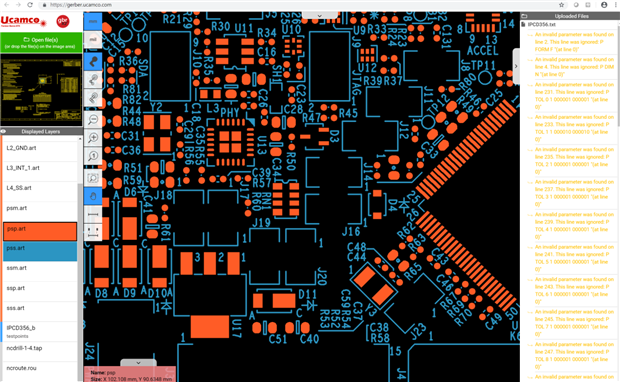
    1. Text on the right side is yellow on white, which is hard to read. Different color preferred.

    2. When selecting an object, I only see partial information about the D-code. I could not see the xy co-ordinates (there is co-ordinates of the mouse pointer at the bottom of the screen, but I couldn't see the co-ordinates of objects, unless I'm missing something).

    3. For 'measure between objects' feature to be more useful, it should also allow selection between left, right or center of object too. Currently it measures shortest distance from nearest edge or point. Also, as well as showing the length, it should show the X and Y distance. I'd find that handy for measuring between (say) board holes. Currently I have to manipulate with a calculator, if the holes are irregularly placed on a board. Perhaps a popup could appear with radio buttons to select the left, right, center or shortest distance, for each of the objects. As mentioned the output could display the distance as currently implemented, and the X and Y distances.


    Here is my screenshot of a FRDM board using the system:

    image

    As mentioned, I've only tried it for a short while. I use other Gerber viewers, but may use this sometimes too.

    • Cancel
    • Vote Up +1 Vote Down
    • Sign in to reply
    • Cancel
  • pvermeulen
    pvermeulen over 6 years ago in reply to shabaz

    Hi,


    thanks for your feedback.

    We strive to make our free online viewer the reference viewer for all Gerber files, so any feedback is greatly appreciated!


    We already made the text of the warnings more readable in the latest version.

    It is now also possible to upload a .zip file, containing a complete Gerber job.


    kind regards,


    Peter Vermeulen

    Ucamco

    • Cancel
    • Vote Up +1 Vote Down
    • Sign in to reply
    • Cancel
  • pvermeulen
    pvermeulen over 6 years ago in reply to pvermeulen

    Just a quick note...


    Our viewer now also shows the exact locations of any object of your PCB design.

    Just hover over the object.


    regards,


    Peter Vermeulen

    Ucamco

    • Cancel
    • Vote Up +2 Vote Down
    • Sign in to reply
    • Cancel
  • pvermeulen
    pvermeulen over 6 years ago in reply to pvermeulen

    Hi all,


    The viewer now also supports the Gerber X3 extensions (components).


    regards,


    Peter Vermeulen

    Ucamco

    • Cancel
    • Vote Up +1 Vote Down
    • Sign in to reply
    • Cancel
  • pvermeulen
    pvermeulen over 5 years ago in reply to pvermeulen

    Hi all,


    we keep improving our Reference Gerber Viewer.


    New in the latest version (which you still find at https://gerber.ucamco.com):


    - increased accuracy while measuring

    - measure object will show you the x and y distance as well


    We hope you enjoy it!


    kind regards,


    Peter Vermeulen

    Ucamco

    • Cancel
    • Vote Up +3 Vote Down
    • Sign in to reply
    • Cancel
  • shabaz
    shabaz over 5 years ago in reply to pvermeulen

    Hi Peter,


    It's becoming great for quickly checking out gerber files: )

    My favorite feature is the XY co-ords displayed of objects automatically when the mouse pointer is hovered over the object.

    The measurement X and Y distances is fantastic - if they could be in a slightly different color to the diagonal (or perhaps have the diagonal in Italic to make it clear) that would be nice, but it's a minor thing.

    One other feature (which you will probably hate me for asking, more difficult : ( would be to allow board rotation by 90 or 180, and also board flip. Maybe it could be a temporary visualization without all the measurement features, e.g. user has to go back to the normal orientation to get all the features. Sometimes it's just hard to mentally visualize things without the board flip or rotate. Anyway, even without this, it's a very good board viewer.

    • Cancel
    • Vote Up +2 Vote Down
    • Sign in to reply
    • Cancel
element14 Community

element14 is the first online community specifically for engineers. Connect with your peers and get expert answers to your questions.

  • Members
  • Learn
  • Technologies
  • Challenges & Projects
  • Products
  • Store
  • About Us
  • Feedback & Support
  • FAQs
  • Terms of Use
  • Privacy Policy
  • Legal and Copyright Notices
  • Sitemap
  • Cookies

An Avnet Company © 2025 Premier Farnell Limited. All Rights Reserved.

Premier Farnell Ltd, registered in England and Wales (no 00876412), registered office: Farnell House, Forge Lane, Leeds LS12 2NE.

ICP 备案号 10220084.

Follow element14

  • X
  • Facebook
  • linkedin
  • YouTube