
element14 Community
element14 Community
    Register Log In
  • Site
  • Search
  • Log In Register
  • Community Hub
    Community Hub
    • What's New on element14
    • Feedback and Support
    • Benefits of Membership
    • Personal Blogs
    • Members Area
    • Achievement Levels
  • Learn
    Learn
    • Ask an Expert
    • eBooks
    • element14 presents
    • Learning Center
    • Tech Spotlight
    • STEM Academy
    • Webinars, Training and Events
    • Learning Groups
  • Technologies
    Technologies
    • 3D Printing
    • FPGA
    • Industrial Automation
    • Internet of Things
    • Power & Energy
    • Sensors
    • Technology Groups
  • Challenges & Projects
    Challenges & Projects
    • Design Challenges
    • element14 presents Projects
    • Project14
    • Arduino Projects
    • Raspberry Pi Projects
    • Project Groups
  • Products
    Products
    • Arduino
    • Avnet & Tria Boards Community
    • Dev Tools
    • Manufacturers
    • Multicomp Pro
    • Product Groups
    • Raspberry Pi
    • RoadTests & Reviews
  • About Us
  • Store
    Store
    • Visit Your Store
    • Choose another store...
      • Europe
      •  Austria (German)
      •  Belgium (Dutch, French)
      •  Bulgaria (Bulgarian)
      •  Czech Republic (Czech)
      •  Denmark (Danish)
      •  Estonia (Estonian)
      •  Finland (Finnish)
      •  France (French)
      •  Germany (German)
      •  Hungary (Hungarian)
      •  Ireland
      •  Israel
      •  Italy (Italian)
      •  Latvia (Latvian)
      •  
      •  Lithuania (Lithuanian)
      •  Netherlands (Dutch)
      •  Norway (Norwegian)
      •  Poland (Polish)
      •  Portugal (Portuguese)
      •  Romania (Romanian)
      •  Russia (Russian)
      •  Slovakia (Slovak)
      •  Slovenia (Slovenian)
      •  Spain (Spanish)
      •  Sweden (Swedish)
      •  Switzerland(German, French)
      •  Turkey (Turkish)
      •  United Kingdom
      • Asia Pacific
      •  Australia
      •  China
      •  Hong Kong
      •  India
      • Japan
      •  Korea (Korean)
      •  Malaysia
      •  New Zealand
      •  Philippines
      •  Singapore
      •  Taiwan
      •  Thailand (Thai)
      • Vietnam
      • Americas
      •  Brazil (Portuguese)
      •  Canada
      •  Mexico (Spanish)
      •  United States
      Can't find the country/region you're looking for? Visit our export site or find a local distributor.
  • Translate
  • Profile
  • Settings
Personal Blogs
  • Community Hub
  • More
Personal Blogs
Legacy Personal Blogs 31 days of Raspberry PI 400 | #11 | Day 16
  • Blog
  • Documents
  • Mentions
  • Sub-Groups
  • Tags
  • More
  • Cancel
  • New
  • Share
  • More
  • Cancel
Group Actions
  • Group RSS
  • More
  • Cancel
Engagement
  • Author Author: feiticeir0
  • Date Created: 17 Apr 2021 9:47 AM Date Created
  • Views 1308 views
  • Likes 3 likes
  • Comments 5 comments
  • lxde desktop shortcuts
  • lxde raspberry pi os add menu items
  • lxde raspberry pi desktop
  • lxde add menu items
  • lxde raspberry pi desktop shortcuts
  • install from source network-manager-l2tp raspberry pi
  • review raspberry pi 400
  • raspberrypi 400
  • compile network-manager-l2tp raspberry pi
  • 31daysofraspberrypi400
Related
Recommended

31 days of Raspberry PI 400 | #11 | Day 16

feiticeir0
feiticeir0
17 Apr 2021

image

Hi all !

Welcome to another update.

This is part of a challenge - 31 days of Raspberry PI 400 . This challenge consists of me using the Raspberry PI 400 and nothing else, for 31 days !


Today we're going to create shortcuts in the desktop or in the menus and give the first steps into fixing the VPN


By default, with the LXDE GUI there's no way of creating shortcuts to applications or custom applications (like AppImages).


To create a desktop shortcut, just create a .deskop file in your Desktop folder


cd Desktop
vi Cura.desktop


Here are it's contents (the basics):

[Desktop Entry]
Encoding=UTF-8
Type=Application
Icon=/home/pi/.icons/Papirus-Yellow/48x48/apps/cura-icon.svg
Name=Cura
Exec=/opt/Cura/Cura-mb-master-armhf-20210306.AppImage
Comment=Cura Slicer


I have icons installed so I have a cura icon. There are more icons in /usr/share/pixmaps.

image

I have an annoyance that, every time I click on the desktop shortcut, a warning is displayed:

image

don't know how to solve it, yet. But will find out and write about it.


But, and if I want to have a icon in the menus ?

Well, all the applications on the menus have .desktop files in /usr/share/applications

Let's add a new item to the Cura.desktop file and copy it to the folder /usr/share/applications


Let's add the Category option. I'm going to put it in the same category as Slic3r .

Edit your Cura.desktop file and add the following at the end - after Comment (note: It could be placed anywhere in the file)


Categories=Development;Engineering


Now, copy the file to /usr/share/applications


sudo cp Cura.desktop /usr/share/applications


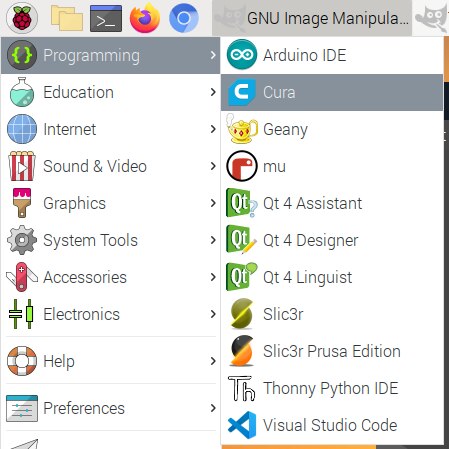
If you go to the menu, you should have a new Cura icon in Programming.
image


Categories

What are those categories ?


Well, freedesktop defines a set of specifications that free software should answer to if the Linux world want's to compete with other Operating Systems.


In my opinion, one of the big problems (but also strengths) with Linux (Operating System) always was/is its fragmentation - Lots and lots of Linux vendors and a multitude of operating systems based on Linux.

According to Tecmint, in 2020 there were more than 600 distros, with 500 in active development. Distrowatch is a site that maintains a watch in the best, most used Linux distros.

Don't get me wrong, this is what makes Linux the best operating system of the world, but it leads to fragmentation.

Each distribution puts the configurations files where it pleases (this is no longer the case - or at least not so much like it was years ago).

There are a set of specifications - Linux LSB for example (I had a LPI certification) and Freedesktop that specifies where each file go and other stuff. This is neat reading and very informative. Go read and learn a bit more about all this stuff.

Freedesktop sets a number of categories for the applications to sit in - thus creating the menus in the desktop. Here is the specification.

LXDE, the Desktop used in Raspberry PI OS, also has a set of categories that abide to those set by freedesktop. Their wiki also explains how to create icons in said categories .


Based on this and in the same files already present, choose the best category to put the ICON.

I've done the same for FreeCAD.


VPN


Let's try solving this issue once and for all.

According to my work folks who manage the VPN, I'm the problem, cause I don't have Network-Manager-L2TP compiled with libreswan-dh2 support. This will enable Libreswan to still support the old modp1024 ! cipher..

Let's try and compile Network-manager-l2tp with the needed support.


First, remove the NetworkManager-l2tp already installed using apt

NOTE: I did sudo bash, so, i'm not using sudo before each command


apt-get remove networkmanager-l2tp networkmanager-l2tp*


Next, install the necessary packages (the need to appstream took me 1h to solve):


apt-get install libdbus-glib-1-dev libxml2-utils libnss3-dev libssl-dev libglib2.0-dev libsecret-1-dev libdbus-glib-1-dev appstream libcurl4-openssl-dev libssl-dev intltool network-manager-dev libnm-dev libnma-dev ppp-dev libdbus-glib-1-dev libsecret-1-dev libgtk-3-dev libglib2.0-dev libnss3-dev


Clone NetworkManager-l2tp github repository


git clone https://github.com/nm-l2tp/NetworkManager-l2tp.git


Enter the directory

cd network-manager-l2tp/

and follow the instructions on the github page

First, issue autogen.sh

./autogen.sh


When it finishes, configure it


./configure --prefix=/usr --sysconfdir=/etc --localstatedir=/var --enable-libreswan-dh2 --disable-static --libexecdir=/usr/lib/NetworkManager --runstatedir=/run --with-nm-ipsec-nss-dir=/usr/include/nss


make it (I'm using two threads)

make -j2


And if everything goes well, you can install it


sudo make install


The configure options I've read about them in the github page (Debian and Ubuntu instructions) and on the Raspberry PI forums.

It did install, but, when creating a new VPN connection, I don't see L2TP option. Obviously I did something wrong and I'm guessing some location is wrong.
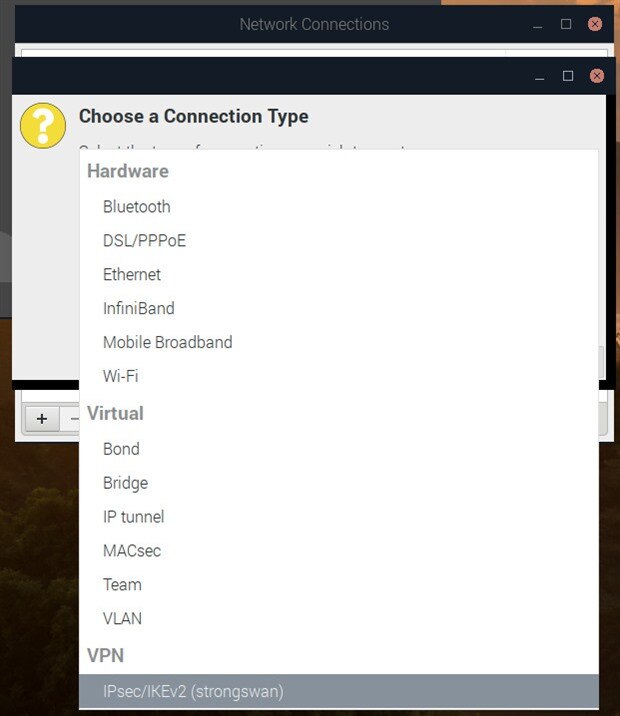
image


I did try another go with configure, but still the same outcome... What am I doing wrong ?


Will try another time . This was all for this day.

  • Sign in to reply

Top Comments

  • luigi2600
    luigi2600 over 4 years ago +1
    --with-nm-ipsec-nss-dir=/usr/include/nss doesn't look right. It is supposed to be the location of libreswan's NSS directory where the machine certificates are stored. The default location of /var/lib/ipsec…
  • luigi2600
    luigi2600 over 4 years ago in reply to feiticeir0 +1
    For --libdir= configure switch, best to use whatever the other NetworkManager VPN plugins are using, like network-manager-pptp, e.g.: $ dpkg -L network-manager-pptp | grep libnm-vpn-plugin /usr/lib/x86_64…
  • feiticeir0
    feiticeir0 over 4 years ago in reply to luigi2600

    So on x86-64 it would be --libdir=/usr/lib/x86_64-linux-gnu . Sorry if I mislead you, I don't have a PI 400 in front of me, so not really sure which dir it uses.


    I'm not using a 64bit version. Although I know there's a 64bit version for RPI400, I'm not using it. That directory is non existent . The one you gave me works .


    Thank you

    • Cancel
    • Vote Up 0 Vote Down
    • Sign in to reply
    • More
    • Cancel
  • feiticeir0
    feiticeir0 over 4 years ago

    Hi !

    Following your advice, I've removed everything strongswan and installed freeswan.


    Using your configuration parameters, I've recompiled network-manager-l2tp and after a reboot, the L2TP plugin appeared on the VPN options.


    unfortunately, it didn't connect. No more complains about modp1024, I guess thats that.

    It did complain about GatewayID not being resolvable, but I was expecting something like that..


    will need to dig a bit further.  Still, thank you so much for your help

    • Cancel
    • Vote Up 0 Vote Down
    • Sign in to reply
    • More
    • Cancel
  • luigi2600
    luigi2600 over 4 years ago in reply to feiticeir0

    For --libdir= configure switch, best to use whatever the other NetworkManager VPN plugins are using, like network-manager-pptp, e.g.:


    $ dpkg -L network-manager-pptp | grep libnm-vpn-plugin
    /usr/lib/x86_64-linux-gnu/NetworkManager/libnm-vpn-plugin-pptp.so


    So on x86-64 it would be --libdir=/usr/lib/x86_64-linux-gnu . Sorry if I mislead you, I don't have a PI 400 in front of me, so not really sure which dir it uses.


    Sometimes you have to restart NetworkManager for it to pickup new NetworkManager VPN plugins


    If you are using libreswan < 3.30 which has modp1024 support as it is built with USE_DH2=true flag by default, then --enable-libreswan-dh2 NetworkManager-l2tp configure script should be all that is required for libreswan modp1024 support.


    If you are using libreswan >= 3.30 then it needs to be built with USE_DH2=true in order to enable DH2/modp1024 support.  If network-manager-l2tp is built with the --enable-libreswan-dh2 configure switch, then all it does is add modp1024 to its default set of Phase 1 algorithms. libreswan will spit the dummy with a modp1024 syntax error if you try to use modp1024 with a libreswan not built with USE_DH2=true. You could add USE_DH2=true to DEBIAN_LIBRESWAN_BUILD_FLAGS if you build a custom libreswan .deb package from the Debian source package:

    • https://salsa.debian.org/debian/libreswan/-/blob/debian/main/debian/rules#L32


    in some cases it might be easier to use strongswan which still has modp1024 support by default, instead of building a newer version of libreswan with USE_DH2=true.

    • Cancel
    • Vote Up +1 Vote Down
    • Sign in to reply
    • More
    • Cancel
  • feiticeir0
    feiticeir0 over 4 years ago in reply to luigi2600

    Hi luigi2600 (Douglas) ! Thank you for the reply.


    I knew that the directory arm-linux-gnueabihf was important because I could see some plugins there. When installed the Network-Manager-L2TP it did place some files there. When compiling, nothing was placed there. I created some symlinks, but still didn't work.


    I will recompile the package and see if it helps.


    Thank you Douglas !

    • Cancel
    • Vote Up 0 Vote Down
    • Sign in to reply
    • More
    • Cancel
  • luigi2600
    luigi2600 over 4 years ago

    --with-nm-ipsec-nss-dir=/usr/include/nss  doesn't look right. It is supposed to be the location of libreswan's NSS directory where the machine certificates are stored. The default location of /var/lib/ipsec/nss should be fine. The following command confirms /var/lib/ipsec/nss is part of the libreswan package.


    $ dpkg -S /var/lib/ipsec/nss
    libreswan: /var/lib/ipsec/nss


    I think you also need to use --libdir=/usr/lib/arm-linux-gnueabihf

    • Cancel
    • Vote Up +1 Vote Down
    • Sign in to reply
    • More
    • Cancel
element14 Community

element14 is the first online community specifically for engineers. Connect with your peers and get expert answers to your questions.

  • Members
  • Learn
  • Technologies
  • Challenges & Projects
  • Products
  • Store
  • About Us
  • Feedback & Support
  • FAQs
  • Terms of Use
  • Privacy Policy
  • Legal and Copyright Notices
  • Sitemap
  • Cookies

An Avnet Company © 2025 Premier Farnell Limited. All Rights Reserved.

Premier Farnell Ltd, registered in England and Wales (no 00876412), registered office: Farnell House, Forge Lane, Leeds LS12 2NE.

ICP 备案号 10220084.

Follow element14

  • X
  • Facebook
  • linkedin
  • YouTube