



Hi all ! Welcome to another day.
I've been away this weekend and I didn't take the computer and that's why a few days have passed since the last post.
Today, well, not today, but yesterday and the last week, I've connected a Raspberry PI Pico on the Raspberry PI 400 and it didn't get recognized by Buster. I got errors and errors and no external drive would appear on the file manager.
I've had to disconnect the bluetooth dongle for it to be recognized. Power issues on the USB ports ?
EDIT: Today I've connected the PICO and everything went well. The drive appeared on the file manager and the bluetooth dongle was connected. Don't know what happened the other time. Better like this. I can keep listen to music while programming a bit. But I've connected it other times and I had to disconnect the bluetooth dongle to get it recognized. This is an intermittent issue...
Visual Studio Code and Mu Editor
I know that Visual Studio Code can program the PICO (I have CircuitPython installed there) with an extension. I installed it, but I get errors about invalid commands.
I couldn't solve the problem, even after closing VS Code and start it again, so I'm switching to Mu Editor.
Arduino
Earlier I've installed the Arduino IDE using APT, but just today I realized is version 1.0.5.. Too old for programming.
So, to update it, I just went to Arduino site and downloaded the arm32 version and uncompressed it to /opt
sudo mv Downloads/arduino-1.8.13-linuxarm.tar.xz /opt
cd /opt
sudo tar -xvf arduino-1.8.13-linuxarm.tar.xz
sudo rm -f arduino-1.8.13-linuxarm.tar.xz
sudo chown pi:pi -R arduino-1.8.13
execute it (as pi)
./arduino-1.8.13/arduino

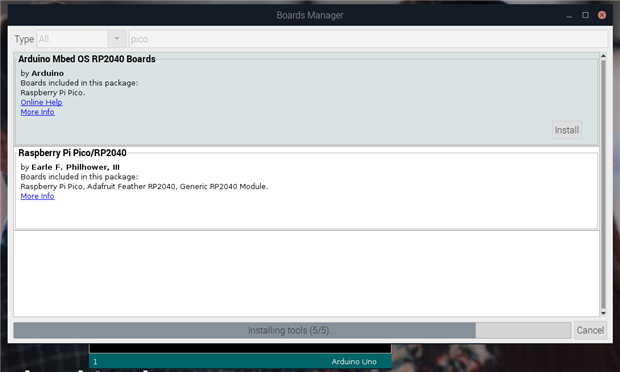
I've installed the Raspberry PI PICO support. Just search for PICO on the boards manager and you'll see it.
I'm doing a thing for my Pimoroni's PICADE - simulate the lights power on on the old arcades cabinets, the fluorescent lights tubes.
I wanted to try the blink sketch first and had a bit of problems loading the sketch. I know that I need to press BOOTSEL button, but still didn't work.
After a bit of googling, I finally found the solution. A udev rule (for Linux) is needed to be added so a normal user can upload sketches to PICO.
Search for post_install.sh or mbed . I found the script in:
/home/pi/.arduino15/packages/arduino/hardware/mbed_rp2040/2.0.0
Just execute the script post_install.sh as sudo
sudo ./post_install.sh
and a new udev rule will be added
Here's the content of the file
#!/usr/bin/env bash


rp2040rules () {
    echo ""
    echo "# Raspberry Pi RP2040 bootloader mode UDEV rules"
    echo ""
cat <<EOF
SUBSYSTEMS=="usb", ATTRS{idVendor}=="2e8a", MODE:="0666"
EOF
}


if [ "$EUID" -ne 0 ]
  then echo "Please run as root"
  exit
fi


rp2040rules > /etc/udev/rules.d/60-rp2040.rules


# reload udev rules
echo "Reload rules..."
udevadm trigger
udevadm control --reload-rules
Basically, it just adds a new rule to udev and reloads udev.
Just unplug and plug again the PICO and it works.
Office 365
I never though on having to work with my work account of Office 365, but today I had to edit an excel file directly in the email. It did work very well. I wasn't expecting problems and I was using Google Chrome.
I suspect because Firefox version is old, it wouldn't work well.
Some thoughts until now
It's fun working with the Raspberry PI 400. The keyboard feels nice, it's smooth writing with it, but sometimes I get some keys that don't register at first stroke. Mainly the i key. Don't know if it's an hardware issue, but it fails sometimes.
The mouse is fun too.
I can't have both browsers open at same time for too long. It kinda starts to get slow. Even if just a couple of TABS on both, it really starts to get on my nerves. Working with just one it's better - but not as fluid as in a normal computer. I know that Firefox and Chrome are memory hungry, but it's that or no Netflix and no support for recent websites.
Despite being a Firefox user, with Raspberry PI OS I can't really use it often because the version is old and it shows in some websites. Firefox is slower than Chrome.
Multitasking is something that can be done. Many times I have multiple applications opened - GIMP, Chrome, Arduino, terminal - and I can switch between them without any fuss or some slowdown.
I have a strange issue - it happens sometimes - the system gets really really slow... Opening a website takes seconds - more than 10 or 15 . Switching applications is not without hiccups . I'm forced to reboot to get things working normally again. I can't precise now if it's when I comeback after a few hours - the system stays on during that time - even with Power Savings in XScreensaver active. Will try to understand that and post about it.
Thank you