


Hi all !
Welcome to the first day of a new month. Yeah, I know today is April's fools, but this is not a lie. 
Beginning
Here's my setup and where I usually are.


I'm just missing the network cable, but it's there.
Raspberry PI OS Desktop
The Raspberry PI OS Desktop boots and it's beautiful in in it's simplicity. It does not come with a lot of software, but that is easily solvable . One of the perks of using Linux - your distro's "app store".

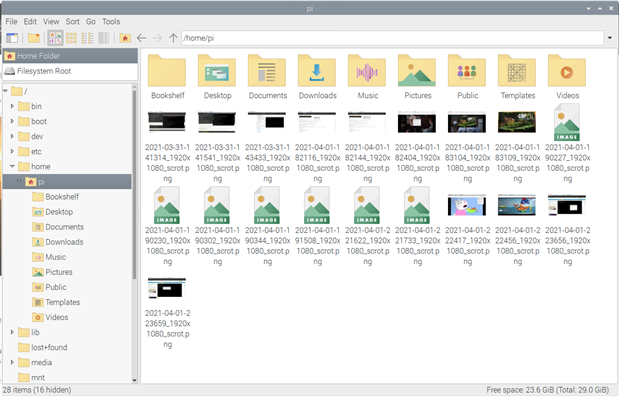
I really love the File Manager ICONS
Hardware
Let's start my trying to have some audio out
Bluetooth
On the the great things of the Raspberry PI is the integrated bluetooth. I have a bluetooth headset that I use daily, let's see if I can make it work out of the box.
For the last 2 hours it has been a pain to try to make this work. 
The bluetooth sees the device, but I just can't connect to it. It appears and disappears . I know it's not a problem with the headset, because I've been using it with the Mac Book and my phone .
When I'm trying to pair it with the Raspberry PI, it's disconnected from all the other devices - just in case.
If I try to pair to it with the bluetooth applet, it just sits there, waiting for some confirmation. I can't pass that screen. I can't confirm anything on the headset.
I've resorted to the command line (I feel more comfortable there  ) and I can pair it, trust it, but not connect to it.. It just keeps disappearing..
After reading and searching, there can be some problem with some modules and bluetooth and pulseaudio - maybe I'm missing some software ?
I did had this error:
sudo pactl load-module module-bluetooth-discover
Failure: Module initialization failed
After reading this post (Raspberry PI Stack Exchange to the rescue), the module-bluetooth-discover may be to blame.
I did install pulseaudio-bluetooth and after still not being able to pair and connect to it, just in case, install everything pulseaudio. I know it's not a (the best) solution, but let's try it and see if it is some software that I'm missing.
sudo apt-get install pulseadio*
After a reboot, I still can't make this work.
External bluetooth dongle
So, lets disable the onboard bluetooth and use a dongle.
To disable the onboard bluetooth, just edit the /boot/config.txt file and add the following line:
dtoverlay=disable-bt
Save and reboot
Now, I'm using a bluetooth dongle.
Partial success
I'm now able to pair, trust and connect to the bluetooth headset - - but still not much luck.
If I try to connect to the device from the bluetooth menu, I get this message

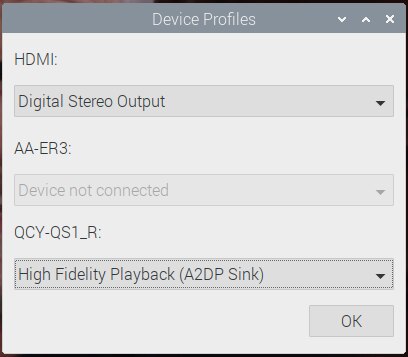
To connect to the device, right click on the volume ICON and select the device.

I was able to ear a bit of music from YouTube with Google Chrome, but after a while it just keeps disconnecting.
02-04-2021
Today, I tested another bluetooth audio device, my QCY T1 earplugs that I have on my work. They worked like a charm. I was able to pair them using the bluetooth applet - they did that thing of waiting for confirmation, but less than two seconds, I got the successful message.

That's why you're seeing 2 bluetooth devices on the screenshots above. I will now enable the onboard bluetooth and remove the USB dongle and see if it works .
EDITED: It didn't work... For some reason, I'm unable to pair the device.
I keep getting stuck in the screen waiting for confirmation:
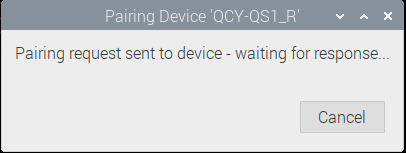
Here's a complete session trying to pair with my bluetooth headphones:
pi@raspberrypi:~ $ bluetoothctl
Agent registered
[bluetooth]# power on
Changing power on succeeded
[bluetooth]# discoverable on
Changing discoverable on succeeded
[CHG] Controller E4:5F:01:06:49:DD Discoverable: yes
[NEW] Device F4:4E:FD:00:16:3A AA-ER3
[CHG] Device F4:4E:FD:00:16:3A Connected: no
[DEL] Device F4:4E:FD:00:16:3A AA-ER3
[bluetooth]# pairable on
Changing pairable on succeeded
[NEW] Device F4:4E:FD:00:16:3A AA-ER3
[CHG] Device F4:4E:FD:00:16:3A Connected: no
[DEL] Device F4:4E:FD:00:16:3A AA-ER3
[bluetooth]# agent NoInputNoOutput
Agent is already registered
[bluetooth]# de
default-agent  devices
[bluetooth]# default-agent
Default agent request successful
[bluetooth]# pair F4:4E:FD:00:16:3A
Device F4:4E:FD:00:16:3A not available
[bluetooth]# scan on
Discovery started
[CHG] Controller E4:5F:01:06:49:DD Discovering: yes
[NEW] Device D6:AD:56:C2:DF:29 Mi Smart Band 4
[CHG] Device A4:C1:38:B2:14:F0 RSSI: -70
[CHG] Device A4:C1:38:B2:14:F0 ManufacturerData Key: 0x0160
[CHG] Device A4:C1:38:B2:14:F0 ManufacturerData Value:
  42 10 f0 14 b2 38 02 02 06 f0 14 01 72 00 00 00  B....8......r...
  01 00 00 00 00 00 00 00 00 00 00                 ...........
[NEW] Device F4:4E:FD:00:16:3A AA-ER3
[bluetooth]# pair F4:4E:FD:00:16:3A
Attempting to pair with F4:4E:FD:00:16:3A
[CHG] Device F4:4E:FD:00:16:3A Connected: yes
[CHG] Device F4:4E:FD:00:16:3A Connected: no
[bluetooth]# trust F4:4E:FD:00:16:3A
[CHG] Device F4:4E:FD:00:16:3A Trusted: yes
Changing F4:4E:FD:00:16:3A trust succeeded
[bluetooth]# connect F4:4E:FD:00:16:3A
Attempting to connect to F4:4E:FD:00:16:3A
Failed to connect: org.bluez.Error.Failed
[CHG] Device A4:C1:38:B2:14:F0 ManufacturerData Key: 0x0160
[CHG] Device A4:C1:38:B2:14:F0 ManufacturerData Value:
  42 10 f0 14 b2 38 02 02 06 f0 14 01 72 00 00 00  B....8......r...
  01 00 00 00 00 00 00 00 00 00 00                 ...........
[bluetooth]# remove F4:4E:FD:00:16:3A
[DEL] Device F4:4E:FD:00:16:3A AA-ER3
Device has been removed
[CHG] Device A4:C1:38:B2:14:F0 ManufacturerData Key: 0x0160
[CHG] Device A4:C1:38:B2:14:F0 ManufacturerData Value:
  42 10 f0 14 b2 38 02 02 06 f0 14 01 72 00 00 00  B....8......r...
  01 00 00 00 00 00 00 00 00 00 00                 ...........
[NEW] Device F4:4E:FD:00:16:3A AA-ER3
[CHG] Device F4:4E:FD:00:16:3A Connected: yes
[CHG] Device F4:4E:FD:00:16:3A Connected: no
[bluetooth]# trust F4:4E:FD:00:16:3A
[CHG] Device F4:4E:FD:00:16:3A Trusted: yes
Changing F4:4E:FD:00:16:3A trust succeeded
[CHG] Device A4:C1:38:B2:14:F0 ManufacturerData Key: 0x0160
[CHG] Device A4:C1:38:B2:14:F0 ManufacturerData Value:
  42 10 f0 14 b2 38 02 02 06 f0 14 01 72 00 00 00  B....8......r...
  01 00 00 00 00 00 00 00 00 00 00                 ...........
[bluetooth]# connect F4:4E:FD:00:16:3A
Attempting to connect to F4:4E:FD:00:16:3A
Failed to connect: org.bluez.Error.Failed
[CHG] Device A4:C1:38:B2:14:F0 ManufacturerData Key: 0x0160
[CHG] Device A4:C1:38:B2:14:F0 ManufacturerData Value:
  42 10 f0 14 b2 38 02 02 06 f0 14 01 72 00 00 00  B....8......r...
  01 00 00 00 00 00 00 00 00 00 00                 ...........
[CHG] Device A4:C1:38:B2:14:F0 ManufacturerData Key: 0x0160
[CHG] Device A4:C1:38:B2:14:F0 ManufacturerData Value:
  42 10 f0 14 b2 38 02 02 06 f0 14 01 72 00 00 00  B....8......r...
  01 00 00 00 00 00 00 00 00 00 00                 ...........
[CHG] Device A4:C1:38:B2:14:F0 ManufacturerData Key: 0x0160
[CHG] Device A4:C1:38:B2:14:F0 ManufacturerData Value:
  42 10 f0 14 b2 38 02 02 06 f0 14 01 72 00 00 00  B....8......r...
  01 00 00 00 00 00 00 00 00 00 00                 ...........
[bluetooth]# agent
Missing on/off/capability argument
[bluetooth]# agent on
Agent is already registered
[bluetooth]# agent
Missing on/off/capability argument
[bluetooth]# agent
DisplayOnly      DisplayYesNo     KeyboardDisplay  KeyboardOnly     NoInputNoOutput  off              on
[CHG] Device A4:C1:38:B2:14:F0 ManufacturerData Key: 0x0160
[CHG] Device A4:C1:38:B2:14:F0 ManufacturerData Value:
  42 10 f0 14 b2 38 02 02 06 f0 14 01 72 00 00 00  B....8......r...
  01 00 00 00 00 00 00 00 00 00 00                 ...........
[bluetooth]# agent NoInputNoOutput
Agent is already registered
[bluetooth]# agent off
Agent unregistered
[bluetooth]# agent NoInputNoOutput
Agent registered
[CHG] Controller E4:5F:01:06:49:DD Discoverable: no
[CHG] Device A4:C1:38:B2:14:F0 ManufacturerData Key: 0x0160
[CHG] Device A4:C1:38:B2:14:F0 ManufacturerData Value:
  42 10 f0 14 b2 38 02 02 06 f0 14 01 72 00 00 00  B....8......r...
  01 00 00 00 00 00 00 00 00 00 00                 ...........
[bluetooth]# pair F4:4E:FD:00:16:3A
Attempting to pair with F4:4E:FD:00:16:3A
Failed to pair: org.bluez.Error.AlreadyExists
[bluetooth]# remove F4:4E:FD:00:16:3A
[DEL] Device F4:4E:FD:00:16:3A AA-ER3
Device has been removed
[bluetooth]#
[CHG] Device A4:C1:38:B2:14:F0 ManufacturerData Key: 0x0160
[CHG] Device A4:C1:38:B2:14:F0 ManufacturerData Value:
  42 10 f0 14 b2 38 02 02 06 f0 14 01 72 00 00 00  B....8......r...
  01 00 00 00 00 00 00 00 00 00 00                 ...........
[NEW] Device F4:4E:FD:00:16:3A AA-ER3
[bluetooth]# pair F4:4E:FD:00:16:3A
Attempting to pair with F4:4E:FD:00:16:3A
[CHG] Device F4:4E:FD:00:16:3A Connected: yes
[CHG] Device F4:4E:FD:00:16:3A Connected: no
[bluetooth]# trust F4:4E:FD:00:16:3A
[CHG] Device F4:4E:FD:00:16:3A Trusted: yes
Changing F4:4E:FD:00:16:3A trust succeeded
[CHG] Device A4:C1:38:B2:14:F0 ManufacturerData Key: 0x0160
[CHG] Device A4:C1:38:B2:14:F0 ManufacturerData Value:
  42 10 f0 14 b2 38 02 02 06 f0 14 01 72 00 00 00  B....8......r...
  01 00 00 00 00 00 00 00 00 00 00                 ...........
[bluetooth]# connect F4:4E:FD:00:16:3A
Attempting to connect to F4:4E:FD:00:16:3A
Failed to connect: org.bluez.Error.Failed
[CHG] Device F4:4E:FD:00:16:3A RSSI: -41
[CHG] Device A4:C1:38:B2:14:F0 ManufacturerData Key: 0x0160
[CHG] Device A4:C1:38:B2:14:F0 ManufacturerData Value:
  42 10 f0 14 b2 38 02 02 06 f0 14 01 72 00 00 00  B....8......r...
  01 00 00 00 00 00 00 00 00 00 00                 ...........
[CHG] Device F4:4E:FD:00:16:3A Connected: yes
[CHG] Device F4:4E:FD:00:16:3A Connected: no
[CHG] Device F4:4E:FD:00:16:3A Connected: yes
[CHG] Device F4:4E:FD:00:16:3A Connected: no
[CHG] Device A4:C1:38:B2:14:F0 ManufacturerData Key: 0x0160
[CHG] Device A4:C1:38:B2:14:F0 ManufacturerData Value:
  42 10 f0 14 b2 38 02 02 06 f0 14 01 72 00 00 00  B....8......r...
  01 00 00 00 00 00 00 00 00 00 00                 ...........
[CHG] Device F4:4E:FD:00:16:3A Connected: yes
[CHG] Device F4:4E:FD:00:16:3A Connected: no
[CHG] Device F4:4E:FD:00:16:3A RSSI: -52
[CHG] Device F4:4E:FD:00:16:3A Connected: yes
[CHG] Device F4:4E:FD:00:16:3A Connected: no
[CHG] Device A4:C1:38:B2:14:F0 ManufacturerData Key: 0x0160
[CHG] Device A4:C1:38:B2:14:F0 ManufacturerData Value:
  42 10 f0 14 b2 38 02 02 06 f0 14 01 72 00 00 00  B....8......r...
  01 00 00 00 00 00 00 00 00 00 00                 ...........
[bluetooth]# remove F4:4E:FD:00:16:3A
[DEL] Device F4:4E:FD:00:16:3A AA-ER3
Device has been removed
[NEW] Device F4:4E:FD:00:16:3A AA-ER3
[CHG] Device F4:4E:FD:00:16:3A Connected: yes
[CHG] Device F4:4E:FD:00:16:3A Connected: no
[CHG] Device A4:C1:38:B2:14:F0 ManufacturerData Key: 0x0160
[CHG] Device A4:C1:38:B2:14:F0 ManufacturerData Value:
  42 10 f0 14 b2 38 02 02 06 f0 14 01 72 00 00 00  B....8......r...
  01 00 00 00 00 00 00 00 00 00 00                 ...........
[bluetooth]# remove F4:4E:FD:00:16:3A
[DEL] Device F4:4E:FD:00:16:3A AA-ER3
Device has been removed
[CHG] Device A4:C1:38:B2:14:F0 ManufacturerData Key: 0x0160
[CHG] Device A4:C1:38:B2:14:F0 ManufacturerData Value:
  42 10 f0 14 b2 38 02 02 06 f0 14 01 72 00 00 00  B....8......r...
  01 00 00 00 00 00 00 00 00 00 00                 ...........
[CHG] Device D6:AD:56:C2:DF:29 RSSI: -43
[NEW] Device F4:4E:FD:00:16:3A AA-ER3
[CHG] Device A4:C1:38:B2:14:F0 ManufacturerData Key: 0x0160
[CHG] Device A4:C1:38:B2:14:F0 ManufacturerData Value:
  42 10 f0 14 b2 38 02 02 06 f0 14 01 72 00 00 00  B....8......r...
  01 00 00 00 00 00 00 00 00 00 00                 ...........
[CHG] Device D6:AD:56:C2:DF:29 RSSI: -51
[bluetooth]# trust F4:4E:FD:00:16:3A
[CHG] Device F4:4E:FD:00:16:3A Trusted: yes
Changing F4:4E:FD:00:16:3A trust succeeded
[bluetooth]# connect F4:4E:FD:00:16:3A
Attempting to connect to F4:4E:FD:00:16:3A
Failed to connect: org.bluez.Error.Failed
[CHG] Device A4:C1:38:B2:14:F0 ManufacturerData Key: 0x0160
[CHG] Device A4:C1:38:B2:14:F0 ManufacturerData Value:
  42 10 f0 14 b2 38 02 02 06 f0 14 01 72 00 00 00  B....8......r...
  01 00 00 00 00 00 00 00 00 00 00                 ...........
[CHG] Device A4:C1:38:B2:14:F0 RSSI: -80
[CHG] Device A4:C1:38:B2:14:F0 ManufacturerData Key: 0x0160
[CHG] Device A4:C1:38:B2:14:F0 ManufacturerData Value:
  42 10 f0 14 b2 38                                B....8
[CHG] Device A4:C1:38:B2:14:F0 RSSI: -71
[CHG] Device A4:C1:38:B2:14:F0 ManufacturerData Key: 0x0160
[CHG] Device A4:C1:38:B2:14:F0 ManufacturerData Value:
  42 10 f0 14 b2 38 02 02 06 f0 14 01 72 00 00 00  B....8......r...
  01 00 00 00 00 00 00 00 00 00 00                 ..........
I'm having mixed results.
Will now try my external dongle again and see if something works.
With the external dongle, I'm able to connect to my headphones and earphones. My headphones keep connecting and disconnecting, but the earphones work fine.
I can't get sound on Firefox, but Chromium works fine. Apparently there's a problem with Firefox and the latest pulse audio update on Raspberry PI OS. This post is from December 2020.
03/04/2021
Updated Firefox don't playing sounds via bluetooth and pulseaudio is a known bug and still no solution for it. The funny thing is there's some videos it plays, but the majority it won't... Still fighting .
If one executes some commands, everything goes to proper state.
Will try this later.
I will keep the external dongle and use my QCY earphones.
Software
Browser
Raspberry PI OS Desktop comes with Chromium, but I mainly use Firefox. Unfortunately, the latest version available is a ESR version. No worries, let's install it.
sudo apt-get install firefox-esr

Everything works fine and I was able to add my account and have all my bookmarks and extensions. I use a lot 1Password and it's working fine.
One thing that I'm finding weird is the google search page is half and not the all page. Is it showing like this because of the Firefox version ? Does it thinks it is on a mobile ?
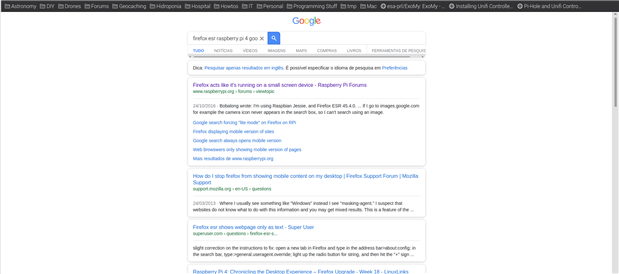
Need to sort this out. I really really prefer Firefox.
Netflix
Netflix is one site that I visit every day. Whether I'm just relaxing or doing something else and just for the noise - it helps me focus - this was one site that I really wanted to work.
I already knew that it was a possibility. After reading a blog post by VPetkov, I was able to have Chromium opening Netflix and playing.
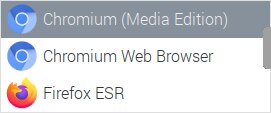
A new item was added to Internet Menu and after executing Chromium (Media Edition), here it is:

Casting to Google ChromeCast
One of the things I used to do a lot is casting Netflix to my ChromeCast connected to my office TV. My son (4 years old) loves to be with me watching it's cartoons. I use fx_cast on Firefox, but is necessary a companion app. The site does not support arm, but I will try to compile from source and see if I can use it.
Nonetheless, since Chrome can play Netflix and it has support for Casting. I did try it and it work out of the box.
Here's the ChromeCast showing on Chromium Cast Menu (In Portuguese)
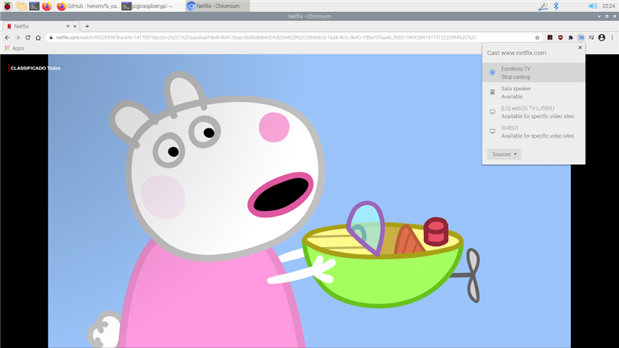
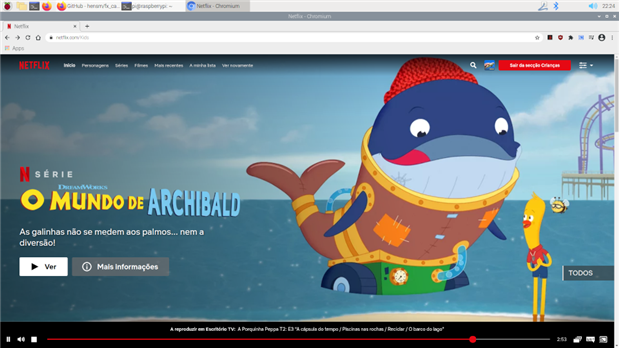
I must say that I didn't notice no slowdown or less performance while Chromium was casting.
And this was my first day using the Raspberry PI 400 (and this post was written with the Raspberry PI 400)
Things to sort out:
- Bluetooth audio and Firefox
- VPN
- Why Google's search page in Firefox looks like mobile