element14 Community
element14 Community
    Register Log In
  • Site
  • Search
  • Log In Register
  • Community Hub
    Community Hub
    • What's New on element14
    • Feedback and Support
    • Benefits of Membership
    • Personal Blogs
    • Members Area
    • Achievement Levels
  • Learn
    Learn
    • Ask an Expert
    • eBooks
    • element14 presents
    • Learning Center
    • Tech Spotlight
    • STEM Academy
    • Webinars, Training and Events
    • Learning Groups
  • Technologies
    Technologies
    • 3D Printing
    • FPGA
    • Industrial Automation
    • Internet of Things
    • Power & Energy
    • Sensors
    • Technology Groups
  • Challenges & Projects
    Challenges & Projects
    • Design Challenges
    • element14 presents Projects
    • Project14
    • Arduino Projects
    • Raspberry Pi Projects
    • Project Groups
  • Products
    Products
    • Arduino
    • Avnet & Tria Boards Community
    • Dev Tools
    • Manufacturers
    • Multicomp Pro
    • Product Groups
    • Raspberry Pi
    • RoadTests & Reviews
  • About Us
  • Store
    Store
    • Visit Your Store
    • Choose another store...
      • Europe
      •  Austria (German)
      •  Belgium (Dutch, French)
      •  Bulgaria (Bulgarian)
      •  Czech Republic (Czech)
      •  Denmark (Danish)
      •  Estonia (Estonian)
      •  Finland (Finnish)
      •  France (French)
      •  Germany (German)
      •  Hungary (Hungarian)
      •  Ireland
      •  Israel
      •  Italy (Italian)
      •  Latvia (Latvian)
      •  
      •  Lithuania (Lithuanian)
      •  Netherlands (Dutch)
      •  Norway (Norwegian)
      •  Poland (Polish)
      •  Portugal (Portuguese)
      •  Romania (Romanian)
      •  Russia (Russian)
      •  Slovakia (Slovak)
      •  Slovenia (Slovenian)
      •  Spain (Spanish)
      •  Sweden (Swedish)
      •  Switzerland(German, French)
      •  Turkey (Turkish)
      •  United Kingdom
      • Asia Pacific
      •  Australia
      •  China
      •  Hong Kong
      •  India
      • Japan
      •  Korea (Korean)
      •  Malaysia
      •  New Zealand
      •  Philippines
      •  Singapore
      •  Taiwan
      •  Thailand (Thai)
      • Vietnam
      • Americas
      •  Brazil (Portuguese)
      •  Canada
      •  Mexico (Spanish)
      •  United States
      Can't find the country/region you're looking for? Visit our export site or find a local distributor.
  • Translate
  • Profile
  • Settings
Personal Blogs
  • Community Hub
  • More
Personal Blogs
Legacy Personal Blogs 7a - Preparing For Twitter
  • Blog
  • Documents
  • Mentions
  • Sub-Groups
  • Tags
  • More
  • Cancel
  • New
  • Share
  • More
  • Cancel
Group Actions
  • Group RSS
  • More
  • Cancel
Engagement
  • Author Author: ge0rgej
  • Date Created: 8 Sep 2013 12:55 PM Date Created
  • Views 439 views
  • Likes 0 likes
  • Comments 0 comments
Related
Recommended

7a - Preparing For Twitter

ge0rgej
ge0rgej
8 Sep 2013

image

Two of the key features that I wanted to implement in this project from the outset was 1) having a facility of being informed when my irrigation system was operating, or not as the case may be, and 2) having a means of over-riding the system via mobile 3G.


When it came to being informed, Twitter was the most obvious choice. But then after spending a considerable amount of time trying to get my head around Twitter's OAuth mechanisms I came across www.SuperTweet.net who simplify this process using a Basic Auth connection to their proxy servers .... with the OAuth process being completed by SuperTweet.


This section will deal with setting up your Twitter App,  completing the SuperTweet requirements and by the end of the section we'lll post random Tweets from the Linux command prompt .... and also setup the Python scripts that will be sending the Irrigation Alerts.


1 - The first prerequisite in this process is that you will need to install cURL


     In Linux Terminal - at the command prompt;


     type : $ sudo apt-get install curl


2 - Next head over to Twitter and create yourself a new Twitter account. If you already have a Twitter account you'll be needing another email address to setup the account as Twitter doesn't allow the same email address to be used for multiple accounts. Obviously make a note of the username and password you setup the account with.


3 - You now need to create yourself a Twitter App.


     Visit https://dev.twitter.com/ and sign in with the username / password you have just created
 

image


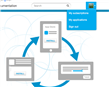
In the top right hand corner of the screen click under

your Avatar and choose 'My Applications'


image


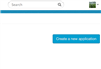
Now click on 'Create Application'


image


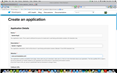
Fill in all the fields and Save


image


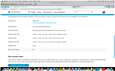
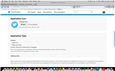
You will then be taken to your Twitter App.

Notice that your Access Level is 'Read Only'

Click on 'Create My Access Token'


image

When you are returned back to your app - go to

'Settings'  -> 'Application Type' and choose

Read, Write and Access Direct Messages

Then scroll to the bottom of the page and

'Update The Twitter applications settings'


That's it - your are done with Twitter ..... next its time for SuperTweet


  • Sign in to reply
element14 Community

element14 is the first online community specifically for engineers. Connect with your peers and get expert answers to your questions.

  • Members
  • Learn
  • Technologies
  • Challenges & Projects
  • Products
  • Store
  • About Us
  • Feedback & Support
  • FAQs
  • Terms of Use
  • Privacy Policy
  • Legal and Copyright Notices
  • Sitemap
  • Cookies

An Avnet Company © 2025 Premier Farnell Limited. All Rights Reserved.

Premier Farnell Ltd, registered in England and Wales (no 00876412), registered office: Farnell House, Forge Lane, Leeds LS12 2NE.

ICP 备案号 10220084.

Follow element14

  • X
  • Facebook
  • linkedin
  • YouTube