


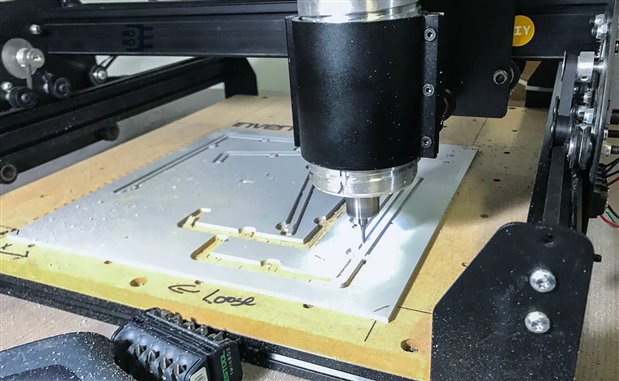
This week felt like the week of experiments. I have never milled Sintra (PVC) before and I have never used Fusion 360 to generate the mill's CAM files. My enclosure is using layers of PVC for a couple of reasons. First, my 3D printer's build volume is not large enough. (I could glue pieces together though.) Also, I am not confident PLA has enough strength, so I need something a bit more durable. Another option is acrylic. I laser cut that all the time. However, acrylic is just way too brittle. So that leaves layered PVC, which means milling because you cannot (or should not) laser cut PVC.
In the picture above you can see my X-Carve going to town on a PVC sheet. I did run into a few problems with that cut. Which, I think I have resolved now that I understand 360's CAM a bit better. If you are not familiar with the term "CAM," but you have used a 3D printer, then you already know about "CAM"!
CAD vs. CAM
CAD stands for computer-aided design. It is a broad term, but the key word in that acronym is "design." Using a tool like Solidworks, Fusion 360, or OpenSCAD you design an object. Converting that design into instructions for a machine is the CAM step. CAM stands for "computer-aided manufacturing" or "computer-aided machining." It depends on whom you ask. (Honestly, I do not think anyone knows. We all just say "CAM" and know what we mean.) In the case of a CNC router, the CAM processor creates the instructions that move the tool around. As I said, if you have used a 3d printer, you have used a CAM processor. The slicing softer, slic3r for example, slices the model up and then creates instructions to tell the printer where to move the nozzle.
The common language for machines to use is "g-code." These are instructions that tell a tool (drill head, 3d printer extruder, etc.) to turn on, where the steppers should move and other functions. It is a relatively simple language. In fact, may machinist can operate their CNCs faster by typing in g-code command, than a front panel GUI.
Fusion 360 as CAM
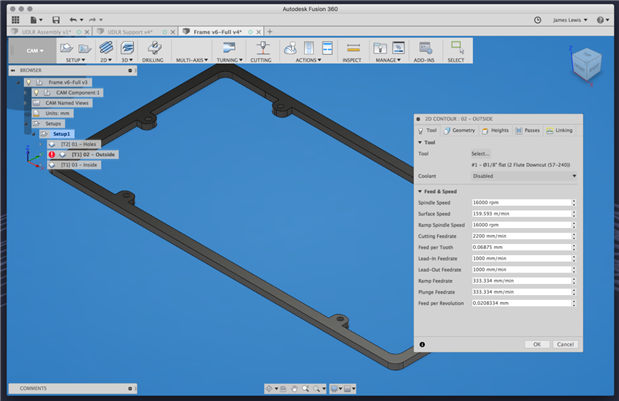
In the past, I either used a simple CAM processor from Inventables called Easel. It is an online tool that relatively straightforward. It is excellent for 2D (or 2.5D) cuts. Alternatively, I would use software called Vcarve. Sadly since TechShop closed, I no longer have access to Vcarve. Fusion 360's CAM capability is not just a minor add-on, however. It is a full 2D and 3D CAM processor. Since I have not used it before, it took me some time to dial in the speeds and feeds. The language they use is not what I am used to, but all of the necessary features are there.
To be frank, I miss the polish of Vcarve (and it is 3D cousin Cut3d.) Purpose-specific tools tend to be a bit cleaner and straightforward. However, since I do not mill very often, they are both beyond my current tool budget. So for now, 360 gets another gold star in my design workflow.
Based on my last Fusion 360 build-up, my build should come in just under one inch. This size sounds thick compared to today's thin electronics. However, I pulled out my Game Gear for comparison. If nothing changes, my Pi Portable 3 (PP3) will be slightly smaller than the original Game Gear. (And with a much better screen!)
This Week
The focus this week is finishing the case design, which is nearly done. My PCBs came back for the controllers, and I started testing those tonight. They are in good shape. The end of this week I will have all of the pieces together. Then I will have some code on my Teensy to finish. Overall, the build is coming together, and I am getting excited to show it off.
Top Comments
-

DAB
-
Cancel
-
Vote Up
0
Vote Down
-
-
Sign in to reply
-
More
-
Cancel
Comment-

DAB
-
Cancel
-
Vote Up
0
Vote Down
-
-
Sign in to reply
-
More
-
Cancel
Children