element14 Community
element14 Community
    Register Log In
  • Site
  • Search
  • Log In Register
  • Community Hub
    Community Hub
    • What's New on element14
    • Feedback and Support
    • Benefits of Membership
    • Personal Blogs
    • Members Area
    • Achievement Levels
  • Learn
    Learn
    • Ask an Expert
    • eBooks
    • element14 presents
    • Learning Center
    • Tech Spotlight
    • STEM Academy
    • Webinars, Training and Events
    • Learning Groups
  • Technologies
    Technologies
    • 3D Printing
    • FPGA
    • Industrial Automation
    • Internet of Things
    • Power & Energy
    • Sensors
    • Technology Groups
  • Challenges & Projects
    Challenges & Projects
    • Design Challenges
    • element14 presents Projects
    • Project14
    • Arduino Projects
    • Raspberry Pi Projects
    • Project Groups
  • Products
    Products
    • Arduino
    • Avnet & Tria Boards Community
    • Dev Tools
    • Manufacturers
    • Multicomp Pro
    • Product Groups
    • Raspberry Pi
    • RoadTests & Reviews
  • About Us
  • Store
    Store
    • Visit Your Store
    • Choose another store...
      • Europe
      •  Austria (German)
      •  Belgium (Dutch, French)
      •  Bulgaria (Bulgarian)
      •  Czech Republic (Czech)
      •  Denmark (Danish)
      •  Estonia (Estonian)
      •  Finland (Finnish)
      •  France (French)
      •  Germany (German)
      •  Hungary (Hungarian)
      •  Ireland
      •  Israel
      •  Italy (Italian)
      •  Latvia (Latvian)
      •  
      •  Lithuania (Lithuanian)
      •  Netherlands (Dutch)
      •  Norway (Norwegian)
      •  Poland (Polish)
      •  Portugal (Portuguese)
      •  Romania (Romanian)
      •  Russia (Russian)
      •  Slovakia (Slovak)
      •  Slovenia (Slovenian)
      •  Spain (Spanish)
      •  Sweden (Swedish)
      •  Switzerland(German, French)
      •  Turkey (Turkish)
      •  United Kingdom
      • Asia Pacific
      •  Australia
      •  China
      •  Hong Kong
      •  India
      • Japan
      •  Korea (Korean)
      •  Malaysia
      •  New Zealand
      •  Philippines
      •  Singapore
      •  Taiwan
      •  Thailand (Thai)
      • Vietnam
      • Americas
      •  Brazil (Portuguese)
      •  Canada
      •  Mexico (Spanish)
      •  United States
      Can't find the country/region you're looking for? Visit our export site or find a local distributor.
  • Translate
  • Profile
  • Settings
Personal Blogs
  • Community Hub
  • More
Personal Blogs
Legacy Personal Blogs Creating the 6 DoF Platform – Part3
  • Blog
  • Documents
  • Mentions
  • Sub-Groups
  • Tags
  • More
  • Cancel
  • New
  • Share
  • More
  • Cancel
Group Actions
  • Group RSS
  • More
  • Cancel
Engagement
  • Author Author: benmatrix
  • Date Created: 16 Mar 2015 10:27 AM Date Created
  • Views 1275 views
  • Likes 0 likes
  • Comments 5 comments
  • inverse
  • flowcode
  • 6dof
  • servo
  • platform
  • kinematics
  • stewart
  • dspic
  • arduino
Related
Recommended

Creating the 6 DoF Platform – Part3

benmatrix
benmatrix
16 Mar 2015

In this final blog article we will be discussing the finer details of finishing the 6DoF Platform, alongside a conversion to a PIC based microcontroller.


Completing the Platform;

With all the parts created for the actual 6DoF platform we needed to finalise construction and mount it for demonstration and use. For the mounting base we used a clear 5mm acrylic base that we cut on our laser cutter. We found in testing that sudden movements could cause the whole platform to shift around the desk.


For the platform base we also printed some specifications of the platform for show visitors to see. We did this using our UV printer that we have here at Matrix which allows us to print on any relatively flat hard surface. It works much like a desk jet printer, but instead of regular air drying inks the ink is cured hard via UV light.


Below you can see the final design of the platform, with the Arduino Uno controller placed in the middle. The platform was an excellent exhibition demonstration for us. It allowed us to easily engage with visitors, and discuss both our abilities in rapid prototyping and our Arduino support.


Maze_Blog.png

Converting the 6DoF Platform to a Pic-based microcontroller;

This final section of this article, and indeed our series of articles is the conversion of our platform to a PIC based microcontroller. One of the KEY benefits of Flowcode is the ability to switch between microcontroller platforms with great ease. Imagine the scenario; you work as part of a team creating new products in the Research & Development department. You want to rapid prototype a system as we have here with the 6DoF Platform. You choose a microcontroller that you think will be suitable. You invest time developing code only to find 2 weeks in that the particular family is not suitable, perhaps because you didn’t foresee a problem or the project specification has changed Not only do you need to change microcontroller, but you need to swap complete family of microcontroller.


This is where Flowcode offers a very powerful solution. Swapping between microcontrollers in Flowcode is as simple as a few clicks. You navigate to the project explorer and change the target chip as seen in the picture below. Flowcode has been designed to take away all the frustration, complexity and time consuming elements of changing microcontrollers. It’s simple, really simple!
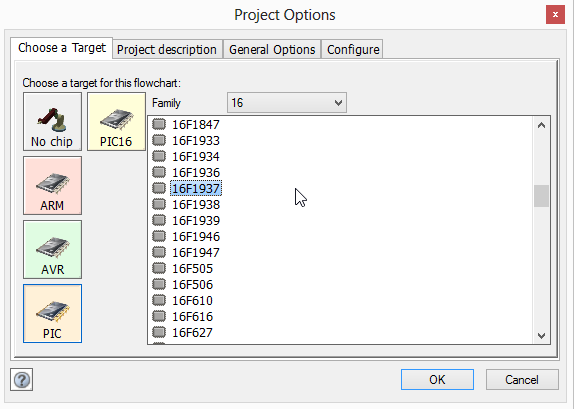
 

ChangeTarget.png


In this example, we wanted to change the microcontroller to a PIC-based product to align with our own internal hardware that we develop. Our most popular microcontroller board is the EB064, a 16bit microcontroller which allows users to prototype designs based on their controller of choice. We also offer a range of peripheral boards that add additional functionality called eBlocks. For the 6DoF Platform we also required a servo controller eBlock board, a Bluetooth eBlock and an RS232 eBlock to send live data back to the PC to update the simulation live.


Upon changing the target device in Flowcode, we had a few changes to make reallocating port assignments for hardware, but this was all achieved through the properties toolbar within Flowcode, which again provides a nice graphical interface.


CHangingProperties.png

Component properties are easily changed through a graphical interface in Flowcode


Here we have it, the same 6DoF Platform, but now utilising a PIC microcontroller instead of an Arduino. The whole conversion process took approximately 3 hours, including re-cutting the base plate to allow the different mounting of the eBlocks.
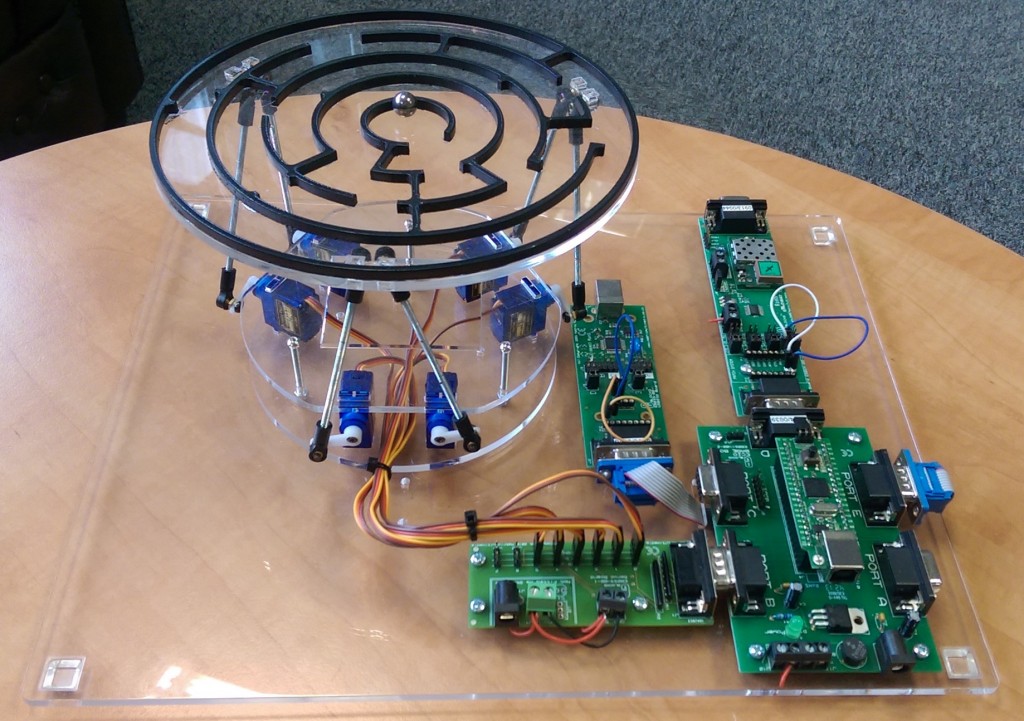

PIC_6DoFBlog-1024x721.jpg


Here is a video of my wife having a play.

You don't have permission to edit metadata of this video.
Edit media
x
image
Upload Preview
image

  • Sign in to reply

Top Comments

  • Former Member
    Former Member over 10 years ago +1
    Really neat design. I'm looking to make something similar but hoping to re-use some existing kit. Are you using Towerpro servos? If so, which ones and what size ball connectors / rods have you used with…
  • Former Member
    Former Member over 10 years ago in reply to benmatrix +1
    Thanks Ben. This blog post has been really useful.
  • Former Member
    Former Member over 10 years ago in reply to benmatrix

    Thanks Ben. This blog post has been really useful.

    • Cancel
    • Vote Up +1 Vote Down
    • Sign in to reply
    • More
    • Cancel
  • benmatrix
    benmatrix over 10 years ago in reply to Former Member

    Hello,


    Yes we used the larger servos and then re-created the CAD using the smaller tower pro servos, this worked fine. We used the Tamiya ball joints and cut the supplied rods in half to make them a better suit.

    • Cancel
    • Vote Up 0 Vote Down
    • Sign in to reply
    • More
    • Cancel
  • Former Member
    Former Member over 10 years ago

    Really neat design. I'm looking to make something similar but hoping to re-use some existing kit. Are you using Towerpro servos? If so, which ones and what size ball connectors / rods have you used with them? My Towerpros are the micro SG90s and I was wondering if they would be suitable - most examples of Stewart platforms seem to use larger hobby servos. Thanks.

    • Cancel
    • Vote Up +1 Vote Down
    • Sign in to reply
    • More
    • Cancel
  • benmatrix
    benmatrix over 10 years ago in reply to DAB

    Hi DAB,


    Thanks for the comment image


    We do already implement a low pass filter on the Android tablet to try and get rid of some vibration. Thinking about it maybe an additional low pass filter stage after the inverse kinematics calcs would also be helpful.

    • Cancel
    • Vote Up 0 Vote Down
    • Sign in to reply
    • More
    • Cancel
  • DAB
    DAB over 10 years ago

    Very nice.


    You might want to add some smoothing or dampening to the drivers.  That will reduce the amount of jerking motions.


    All in all, a good initial implementation.


    DAB

    • Cancel
    • Vote Up 0 Vote Down
    • Sign in to reply
    • More
    • Cancel
element14 Community

element14 is the first online community specifically for engineers. Connect with your peers and get expert answers to your questions.

  • Members
  • Learn
  • Technologies
  • Challenges & Projects
  • Products
  • Store
  • About Us
  • Feedback & Support
  • FAQs
  • Terms of Use
  • Privacy Policy
  • Legal and Copyright Notices
  • Sitemap
  • Cookies

An Avnet Company © 2025 Premier Farnell Limited. All Rights Reserved.

Premier Farnell Ltd, registered in England and Wales (no 00876412), registered office: Farnell House, Forge Lane, Leeds LS12 2NE.

ICP 备案号 10220084.

Follow element14

  • X
  • Facebook
  • linkedin
  • YouTube