element14 Community
element14 Community
    Register Log In
  • Site
  • Search
  • Log In Register
  • Community Hub
    Community Hub
    • What's New on element14
    • Feedback and Support
    • Benefits of Membership
    • Personal Blogs
    • Members Area
    • Achievement Levels
  • Learn
    Learn
    • Ask an Expert
    • eBooks
    • element14 presents
    • Learning Center
    • Tech Spotlight
    • STEM Academy
    • Webinars, Training and Events
    • Learning Groups
  • Technologies
    Technologies
    • 3D Printing
    • FPGA
    • Industrial Automation
    • Internet of Things
    • Power & Energy
    • Sensors
    • Technology Groups
  • Challenges & Projects
    Challenges & Projects
    • Design Challenges
    • element14 presents Projects
    • Project14
    • Arduino Projects
    • Raspberry Pi Projects
    • Project Groups
  • Products
    Products
    • Arduino
    • Avnet & Tria Boards Community
    • Dev Tools
    • Manufacturers
    • Multicomp Pro
    • Product Groups
    • Raspberry Pi
    • RoadTests & Reviews
  • About Us
  • Store
    Store
    • Visit Your Store
    • Choose another store...
      • Europe
      •  Austria (German)
      •  Belgium (Dutch, French)
      •  Bulgaria (Bulgarian)
      •  Czech Republic (Czech)
      •  Denmark (Danish)
      •  Estonia (Estonian)
      •  Finland (Finnish)
      •  France (French)
      •  Germany (German)
      •  Hungary (Hungarian)
      •  Ireland
      •  Israel
      •  Italy (Italian)
      •  Latvia (Latvian)
      •  
      •  Lithuania (Lithuanian)
      •  Netherlands (Dutch)
      •  Norway (Norwegian)
      •  Poland (Polish)
      •  Portugal (Portuguese)
      •  Romania (Romanian)
      •  Russia (Russian)
      •  Slovakia (Slovak)
      •  Slovenia (Slovenian)
      •  Spain (Spanish)
      •  Sweden (Swedish)
      •  Switzerland(German, French)
      •  Turkey (Turkish)
      •  United Kingdom
      • Asia Pacific
      •  Australia
      •  China
      •  Hong Kong
      •  India
      • Japan
      •  Korea (Korean)
      •  Malaysia
      •  New Zealand
      •  Philippines
      •  Singapore
      •  Taiwan
      •  Thailand (Thai)
      • Vietnam
      • Americas
      •  Brazil (Portuguese)
      •  Canada
      •  Mexico (Spanish)
      •  United States
      Can't find the country/region you're looking for? Visit our export site or find a local distributor.
  • Translate
  • Profile
  • Settings
Personal Blogs
  • Community Hub
  • More
Personal Blogs
Legacy Personal Blogs Flashing nRF51 & nRF52 firmware using any dumb terminal program via standard serial COM port
  • Blog
  • Documents
  • Mentions
  • Sub-Groups
  • Tags
  • More
  • Cancel
  • New
  • Share
  • More
  • Cancel
Group Actions
  • Group RSS
  • More
  • Cancel
Engagement
  • Author Author: hnhoan
  • Date Created: 9 Nov 2017 1:35 AM Date Created
  • Views 1419 views
  • Likes 0 likes
  • Comments 0 comments
  • jtag debugger
  • jtag
  • arm cortexm
  • arm-usb-ocd
  • swd
  • cmsis-dap
  • nrf52
  • nrf51
Related
Recommended

Flashing nRF51 & nRF52 firmware using any dumb terminal program via standard serial COM port

hnhoan
hnhoan
9 Nov 2017

There are times that we needed to flash the nRF5x series on a PC where the development software were not installed. The problem could be worst when network access is limited. With a HEX file on hand, it is now possible to flash the nRF5x device using regular dumb terminal software such as CoolTerm, Putty,... through the COM port. This is the new feature of the IDAP-Link, a CMSIS-DAP compatible debug jtag. This feature is called 'Console Mode'. Please note that programming the nRF5x is actually done using SWD. The COM port is only for user interface.
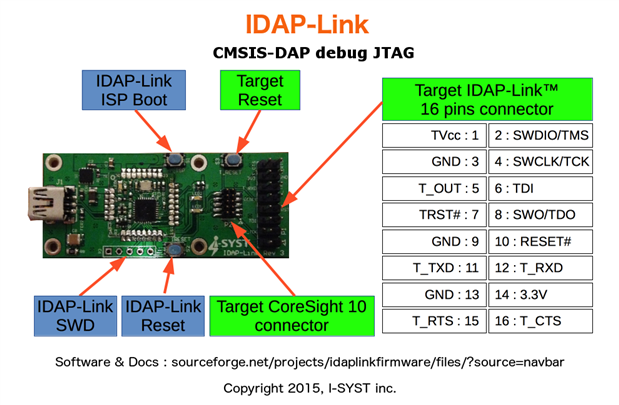
 

image


To active the Console Mode, use any dumb terminal program and connect to the IDAP-Link CDC COM port at 4 MBaud. The best terminal software to use is CoolTerm.  CoolTerm is available for Linux, OSX and Windows.

By default, CoolTerm supports upto 230400 Baud. To add new Buadrates to CoolTerm, create a file name 'baudrates.ini'. Add 1 baudrate value per line the file. Then copy the baudrate.ini file to the location based on platform used.

   Mac: /Users/UserName/Library/Application Support/CoolTerm/
  
Win: \Users\UserName\AppData\Roaming\CoolTerm\
  
Linux: /home/UserName/CoolTerm/.


At connection, a welcome screen is displayed in the terminal with a small menu.
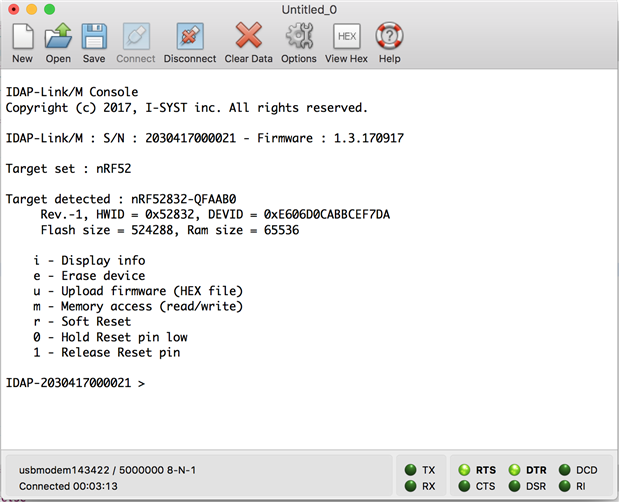
image


To upload new firmware (or Softdevice), select 'u' on the menu. Wait for the message 'Ready for HEX upload' to appears.
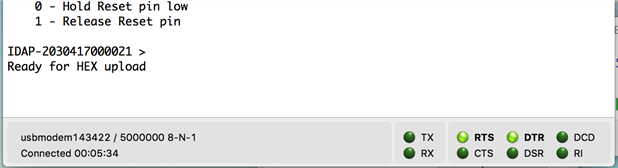
 

image


Once the message is received. Use the terminal program, CoolTerm in this case to send a text file.


image


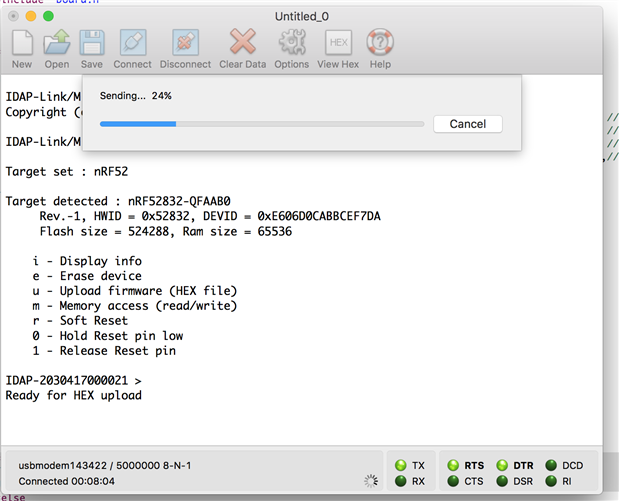
The transfer immediately begins


image


Once the file transfer is completed a new message 'Upload completed' will be displayed.
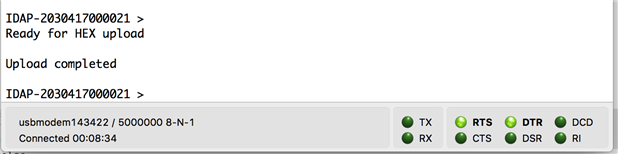
 

image


That's how it is done.

IDAP-Link user guide and software are here.

  • Sign in to reply
element14 Community

element14 is the first online community specifically for engineers. Connect with your peers and get expert answers to your questions.

  • Members
  • Learn
  • Technologies
  • Challenges & Projects
  • Products
  • Store
  • About Us
  • Feedback & Support
  • FAQs
  • Terms of Use
  • Privacy Policy
  • Legal and Copyright Notices
  • Sitemap
  • Cookies

An Avnet Company © 2025 Premier Farnell Limited. All Rights Reserved.

Premier Farnell Ltd, registered in England and Wales (no 00876412), registered office: Farnell House, Forge Lane, Leeds LS12 2NE.

ICP 备案号 10220084.

Follow element14

  • X
  • Facebook
  • linkedin
  • YouTube