element14 Community
element14 Community
    Register Log In
  • Site
  • Search
  • Log In Register
  • Community Hub
    Community Hub
    • What's New on element14
    • Feedback and Support
    • Benefits of Membership
    • Personal Blogs
    • Members Area
    • Achievement Levels
  • Learn
    Learn
    • Ask an Expert
    • eBooks
    • element14 presents
    • Learning Center
    • Tech Spotlight
    • STEM Academy
    • Webinars, Training and Events
    • Learning Groups
  • Technologies
    Technologies
    • 3D Printing
    • FPGA
    • Industrial Automation
    • Internet of Things
    • Power & Energy
    • Sensors
    • Technology Groups
  • Challenges & Projects
    Challenges & Projects
    • Design Challenges
    • element14 presents Projects
    • Project14
    • Arduino Projects
    • Raspberry Pi Projects
    • Project Groups
  • Products
    Products
    • Arduino
    • Avnet & Tria Boards Community
    • Dev Tools
    • Manufacturers
    • Multicomp Pro
    • Product Groups
    • Raspberry Pi
    • RoadTests & Reviews
  • About Us
    About the element14 Community
  • Store
    Store
    • Visit Your Store
    • Choose another store...
      • Europe
      •  Austria (German)
      •  Belgium (Dutch, French)
      •  Bulgaria (Bulgarian)
      •  Czech Republic (Czech)
      •  Denmark (Danish)
      •  Estonia (Estonian)
      •  Finland (Finnish)
      •  France (French)
      •  Germany (German)
      •  Hungary (Hungarian)
      •  Ireland
      •  Israel
      •  Italy (Italian)
      •  Latvia (Latvian)
      •  
      •  Lithuania (Lithuanian)
      •  Netherlands (Dutch)
      •  Norway (Norwegian)
      •  Poland (Polish)
      •  Portugal (Portuguese)
      •  Romania (Romanian)
      •  Russia (Russian)
      •  Slovakia (Slovak)
      •  Slovenia (Slovenian)
      •  Spain (Spanish)
      •  Sweden (Swedish)
      •  Switzerland(German, French)
      •  Turkey (Turkish)
      •  United Kingdom
      • Asia Pacific
      •  Australia
      •  China
      •  Hong Kong
      •  India
      •  Japan
      •  Korea (Korean)
      •  Malaysia
      •  New Zealand
      •  Philippines
      •  Singapore
      •  Taiwan
      •  Thailand (Thai)
      •  Vietnam
      • Americas
      •  Brazil (Portuguese)
      •  Canada
      •  Mexico (Spanish)
      •  United States
      Can't find the country/region you're looking for? Visit our export site or find a local distributor.
  • Translate
  • Profile
  • Settings
Personal Blogs
  • Community Hub
  • More
Personal Blogs
Legacy Personal Blogs [FRDM-KL46Z + Kinetis Design Studio (KDS)+Processor Expert(PE)] Project: Interfacing element14 Xtrinsic Sensor Board with KL46Z freedom Board using command line interface on hyper terminal
  • Blog
  • Documents
  • Mentions
  • Sub-Groups
  • Tags
  • More
  • Cancel
  • New
  • Share
  • More
  • Cancel
Group Actions
  • Group RSS
  • More
  • Cancel
Engagement
  • Author Author: bheemarao
  • Date Created: 29 Oct 2014 12:10 PM Date Created
  • Views 360 views
  • Likes 0 likes
  • Comments 0 comments
  • xtrinsic-sense-board
  • frdm-kl46z
  • kl46z
Related
Recommended

[FRDM-KL46Z + Kinetis Design Studio (KDS)+Processor Expert(PE)] Project: Interfacing element14 Xtrinsic Sensor Board with KL46Z freedom Board using command line interface on hyper terminal

bheemarao
bheemarao
29 Oct 2014

Note: The Project folder has been extracted from Freescale community https://community.freescale.com/docs/DOC-101370


Dear All,


Here is a Project with implementation of element14 Xtrinsic sensor evaluation board on KL46Z Freedom board using Kinetis Design Studio (KDS) on Processor Expert environment using hyper terminal command line interface.


To quick start evaluating this project download the attached project folder and extract the "Xtrinsic module-kl46.srec" file and download to the board. or import this project folder to your existing workspace compile, debug and execute it.


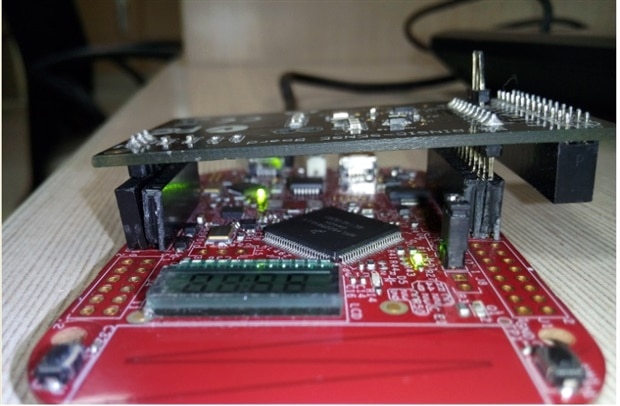
Connect the Sensor board as shown below:
image

connect USB cable from your PC to SDA port of the KL46Z board and power up the board,

Open Hyper terminal from your PC by providing the right serial COM port number with below settings:


Speed: 9600 baud rate

Data bits: 8

Stop bits:1

Parity: None

Flow Control: XON/XOFF


Now you can see 'E14>' prompt on your hyperterminal as shown in below pictures. Proceed further by typing below shown commands to see the sensor data:


1) Accelerometer data: type "accel a r" : This command displays all the 3 axis sensor raw data

image

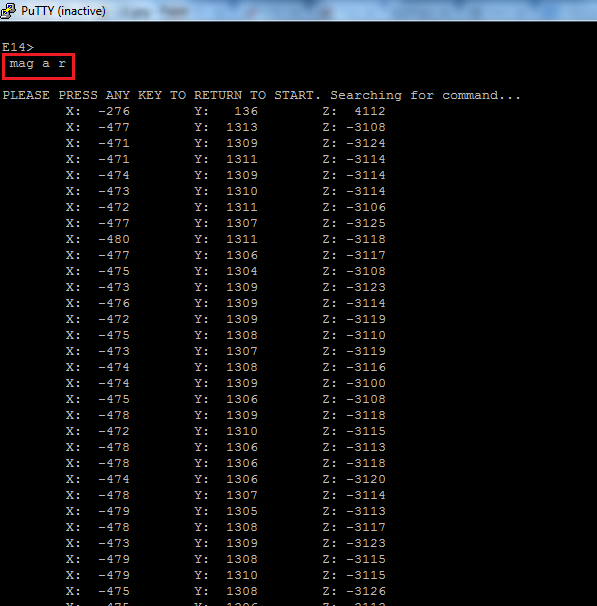
2) Magnetometer: type "mag a r" to display all the 3 axis magnetometer data.
image


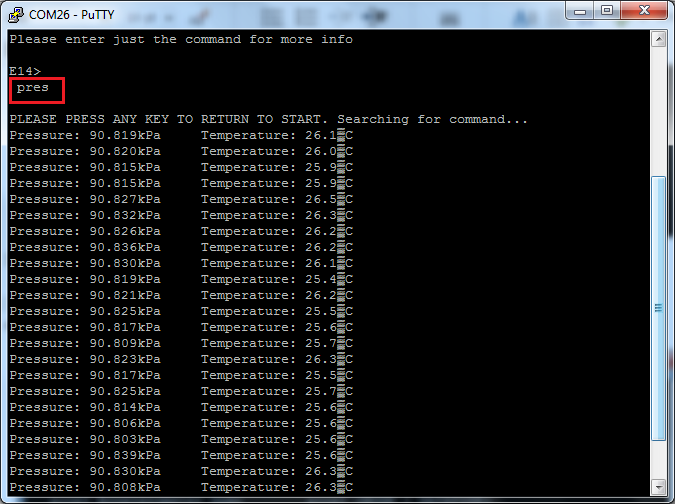
3) Pressure and Temperature : type "pres" to see pressure in kPa and temperature in deg c.
 

image

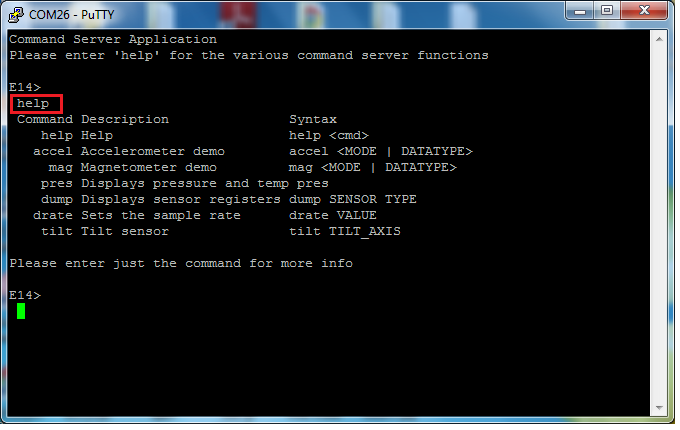
4) For help on various command type "help"
image


Best Regards

Bheema Rao


Attachments:
Xtrinsic module-kl46.rar
Xtrinsic module-kl46-srec.rar
  • Sign in to reply
element14 Community

element14 is the first online community specifically for engineers. Connect with your peers and get expert answers to your questions.

  • Members
  • Learn
  • Technologies
  • Challenges & Projects
  • Products
  • Store
  • About Us
  • Feedback & Support
  • FAQs
  • Terms of Use
  • Privacy Policy
  • Legal and Copyright Notices
  • Sitemap
  • Cookies

An Avnet Company © 2026 Premier Farnell Limited. All Rights Reserved.

Premier Farnell Ltd, registered in England and Wales (no 00876412), registered office: Farnell House, Forge Lane, Leeds LS12 2NE.

Follow element14

  • X
  • Facebook
  • linkedin
  • YouTube