element14 Community
element14 Community
    Register Log In
  • Site
  • Search
  • Log In Register
  • Community Hub
    Community Hub
    • What's New on element14
    • Feedback and Support
    • Benefits of Membership
    • Personal Blogs
    • Members Area
    • Achievement Levels
  • Learn
    Learn
    • Ask an Expert
    • eBooks
    • element14 presents
    • Learning Center
    • Tech Spotlight
    • STEM Academy
    • Webinars, Training and Events
    • Learning Groups
  • Technologies
    Technologies
    • 3D Printing
    • FPGA
    • Industrial Automation
    • Internet of Things
    • Power & Energy
    • Sensors
    • Technology Groups
  • Challenges & Projects
    Challenges & Projects
    • Design Challenges
    • element14 presents Projects
    • Project14
    • Arduino Projects
    • Raspberry Pi Projects
    • Project Groups
  • Products
    Products
    • Arduino
    • Avnet & Tria Boards Community
    • Dev Tools
    • Manufacturers
    • Multicomp Pro
    • Product Groups
    • Raspberry Pi
    • RoadTests & Reviews
  • About Us
  • Store
    Store
    • Visit Your Store
    • Choose another store...
      • Europe
      •  Austria (German)
      •  Belgium (Dutch, French)
      •  Bulgaria (Bulgarian)
      •  Czech Republic (Czech)
      •  Denmark (Danish)
      •  Estonia (Estonian)
      •  Finland (Finnish)
      •  France (French)
      •  Germany (German)
      •  Hungary (Hungarian)
      •  Ireland
      •  Israel
      •  Italy (Italian)
      •  Latvia (Latvian)
      •  
      •  Lithuania (Lithuanian)
      •  Netherlands (Dutch)
      •  Norway (Norwegian)
      •  Poland (Polish)
      •  Portugal (Portuguese)
      •  Romania (Romanian)
      •  Russia (Russian)
      •  Slovakia (Slovak)
      •  Slovenia (Slovenian)
      •  Spain (Spanish)
      •  Sweden (Swedish)
      •  Switzerland(German, French)
      •  Turkey (Turkish)
      •  United Kingdom
      • Asia Pacific
      •  Australia
      •  China
      •  Hong Kong
      •  India
      •  Korea (Korean)
      •  Malaysia
      •  New Zealand
      •  Philippines
      •  Singapore
      •  Taiwan
      •  Thailand (Thai)
      • Americas
      •  Brazil (Portuguese)
      •  Canada
      •  Mexico (Spanish)
      •  United States
      Can't find the country/region you're looking for? Visit our export site or find a local distributor.
  • Translate
  • Profile
  • Settings
Personal Blogs
  • Community Hub
  • More
Personal Blogs
Legacy Personal Blogs Getting started with Gertduino - It's alive!
  • Blog
  • Documents
  • Mentions
  • Sub-Groups
  • Tags
  • More
  • Cancel
  • New
  • Share
  • More
  • Cancel
Group Actions
  • Group RSS
  • More
  • Cancel
Engagement
  • Author Author: doorknob
  • Date Created: 20 Apr 2014 3:37 PM Date Created
  • Views 568 views
  • Likes 0 likes
  • Comments 0 comments
  • gertduino
  • firmata
  • all-sky
  • camera
Related
Recommended

Getting started with Gertduino - It's alive!

doorknob
doorknob
20 Apr 2014

I'm installing pyFirmata on the Pi to communicate with the StandardFirmata sketch on the Gertduino.


I had already installed the pySerial library a couple of blog posts ago in order to enable the program-to-program sample code that I tested. So I can skip that step now and go directly to installing pyFirmata.


But I do need to install git in order to git pyFirmata. Some folks (for example, the author of the MagPi article referenced previously) install pyFirmata by using mercurial to access the pyFirmata repository, rather than git, however I'm going to use git:


sudo apt-get install git

git clone https://github.com/tino/pyFirmata.git

cd pyFirmata

sudo python setup.py install


OK, that was easy enough.


I'd like to do a simple test to see if I can set something digital on the Gertduino board from a script running on the Pi. The Raspberry Pi Cookbook has such a test, which I will modify slightly to use the serial port /dev/ttyAMA0 rather than the USB serial port. I will also set several of the Gertduino LEDs on instead of only one.


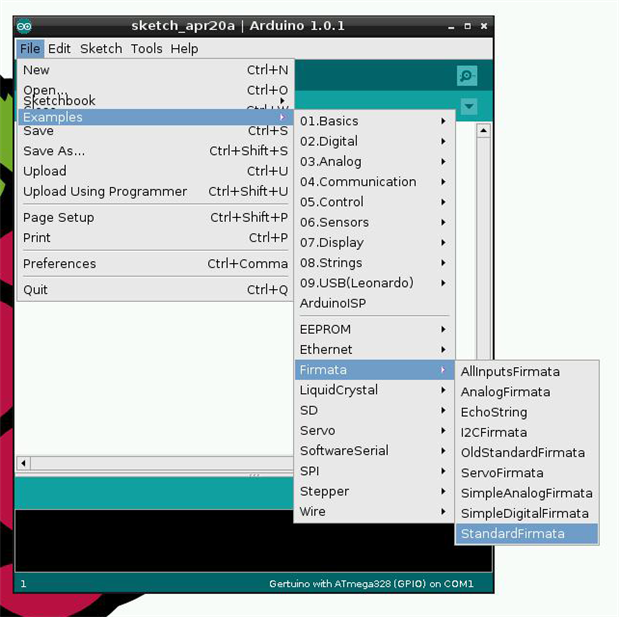
First, though, I need to bring up the Arduino IDE and then upload StandardFirmata to the Gertduino:
 

image


Now, I'll bring up the Python console and issue some interactive commands:


>image
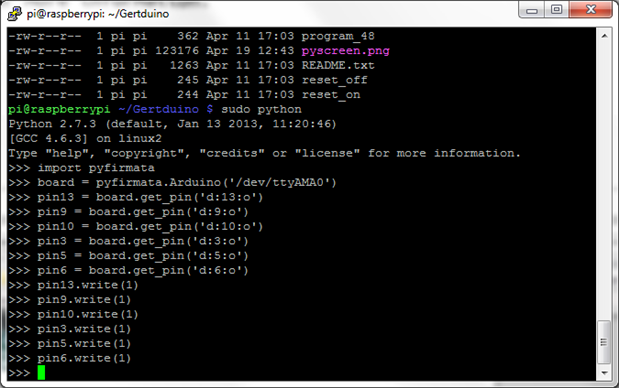
 

I now have all six of the Gertduino's blue LEDs brightly lit up.


This is fun. But using the Python console to send Firmata commands is also a bit tedious. So I'll write a Python script, similar to the example from the Raspberry Pi Cookbook, save the file as ledblink.py, and run it from the command line:


import pyfirmata
import time

board = pyfirmata.Arduino('/dev/ttyAMA0')
led_pin13 = board.get_pin('d:13:o')
led_pin9 = board.get_pin('d:9:o')
led_pin10 = board.get_pin('d:10:o')
led_pin3 = board.get_pin('d:3:o')
led_pin5 = board.get_pin('d:5:o')
led_pin6 = board.get_pin('d:6:o')

while True:
  led_pin13.write(1)
  led_pin10.write(1)
  led_pin5.write(1)
  led_pin9.write(0)
  led_pin3.write(0)
  led_pin6.write(0)
  time.sleep(0.5)

  led_pin13.write(0)
  led_pin10.write(0)
  led_pin5.write(0)
  led_pin9.write(1)
  led_pin3.write(1)
  led_pin6.write(1)
  time.sleep(0.5)


It's a fairly pedestrian program as Python scripts go, but it does the trick and alternates the blinking of the Gertduino's LEDs, three of them on and three of them off, and then vice-versa, every half second.


It took several seconds (perhaps eight or ten of them) for the script to load pyFirmata and start controlling the Gertduino over the serial port. If I had not been patient, I would have given up in despair. OK, in the interest of full disclosure, the first time that I tried it, I gave up after a few seconds of (apparently) nothing happening and hit Ctrl-C to terminate the script. Luckily, instead of smashing my fist through the monitor screen in disgust, or resolving to take up a safer hobby such as stamp collecting or sword swallowing, I gave it another try and waited it out.


Note that I needed to execute the script via sudo to get it to work (because it's accessing the GPIO port to use the serial Tx and Rx pins):


sudo python ledblink.py


Also note that I needed to call pyfirmata in lower case instead of pyFirmata in mixed case (because the module name is actually pyfirmata).


Here it is, blinking up a storm:

You don't have permission to edit metadata of this video.
Edit media
x
image
Upload Preview
image


Remember, I have not loaded an alternating blink sketch onto the Gertduino, rather the Gertduino is running StandardFirmata and the Python script is sending digital write commands over the serial port in real time to control the state of each of the LEDs.


So it's definitely, positively, certifiably alive.


This is only the beginning, though - there's more to come (soon).

  • Sign in to reply
element14 Community

element14 is the first online community specifically for engineers. Connect with your peers and get expert answers to your questions.

  • Members
  • Learn
  • Technologies
  • Challenges & Projects
  • Products
  • Store
  • About Us
  • Feedback & Support
  • FAQs
  • Terms of Use
  • Privacy Policy
  • Legal and Copyright Notices
  • Sitemap
  • Cookies

An Avnet Company © 2025 Premier Farnell Limited. All Rights Reserved.

Premier Farnell Ltd, registered in England and Wales (no 00876412), registered office: Farnell House, Forge Lane, Leeds LS12 2NE.

ICP 备案号 10220084.

Follow element14

  • X
  • Facebook
  • linkedin
  • YouTube